


Microsoft has just officially released Windows 11’s routine October security update KB5127648, and users on 24H2, 25H2, and this year’s new 26H2 will all receive it. In addition to routine security vulnerability patches, this update also brings quite a few useful new features and bug fixes. Among them, the most anticipated by users is none other than that the Copilot key on laptops can finally be remapped directly to Right Ctrl or the Menu key. In addition, this update removes the restriction on File Explorer previewing PDF files downloaded from the internet, greatly improves the connection stability of Bluetooth headphones and microphones, and officially adds the new Emoji 17.0 emojis.
Image source: Windows Latest
Windows 11’s first October update is officially here! The Copilot key can finally be remapped to Ctrl, and File Explorer and Bluetooth also get several improvements.
According to foreign media Windows Latest According to reports, Microsoft released KB5127648 on the October 13 Patch Tuesday (the routine update day held on the second Tuesday of each month), applicable to Windows 11 24H2, 25H2, and 26H2. It is also the first wave of routine Patch Tuesday security updates since the official release of 26H2. After installation, the Build numbers for each version are as follows:
- 24H2:26100.9711
- 25H2:26200.9711
- 26H2:26300.9711
To confirm whether you’ve updated, press Windows + R and type “winver” to check whether the Build suffix is 9711.
Also note that many of the new features introduced this time are being rolled out in stages, meaning Microsoft will release them in batches, so you won’t necessarily see them just by updating. If they haven’t appeared on your computer yet, waiting a while will usually bring them.
First up is the highly anticipated Copilot key customization.
New laptops released in the past two years usually have an extra dedicated Copilot key in the lower-right corner of the keyboard, and pressing it brings up Copilot. Although this makes it easier to invoke AI, the problem is that many models simply replace the original right Ctrl key or Menu key with it, so people who are used to pressing Ctrl shortcuts with their right hand, or who rely on the Menu key together with a screen reader, find it very awkward to use.
In the past, although you could also change Copilot, you needed to install third-party tools like PowerToys separately. After this update, Windows 11 has a built-in setting option that lets you change the Copilot key to:
- Right Ctrl (right Ctrl key): suitable for people who frequently use Ctrl key combinations.
- Context Menu (Menu key): Functions the same as right-clicking the mouse to bring up the right-click menu.
The setting is located in “Settings” → “Bluetooth & devices” → “Keyboard”.
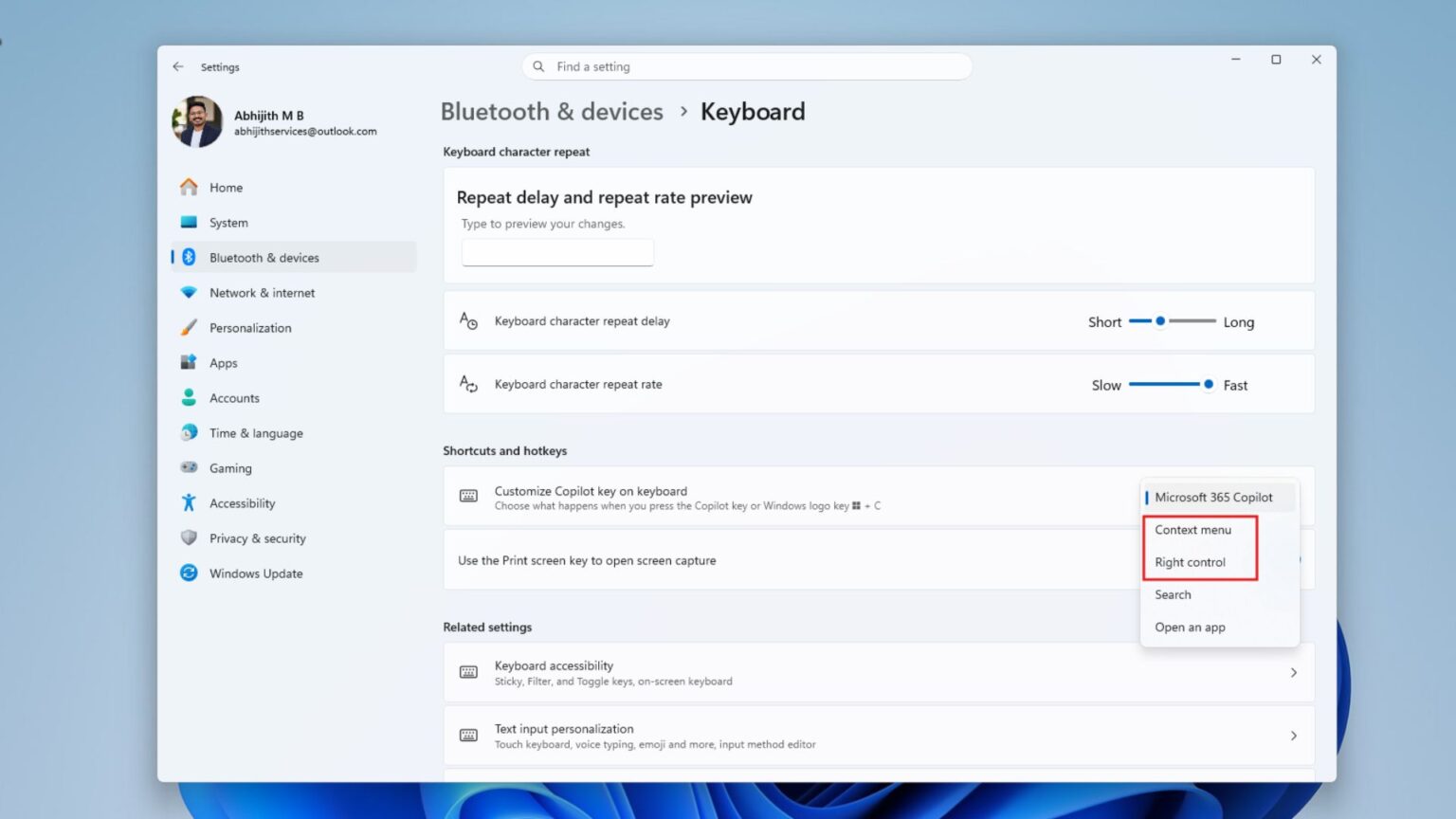
Image source: Windows Latest
And starting in October 2025, PDF and other files downloaded from the internet often only display a warning when previewed through File Explorer, and cannot be previewed. This is because Microsoft at the time blocked previews for all files “from the internet” to close a security vulnerability, since malicious actors could embed external links in HTML and other files, and users could leak the NTLM hash of their Windows account just by taking one look at the preview pane.
However, this approach had too broad an impact, blocking even plain PDFs and making it very inconvenient to use. After this update, the rules were changed to:
- For non-HTML files such as PDFs: previews are displayed automatically, so you no longer need to unblock them manually.
- HTML files: A warning will still pop up first, but there’s an extra “Preview anyway” button, so if you’re sure it’s safe, you can decide whether you want to view it.
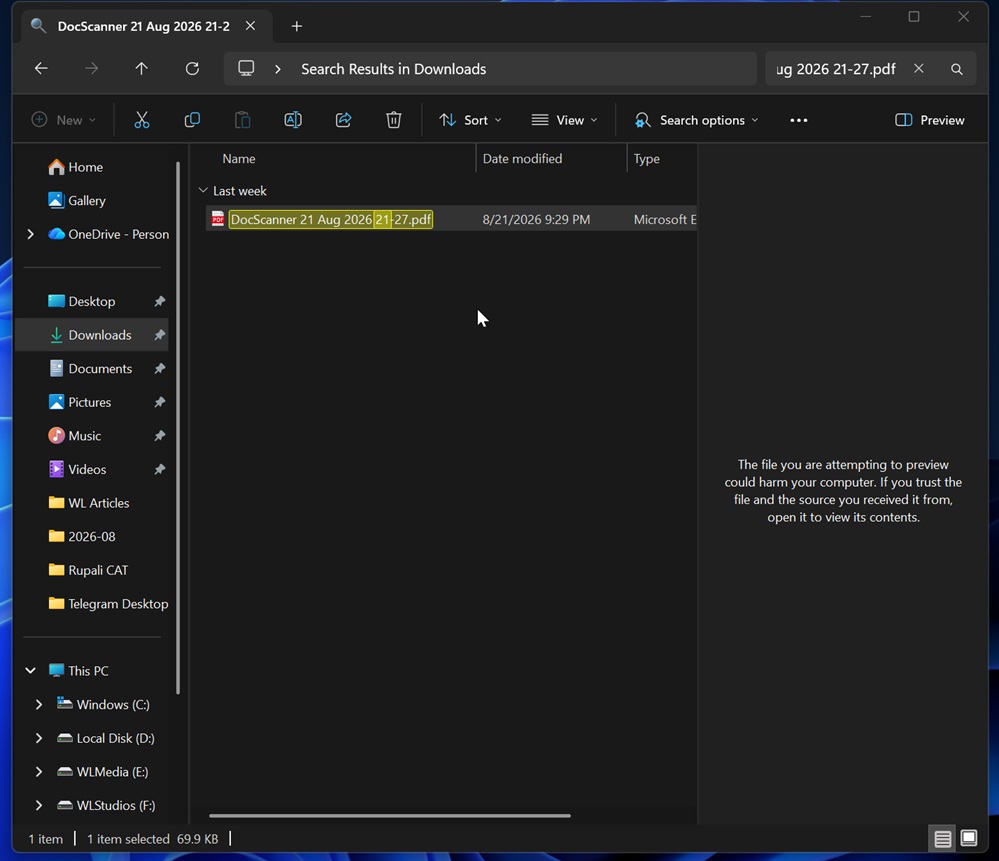
Image source: Windows Latest
File Explorer also has a few small improvements. For example, sections on the Home page such as Recent and Favorites will now remember whether you expanded or collapsed them last time, so they won’t all be expanded every time you open it. Thumbnail rendering for cloud files in the details pane has also become more stable, so people using cloud drives like OneDrive should run into blank thumbnails less often. In addition, an issue where clicking near the right side of the address bar cleared its contents has been fixed.
There are quite a few Bluetooth fixes this time, and for anyone who wears Bluetooth headphones every day for meetings and listening to music, they’re all tangible improvements:
- The issue where Windows still shows “Connected” even though the Bluetooth device has disconnected has been fixed.
- When using traditional Bluetooth headphones to talk on the phone, pressing the buttons on the headphones to adjust the volume will make the volume indicator pop up normally on the screen, and it will no longer be out of sync.
- Improved microphone compatibility for some traditional Bluetooth headsets.
- Fix the issue where error code 0x139 may occur and cause a system crash (blue screen) when streaming Bluetooth audio.
- Improve the stability and performance of Bluetooth LE Audio devices. LE Audio is a next-generation low-power Bluetooth audio standard.
- The “Shared Audio” feature (sending sound to two pairs of headphones at the same time) is more stable.
- Fixed a bug where Bluetooth was actually turned off but the toggle in Settings still showed it as on, and made the Bluetooth & devices settings page more stable.
Windows 11 has now added support for Emoji 17.0. The new emojis include a distorted face, a fight cloud (the puff of smoke in cartoons when characters fight and roll into a ball), and a furry mystery creature, and it has also tweaked the designs of a few older emojis. Press Windows + . (period) to open the emoji panel:
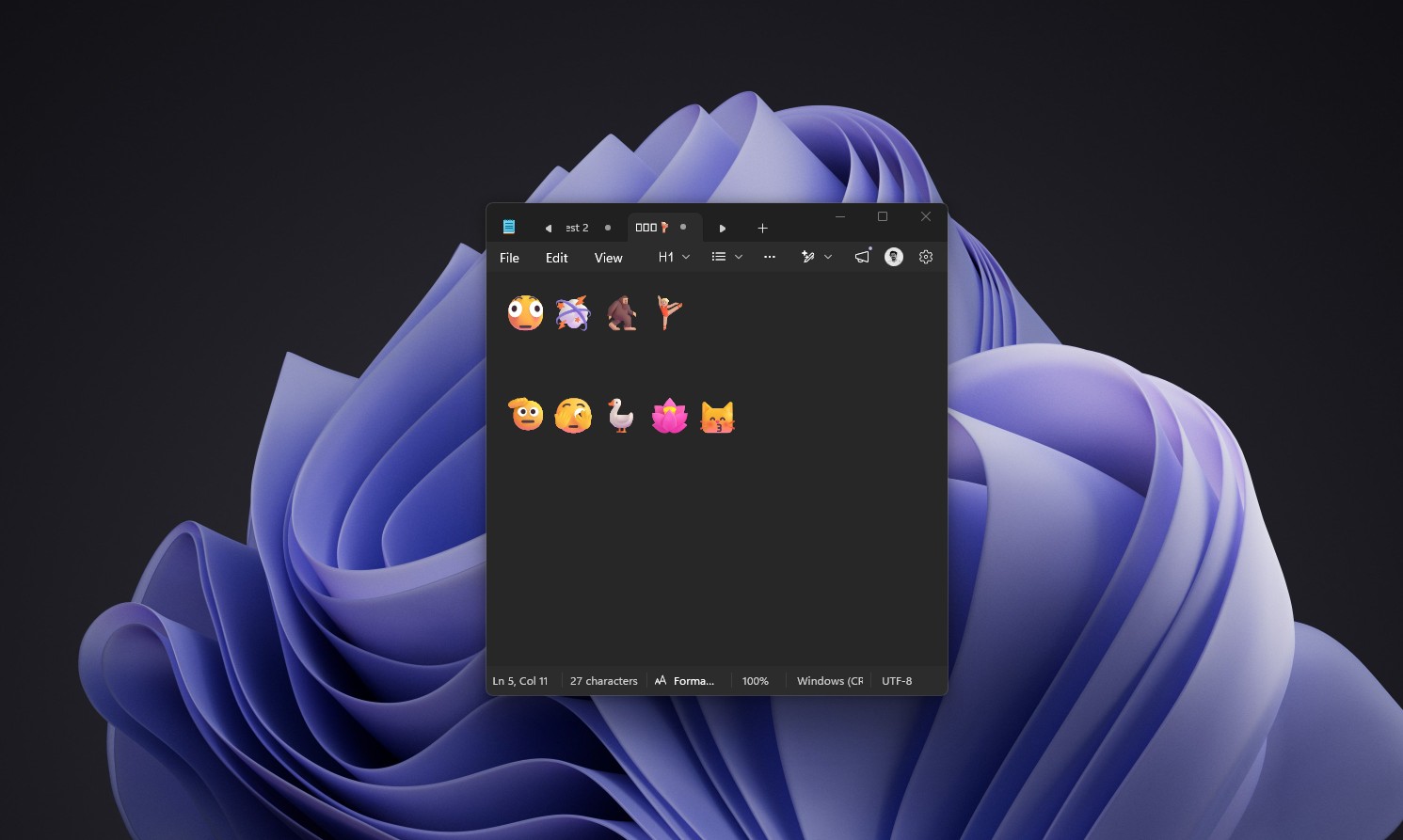
Image source: Windows Latest
Trackpad gestures have also been improved:
- One-finger scrolling: Slide your finger up or down along the left or right edge of the trackpad to scroll the page, with no two-finger gesture required.
- Auto-scroll: When scrolling, if your finger slides to the edge of the touchpad, the screen will keep scrolling down, so you don’t have to keep swiping repeatedly when viewing long web pages or documents.
Other features
- Maximize windows when opening apps: There’s a new option under “Settings” → “Accessibility” → “Visual effects.” Once enabled, app windows automatically maximize when they launch, so you no longer have to manually click the maximize button. This is more convenient for people with low vision who need a larger screen. However, some older programs or emulators may not support it.
- Tips widget: A new “Tips” widget can be added to the widgets panel and lock screen, introducing Windows features and usage tips.
- Magnifier: toolbar icons and spacing redesigned, functionality unchanged
- Desktop background: Supports DIB-format images as wallpaper, and slideshow wallpapers are also more stable with multiple desktops and portrait displays.
Besides the new features, KB5127648 itself also fixes quite a few issues:
- Game mouse stuttering: Fixed an issue where mouse input would briefly hitch in some games.
- AC-3 Audio: Fixed an issue where some apps played AC-3 (Dolby Digital) audio abnormally or even crashed.
- Windows Hello: Fixed an issue where some devices could not sign in with a fingerprint after a cold boot (after a complete shutdown and restart).
- VPN: Fixed an issue where Always On VPN, commonly used by enterprises, would get stuck at “Connecting” or fail to connect after the first time when set to automatic protocol selection.
- Printer: Fixes an issue where some apps or printers using RAW or generic plain-text drivers cannot print after the August update.
- Black screen: Fixed an issue in multi-session environments such as Azure Virtual Desktop where File Explorer fails to launch and the entire screen goes black after sign-in.
- Storage: Fixed an issue where some tiered Storage Spaces Direct virtual disks could not come online.
Source: KOCPC Chinese