


Only a few days after Apple released the official version of iOS 27, an interface bug was discovered that can temporarily make an iPhone completely unusable. Users only need to quickly perform a specific sequence of swipe gestures on the home screen to trigger a system software soft-lock, causing touch functionality to fail entirely. This bug has now spread rapidly across major social platforms, becoming a new trick for pranking friends’ phones. The good news is that it won’t cause any permanent damage to the hardware, and a force restart will completely restore normal operation.
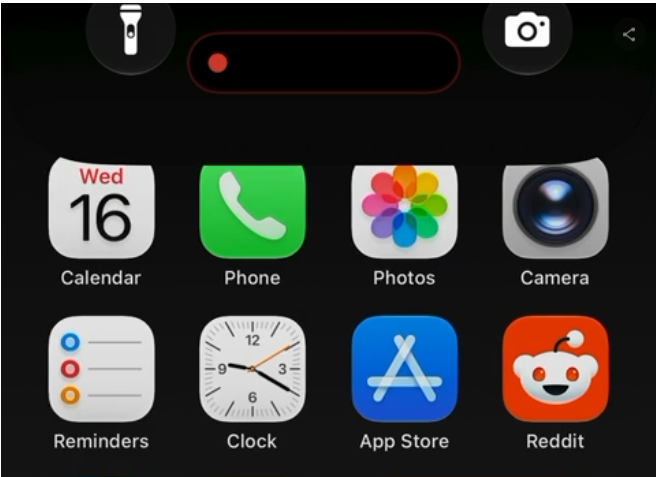
Trigger mechanism: gesture conflict between Notification Center and Control Center.
According to a technical analysis by foreign media, the root cause of this vulnerability lies in a UI logic conflict in how iOS 27 handles top pull-down gestures. iOS Notification Center and Control Center are triggered by pull-down gestures from the top-left and top-right corners of the screen, respectively, and both share the same system-level gesture recognizer. When a user triggers these two gestures consecutively within an extremely short time interval, the system enters an unhandled intermediate state while switching between the two panels, causing the UI rendering pipeline to lock up.
This isn’t the first time in iOS history that software lockups caused by such “gesture conflicts” have occurred. In iOS 11, similar multitasking gesture conflicts caused SpringBoard (iOS’s home screen manager) to crash and restart; iOS 15 also had a UI freeze issue triggered by specific Spotlight search operations. Apple typically patches such vulnerabilities in the next minor version update after discovery.
Trigger method: A three-step swipe to brick an iPhone
According to 9to5Mac’s hands-on testing and technical analysis, the steps to trigger this vulnerability are as follows:
- The first stepOn the iPhone Home Screen in iOS 27, swipe down from the top-left corner of the screen to try to open Notification Center.
- Step 2: In the brief moment before Notification Center has fully expanded, immediately swipe down from the top-right corner of the screen to open Control Center.
- Step 3Push Control Center back up to close it.
After completing the above actions, the system UI may freeze. The most obvious sign of the issue is that the Camera and Flashlight icons on the lock screen get stuck at the top of the screen; the Home Screen cannot switch pages left or right, and even tapping app icons does not register touch input. Even more bizarrely, when you long-press the side power button to bring up the “slide to power off” screen, even the slider does not respond to gestures.
The trigger threshold is low—success can be achieved in just 2-3 attempts.
9to5Mac reporter Benjamin Mayo tested this on his own iPhone Air (iOS 27.0) and was able to reliably reproduce the bug after about two or three attempts. The interval between the two swipes must be very short: you have to immediately swipe out Control Center while Notification Center has not fully expanded. Once triggered, although the phone’s screen remains on and the Face ID sensor continues to operate, all UI elements lose interactivity. The touchscreen hardware itself is fine; it is purely that the higher-level interface management logic has entered a deadlock state. This also explains why a forced restart solves the problem, because restarting reloads the entire SpringBoard home screen management service.
What makes it even more embarrassing for Apple is that the iOS 27.2 Beta build just pushed to developers has the same problem, suggesting Apple has not yet fixed this interface logic conflict. In the Reddit iOS Beta community, similar freezing issues were already reported back during the iOS 27 developer beta period; one user said that in Beta 1, the phone froze after running for about 10 minutes, and after a forced restart, it even needed to enter DFU mode to recover.
[iOS 27 DB1] Potentially bricked iPhone, Be Careful.
byu/Sad_Performance6386 iniOSBeta
Solution: Force restart
This bug won’t cause permanent damage; it’s purely a temporary software-level lock-up. The solution is to perform a Force Restart on the iPhone:
- PressTurn up the volume.Press the button and quickly release it.
- PressTurn down the volumePress the button and quickly release it.
- Press and hold the side power buttonuntil the Apple logo appears, then release.
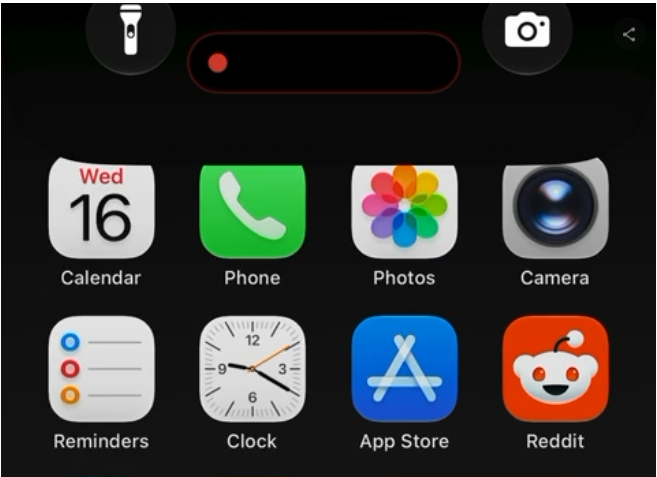
After the phone restarts, it immediately returns to completely normal, and no data will be lost.
The impact on iPhone 18 Pro users
The timing of this bug is especially awkward for Apple. The iPhone 18 Pro series just officially went on sale on September 16, and the first batch of new phone users are happily setting up their devices, while iOS 27 is the operating system version preinstalled on the iPhone 18 Pro at the factory. Although this bug won’t damage the hardware, for users who just spent a lot of money on a new phone, the experience of the phone suddenly becoming completely unresponsive definitely won’t be pleasant.
Repair Outlook
This type of interface software lockup issue has occurred in different versions of iOS in the past, and Apple usually fixes it in subsequent updates. However, this bug has persisted from iOS 27.0 all the way to 27.2 Beta, and it is still unknown when it will be fixed. Based on past experience, Apple may patch this issue in the official releases of iOS 27.1 or 27.2.
Before that, if your iPhone accidentally triggers this bug, there’s no need to panic. Just follow the force restart steps above. It’s also advisable not to use this bug to prank older adults or children who aren’t familiar with using phones for the time being, to avoid causing unnecessary panic.
Source: KOCPC Chinese