


Earlier OpenAI brought a pretty good update, ChatGPT desktop App joined “ChatGPT Voice“With the new function, when you ask AI to do something in the future, you will no longer have to type hard, but will use a more relaxed “speaking” method. Moreover, because it is driven by GPT-Live, AI can listen and speak at the same time, and even directly interrupt or change direction during the answer, which will definitely greatly improve the efficiency of use.
Three highlights of this update include:
- You can use voice to start, view and adjust ChatGPT Work and Codex tasks, and coordinate multiple executing agent jobs.
- macOS exclusively supports Screen context, which can pass the screen and text of the current front window to ChatGPT through Appshots.
- The desktop app adds multi-folder local projects. Code, documents or front-end and back-end projects can be managed in the same workspace.
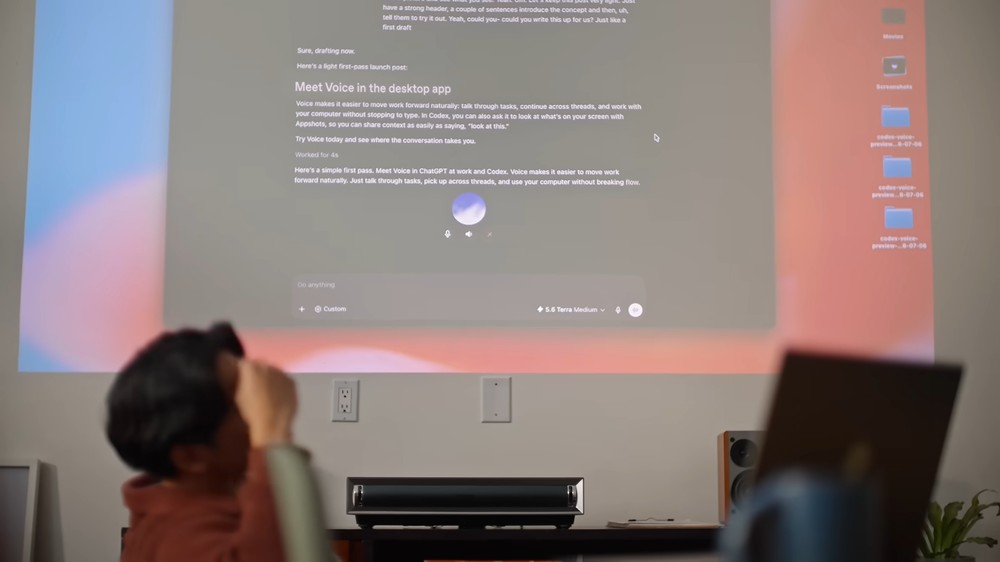
What can ChatGPT Voice do for you? Use voice to control Work and Codex, and Mac can also understand the current window through Appshots
The general voice dictation function only converts what you say into text. ChatGPT Voice is different. You can imagine that you can have a continuous back-and-forth real-time conversation with the AI. For example, when ChatGPT is talking, you can interrupt, add conditions, or ask it not to answer until you finish speaking your mind before starting to process.
Behind this is the full-duplex voice capability of GPT-Live. The model can listen and speak at the same time, without having to take turns speaking strictly like traditional voice assistants.
According to OpenAI’s instructions, you can create independent long-term tasks from a Voice conversation, check other work discussion threads, and then pass subsequent instructions to the executing agent.
For example: “Open a Codex task to execute the test and investigate the projects that failed”, “Check the current work in progress and sort out the stuck areas for me”, or “Read today’s planning document and list the items that need to be decided by me.”
There is no need to keep switching screens after the task is started. Voice will bring the progress of each work, obstacles encountered, and completion results back to the current voice conversation, and you can continue to ask questions or change directions.
For those who use ChatGPT Work to make reports, let Codex modify the program, and have other agents organize data at the same time, they should be very impressed. It not only saves a few lines of typing, but can command multiple tasks through one conversation.
You can refer to the official display video:
Of course, switching to voice doesn’t automatically give ChatGPT additional permissions.
Voice can only use the tools and permissions that are currently available in Chat, Work or Codex. However, if the selected work mode has been allowed to access local files, Plugins or Computer Use, you can use your voice to ask it to use these capabilities.
Actions involving logging in, modifying files, or operating the computer will still be restricted by the original permissions and audit settings.
ChatGPT Voice for macOS also integrates Screen context this time. After the user turns on the function in the settings, just say “Help me see this”, ChatGPT can capture the Appshot of the current front window and directly use the screen as the conversation background:
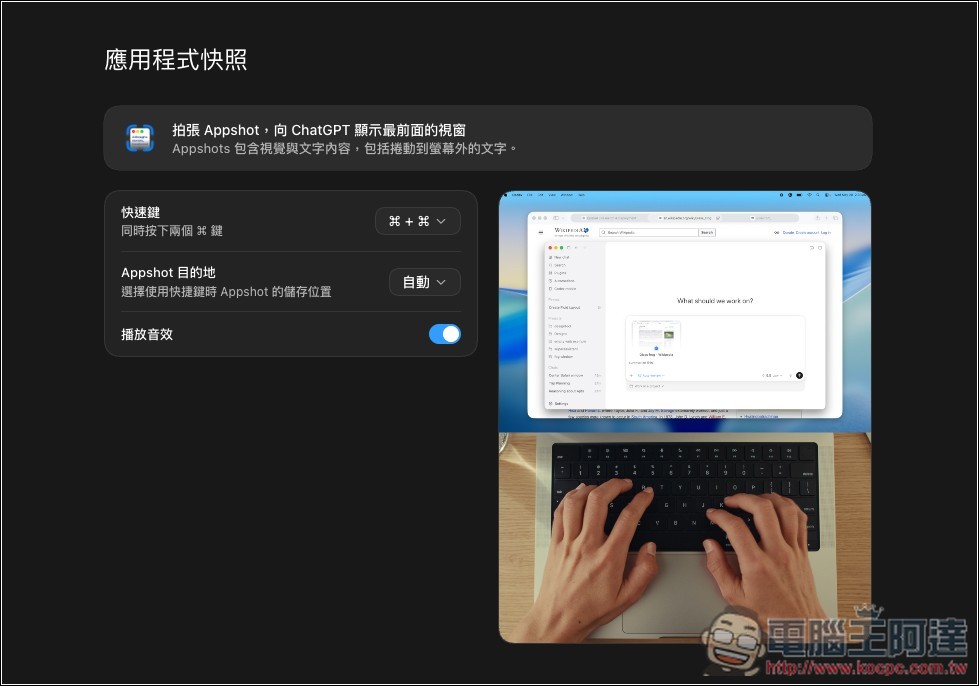
Appshot is not just an ordinary screenshot. In addition to window images, it can also add system-accessible text, even content that has not been scrolled into the screen. This allows ChatGPT to obtain more complete context than dictation when helping to review files, interpret error messages, or discuss interface design.
However, ChatGPT Voice also has several usage limitations.
Only one Voice conversation can be executed at the same time, and the voice usage time will be different according to the subscription plan. Work or Codex tasks initiated through Voice will consume the original agent work quota and will not become free just because they are initiated through Voice.
If the user just wants to speak a prompt word, it would be more suitable to use the voice dictation function.
Although OpenAI announced that ChatGPT Voice has been launched for paid users, I have not seen it in actual testing, so it should be launched in batches. For details, please refer to the table below:
| project | Support status | Additional information |
|---|---|---|
| Applicable solutions | Plus、Pro、Business、Edu、Enterprise | Will still be affected by batch rollout progress, region and workspace settings |
| desktop platform | macOS、Windows | GPT-Live experience available in Chat, Work and Codex |
| Appshots/Screen context | macOS | Ability to share images and accessible text of the frontmost window |
| Enterprise、Edu | Two weeks of Early Access available | Administrators need to enable Advanced voice capabilities and Early Model Access |
In addition to ChatGPT Voice,The new version of the desktop app also improves local project management, now a project can add multiple related folders.
The setting method is to click “Edit Project” in the right-click menu of the project, and then add other folders through “Add Folder”. Each local project can select one primary folder and add the remaining secondary folders:
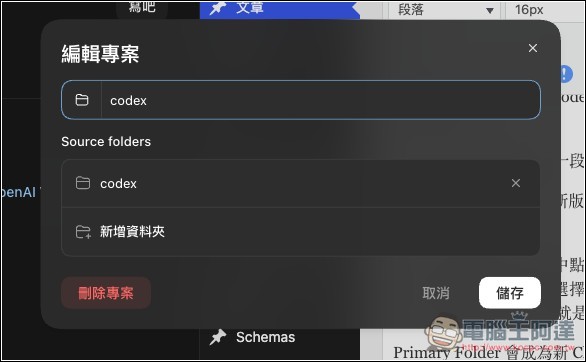
The main folder will become the default working directory of the new Chat, and Codex will also use this folder as the main folder when performing Git operations. In addition, the system will automatically search for project settings such as `AGENTS.md`, skills and `config.toml` from the main folder.
Secondary folders allow ChatGPT to search, read, and edit files, but Codex does not automatically load the above profiles from these secondary folders.
To put it simply, if you are developing a website, you can set the main code as the Primary Folder, and then use the documentation or back-end project as the secondary folder. This way ChatGPT can reference multiple related locations at the same time without confusing the main Git repository and project rules.
Source: KOCPC Chinese