


In the process of AI application development, there is a problem that is often ignored but is super annoying. The data you want to hand over to AI for processing may be PDF, Word, PowerPoint, Excel, or even pictures and audio files, but the format that AI Large Language Model (LLM) likes most is plain text or Markdown. In the past, developers often needed to write or install a bunch of conversion scripts to deal with the “format gap” in between. Microsoft saw this pain point and directly open sourced a Python tool called MarkItDown, which is known as the “universal file conversion tool for Markdown”, allowing you to convert various files into a format that LLM can directly digest with one line of instructions. Currently, it has accumulated more than 48,000 stars on GitHub, and its popularity is quite amazing!

MarkItDown: Convert PDF, Word, and PPT into Markdown that AI can understand with one click
The number of supported formats is scary
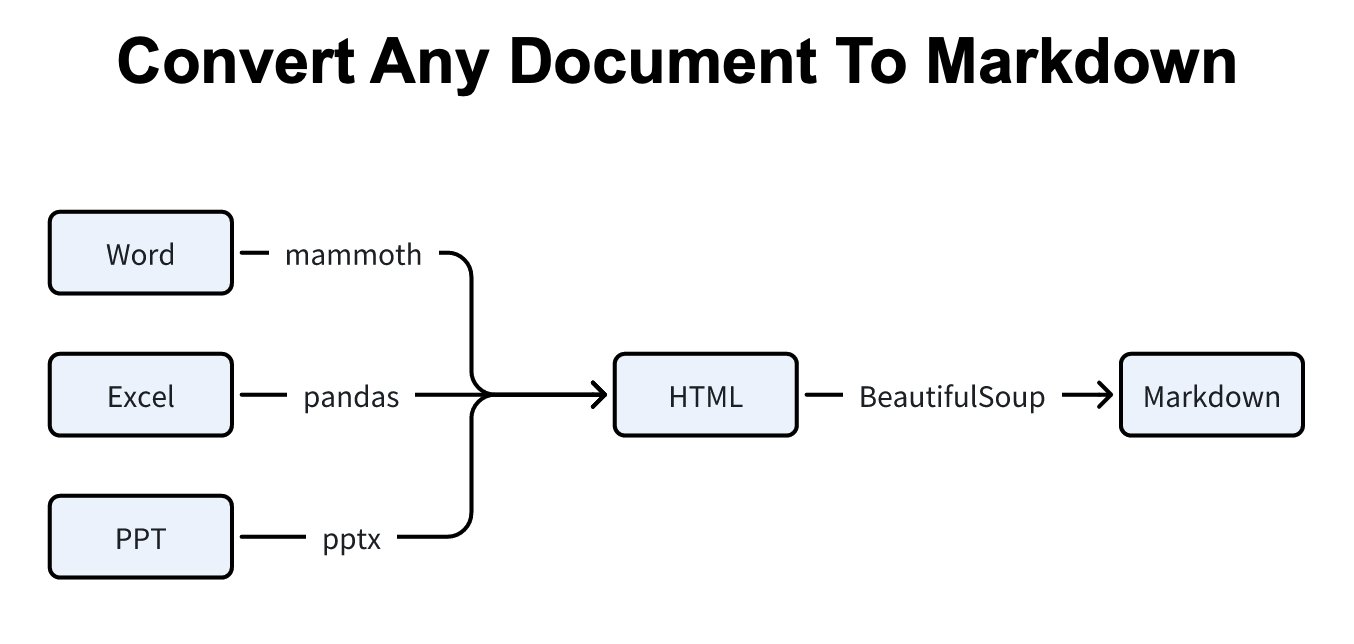
The most powerful thing about MarkItDown is that it supports a wide range of file formats:
- Office documents:PDF、Word(DOCX)、PowerPoint(PPTX)、Excel(XLSX/XLS)
- Web content:HTML, or just drop the URL directly.
- image file: JPG, PNG (with OCR to recognize text or AI to describe image content)
- audio file: WAV, MP3 (automatic speech to text)
- Data format:CSV、JSON、XML
- other: ZIP compressed files (automatic decompression and conversion), Outlook emails, YouTube videos (capture subtitles), EPub e-books
And during the conversion process, it will preserve the structure of the file as much as possible, such as title levels, tables, lists, hyperlinks, etc., will be completely converted into the corresponding Markdown syntax, and will not become a mess of plain text.
Super easy to install and use
Installation only requires one line of instructions:
pip install 'markitdown[all]'If you only need support for a specific format, you can also install it selectively, for example pip install 'markitdown[pdf,docx,pptx]', which can reduce unnecessary dependency packages.
The usage is equally simple, just type directly from the command line:
markitdown 報告.pdf -o 報告.mdOr it’s also convenient to call it in Python code:
from markitdown import MarkItDown
md = MarkItDown()
result = md.convert("文件.docx")
print(result.markdown)
It’s that simple, just a few lines of code can turn a Word document into clean Markdown output.[2]
Advanced functions: more powerful with AI
MarkItDown is not just a simple format conversion tool, it can also be used with AI models to do smarter things:
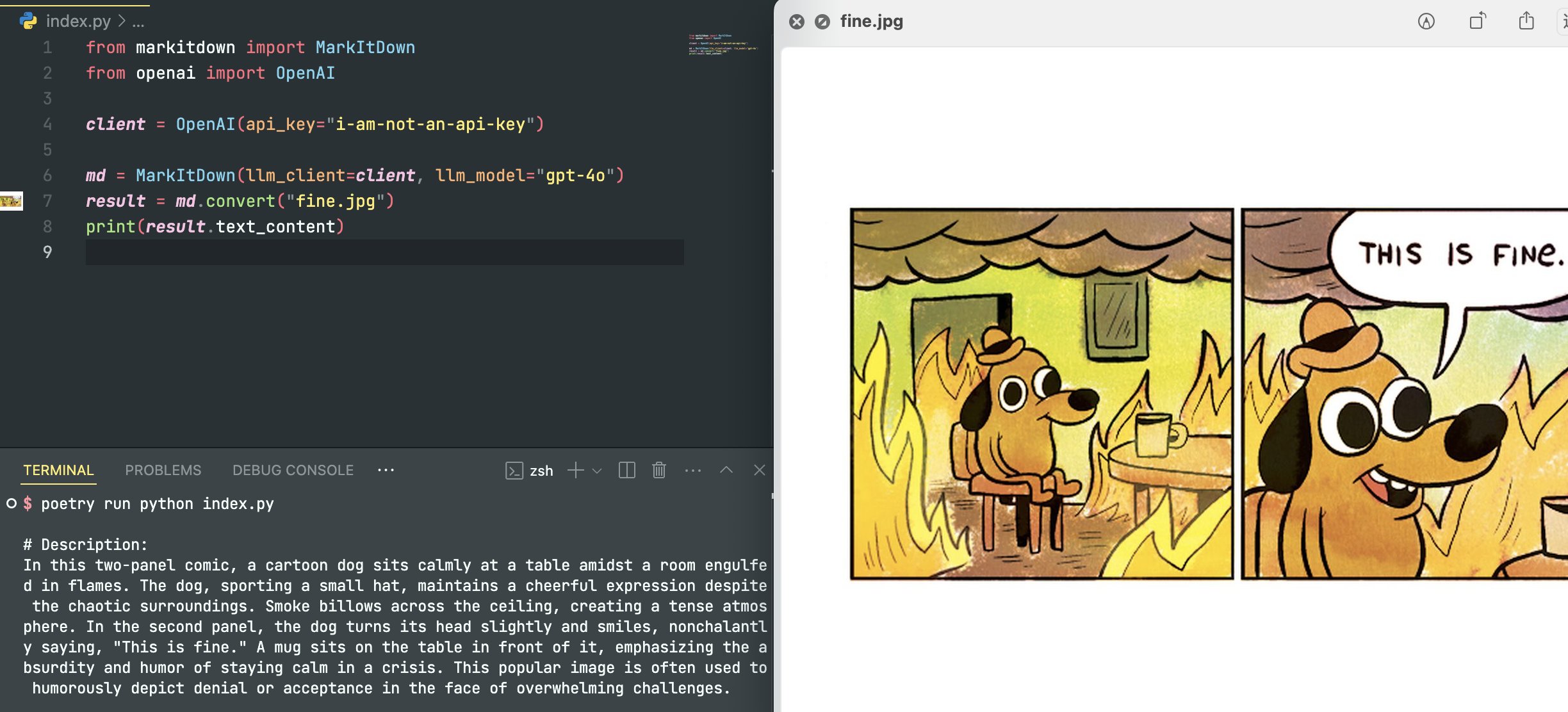
- Image AI Description: Paired with OpenAI’s visual model, it can automatically generate text descriptions for images, so that image content that is originally incomprehensible to AI can be understood (requires OpenAI’s API Key).
- OCR text recognition: Integrate with Azure Document Intelligence to extract text from scans or images.
- MCP server integration: Natively supports Model Context Protocol and can be directly mounted to Claude Desktop or other AI tools that support MCP.
- plug-in system: Supports custom plug-in expansion functions, developers can write their own conversion logic for special formats.
Practical application scenarios
So where can this tool be used? Some of the most common application scenarios:
- Feed the AI files: Convert all the company’s PDF reports, PPT presentations, and Excel reports to Markdown, and send them to ChatGPT or Claude for analysis and summary. Some developers have actually measured that using MarkItDown to convert first and then feeding it to AI can save up to 80% of token consumption compared to directly uploading the original file.
- Build knowledge base: Convert a large number of files in batches and import them into the Vector Store for enterprise-level RAG (retrieval enhancement generation) applications.
- Automated workflow: Used as a pre-processing step in the AI Agent’s workflow, allowing the Agent to “read” files in any format.
- Organizing meeting minutes: Convert the recording file to text and then convert it to Markdown to automatically generate structured meeting minutes.
Not a panacea: know its limitations
Of course, MarkItDown is not entirely without its weaknesses. The conversion effect of complex charts and visual content is not ideal, and the formatting details of highly customized typeset files may also be lost. In addition, its positioning is to “quickly extract text for AI use.” If you need high-fidelity format control (such as perfectly reproducing the original typesetting), then traditional Pandoc may be more suitable. But if your purpose is to enable AI to understand the file content, MarkItDown is definitely the most convenient choice at present.
Installation and use are also very simple, you just need to GitHub Give the warehouse URL to your Agent and ask him to install it directly.
Summary: The Swiss Knife of Documents in the AI Era
Microsoft’s MarkItDown solves a seemingly simple but actually very annoying problem: allowing AI to smoothly “read” files in various formats. Free and open source, easy to install, supports many formats, and can be used with AI models for advanced processing. If you are an AI application developer, or you often need to feed files to AI for processing in your daily work, this tool is definitely worth adding to your toolbox.
Source: KOCPC Chinese