


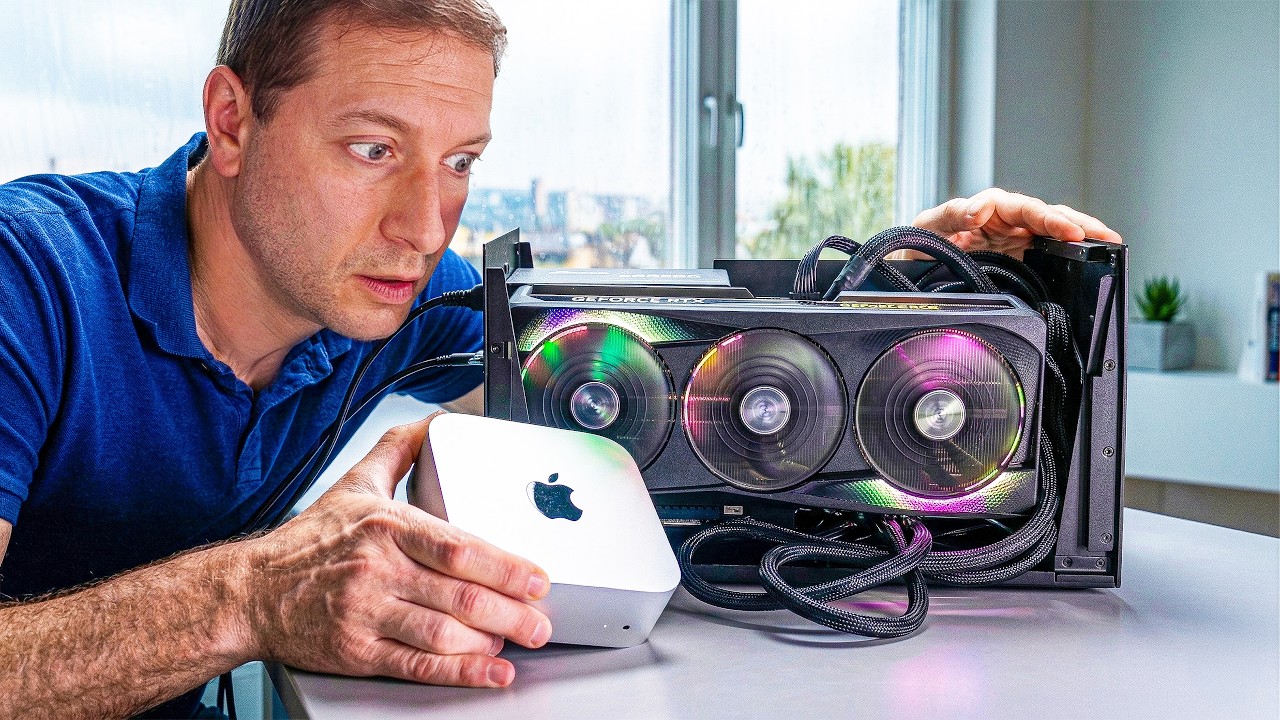
Many people may not know that since 2019, macOS no longer supports any NVIDIA graphics cards (previously it only supported AMD graphics cards). But now, thanks to AI and the innovative team, mac OS can finally support NVIDIA graphics cards through Thunderbolt external graphics cards. Foreign hardware YouTuber Alex Ziskind tested the actual performance of the current three most mainstream Blackwell architecture graphics cards, RTX 5060 Ti, 5070 Ti and 5090, on the Mac Mini M4 Pro for the first time, and gave honest data, including those parts that are “not quite good yet”.
Let’s start from the beginning: Why doesn’t macOS support NVIDIA graphics cards?
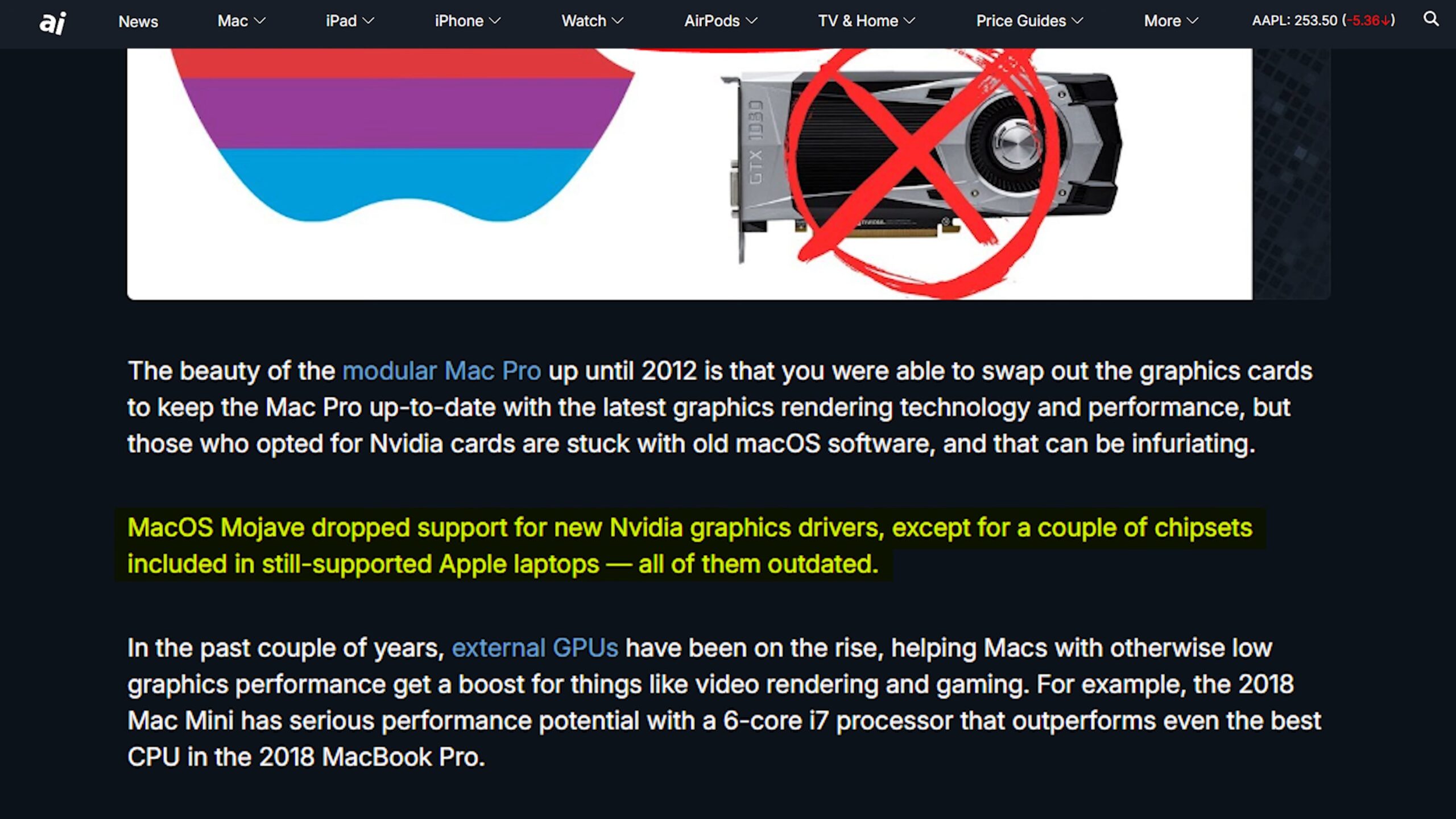
The story begins in 2018. That year, Apple and NVIDIA fell out. Apple completely removed NVIDIA support in macOS Mojave, cutting off the CUDA ecosystem on Mac in one fell swoop because they decided to bet all on their own Metal GPU framework. Seven years later, if you want to use NVIDIA’s GPU computing power on macOS, the answer is just one word: no.
Then Tiny Corp, founded by cracking master GeoHotz, did something crazy. They wrote their own NVIDIA GPU driver from scratch, a macOS core extension called TinyGPU. No official NVIDIA drivers are required, no Linux is required, you just plug the GPU into your Mac’s Thunderbolt port, approve the system expansion, and it works.
Alex’s excitement was palpable when he saw Tiny Corp’s announcement on Twitter. The tweet read: “If you have a Thunderbolt or USB4 eGPU and a Mac, today is the day you’ve been waiting for. Apple has finally approved our driver, supporting both AMD and NVIDIA.” So he was ready to test it as soon as possible.
If you have a Thunderbolt or USB4 eGPU and a Mac, today is the day you’ve been waiting for! Apple finally approved our driver for both AMD and NVIDIA. It’s so easy to install now a Qwen could do it, then it can run that Qwen… pic.twitter.com/daUsyBHh1W
— the tiny corp (@__tinygrad__) April 1, 2026
Hardware configuration and eGPU external solution
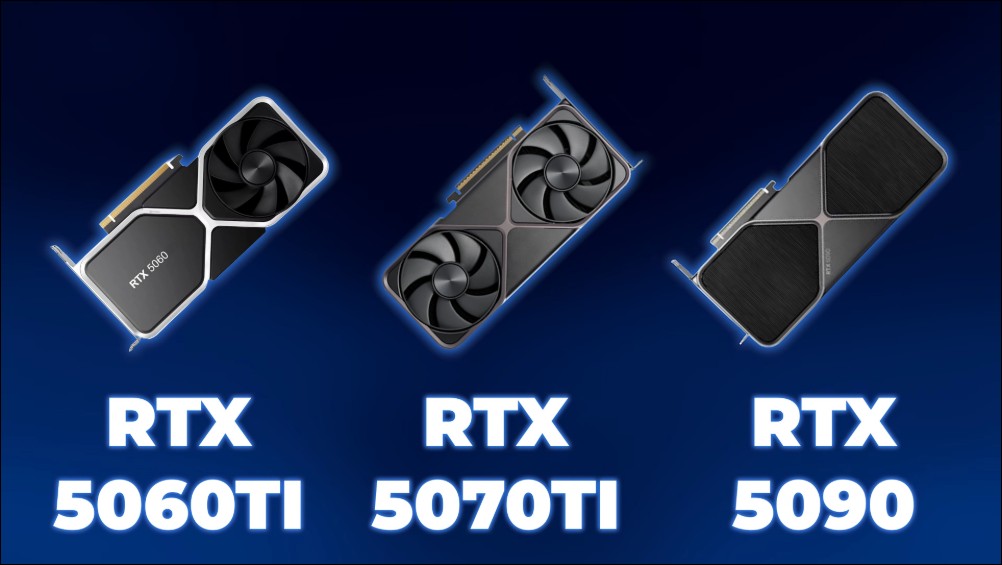
Alex’s test platform is a Mac Mini equipped with an Apple M4 Pro chip and 64GB of memory. In total, he tested three Blackwell architecture graphics cards: RTX 5060 Ti, RTX 5070 Ti, and RTX 5090.
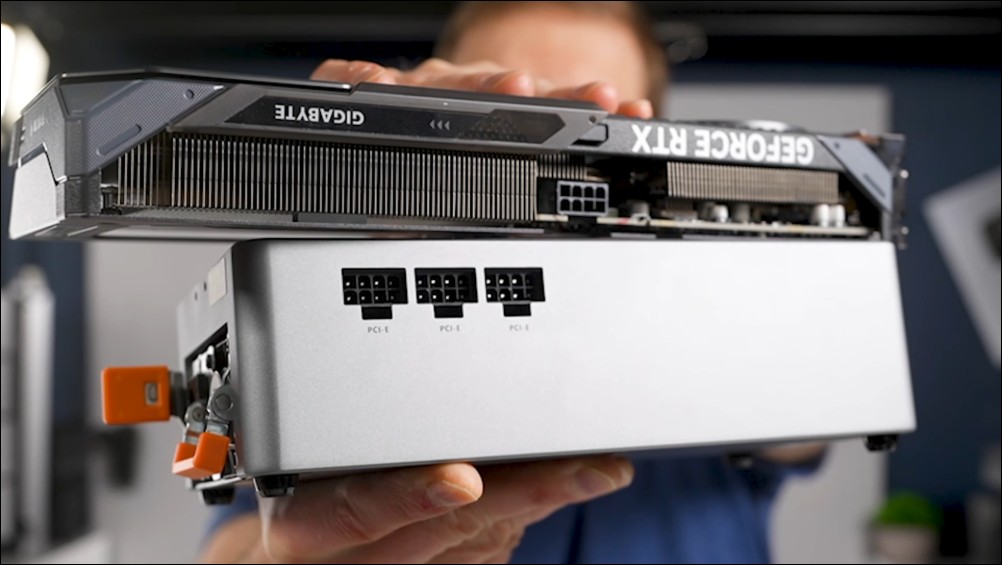
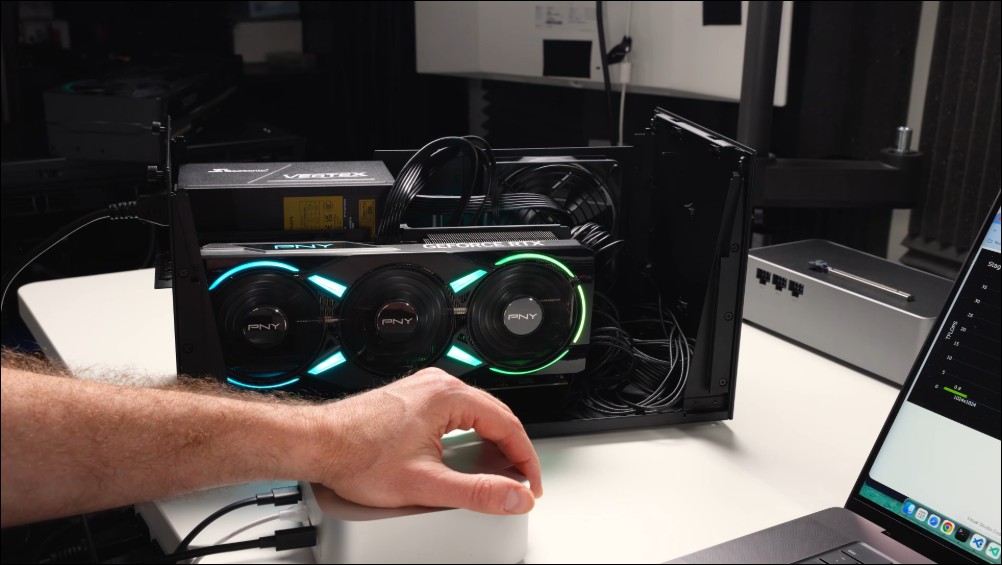
In terms of external solutions, when he first saw someone showing off a small Oculink USB4 eGPU base below the tweet, he immediately ran to buy one. Oculink is a technology he has introduced many times before. It is indeed cool, but there is a fatal problem: if you accidentally unplug that line during operation, the consequences will be serious. There’s even a warning sign on the base to remind you not to do this. So what he finally chose was a USB4 device, which can provide a certain amount of power to the GPU and works well with an 8-pin power connector. But if you want to use NVIDIA’s 12-pin connector, you’ll need a weird adapter cable.
Done in five minutes: surprisingly simple setup
The setup process is surprisingly simple. All steps are documented in tinygrad.org superior. You just need to execute a curl command to enable the driver, and it will appear under “General” > “Extended Features” in System Preferences. Find the TinyGPU extension, enable it, and that’s it. In addition, you also need to install Docker Desktop so that it can automatically handle the NVIDIA compiler part for you. If you’re using AMD, the HIP compiler is used.
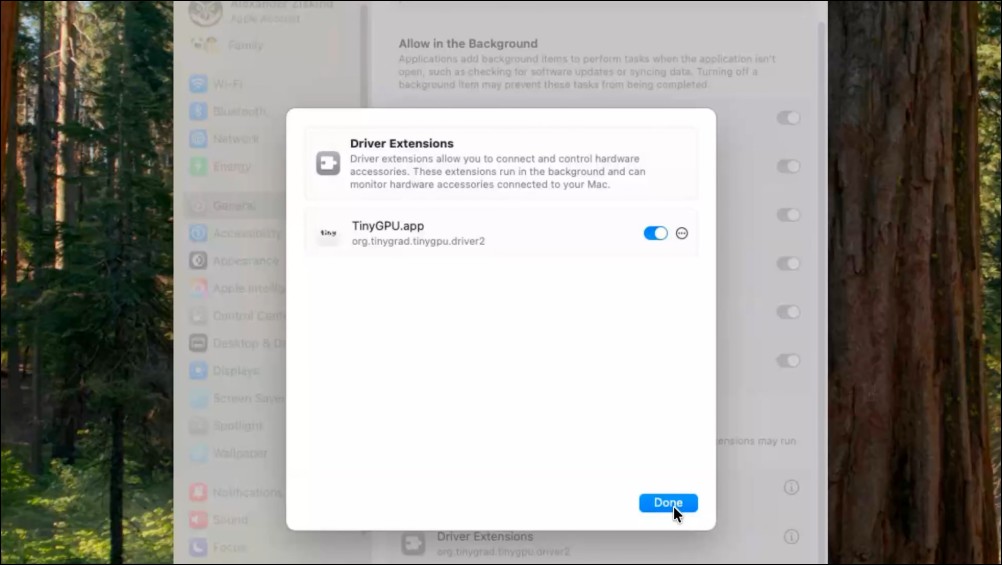
Then you just specify the device to use (AMD, NV, or Metal) and start the inference server. Alex couldn’t wait to complete all the settings, and after starting the server, a chat interface appeared. He typed “Hi” and the GPU responded to him through the Mac. “This is incredible. The whole setup time is less than five minutes.” An NVIDIA GPU runs calculations on a Mac, which has never happened since 2019.
Matrix Multiplication Benchmark: Expectations vs. Reality
Tiny comes with a set of benchmarking tools that perform inference directly on the GPU with no server overhead. Alex also used an open source tool called LlamaBeni (developed by Yugger). This benchmark is a complete end-to-end experience, passing through the API layer, including prompt processing, token generation, first token delay, as well as HTTP overhead and streaming transmission. “This is the speed that users really feel.”
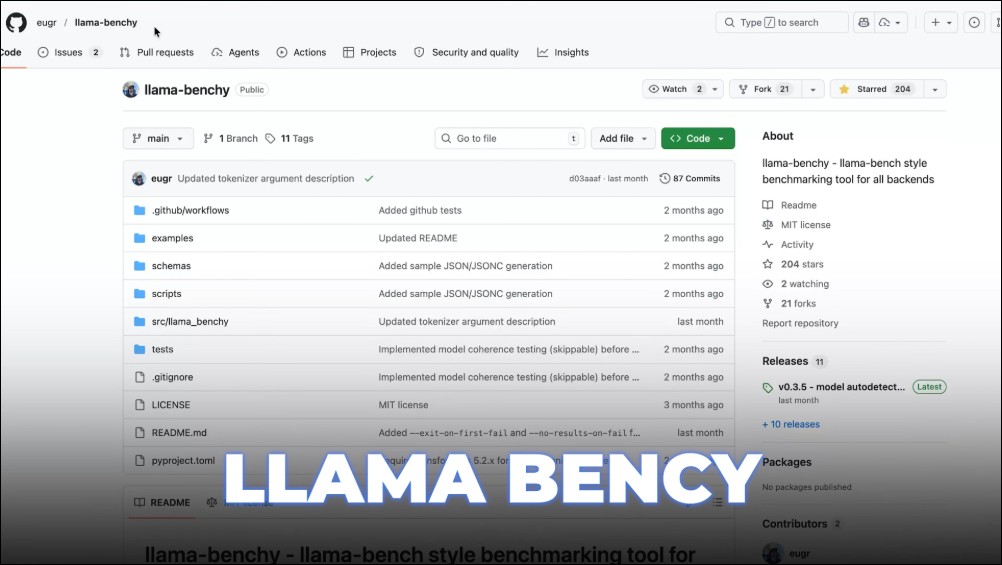
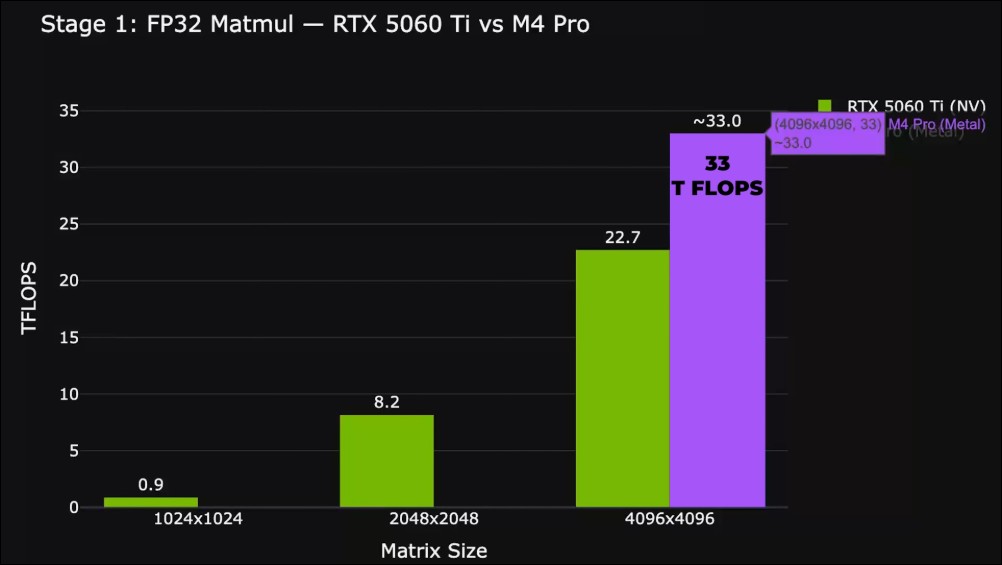
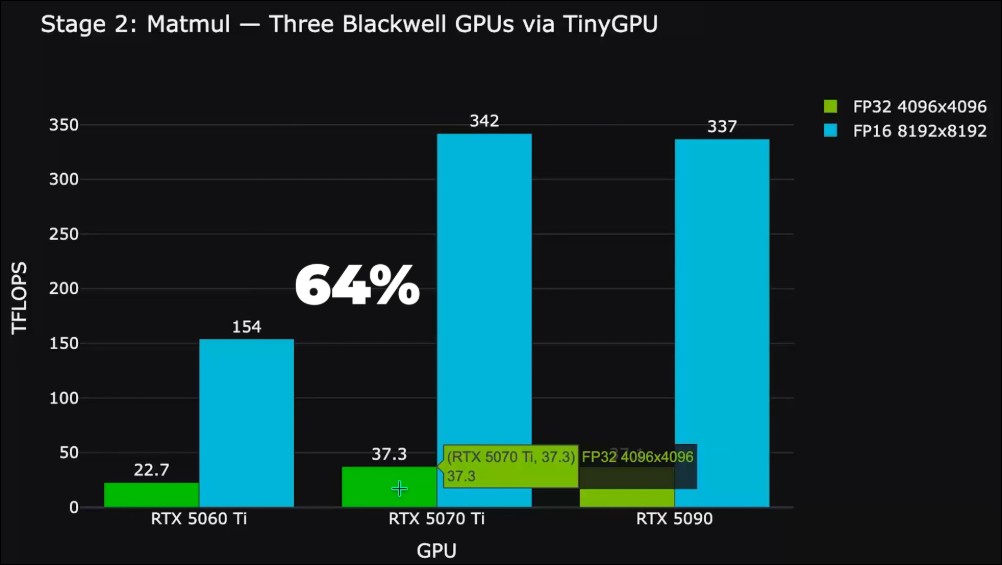
The initial matrix multiplication benchmark for the RTX 5060 Ti showed 22.7 TFlops FP32. That’s an okay number, but Alex’s M4 Pro actually won by running around 33 TFlops. “Honestly, it wasn’t what I expected (it was too low). But the beautiful thing is, it worked.”
To test whether a larger GPU would be significantly faster, Alex switched to a 5070 Ti. But here’s the problem: The 5070 Ti doesn’t get enough power from that little base. In theory it should be possible with a weird adapter cable from three 8-pins to 12V, but he lost the three-to-one cable. I tried it with a four-to-one cable, but it didn’t work.
So he went shopping again, this time buying a Razer Thunderbolt 5 external box, which has space for an independent power supply, and you can choose how much power you want to use. Although the cost of adding a power supply and external box is higher, there will be no power supply problems. With a separate power supply, he can use 12V wire directly. Hot-swappable Thunderbolt cables, no need to shut down, TinyGrad automatically recognizes the new GPU and starts running directly.
The 5070 Ti improves FP32 matrix multiplication by about 64% over the 5060 Ti. Achieved 342 TFlops on an 8K×8K matrix, more than twice that of the 5060 Ti. But the 5090 performed surprisingly well. Its matrix multiplication numbers are about the same as the 5070 Ti, and even slightly lower on paper. But the real advantage the 5090 brings to the table is 32GB of VRAM, compared to the 16GB on the other two cards, which means it can run larger models.
LLM inference test: depressing numbers
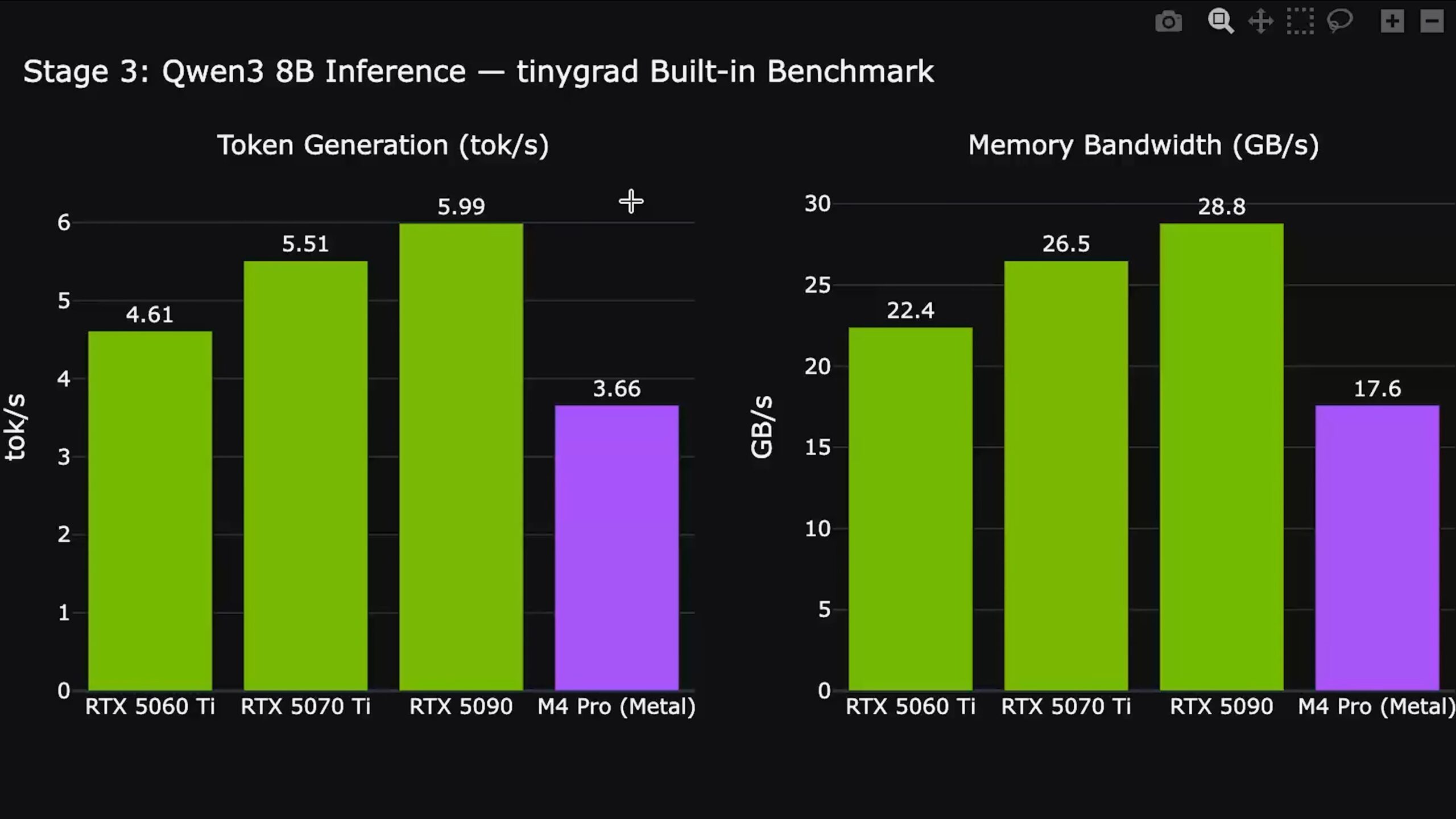
Alex ran the Qwen 3 8B model using TinyGrad’s built-in benchmark. The 5090 achieved nearly 6 tokens/s with a memory bandwidth of 28.8 GB/s. The memory bandwidth of the 5090 should be able to reach 1.7 TB/s, but now it only runs 28.8 GB/s. The gap is really huge. However, there is consistency between the three cards: the 5060 Ti ran 4.6 tokens/s, the 5070 Ti ran 5.5 tokens/s, and all external NVIDIA GPUs beat the built-in Metal GPU (3.66 tokens/s).
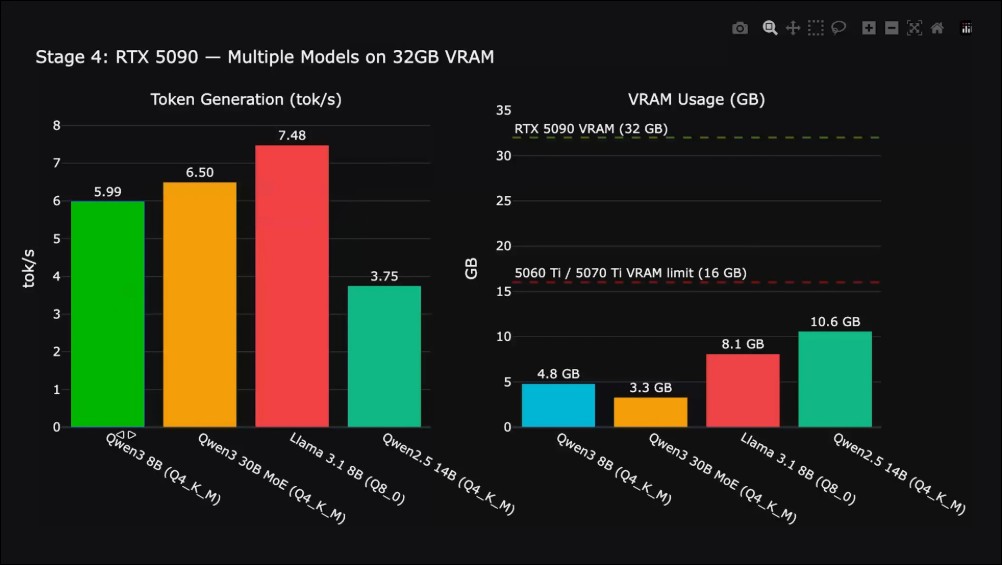
Taking advantage of the 5090’s 32GB VRAM, Alex tested the larger model. Qwen 3 30B MoE (hybrid expert model, smaller number of active parameters) ran out of 6.5 tokens/s. Llama 3.1 8B INT8 quantized version ran 7.48 tokens/s. Qwen 2.5 14B is 3.75 tokens/s.
“These numbers make me so sad.” Alex admitted that these numbers made him very depressed.
End-to-end benchmarks: NVIDIA vs Metal
Complete end-to-end testing using LlamaBeni, running the same Qwen 3 4B model, switching between NVIDIA and Metal backends. The token generation speed of RTX 5090 is 72% faster than Metal, reaching 7.39 tokens/s, while Metal is 4.29 tokens/s. In terms of first token latency, NVIDIA is 3 to 4 times faster than Metal. If you’re just doing chat interactions, the NVIDIA GPU does make for a noticeably more responsive experience.
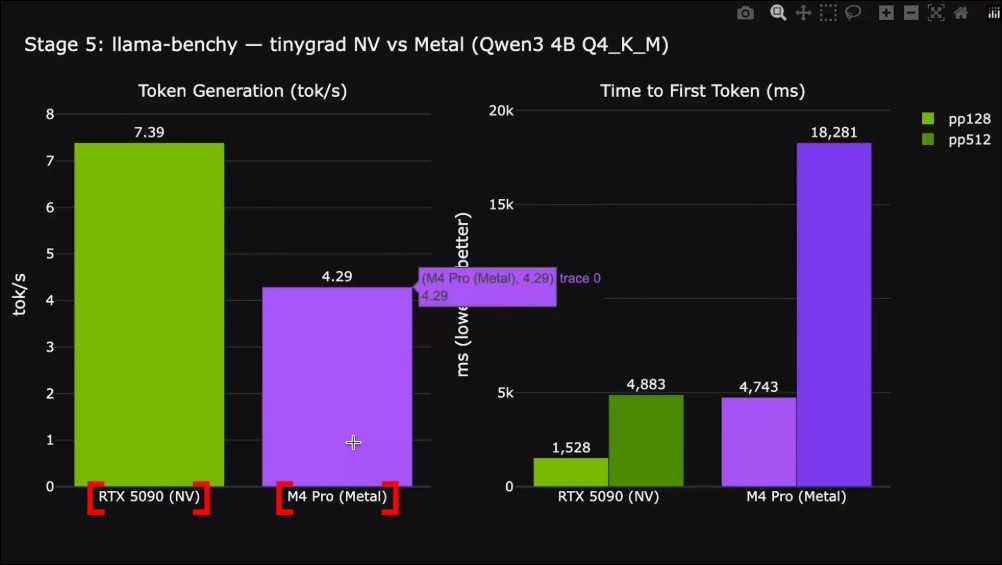
But these numbers are ridiculously low for a high-end graphics card like the 5090, running a 4B parameter, INT4 quantized model.
The Hard Truth: Comparison with Llama.cpp
To do a sanity check, Alex ran Llama.cpp, the tool everyone knows, loves and uses. Of course, Llama.cpp compiled on Metal won’t run on an NVIDIA GPU (that’s what TinyGrad is doing), so he just wanted to get the numbers for Llama.cpp on Metal as a comparison. The results are shocking. Same model, same test, same settings: Llama.cpp runs 10 times faster on Metal than TinyGrad on 5090, and 18 times faster than TinyGrad on Metal. The first token delay is 651 milliseconds, while TinyGrad takes almost 5 seconds.
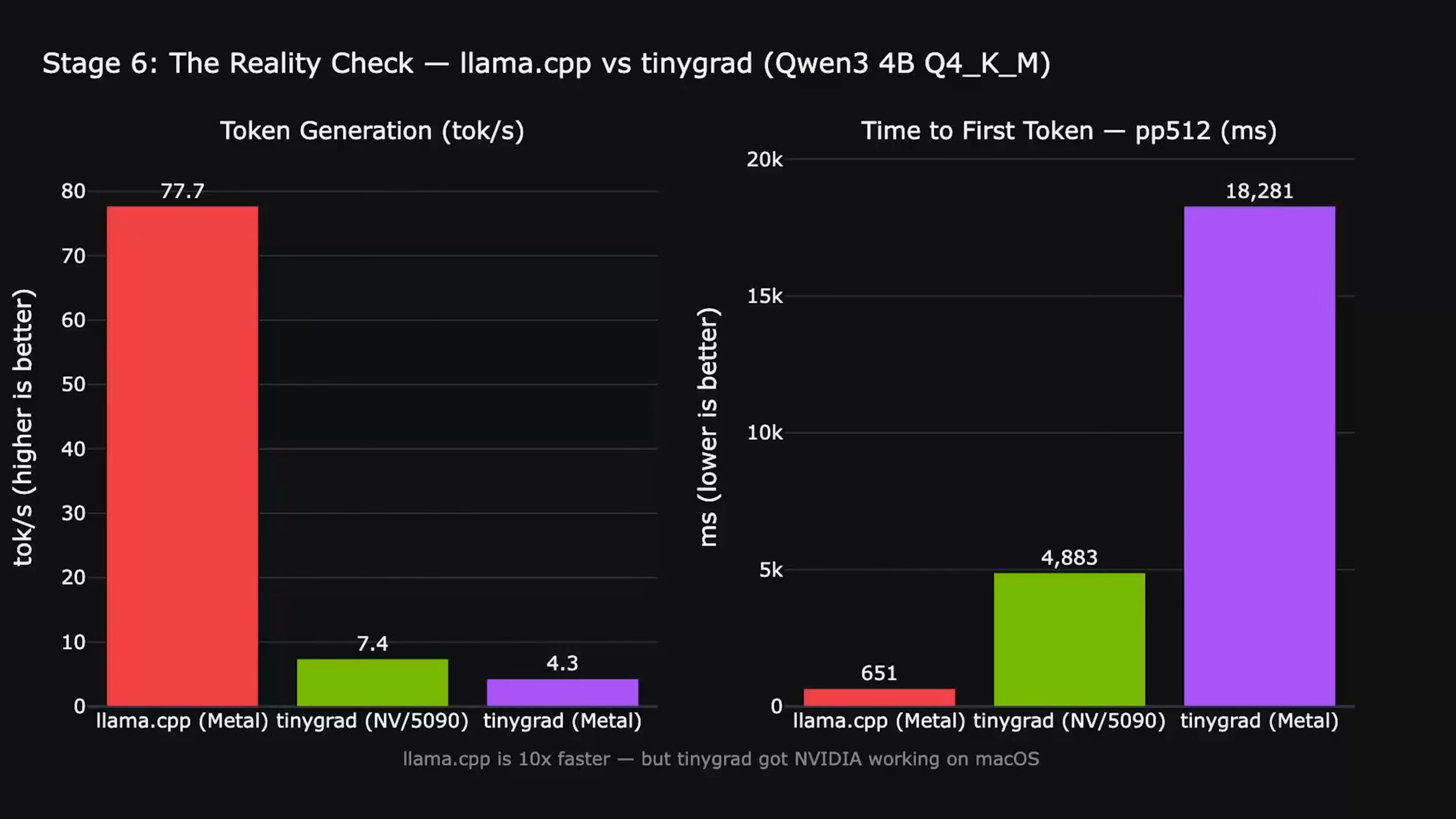
After the entire test, Alex’s biggest impression is that the current macOS using the tiny driver solution to connect an external graphics card to run AI performance is indeed poor.
Final review: At least it’s not completely pointless
Alex was very candid in his analysis of the reasons for this gap. Llama.cpp has years of hand-tuned Metal cores, integrated quantization-aware matrix multiplication, optimized KV cache management, and thousands of contributors frantically squeezing every ounce of performance out of it. TinyGrad, on the other hand, automatically generates cores from a general-purpose compiler. It is not currently trying to compete with Llama.cpp in inference speed, at least not yet.
So what’s the point of all this if Llama.cpp is 10 times faster?
“Because Tiny did something that no one had ever done. They wrote an NVIDIA GPU driver from scratch, an open-source macOS core extension that allowed Blackwell GPUs to run over Thunderbolt on Apple Silicon. This was impossible a year ago. Two trillion-dollar companies, Apple and NVIDIA, refused to let this happen, and a community project did it.”
Tiny did something no one had ever done. They wrote an NVIDIA GPU driver from scratch, an open source macOS core extension that allows Blackwell GPUs to run over Thunderbolt on Apple Silicon. This would have been impossible a year ago. Two trillion-dollar companies, Apple and NVIDIA, refused to let this happen, but a community project did.
Some of you may ask: Will connecting via Thunderbolt slow things down? Alex The short answer is: basically no for LLM inference. Once the model weights are loaded once into the GPU’s VRAM at startup, token generation occurs entirely within the GPU. Model weights are read from VRAM, computed on the GPU, and written back to VRAM. The data that each token actually passes through the Thunderbolt cable is only a few bytes. The bottleneck is not the cable but the core performance of the current TinyGrad driver. The memory bandwidth of the 5090 can reach 1.8 TB/s, but we currently only see 33 GB/s. This is not a cable problem, but a software optimization problem, and in theory it will get better and better.
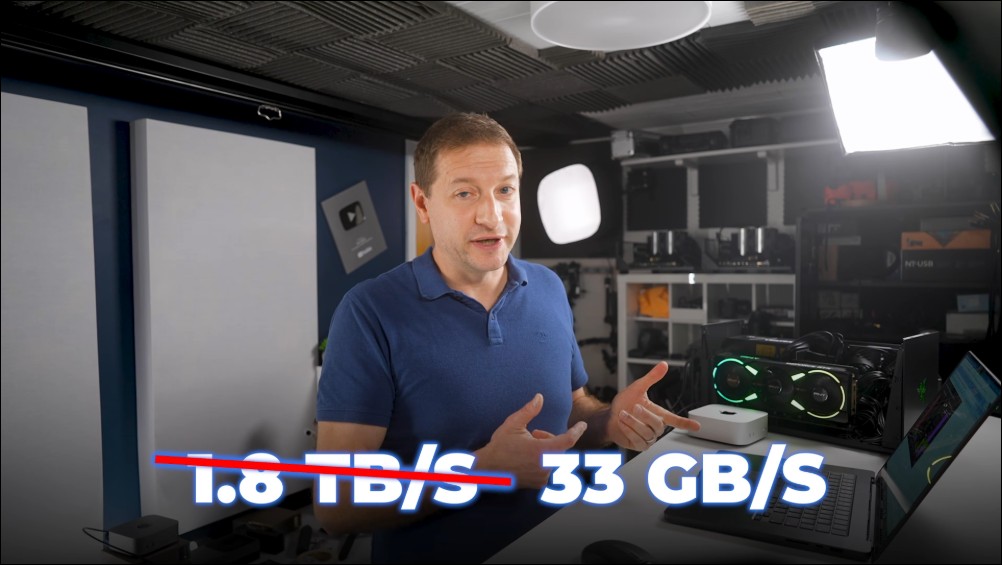
Performance will be improved, the core will be optimized, but the most difficult parts: drivers, compiler pipelines, memory managers, have been completed. However, it is currently not recommended that Mac users spend a lot of money to buy graphics cards to try out the experience now, because the price/performance ratio is too low now, and it may not be the same in a few months. Interested friends can also watch this quite exciting video directly:
Source: KOCPC Chinese