


Once you have used an SSD solid state drive, you will never go back, because the impressive reading speed is unforgettable, but the worrying writing life is the biggest obstacle. If there is a mistake, the hard-earned data will be said goodbye directly, and the gain is not worth the loss. Let’s take a look at Stellar Drive Monitor hard disk health check tool, which can check, scan and diagnose problems related to your HDD/SSD disk, and always remind you of disk temperature and disk abnormality warnings. It is currently a limited-time free event, come and download and install it!

用 Telegram 訂閱【挨踢路人甲】最新文章:https://t.me/itwshare
追蹤【挨踢路人甲】粉絲專頁:https://www.facebook.com/itwalker
Go to the event webpage to see that the $19.99 Stellar Drive Monitor is free for a limited time (the event webpage URL is at the end of the article).

Scroll down to see the “GIVEAWAY PAGE” link in Step 1, click on it to enter the online free screen.

Enter your name and email account, click Not a robot, and then click [Get Your Key Now].

Go to the entered email box to receive the email. You will see an Email Verification email. Open and click the link in the red box to verify.

After verification, you will receive an email with the activation serial number again. If you don’t look for it in spam emails, write down the activation serial number in the red box. If you are worried about suspicious links, don’t click on them.

Go back to the event page and scroll down to Step.3 and click “click here” to download the program.
After downloading, start the installation. In the Windows 8/10/11 environment, a window for using this account will appear during execution. This is because a security warning window of “User Account Control” will appear due to security issues. Mainly when the user performs some actions that will affect the system, a confirmation screen will often appear, so press [Yes] to continue (if you want to remove this warning, please refer to “Talking about User Account Control (UAC) in Windows 8/10″article)

There is no Chinese, but English is okay. You will be familiar with the window operation a few times.

Just follow the [Next] step of Windows to complete the installation.

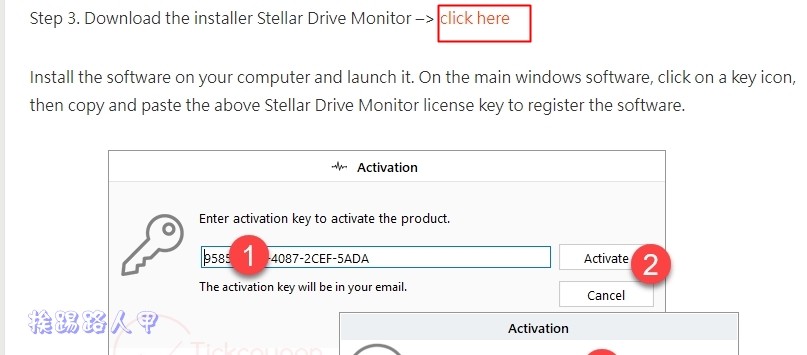
Enter the startup serial number you noted down before and press [Activate] to start.

The menu on the left side of the program screen is the function service area, and the right side is the display. The picture below is the status screen of Disk Statis. You can see the temperature, performance and health status, as well as information such as firmware version, model and product serial number.

Disk Partition can view and detect relevant information about disk partitions.

Scan Disk is a very useful scanning tool that can identify problematic sectors.

Unexpectedly, it also has a disk copy function. Stellar Drive Monitor is free for a limited time and is free for one year. It would be a pity not to download it!

[Limited free event website]: Please clickhere
Further reading:
- iPhone Contact Backup 2021 Latest Tutorial, Complete iPhone Contact Export, File Transfer and Transfer with One Click
- Aiseesoft iPhone Cleaner Easily frees up space on your iPhone without asking for help
- Free Registry Jump quickly reaches the path modified by the login file editor
Source: KOCPC Chinese