


DoYourData Uninstaller Pro is an intelligent software uninstallation tool that uninstalls applications on PC. It can uninstall general applications and Windows Apps in batches. It will completely uninstall the selected application and clean up all related residual parts, including logs, junk files, registry files, logs, cache, etc. Currently, you can get the serial number for free for a limited time. If you need it, hurry up and download it!

用 Telegram 訂閱【挨踢路人甲】最新文章:https://t.me/itwshare
追蹤【挨踢路人甲】粉絲專頁:https://www.facebook.com/itwalker
As we all know, there is a function to add/remove programs in the Windows system. Normally, after installing a program, it will appear in the console. However, some programmers do not design according to the Windows API, making it difficult for users to remove it. Even if they don’t like it, they have no choice but to keep it in the system. We introduce a set of limited-time free DoYourData Uninstaller Pro tools to remove software, general applications and Windows Apps can be searched at a glance, and when the software is removed, the junk left by the software in the computer will be deeply eradicated to keep the system smoother.
Go to the event webpage to see that the $14.9 DoYourData Uninstaller Pro is free for a limited time (the event webpage URL is at the end of the article).

Scroll down to see the download link for Step.1 (blue box), expand the License and see the startup serial number (red box).

Execute the downloaded installation file and execute the installation file. In the Windows 10/11 environment, a window for using this account will appear during execution. This is because a security warning window of “User Account Control” will appear due to security issues. Mainly when the user performs some actions that will affect the system, a confirmation screen will often appear, so click [Yes] to continue (if you want to remove this warning, please refer to “how to Turn off User Account Control (UAC) in Windows 11″article).

Then follow the Windows installation sign [Next] to complete the installation.

Execute and enter the main screen of DoYourData Uninstaller. Click [Activate Pro Version] in the lower left corner to bring up the upgrade window. Please enter the serial number you noted before and click [Activate].

When you see the Activation Successeded message window, you can turn it into a full-featured professional version.

The author’s computer often installs some programs that are not suitable and will be removed if they are not suitable. However, some programs will still retain information after they are removed. DoYourData Uninstaller Pro can easily find out the leftover items that have been uninstalled.

Removal will be confirmed again.
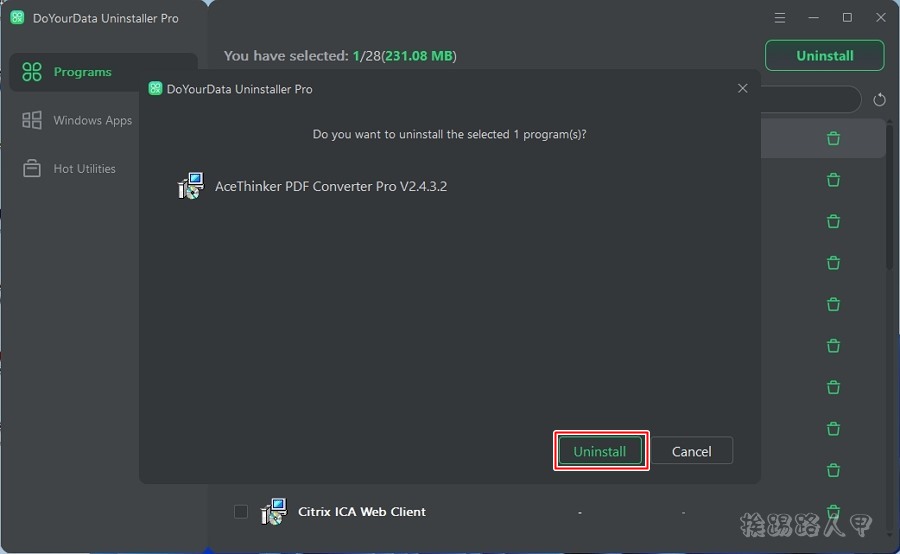
A detailed removal list will appear, clearly letting you know where the data is placed, and you can uncheck the options you don’t want to remove, which is quite flexible.

After success, you can also see the space size after removal.

In addition to the removal of general applications, you can also remove Windows Apps!

[Software name]: DoYourData Uninstaller Pro
[Activity webpage]: Please clickhere
Further reading:
- DoYourData Super Eraser (Windows/Mac) Easily and completely delete files and folders
- Limited time free ASCOMP Secure-PDF Professional, easy encryption/permissions/watermarks/messages
- Watermark Software watermark creation software, free for a limited time~
Source: KOCPC Chinese