


The “Circle to Search” feature is one of Google’s most successful Lens features, letting you instantly circle and search anything on any screen. Now, Google is bringing Circle to Search into Gemini, allowing you to see and analyze what your phone’s camera sees in the Gemini Live overlay, as well as analyze your screen content. The two are basically the perfect match.
Google will introduce Circle to Search in the Gemini overlay.
Google has many ways to search on your phone screen, from Google Lens and Circle to Search to Gemini. Earlier this year, we saw the two methods become increasingly connected, and now, this initiative is finally starting to roll out more broadly.

As early as May this year, Google was already discovered to be integrating the Circle to Search feature into the Gemini overlay (not Gemini Live), and this integration now appears to be launching soon. According to Android Authority the report, X user HHUUEELL Discovered that this integration is now available on Samsung devices. See the video below for how to do it:
Although the new integration doesn’t have “lens perspective analysis” capability, it makes narrowing down on-screen searches much easier through the Gemini overlay. You simply open the Gemini overlay, circle the content you’re interested in, and then enter your query, as shown in the video above. As far as the author knows, this is almost identical to the standard Circle to Search workflow, just with an extra option to enter a query at the start.
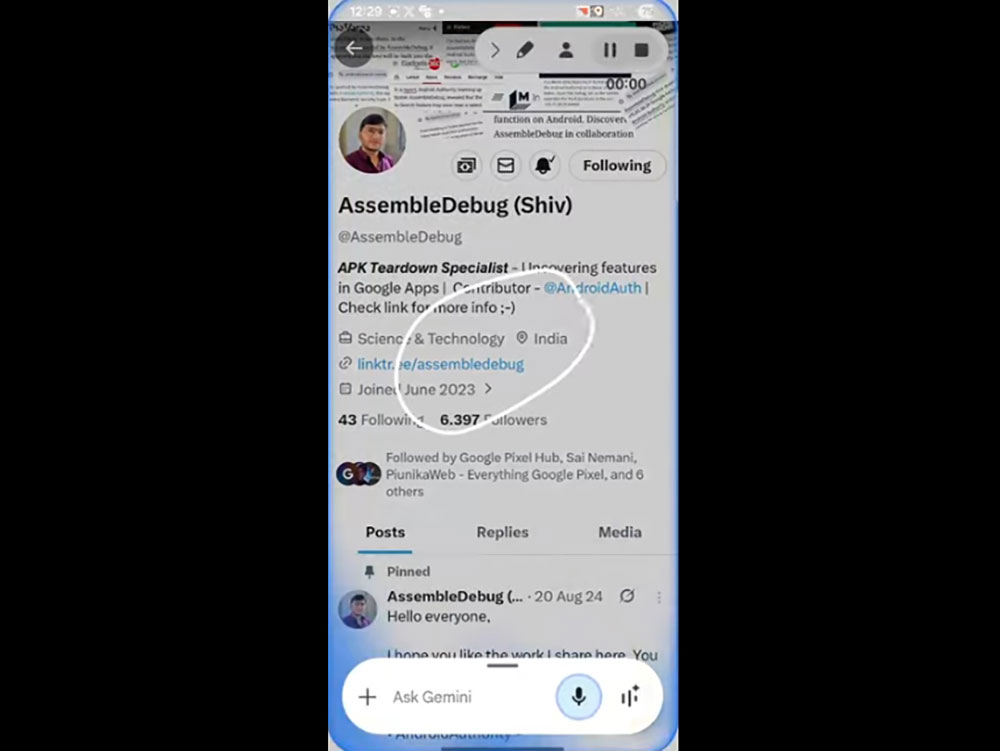
This latest version makes it just as easy to search a specific area of your screen with Gemini as it is with Circle to Search—the only difference is that the Gemini version starts by swiping in from the corner instead of holding down the home button. Once you circle the part you’re interested in, you can ask Gemini about anything you’ve marked. The feature appears to be rolling out gradually, and while it’s not yet widely available, the author’s Pixel 9 Pro and Pixel 10 don’t have it yet either.
Source: KOCPC Chinese