


rush every daytrainDoes your commute stress you out? I look at the sign saying “15 minutes late”, but I don’t know whether to rush to the platform or turn around and buy breakfast? Now just add LINE Friends, “Taiwan Train Commuting Assistant” will immediately help you check whether the nearest train will arrive in a few minutes or not.Taiwan RailwayIf you are late, you can also check your commute route with one click, so you no longer have to rush to catch the bus!iPhone And Apple Watch users can also use Siri voice queries, which instantly upgrades their commuting life to super smartness. Why don’t you give it a try now?
A must-have for Taiwan Railway commuters! Taiwan’s train commuting assistant LINE robot also supports iPhone shortcuts and Apple Watch
Do you often have this experience when commuting every day? You rush to the station in a hurry and rush to the platform sweating profusely, only to find that the sign says “15 minutes late” and you have to figure out how long it will take to arrive. Or you might check the time, only to find out when you arrive at the scene that the train hasn’t arrived yet, which makes you upset and irritating. There are even those who have already entered the station, but are stuck in the crowded platform, unable to move, and can only watch the time pass.
If you have ever encountered these situations, then you must get to know this practical and simple gadget: “Taiwan Train Commuting Assistant”! This is not an app and does not require downloading. As long as you join LINE friends, you can instantly check the train schedule, on-time status and countdown time between the two stations. Whether you are an office worker commuting every day, a college student rushing to catch up with classes, or a traveler who needs a ride temporarily, this tool can greatly improve your ride efficiency!
Why do you need “Taiwan Train Commuting Assistant”?
Taiwan Train Commute Assistant helps users solve the three major pain points of long commutes at once:
- Is the information on the board too general?
It tells you directly how many minutes the train will arrive. - Worried about missing the train?
Not only does it tell you which class you are currently on, but it also lists the next two classes so you can choose with peace of mind. - Is it troublesome to check?
Preset commuting routes, one-click query is super convenient and saves typing time every day.
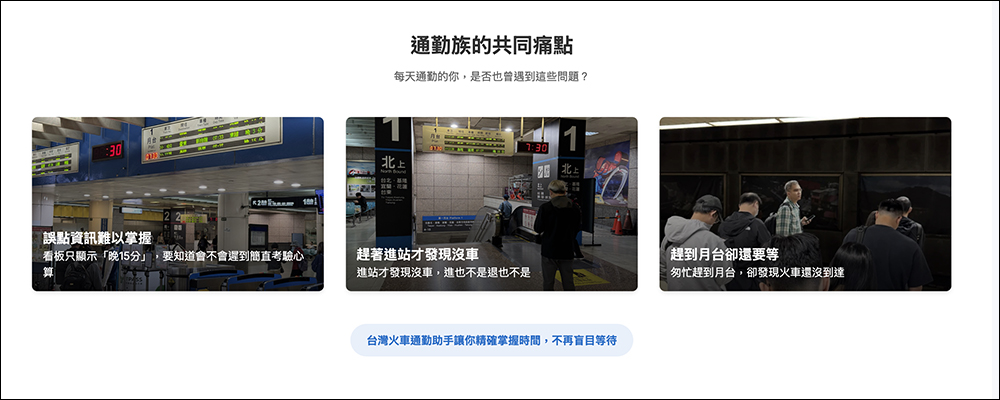
▲Picture source: Taiwan train commute assistant
Four practical highlights
- Accurate countdown, no longer rely on imagination:
Instead of simply showing the departure time, it clearly shows “how many minutes are left to drive.” This way you can instantly tell whether to sprint or leisurely walk over, much more accurately than traditional train timetables. - Detailed train information at a glance:
Everything from train types (regional, Juguang, Ziqiang), train numbers, departure and destination stations to destinations are clearly marked, so you don’t have to Google or jump through several apps to look up information. - Simultaneous comparison of multiple shifts:
By listing the next three trains at once, you can easily decide which one is the most cost-effective and time-saving. You don’t have to wait at the platform only to find out that it would have been better to take the next one. - Quick query key for commuting:
Frequent commuters can set the “Go to work” and “Get off work” buttons by inputting once. From now on, they can automatically check the starting and ending trains with just one click every day. It’s perfect for lazy people!
How to use Taiwan Train Commuting Assistant, teach you 3 steps to get it done
Step 1. Join LINE friends
Just open this link → Click me to add friends Or scan the QR Code and add “Taiwan Train Commute Assistant” as a friend. After adding it, you can directly use the LINE chat box to start querying!
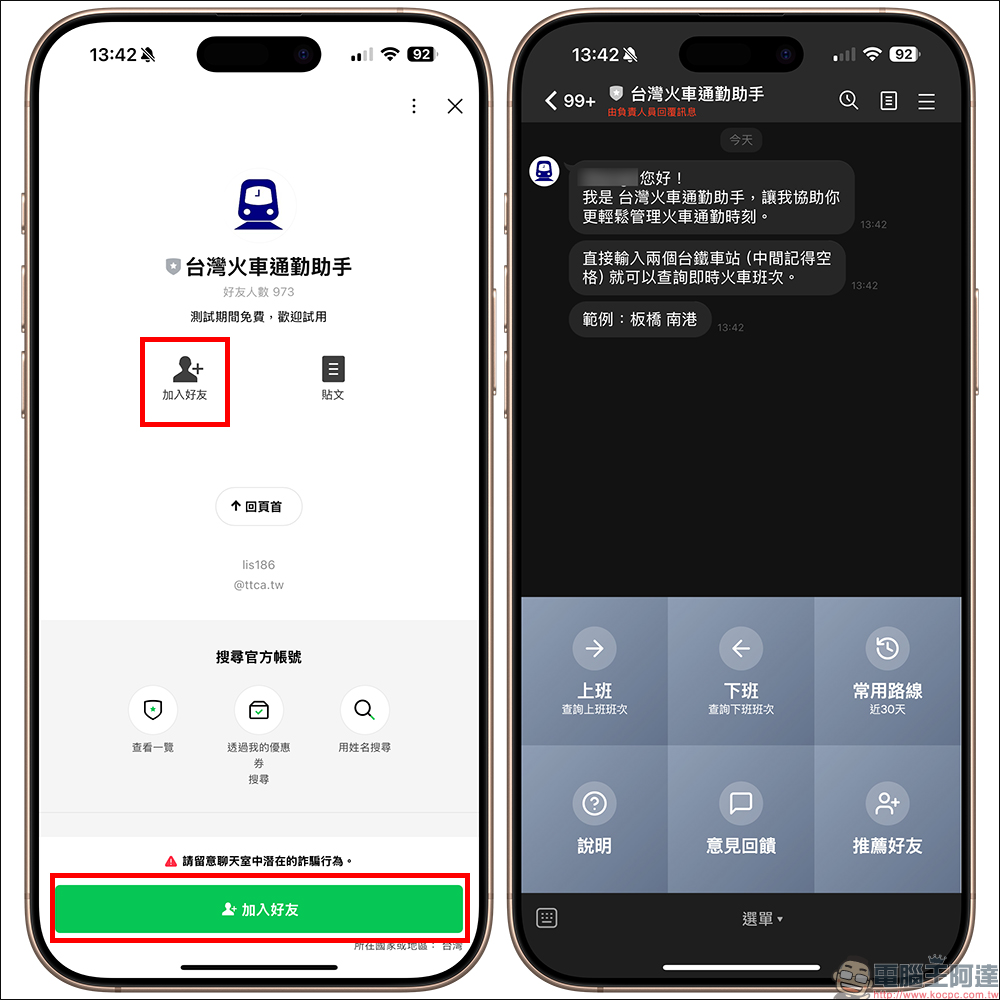
Step 2: The query method is super intuitive
Enter “origin, space, destination” in the chat bar, such as “Banqiao Taichung”, and information such as the latest trains’ real-time schedules, whether they are delayed, how many minutes are left to depart, vehicle type and travel time will appear immediately. What’s more considerate is that if you can’t catch this train soon, it will also list the next two trains, allowing you to decide whether to give up this train, which can save you the trouble of repeated inquiries during commuting.
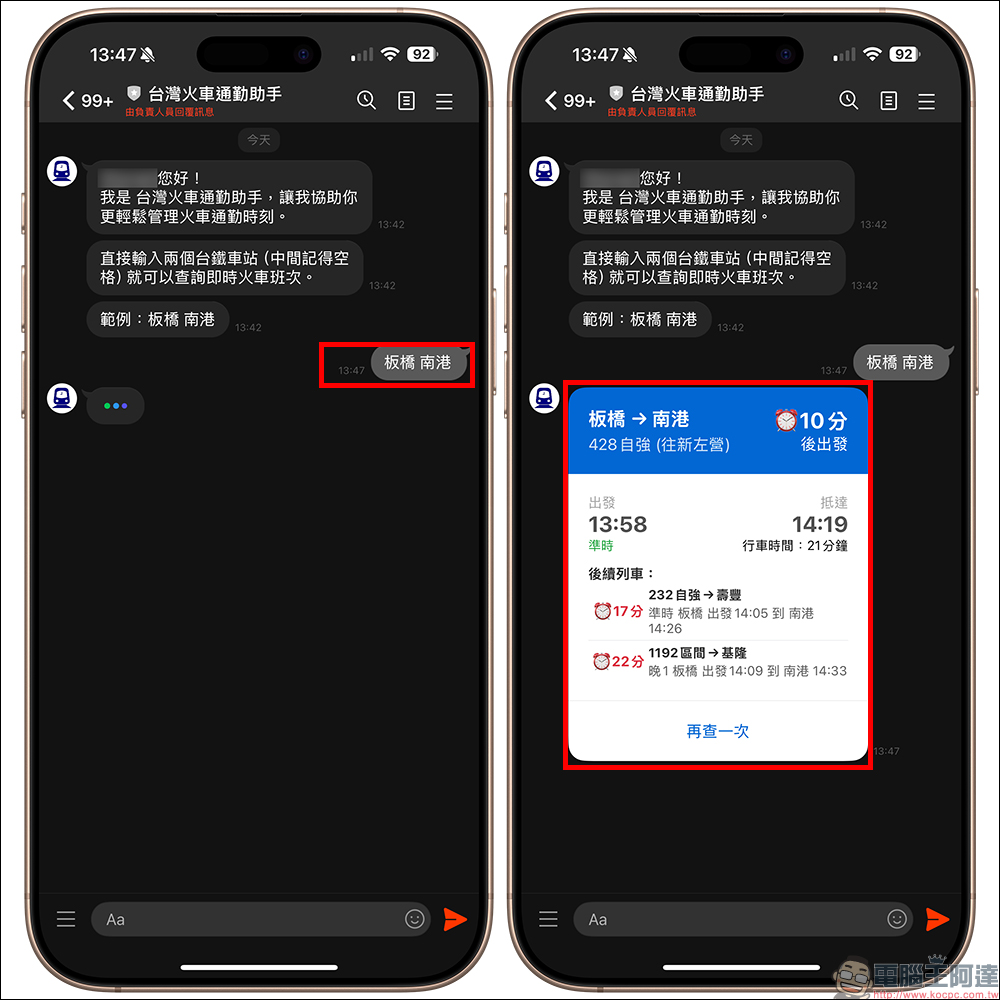
Step 3. Set frequently used routes
Enter “work start station end” or “off work start station end” to set your daily commute schedule. In the future, just click the “work” or “off work” button to check it with one click. If you want to delete, just enter “Delete at work” or “Delete at get off work”. The usage is very intuitive!
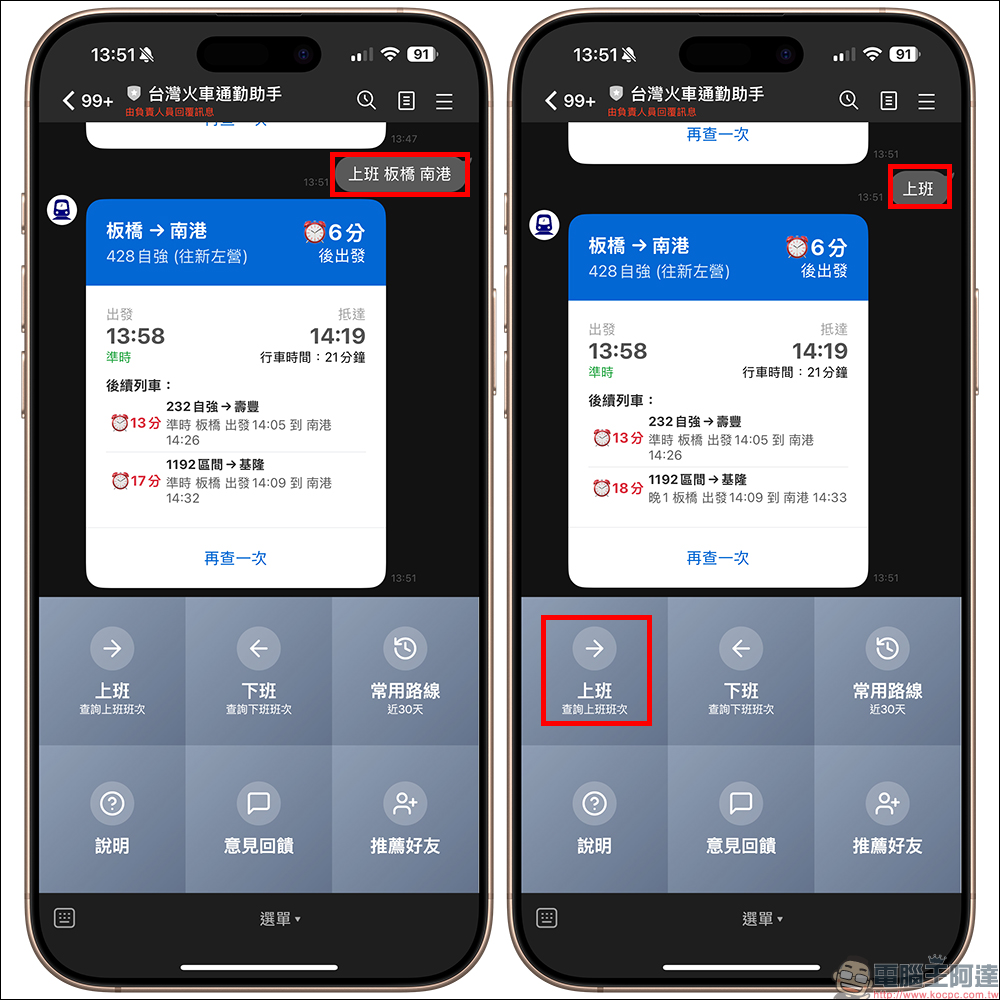
Additional screening at the same scene: You can check it without opening LINE! Exclusive points for iPhone and Apple Watch users
In addition to LINE queries, “Taiwan Train Commuting Assistant” also supports the iPhone’s “Shortcut” function. What does this mean? You can set up an automated process in your iPhone so that it automatically pops up the nearest train notification when approaching the station, or say to Siri: “Help me find the nearest train” and it will do it for you right away! You no longer need to click on the app, you can check it just by moving your mouth or approaching the station, which is very suitable for commuters who are in a hurry.
It is even more convenient for friends who wear Apple Watch. You don’t need to take out your phone. Just raise your wrist and you can immediately see the latest train times, departure countdown and delay information, and your technological commuting life can start immediately.
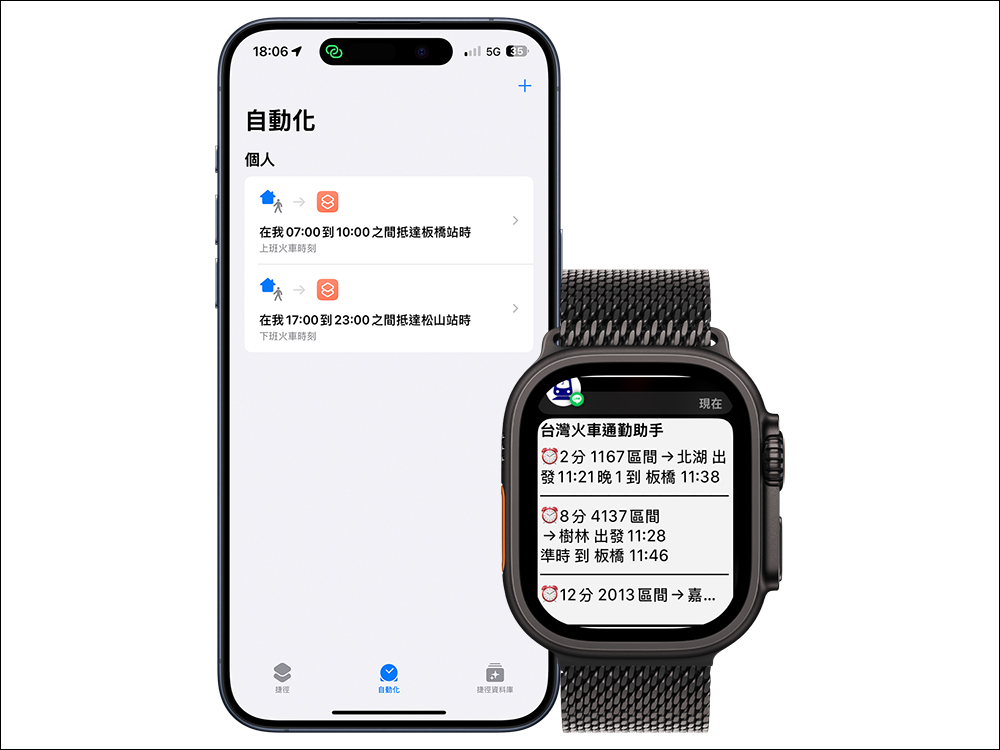
To obtain the Taiwan Train Commuting Assistant shortcut script and use this part of the function, please go to“Taiwan Train Commuting Assistant” official websiteDownload the application.
Conclusion
In this era of information explosion, even taking a train cannot rely solely on “being lucky and being on time”. Using the right tools, searching quickly, and understanding things is the right answer to commuting life. “Taiwan Train Commuting Assistant” is not only a query tool, but also your most reliable partner when you are in a hurry and fighting delays every day. If you take the Taiwan Railway every day, or occasionally need to check train times, add it up and give it a try now. I guarantee you will feel like “I should have known this before”!
Currently, “Taiwan Train Commuting Assistant” is available for free trial during the test period. For information on when fees will be required or fee-related information, please stay tuned for official news:https://www.ttca.tw。
Further reading:
Source: KOCPC Chinese