


Recently, many people have been lamenting on Threads or other social platforms: “Why do strangers spread the word LINE He said I was his neighbor and asked me to be quiet at night? ! “What’s even more outrageous is that some say they are B&B owners, teachers, online shopping customer service… The scripts are all kinds of weird, but they are all very real. Faced with this kind of news, the common question in everyone’s mind is: “Hey, how could he have me?” LINE?」
The reason why this wave of fraud is so clever is that it is “too life-like” and makes people reply to messages or even add them as friends without realizing it. In fact, the reason behind this is not a supernatural phenomenon, but a failure in LINE settings. If someone searches for you through your phone number, and “non-friend messages are not blocked”, the other party can directly knock on you. This article will take you to find out, where do these strange LINEs come from? Why did you get tricked? The most important thing is to teach you 3 quick settings to help your LINE add “anti-virus”Scam“Anti-harassment and anti-skimming” iron triangle, stay away from weirdos and risks!
Why does he have my LINE? Users must learn the latest privacy fraud prevention settings in 2025! Just 3 steps to quickly improve safety
Recently, you may have seen LINE conversation records on social platforms where others are reporting that they have been scammed. You may have experienced it yourself, or your family members or friends may have encountered similar situations. “Why does he have my LINE?” This is a question asked by most people. Next, we will thoroughly analyze the purpose and reasons of these messages and how to prevent them. If you want to use LINE more safely and securely, you must learn it.
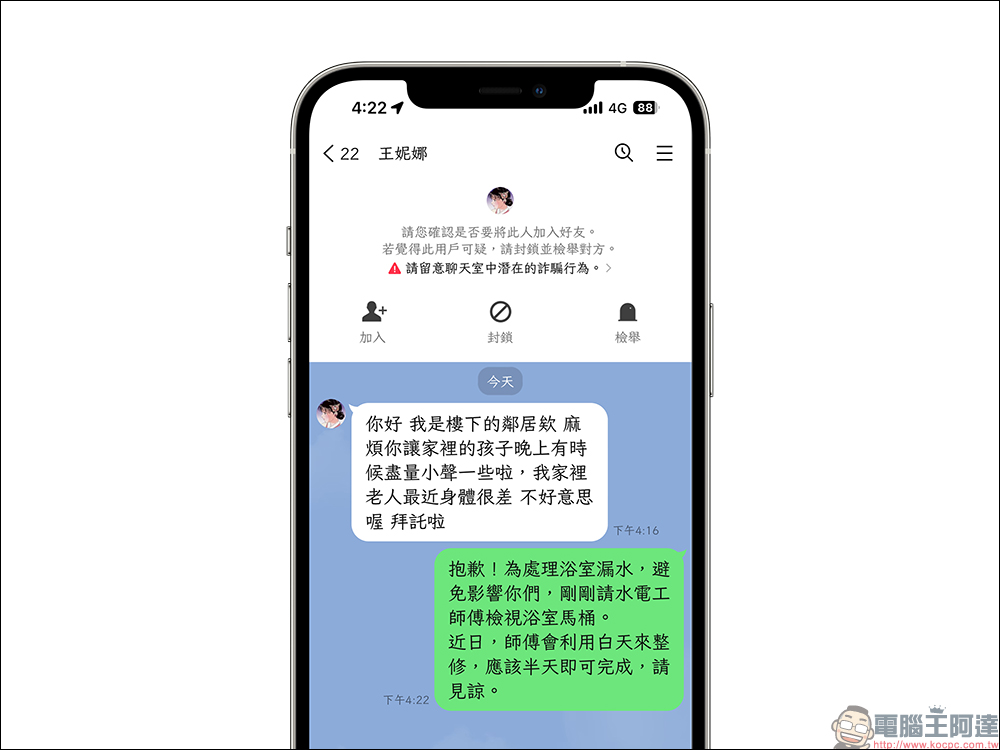
Who are these people?
Don’t doubt it, more than 90% of the accounts that send messages are scam or harassing accounts. You don’t need to talk to them, and don’t hesitate to block them. Currently, LINE also has a thoughtful reminder. “Please be aware of potential fraud in chat rooms” will be displayed above non-friend messages. You will also see three buttons: “Add Friend”, “Block”, and “Report”. Please directly select “Block + Report” to prevent the other party from finding you next time.
Why does he have LINE?
To put it bluntly, this is actually because your own LINE settings are “too open”. At present, it is normal for LINE to bind mobile phone numbers. If you do not turn on the “block non-friend messages” function, then the fraud group will have the opportunity to accurately target you as long as you enter the phone number randomly. As long as your account settings allow such incoming messages, they can start performing these “community theaters.”
The ultimate goal of fraud? Steal your account, trick you into clicking links, and steal your information!
When you receive a LINE message from a stranger, the other party has already obtained two pieces of your personal information: phone number + LINE account number. Next, their routines will generally be as follows:
- Send fake links to trick you into clicking (pretending to be shopping, parking, or bill payment notifications)
- Test whether you can add friends and get more chat information
- Fake customer service asks you to provide a verification code, and your account is stolen.
- Target high-value accounts or high-risk groups for further fraud
In many cases, as soon as you click a link and provide information, your account will be snatched away, and even the bound email and backup data will be emptied.
Fix your LINE privacy defense in 3 simple steps
Don’t be afraid! In fact, it is very simple to prevent this type of fraud. The following 3 setting steps can be completed in just 2 minutes to protect you from being sent messages by weird people in the future.
Step 1: Block messages from non-friends
Open the LINE App, click the gear “Settings” in the upper right corner, click “Privacy Settings” and set the “Block Messages” option to on. After turning on this function, only people in your friend list can send you messages, and strange accounts cannot knock you, completely shutting out those script weirdos.
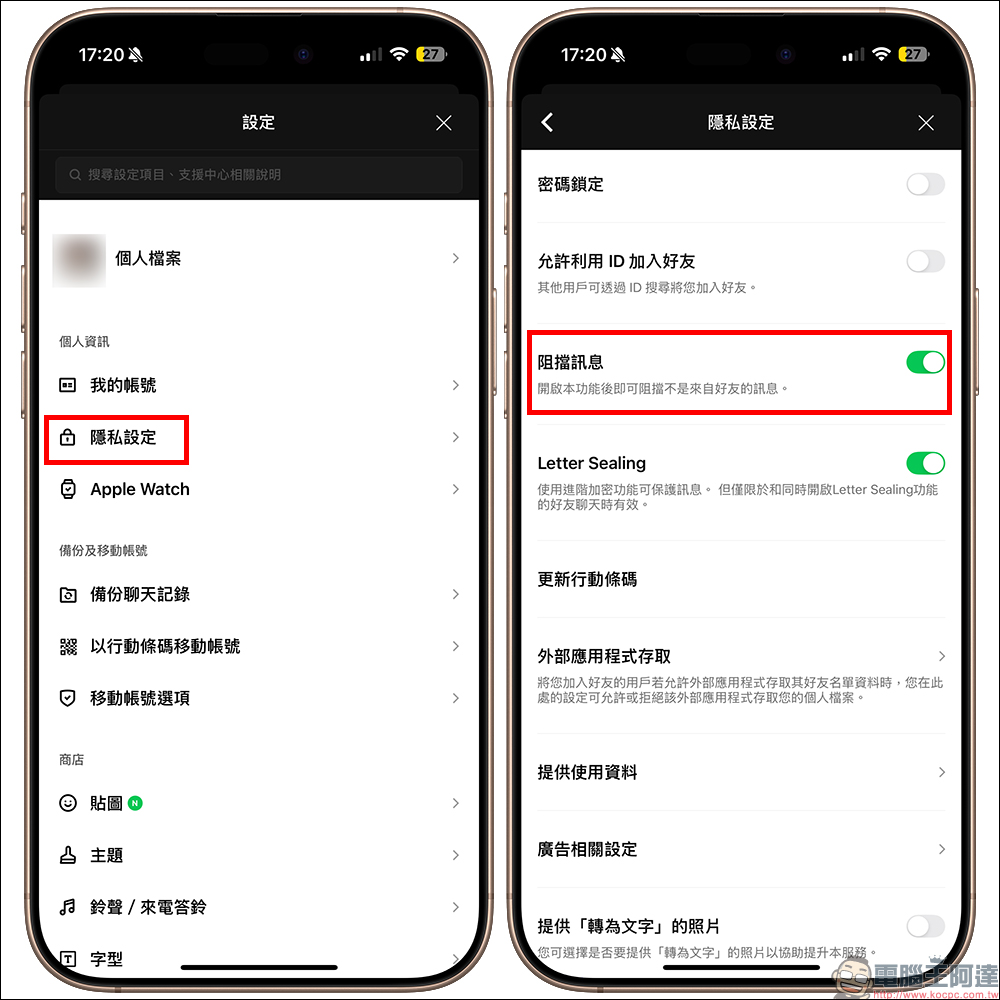
*Tips: You can also turn off “Allow ID to add friends”. Unless you really need strangers to actively add you, especially in situations such as “phone calls” where scanning QR codes and clicking on friend links are not possible, you may need to turn this feature on. otherwise. In daily life, whether it is face-to-face, correspondence, or messaging on other social platforms, turning off “Allow ID to join friends” will not actually affect you, because there are many other ways to make friends.
If “Allow ID to join friends” is turned off, what should I do if I need to add friends?
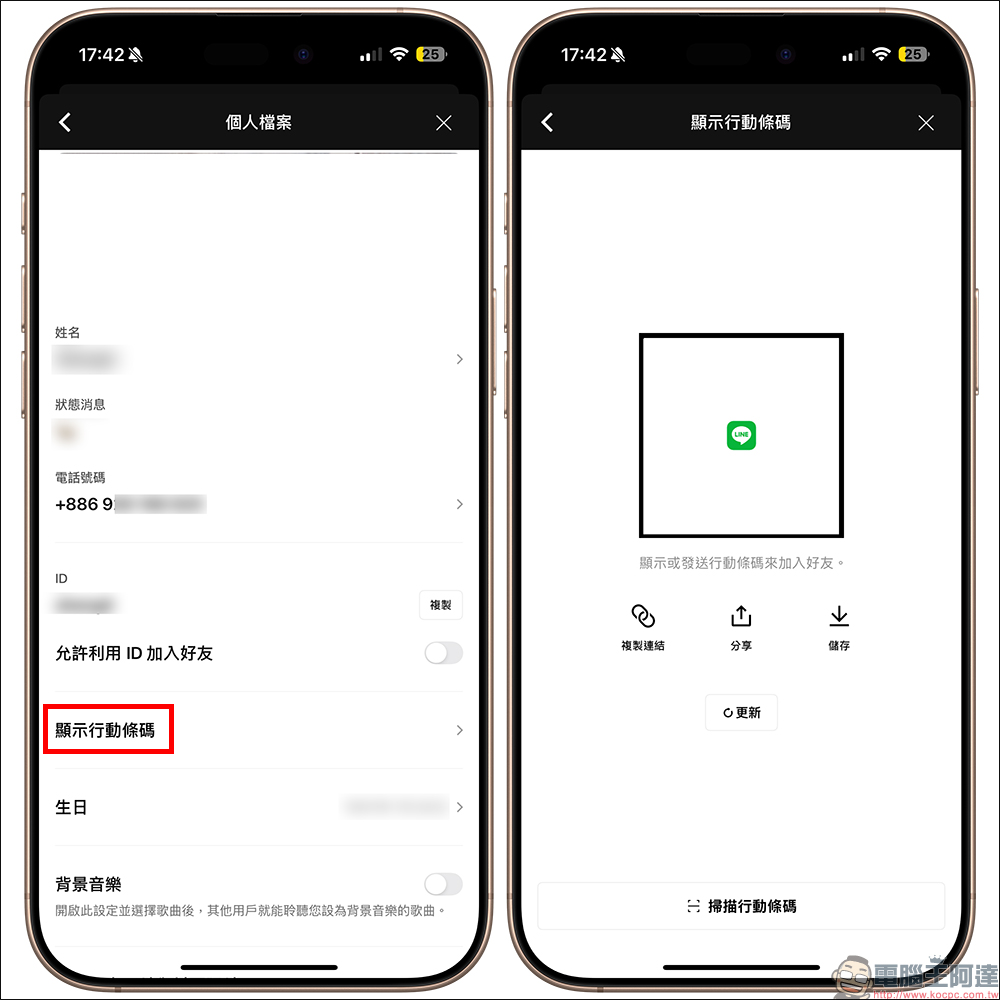
If you are worried that not using “LINE ID” for each other to add friends, it will cause a lot of inconvenience in daily life. As mentioned in the previous paragraph, this is most likely to affect only calls that require spoken language to speak your LINE ID to the other party to search and add friends. Otherwise, LINE has many options for adding friends. First, click “Show Mobile Barcode” in the “Profile” of the settings.
At this time, you will see a large LINE mobile barcode on the screen. This QR Code actually allows the other party to open the friend link by scanning it, and then add you as a friend. The following three options function in sequence:
- “Copy link”: A link to add friends will be generated. After the other party clicks on the link to open it, they will be able to find your LINE file and further add you as a friend. This is usually used on other social platforms and when communicating with each other through letters.
- “Share”: A message will be generated, which will include the text message “Please add me to LINE! Free calls, free messaging, more convenient communication!”, as well as friend links and mobile barcode images. Allow the other party to choose to click the “link” or read the mobile barcode image and scan the code to add friends. This is more useful when communicating on other platforms such as text messages.
- “Save”: The QR Code for adding friends will be saved in the photo album of the mobile phone, so that others can scan and read the code to add friends. This method is suitable for temporarily sending friend information to the other party through other platforms. It can also be used for correspondence, resumes, business cards, etc.
Step 2: Turn off the phone address book to automatically add friends
If this function is not turned off, the other party may be able to use your phone number to find you. Even if he cannot send messages, he may use other methods to harass or defraud you. So first go back to the “Settings” page, this time click on “Friends” and turn off both “Add Friends” and “Allow to be added as friends”.
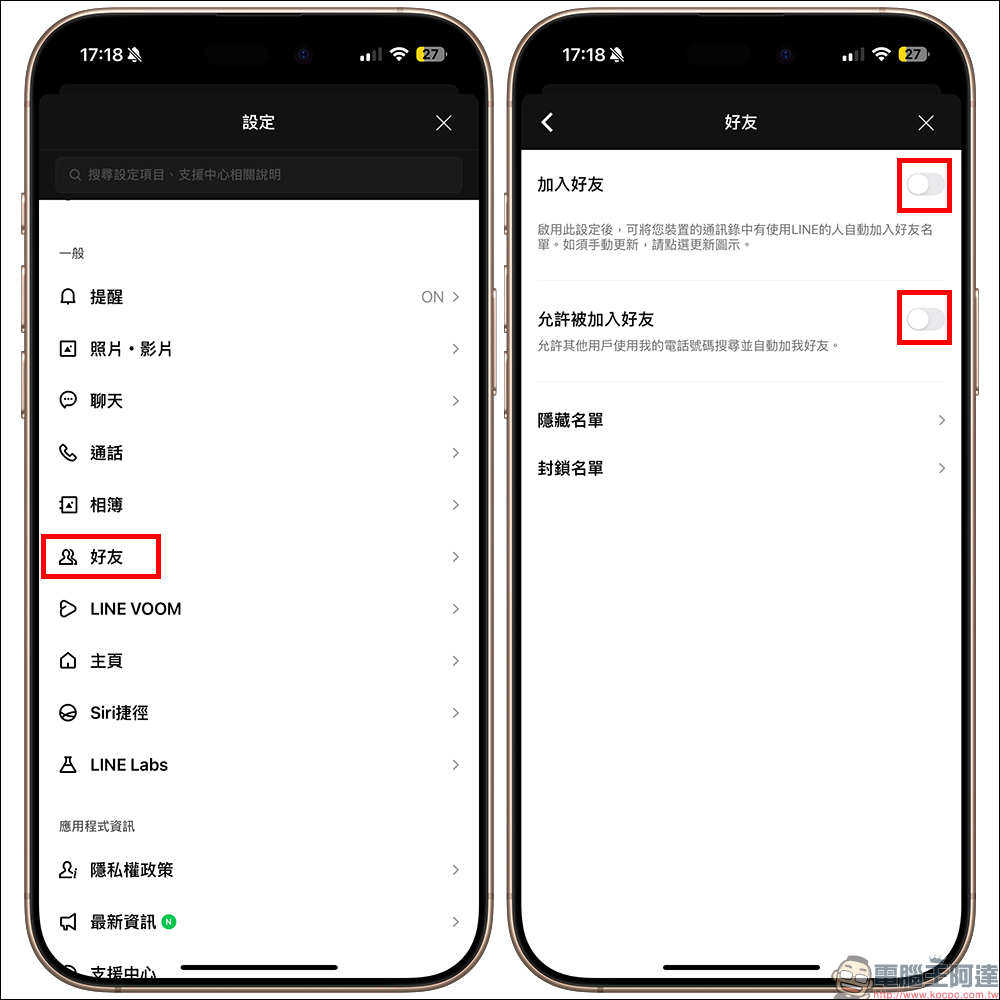
If you turn off “Add Friends”, this can prevent the phone numbers in the mobile address book from being automatically added to the friend list. This will save a bunch of people from running into the friend list and make daily friend management more convenient. At the same time, “Turn off” the ability to be added as a friend. After this function is turned off, others will not be able to use your “phone number” to search for you and automatically add you as a friend.
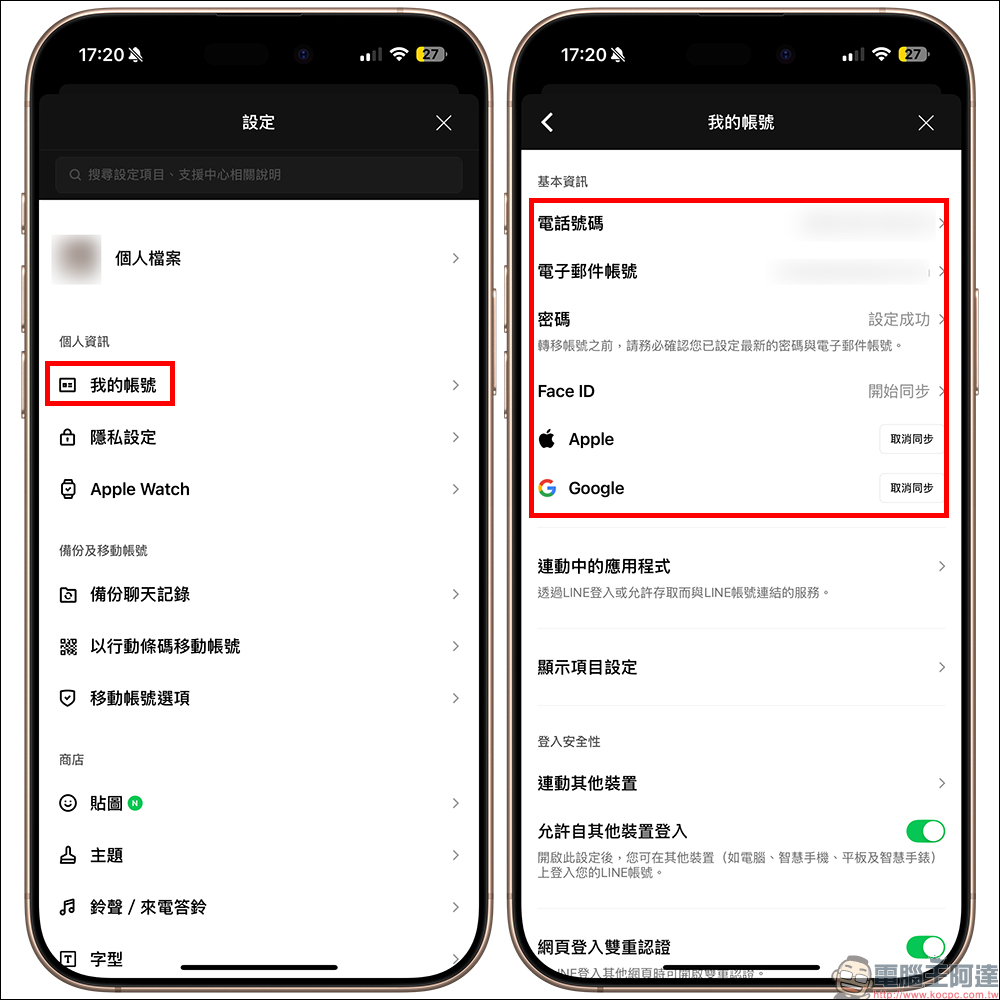
Step 3: Confirm whether the basic information of your account is complete
When your account is unfortunately stolen, changed phones, or accidentally deleted, whether you can successfully recover your account depends on whether you have set these settings properly. First, click “My Account” in “Settings” to confirm whether it is bound:
- telephone number
- Email account
- Password (It is dangerous for some people not to set a password!)
- It is recommended to also synchronize your Apple ID or Google account, which is more secure.
These actions sound ordinary, but they are really life-saving in emergencies!
Conclusion
Although modern social life is convenient, it also exposes us to more and more personal risks. Whether it’s LINE, Instagram, Threads or Facebook, don’t click on unfamiliar links from unknown sources anywhere. A little negligence may turn you into a “fat sheep” in the eyes of fraud syndicates. This article hopes to help you find your own LINE security loopholes, and also let you know how these weirdos find you and how to prevent future troubles. Take 3 minutes to check your LINE settings. Don’t let your “neighbor” knock on you in the middle of the night!
Further reading:
Source: KOCPC Chinese