


As technology products play an increasingly important role in our lives, with whom and what kind of user data is shared has always been a hot topic of privacy discussion. Even if you are extremely senior and know very well Windows For users of the system, even if they read the privacy menu carefully, it is difficult to tell on the surface what data will be sent to Microsoft. Fortunately, Windows is not some unfathomable black technology. Through public file and network analysis, we will let you know what data is being sent by the system, and of course show you how to prevent the most basic data collection.
What data do Windows computers pass to Microsoft?
Telemetry data will cover some basic aspects of the system, such as the computer’s hardware, installed software, and system events, but will not include any clear identification of the user. Windows refers to telemetry data as “diagnostics,” some of which are hidden in system settings, and some of which can only be truly disabled by adjusting the registry. This telemetry data is encrypted and transmitted over HTTPS, and is typically performed periodically or when important events occur (such as system crashes, etc.).
Forced Windows Telemetry does not collect profile names or profiles themselves, emails, or any other data that could personally identify users, which Microsoft says they use to help improve the service.
When you get a new computer and start it up for the first time, Windows will guide you through the initial settings of some core parts of the computer. One of the settings screens contains toggles for all optional data collection. By default, these switches are on, but regulations in some regions, such as GDPR, require Microsoft to show users what data is being collected and obtain their consent before they start using Windows, at which point you can turn off the collection of things like input and drawing data, location information, app usage information, and crash reporting.
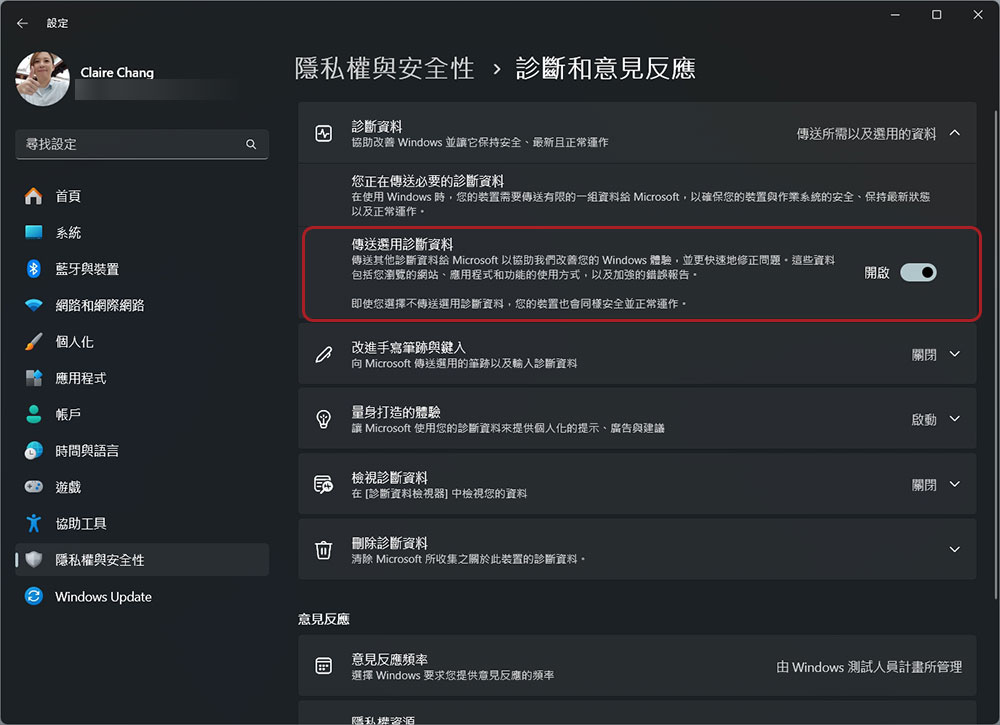
If you skipped the initial settings, in “Settings” you can also make some settings:
- Open the Settings app.
- Click “Privacy & Security” in the left sidebar.
- Select “Diagnosis and Feedback”.
- Turn off the “Send Optional Diagnostic Data” switch.
So how does Windows’ information collection compare to macOS? When you put the two major operating systems together, they approach privacy in much the same way, but there are some key differences. Apple handles optional macOS data collection in much the same way, with app analytics, Siri dictation data, and location services generally handled on a case-by-case basis. Apple does emphasize more device-side processing of these diagnostics, but some data does go to Apple, which is treated largely anonymously. The exception is the collection of information surrounding a person’s Apple ID or iCloud data. However, Windows does much more than that when it comes to mandatory, non-toggleable data collection.

The Linux system collects the least data among all operating systems due to its decentralized nature. Large production releases will sometimes prompt you for crash reports or other diagnostic information, but by default, most Linux production releases collect very little data from users.
Source: KOCPC Chinese