


Scamming techniques are becoming more and more sophisticated. From fake text messages to decoy links and fake social advertising, all kinds of traps are everywhere. When it is impossible to prevent fraud, anti-fraud tools must also keep pace with the times. Whoscall’s latest “one-click search” function is a fraud prevention tool that combines AI artificial intelligence and years of fraud data analysis. This free feature integrates three key functions: number query, link check and screenshot identification. As long as you open the app, enter or upload, you can immediately determine the risk of fraud. Whether you see a suspicious advertisement, receive an unknown call, or receive a phishing text message, AI can help you find out the truth with just one click and reduce the risk of being deceived. This article will take you through the functional highlights and practical applications of Whoscall’s “one-click search” and teach you how to use technology to create an exclusive anti-fraud defense line!

▲Picture source:Whoscall
Whoscall launches “One-Click Check”, a super free new anti-fraud feature! Better at scamming than ChatGPT?
“You have an unpaid tax, please click the link below to pay it back”, “I am your boss, help me handle this transfer” – have you seen this type of scam message? In recent years, fraud groups no longer only use phone attacks, but also use social platforms, instant messaging software, and even AI-generated fake graphics and fake celebrity advertisements to deceive people. According to statistics from the Ministry of the Interior, Taiwan loses tens of billions of dollars every year due to fraud. This is not just a problem of a few people who are “too easy to cheat”, but an information security challenge faced by the entire people.
For this reason, the well-known anti-fraud app “Whoscall” has chosen to upgrade and launch a new integrated function “One-Click Check”, which integrates three major functions: number query, malicious link identification and screenshot interpretation. As long as you enter the number, URL or upload a picture through a simple interface, you can let AI check whether this is a scam message for you. The operation is simple and the process is clear, even elders can easily get started.
How convenient is “one-click search”? This is the fastest way to use it!
To use “One-Click Search”, just update the Whoscall App to the latest version, open the homepage and you will see the entrance. Whether you are:
- I received a call from a stranger and wanted to know if the caller was a scammer.
- Received strange links in LINE or text messages
- Saw screenshots of weird ads on social media
Just enter the “One-click search” function and choose to enter a number, paste a URL, or directly upload an image (supports jpg, png format, size within 20MB), and Whoscall’s AI system will instantly help you compare the database and generate query results.
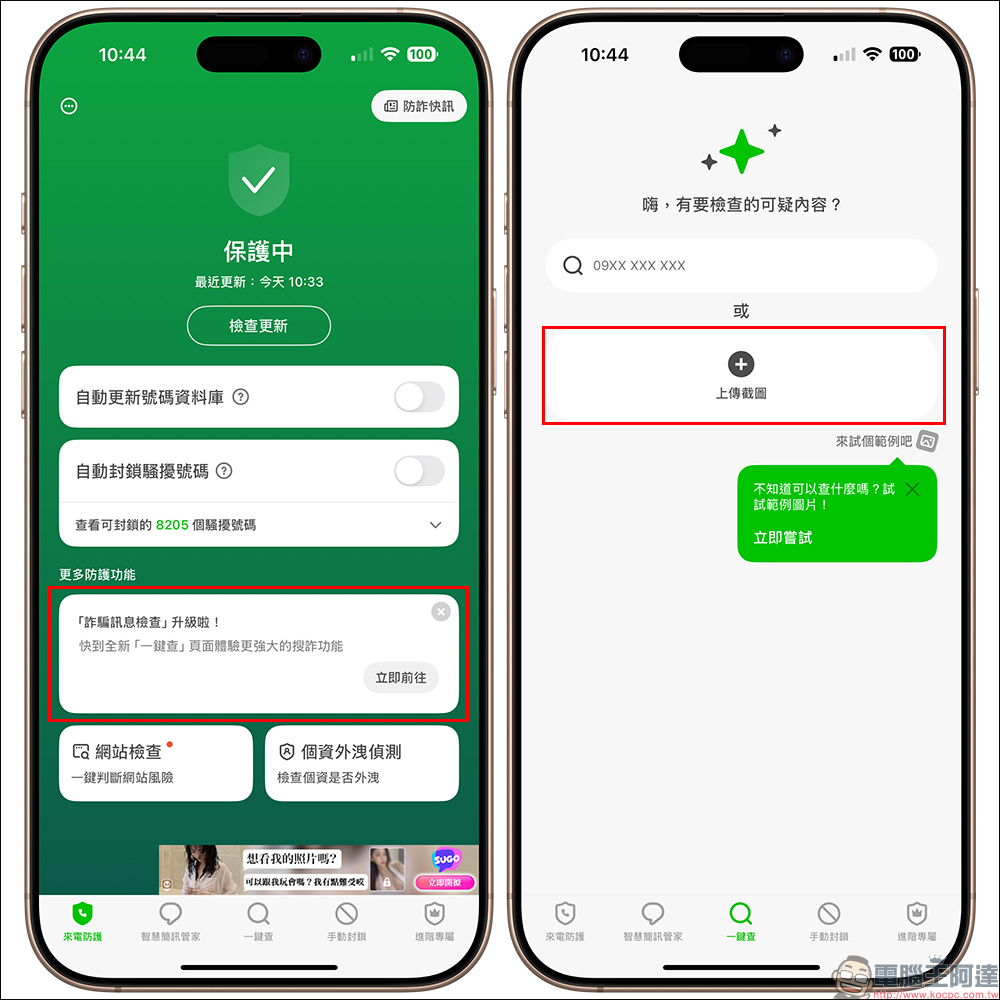
For example, if you take a screenshot of a picture file that looks like an official bank offer, just throw it into “One-click Search”, and AI will analyze whether there are known scam links or fake information hidden in the picture, and even generate a prompt based on the text in the picture: “This kind of content may be fake advertising, please do not trust it.”
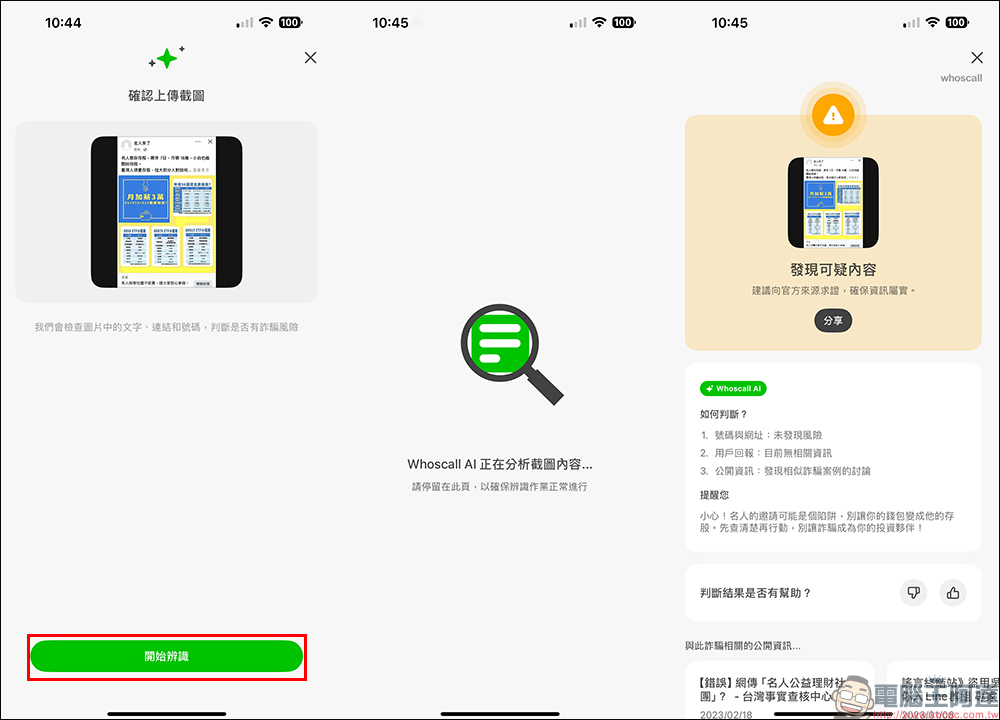
AI is not a gimmick! The technology behind it is strengthened in this way
Why is it so powerful? It turns out that the AI behind Whoscall doesn’t just rely on itself, but combines the Google Gemini model with Gogolook’s self-developed natural language processing algorithm, as well as the fraud number and text database accumulated over the years, giving the AI powerful semantic understanding and keyword comparison capabilities.
This is not just a simple image scanning function, but can interpret the hidden semantics of fraud in the content, such as pretending to be a government agency, impersonating a well-known company, using exaggerated offers to induce clicks, etc. Once similar signs are interpreted, it will proactively issue a risk warning to avoid you falling into a trap. Moreover, this AI will continue to be updated and the detection criteria will be adjusted based on the latest fraud cases to ensure that it will not fall behind the evolution speed of fraud groups.
Share query results and expand fraud prevention circle of friends
Whoscall has more thoughtfully added a “one-click sharing” function. After checking the results, you can directly share the information interpreted by the system with your relatives and friends to remind them not to be deceived, especially for some elders or friends who often receive phishing text messages. This function is basically the “filial piety plan” in the technology industry!
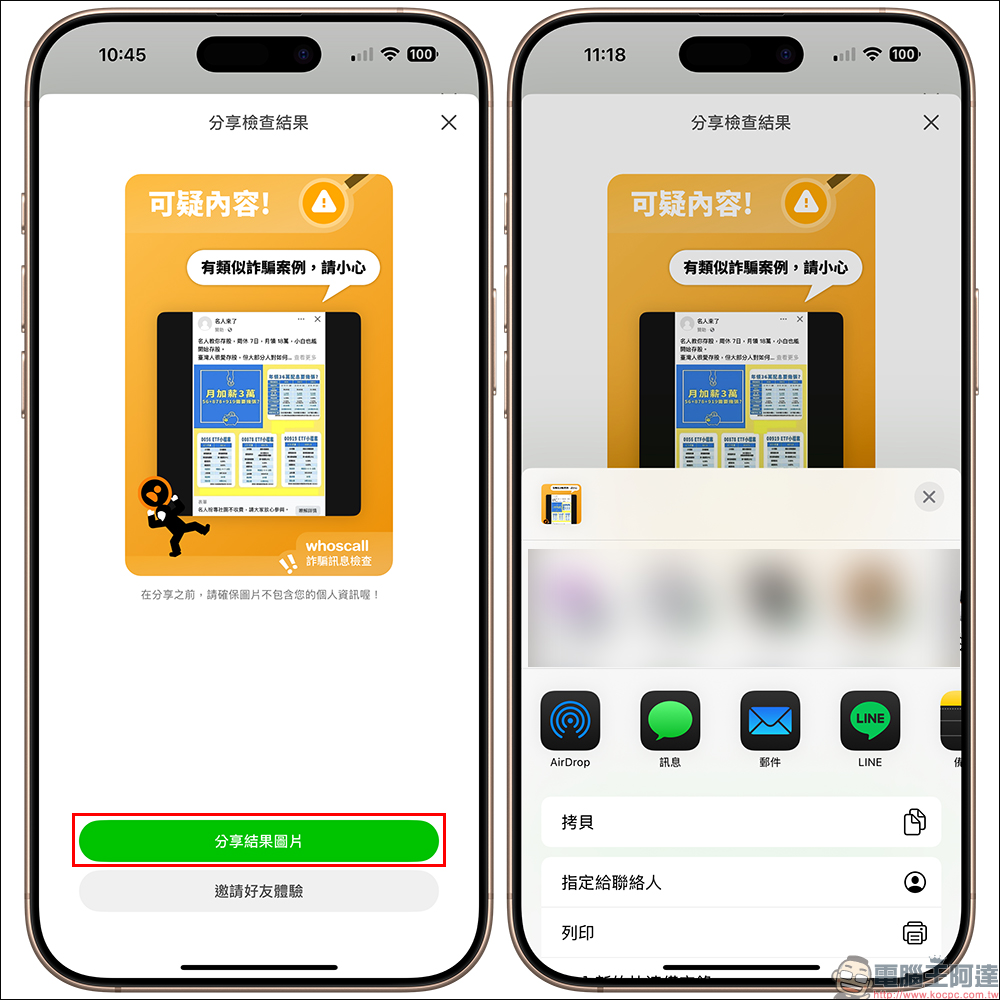
Screenshot query is super popular! Threads usage increased fivefold
It is particularly worth mentioning that the “screenshot to detect fraud” function has suddenly become popular on Threads recently, and its usage has even increased fivefold. Why? Because many scams now no longer use phone calls, but instead use social posts, limited-time updates, and even IG advertising pictures to lure clicks. Many people have begun to upload screenshots to make instant judgments.
From fake celebrities endorsing products, giveaways, to suspected government subsidy notices, as long as there are pictures, you can find out the clues with “one-click search”. Whether it’s false e-commerce advertisements, KOL limited-time updates, or flyer photos, you can check them all!
Small reminder: No matter how powerful the AI is, don’t forget your own judgment!
Although Whoscall’s “one-click search” function is really convenient, officials also remind users that user query results may still change slightly due to database updates or algorithm adjustments. Therefore, when seeing risk warnings, you should be more alert and less impulsive. At the same time, it is recommended that the images uploaded must be clear and complete, preferably including phone numbers, URLs and message content, so that AI can fully interpret them.
If you find that it is clearly a fraud but has not been found out, you can also contact customer service through the reporting mechanism in the app or by writing to customer service (service@gogolook.
Whoscall App Free Download:
iOS version (App Store)|Android version (Google Play Store)
Conclusion
Fraud prevention should not be just a matter for the police or the government, but a daily action that everyone can do. The “One-Click Check” launched by Whoscall is like a portable anti-fraud detector that can help you distinguish authenticity from fakes instantly. It can be easily used by both digital natives and mobile phone users.
You might as well give it a try today and use “One-Click Check” to help your parents check their LINE messages and help you avoid those discount traps flying all over the world. Now just move your finger, you can let AI help you keep your wallet and personal information, and you no longer have to worry about “accidentally making the wrong click” and regretting it later!
Source: KOCPC Chinese