


For gamers who don’t like desktops taking up space and use laptops, they should all use eGPU graphics card external boxes. However, if you are planning to buy the latest RTX 4090, please stop now. Recently, a foreign YouTuber found that it is very wasteful to use the current eGPU external box with the RTX 4090, because you cannot get the full game performance, which may only be 50%.
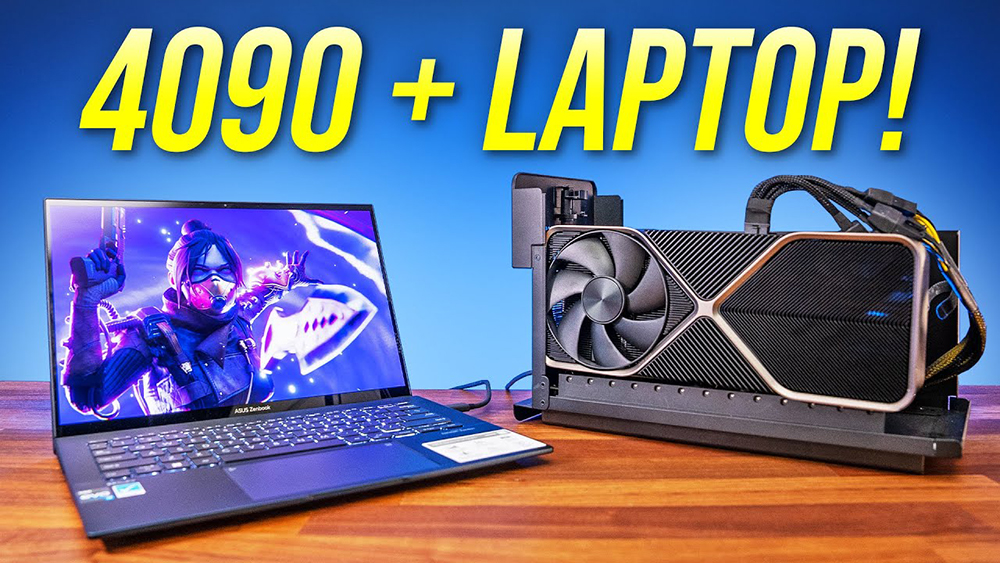
Foreign YouTuber actually tested RTX 4090 with an eGPU graphics card external box, and the game performance was lost by 50%.
Recently, the foreign YouTube channel Jarrod’s Tech shared a video of actually testing the RTX 4090 with an external graphics card and a laptop. He used two laptops, the ASUS Zenbook 14 OLED and the AORUS 17X. The former is not a gaming laptop, the latter is. The ASUS Zenbook 14 OLED is equipped with an Intel i7-1260P processor, and the AORUS 17X is an Intel i9-12900HX As for the processor, it is obvious that the latter one will be more powerful. The external box is the Razer Core X Chroma, which supports Thunderbolt 3 technology.
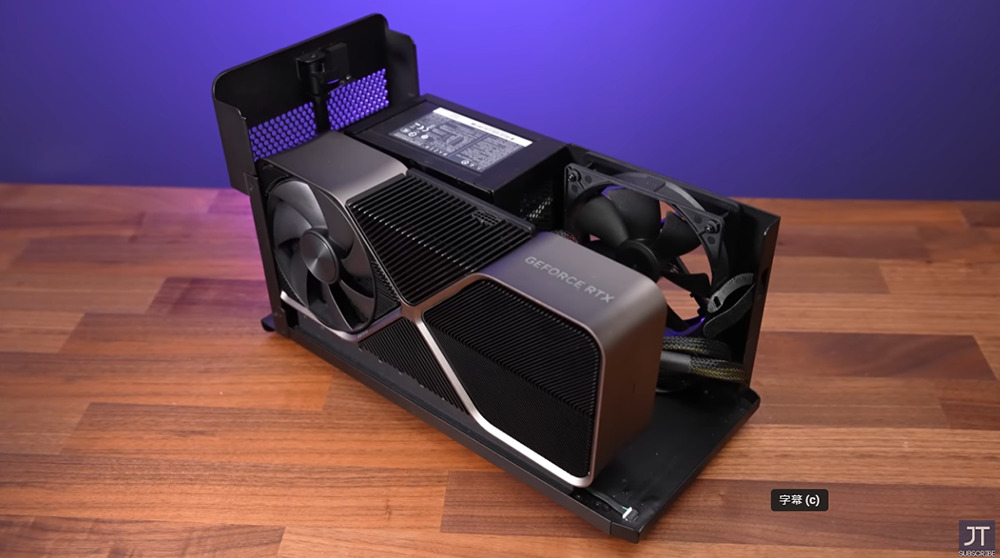
Interestingly, this time the RTX 4090 was too large to be accommodated by the Razer Core X Chroma. Jarrod’s Tech had to remove the casing and make some adjustments inside to fit it in properly:
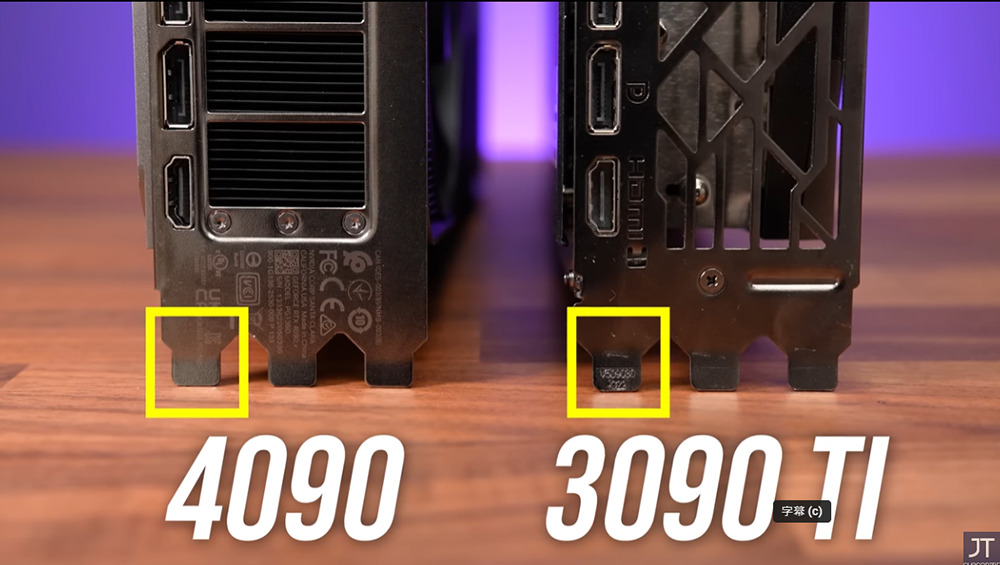
The picture below shows the thickness difference between RTX 4090 vs RTX 3090 Ti. You can notice that the iron piece in the lower left corner is much wider. For the external power supply, he uses the Corsair HX850i 850W power supply:
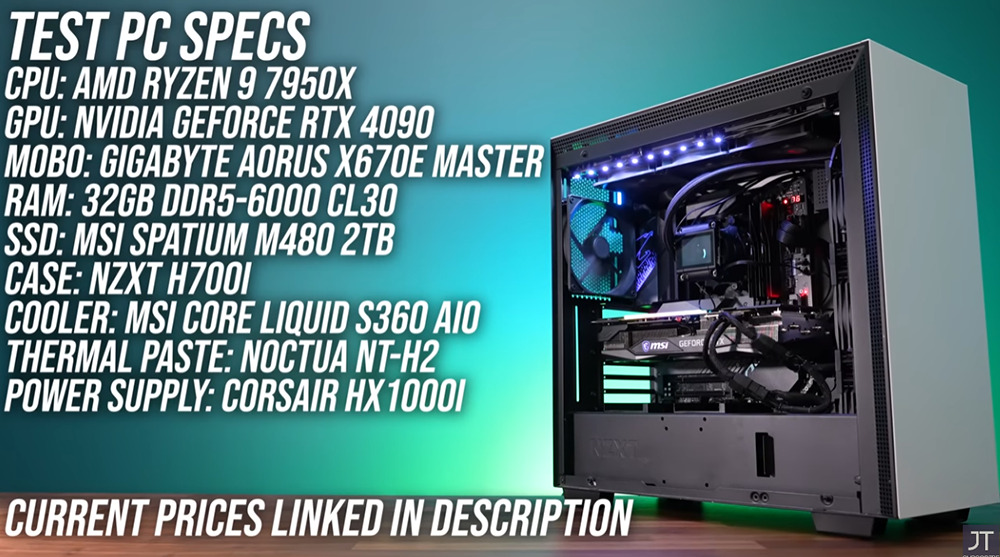
For comparison, the specifications of his desktop test platform are as follows:
- Processor: AMD Ryzen 9 7950X
- Motherboard: Gigabyte AORUS X670E MASTER
- Memory: 32GB DDR5-6000 CL30
- SSD:MSI SPATIUM M480 2TB
- Chassis: NZXT H700I
- Radiator: MSI COre Liquid S360 AIO
- Power supply: Corsair HX 1000I
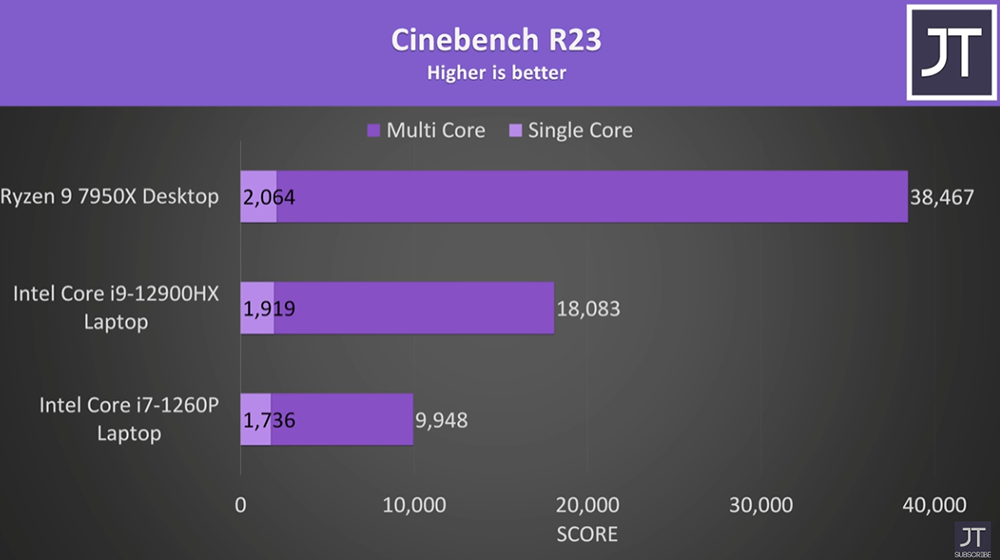
Before starting to show the game test, he also used Cinebench R23 to test the software to let everyone know the performance difference between the three processors. Desktop computers and laptops are completely incomparable. The same is true for general laptop processors and gaming laptop processors. The multi-core gap is huge:
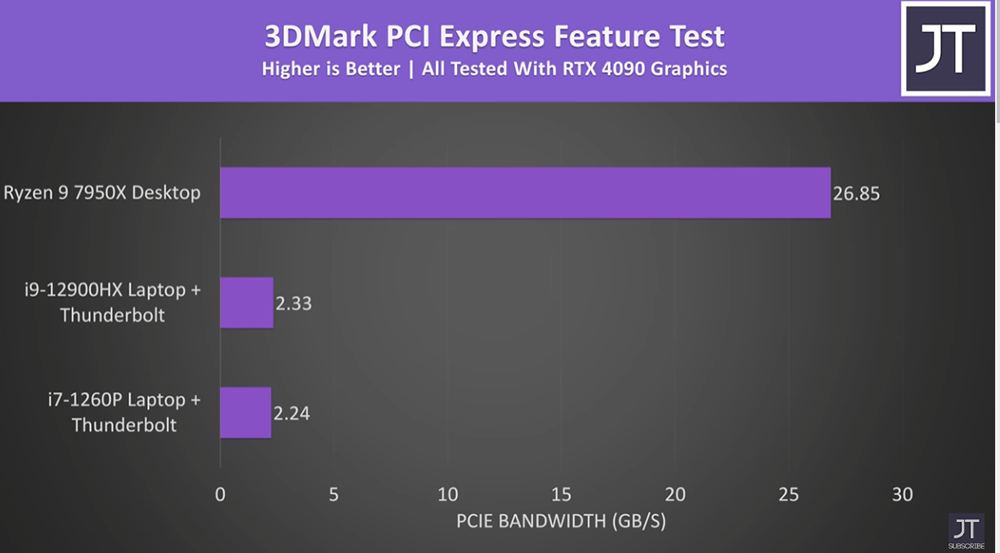
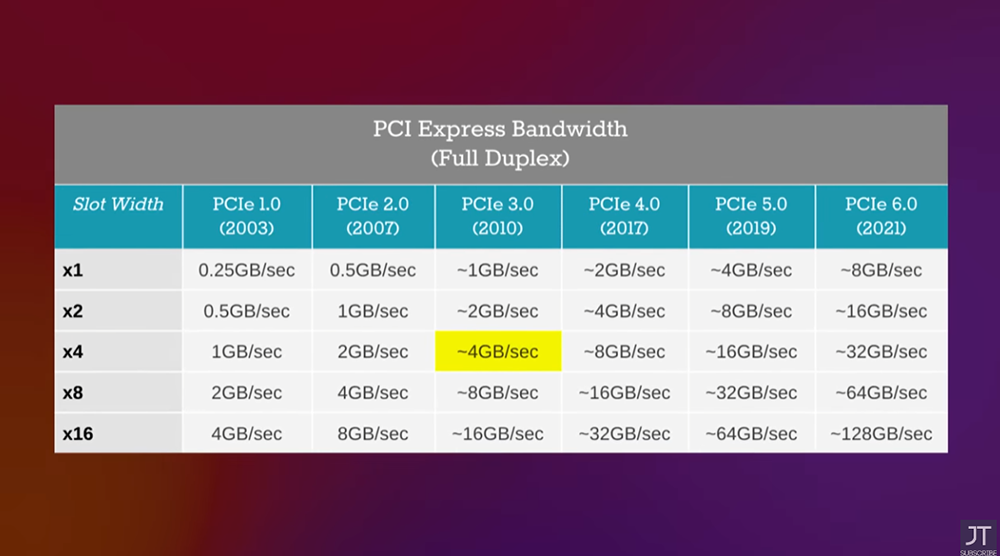
Another thing you need to know is the difference in PCIe bandwidth between the three test platforms. 3DMark results show that desktop computers are much higher than laptops, and the difference is more than ten times different:
Jarrod’s Tech tested a lot of games, as many as 20. Here is the full list:
- 《God of War》
- “Halo: Infinite”
- “Red Dead Redemption 2”
- “Assassin’s Creed: Viking Age”
- “Thriller Tunnel: Exile Enhanced Edition”
- “The Final Hour: Modern Warfare”
- “Fortress Heroes”
- “Watch Dogs: Legion of Liberty”
- 《Total War: WARHAMMER》
- “The Witcher 3: Wild Hunt”
- Apex Legends
- 《Cyberpunk 2077》
- “Rainbow Six: Evacuation from the Forbidden Zone”
- “Forza Horizon 5”
- “Doom: Eternal”
- 《F1® 2021》
- “Marvel’s Spider-Man Remastered Edition”
- “Tomb Raider: Shadow”
- “Borderland 3”
- “Dying Light 2: The Battle between Man and Benevolence”
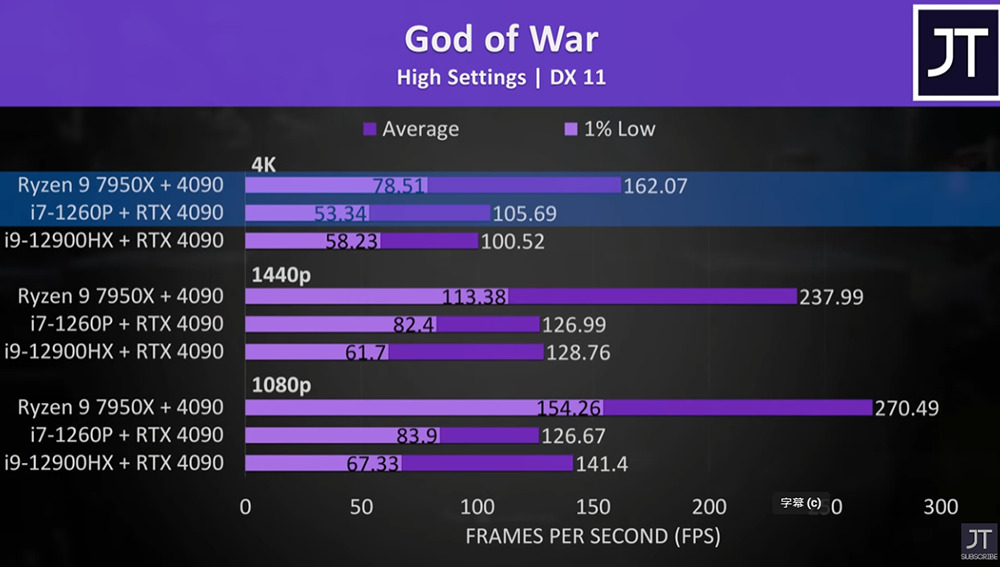
If we don’t compare, just looking at the game performance, the RTX 4090 is paired with an external box + laptop. Even the i7-1260P is very good. Even in 4K ultra-high image quality settings, it can provide an average performance of 105.69 FPS, but it is much worse than a desktop computer, especially in 1080p, “God of War” is about 1 times worse. Ryzen 9 7950X + 4090 reached 270.49FPS, and the other two laptops were 126.67FPS and 141.4FPS respectively:
The gap between the three resolutions of “Thriller Tunnel: Exile Enhanced Edition” is also quite large. For comparison with other games, please watch the full video at the end of the article:
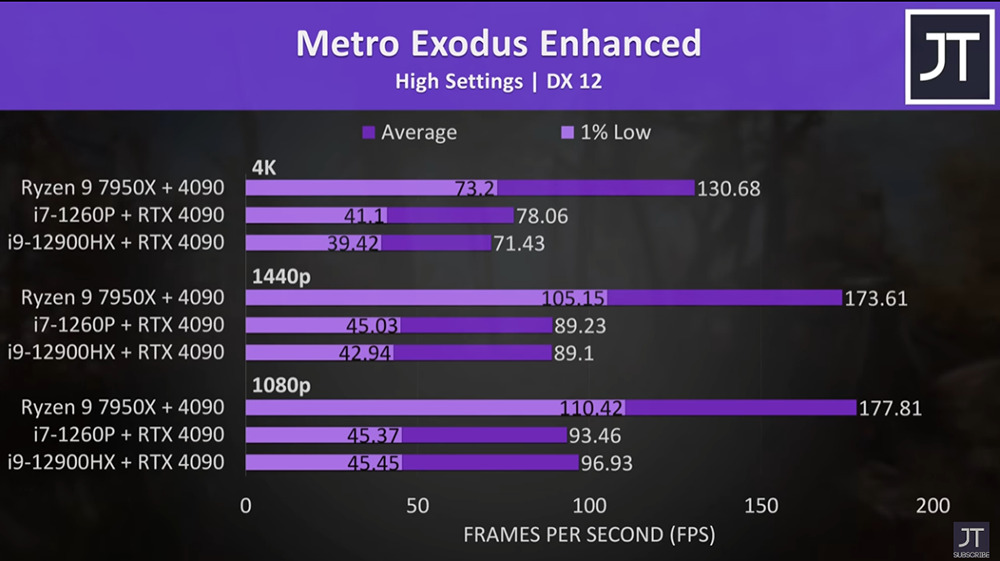
So in the end, he also suggested that it is best not to connect the RTX 4090 externally, because it is too wasteful. It may be more worthwhile to buy a high-end gaming laptop directly. There may be two reasons for this result, Resizable BAR usage and Thunderbolt 4 and Thunderbolt 3 bandwidth.
Source: KOCPC Chinese