


Seeing that another company’s iMessage is being closely watched by government agencies for spam issues, it is even recommended to shut down the service directly (eh). Google has recently been quite proactive in its approach to spam messages and spam invitations on its own services. Not only has it introduced new strategies for Gmail, Google Drive and even its own messages. Recently, even the Google calendar/calendar service has introduced new features to deal with “fish that slip through the net”. Continue reading No more annoying Google Calendar invitation spam! The new setting helps you control the last line of defense against Gmail errors (this article teaches you how to enable it) and reports content.
No more annoying Google Calendar spam invitations! The new setting helps you guard against Gmail omissions as the last line of defense (this article teaches you how to enable it)
Seriously though, I feel that the situation regarding junk calendar invitations has improved a lot at this stage – I can’t even remember the last time someone slipped into my calendar and asked me if I accepted the invitation. However, for friends who have suffered from similar problems for a long time, the recent additions to Google Calendar should hopefully make your Google Calendar page more concise.
Speaking of which, calendar invitations from Gmail are usually processed and filtered out by Gmail’s spam filtering function. But if you still receive calendar invitations from unknown people on your Google Calendar. Now through simple settings, you will be able to directly filter event invitations from non-known contacts.
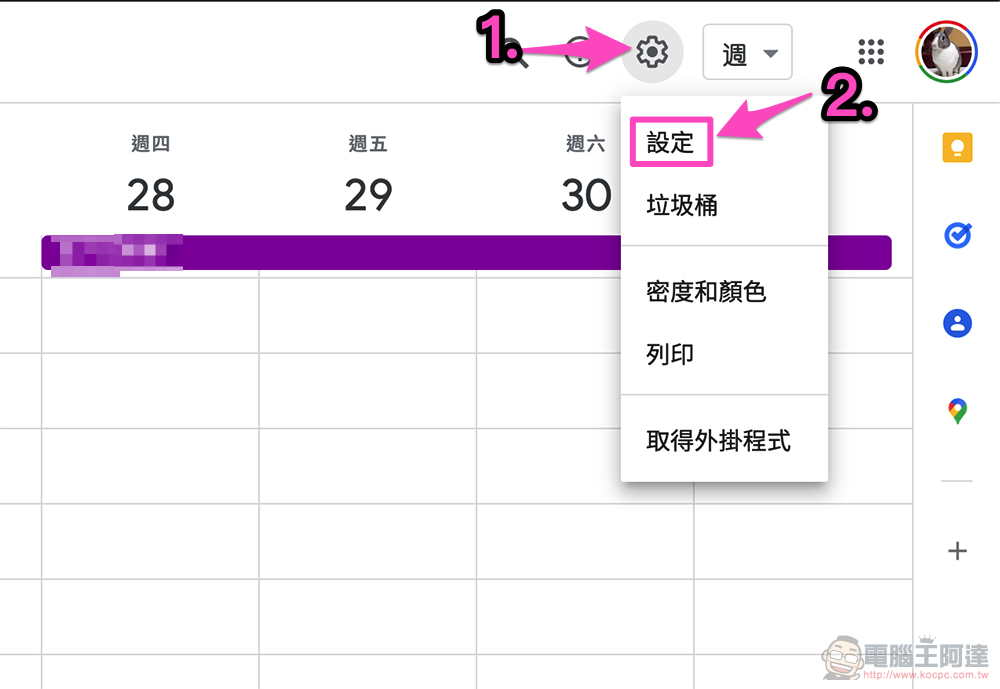
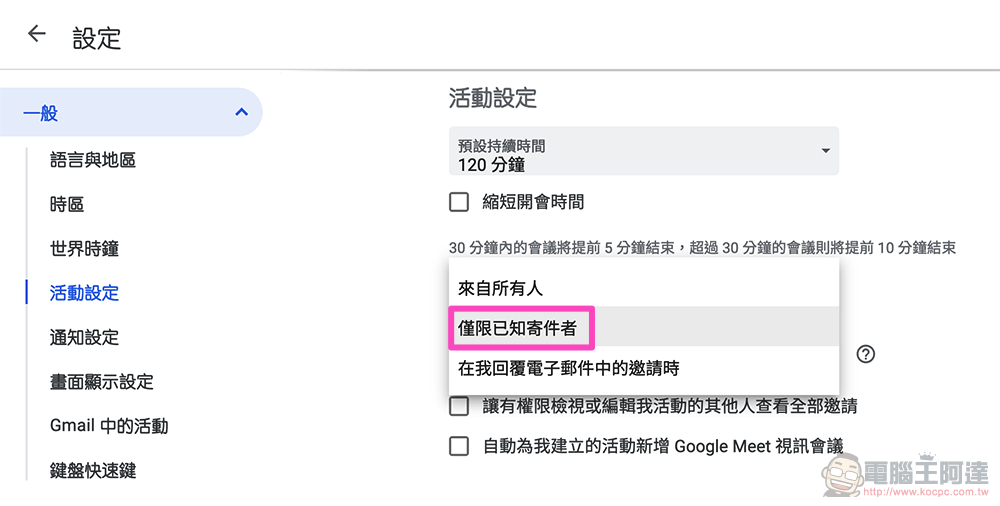
Enter the settings page through the gear button in the upper right corner of Google Calendar. You will be able to directly click on the menu for the “Add invitations to my calendar” option in the “Event Settings” sub-item and select “Known senders only.” According to the official description, this feature is to strike the best balance between automatic functions and filtering out spam invitations between “from everyone” and “when I reply to an invitation in an email” that is added entirely through email permission.
Invitations will be automatically added to Google Calendar based on contacts you’ve interacted with. It should be noted that even if this setting does not affect the invitations you have received, when adjusting this setting, “the sender may know that they are not your contact person.” Therefore, if you want to use it, you may have to consider the changes after the adjustment to avoid some embarrassing problems (it should not be so sensitive, right?).
Through Google’s function description, I also know why my Google calendar has not encountered spam invitations for a long time. However, the new “Known senders only” function that automatically adds the sender to the calendar is a new option worth using in my opinion. I wonder if you would like to try it? This new feature setting confirmation will be rolled out to all Workspace subscribers and personal accounts. You can move to the setting function page of Google Calendar to find out.
Further reading:

Source: KOCPC Chinese