


SAMMobile A recent post noted that Samsung will significantly tighten the limit on failed unlock attempts starting with One UI 9. If users enter the wrong password 5 consecutive times, the system will trigger a temporary lock. If incorrect entries reach 13 times, the device will be permanently locked and must be reset to factory state before it can be used again.
What are the stricter lock screen security specifications introduced by Samsung One UI 9? The following is a summary and analysis:
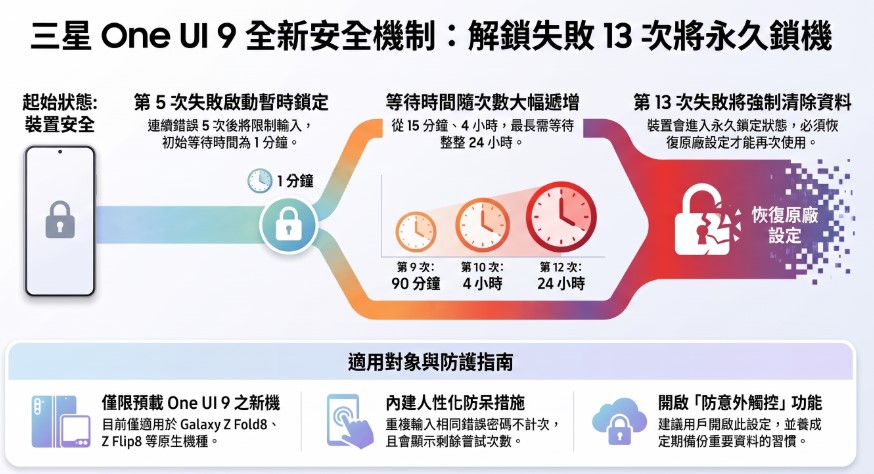
1. One UI 9 introduces stricter lock screen security mechanisms:
To prevent brute force attacks and greatly enhance protection against theft of the device and personal private data, Samsung will introduce a stricter lock screen security mechanism on Galaxy devices that come with One UI 9 preloaded from the factory. By limiting the number of attempts and extending the lockout interval, it becomes difficult for attackers to crack the password and enter the system within a short time. Once the user enters an incorrect PIN, password, or unlock pattern five or more times in a row, the system will temporarily lock. If incorrect entries reach 13 times, the device will be permanently locked, and the device must be reset to factory state before it can be used again.
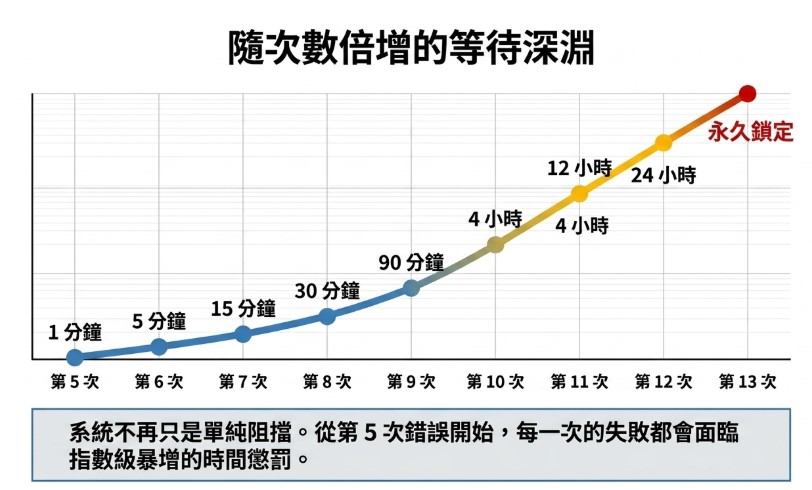
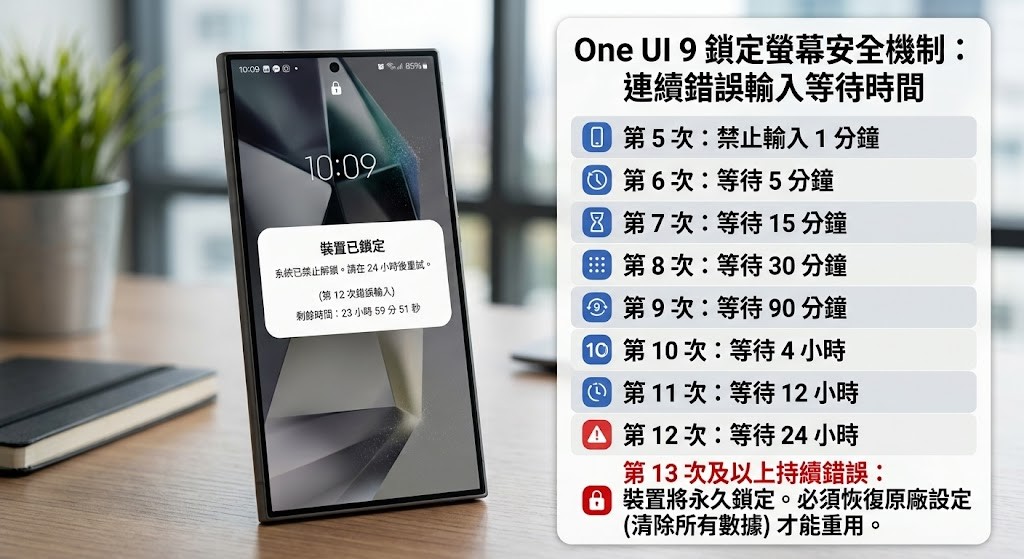
Among these, after 5 incorrect password entries, the system will first block input for 1 minute. The 6th attempt extends the block to 5 minutes, the 7th to 15 minutes, the 8th to 30 minutes, and the 9th to 90 minutes. If errors continue, the 10th attempt requires a 4-hour wait, the 11th a 12-hour wait, and the 12th a full 24-hour wait. If the device still has not been unlocked by the 13th attempt, it will be permanently locked and can only be used again after a factory reset.
Please note that if you restore your phone to factory settings, any photos, videos, messages, apps, and other data that have not been backed up will be erased.
2. Which phones are suitable for implementing stricter lock screen security mechanisms?
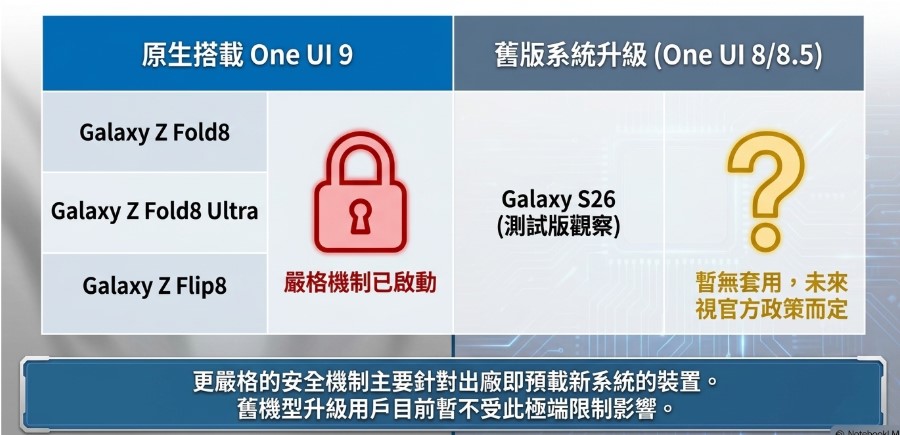
According to SAMMobile, the stricter lock screen security mechanism currently only applies to Galaxy devices that come with One UI 9 pre-installed from the factory, including the Galaxy Z Fold8, Z Fold8 Ultra, and Z Flip8.
As for other models that will upgrade from One UI 8 / 8.5, such as the Galaxy S26, during SAMMobile’s testing of the S26 running the One UI 9 Beta, it was found that this mechanism was not applied, so they may not be affected. However, whether Samsung will change its mind remains uncertain for now.
3. One UI 9 Error-Proofing Measures and Precautions:
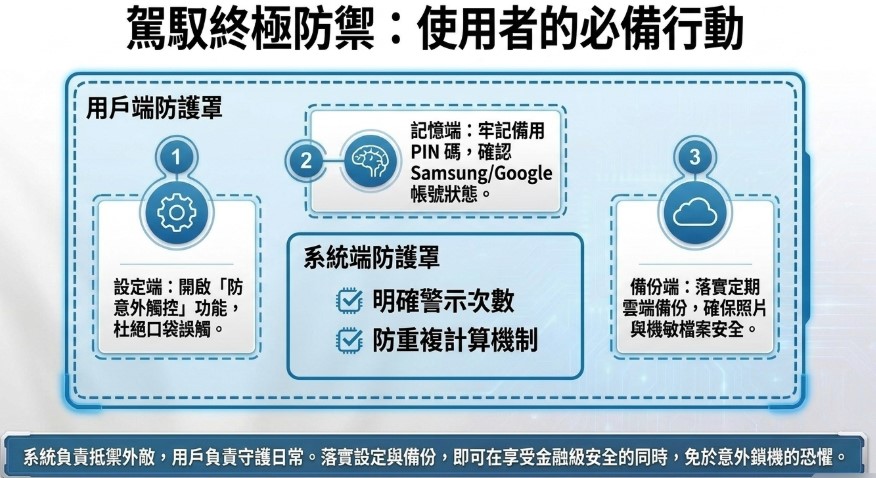
To prevent users from accidentally touching the screen and causing multiple failed unlock attempts that temporarily lock the device, Samsung’s system clearly displays the remaining number of allowed attempts once a warning threshold is reached, so users are not locked out for an extended period without any warning. In addition, repeatedly entering the same incorrect password is not counted as multiple separate failed attempts, reducing the chance of users being penalized for accidentally tapping the screen in quick succession.
To prevent accidentally entering the wrong password, Samsung users can take the following measures:
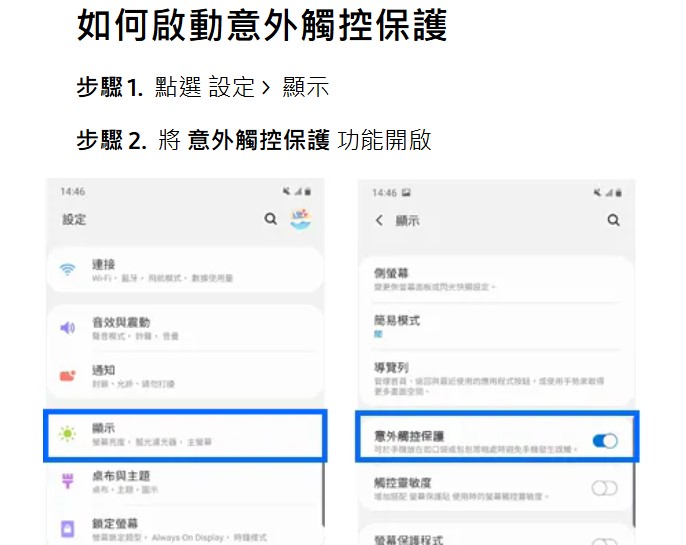
A. Turn on “Accidental Touch Protection”:
To completely avoid accidents, users can also enable the “Accidental Touch Protection” feature in system settings.「Settings” > “Displayenable “Mis-touch Prevention” in,reduce risk.
B. Develop the habit of memorizing passwords:
Since Android 9 (Pie) and Android 10, the Android system has required that devices must have a non-biometric unlock credential entered once after a reboot, or every 72 hours.
Even if users primarily rely on fingerprint or facial recognition to unlock their devices, they still need to remember their backup PIN, unlock password or pattern, confirm their Samsung and Google account information, and develop the habit of regularly backing up photos and important files.
Source: KOCPC Chinese