


One of the biggest impressions iPhone users currently have might be that “Siri is terrible.” The current Siri really doesn’t have much AI capability before the new Apple Intelligence comes out. Developer Sharif Shameem has released an open-source AI solution for iPhone on X (Twitter): Codex iOS Assistant, turning OpenAI’s Codex into a super voice assistant for iPhone. In the video, Codex can read the screen, control apps, and execute commands for users, all running on vanilla iOS 27 without needing a jailbreak.
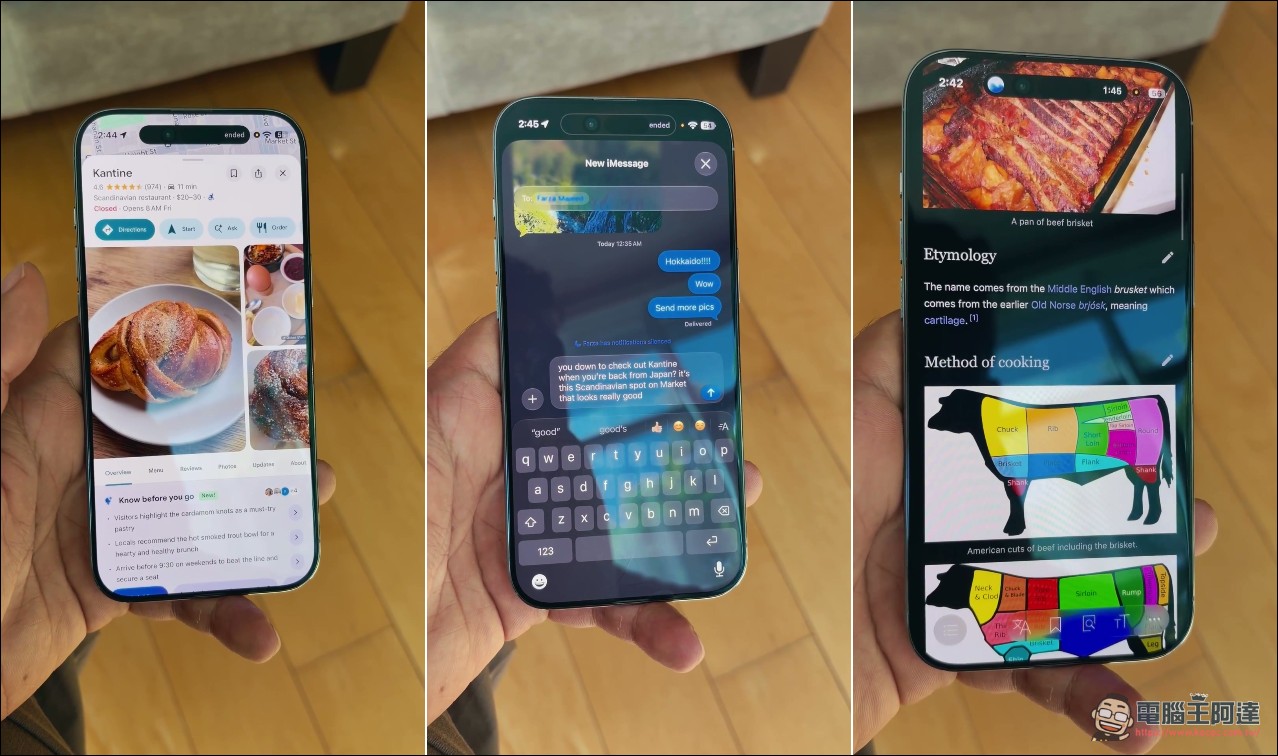
Developer uses Codex to turn iPhone into an AI voice assistant that can operate apps
Codex iOS Assistant principle: uses iMessage as the command channel and Cloudflare Tunnel to send data back.
The clever part of this system is that it doesn’t touch any of Apple’s closed interfaces—it uses only features that are native to iOS. On the command side, it goes through iMessage: Codex on the Mac calls a iphone Command-line tool that packages commands into something like hola openurl、hola screentext、hola screenshot This line of text is sent to the iPhone via iMessage.
On the iPhone side, this relies on the automation features of Shortcuts. Users need to manually create an automation workflow in the Shortcuts app: when a message containing “hola” arrives from a specific sender, it runs a 95-step shortcut. This shortcut calls the corresponding native iOS actions to open apps, take screenshots, read the clipboard, and list alarms.
The data is sent back through a different route. The Shortcuts app has a full HTTP client built in, which can POST results like on-screen text, screenshots, clipboard contents, and alarm lists to a specified HTTPS address. These addresses are routed through Cloudflare Tunnel to a bound Mac. 127.0.0.1 At the receiving end, Codex then polls the local receiver to get the result. This back-and-forth completes the entire cycle of “asking the iPhone for data.”
What it can do: read the screen, manage alarms, open apps — it can do it all.
According to the project description, this solution can do quite a lot. It can read text visible on the iPhone screen and save a screenshot; read and replace clipboard contents; list, create, and close alarms; open apps like Camera, Weather, Calendar, Messages, Find My, Spotify, Photos, Wallet, Notes, Uber, and DoorDash; and control the Home Screen, Control Center, timer, flashlight, Low Power Mode, and even make voice calls—almost as all-capable as that Doubao phone from China a while back.
Siri sucks. So I made a way for Codex to act as my iPhone’s voice assistant.
Now Codex can read my screen, control apps, and take actions on my behalf – all in vanilla iOS 27. pic.twitter.com/pjS7934rar
— Sharif Shameem (@sharifshameem) August 7, 2026
In his tweet, Shameem specifically highlighted a pattern he finds very useful: having Codex grep iMessage content on the Mac, and then using a deep link to open that specific message on the iPhone. It essentially chains the two tasks—reading the message and opening the message—together with a single agent.
Most importantly, this solution deliberately sets boundaries. For message writing, it only generates a draft for the user to confirm first, and never sends it directly. Actions like shopping, ordering food, and booking rides are likewise blocked—opening an e-commerce or ride-hailing link only brings up the page, without actually placing an order or requesting a ride.
Requirements and Installation: You’ll need a Mac, a supported iPhone, and a Cloudflare domain.
To get it running, you need to prepare a few things first. The official requirements are: a Mac with macOS 14 or later, Python 3.11 or later, with Messages and Xcode Command Line Tools installed; an iPhone that can receive messages for setting up the iMessage address; and a domain managed by Cloudflare. iCloud Shortcuts sync also needs to be enabled so that shortcuts can sync from Mac to iPhone.
The installation process is mostly handled by Codex itself. The project recommends pasting a description into the Codex conversation on Mac and letting it handle the rest on its own. codex-ios-assistant All set. The configuration file will be placed in ~/.config/codex-ios-assistant/It won’t be written into the repo. The only step that needs to be done manually is to create that automation flow in the Shortcuts app on iPhone, so that when a message containing “hola” is received, it runs that 95-step shortcut.
Shameem has already made the entire codebase public on GitHub, and the project is called codex-ios-assistantFor him, just write the description as “Control and view your iPhone from Codex via iMessage and Shortcuts.” To him, the significance of this step is handing over control of the iPhone to an AI agent that can understand intent and take action on its own—not just a voice interface that talks back.
Codex iOS Assistant Project
The security design shows real care, but the author themselves admits there are weaknesses.
Handing over control of an iPhone to an AI agent raises concerns about security and privacy above all. In this regard, the author security.md It was written frankly. The sensitive file permissions are locked down tight, with the config files and screenshots used for… 0600for folder use 0700The receiving end is bound to the local machine only, using Cloudflare Tunnel for external access; data return requires at least 32 characters and exact matching. X-Auth Tokens; the log will not record on-screen text, clipboard values, or alarm details. The iMessage sender, on the other hand, goes through a permission-locked Unix socket that checks the user’s UID, and can only execute fixed AppleScript—users cannot inject arbitrary programs.
However, the author also acknowledges that the current protocol lacks request signing, expiration times, and replay protection. Anyone with the token and hostname can submit fake responses, or read a response after guessing the request ID. In other words, this solution has achieved the ability to remotely control an iPhone, but the security boundaries are not yet complete. If you’re self-hosting it, safeguarding the token and the Cloudflare account will be critical.
Conclusion: Feasible Directions for Turning the iPhone into a Full-Fledged AI Assistant
This solution may not become mainstream, but its significance lies in proving one thing: without jailbreaking or touching Apple’s closed interface, you can build a pipeline for AI agents to “physically operate” a phone using just two native features—iMessage automation and Shortcuts. For those who think Siri is too dumb but want a voice assistant that can actually get things done, it’s worth trying out, but you’ll need to handle the security aspects yourself. Personally, I hope Apple or OpenAI can come up with a safer and more user-friendly solution along these lines.
Source: KOCPC Chinese