


For heavy ChatGPT users like me, there’s no denying that memory is a crucial feature—it lets ChatGPT understand you better over time and figure out what kinds of responses you actually need. After using it for a while, the overall experience has been pretty good, but it still felt like an incomplete version. Earlier, OpenAI announced the launch of a new ChatGPT memory system called “Dreaming V3,” which significantly enhances memory capabilities, allowing ChatGPT to automatically extract more useful context from past conversations and keep memories as fresh and relevant as possible.
In other words, the previous memory feature was more like a notebook, while Dreaming is more like helping ChatGPT organize your usage habits, preferences, and long-term tasks in the background, so it can understand your needs faster in new conversations.
ChatGPT’s New Dreaming Memory System Arrives: Automatically Organizes Past Conversations, Launches First in the U.S. for Plus and Pro, with Free and Go to Follow
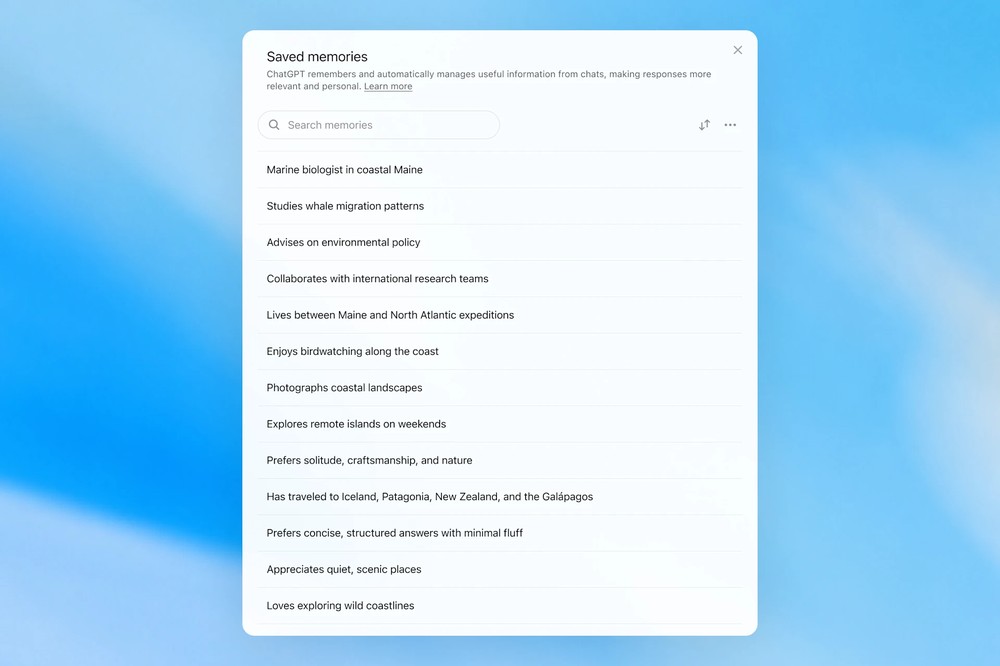
ChatGPT’s earliest memory feature was more like “saved memories”—you could ask ChatGPT to remember something, such as your name, preferences, job details, or constraints it should follow in future responses. The design was intuitive, but its downside was obvious: it relied heavily on the user explicitly telling ChatGPT “please remember this.” If you were just chatting naturally, it might not necessarily synthesize all that context.
By April 2025, OpenAI began rolling out updates that allowed ChatGPT to reference chat context beyond stored memories—this was the first version of Dreaming. The latest version, launched shortly after, is a new memory architecture built on Dreaming called Dreaming V3.
OpenAI mainly evaluates the new memory system across three dimensions:
- Is it possible to carry useful context over into a new conversation, so users don’t have to introduce themselves from scratch every time?
- Can it respect users’ preferences and restrictions? For example, if you mentioned that you’re vegetarian, then the next time you ask ChatGPT to recommend meals, it should proactively avoid unsuitable options.
- Can it update over time? Something like “we’re throwing a birthday party next Saturday” shouldn’t remain marked as a future plan forever once that day has passed.
OpenAI noted in the article that ChatGPT now serves hundreds of millions of users across use cases spanning many years, so its memory system cannot rely solely on a fixed list—otherwise, a trip to Singapore you mentioned last year could easily leave ChatGPT thinking you’re still preparing to go to Singapore this year.
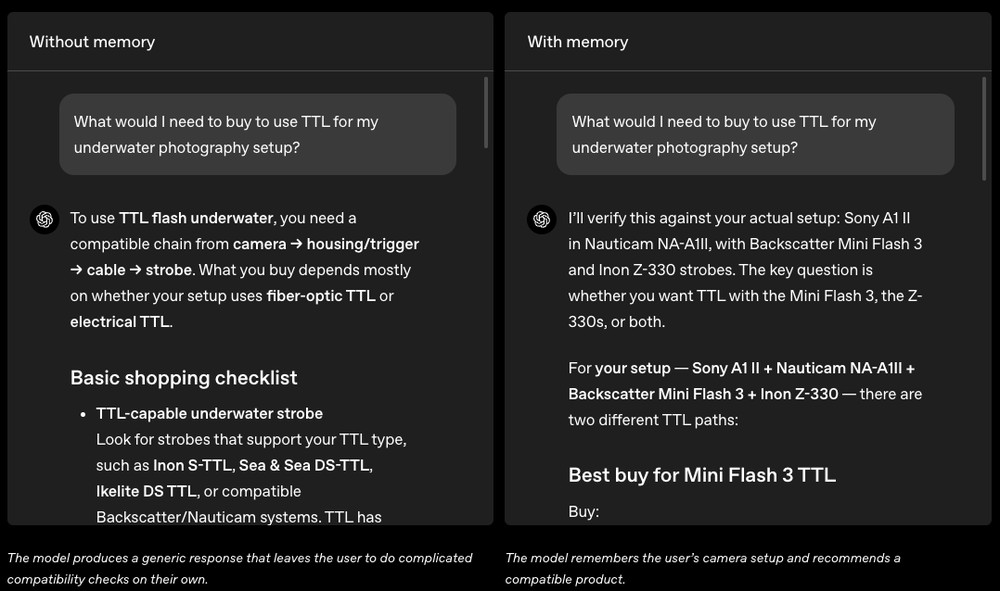
OpenAI gave many examples of things with and without memory, one of which is “underwater photography equipment.”
Without memory, if a user asks, “What do I need to buy to enable automatic flash metering on my underwater photography setup?” ChatGPT would only provide a very generic list, such as a TTL strobe, TTL trigger, cables, adapters, and so on. In the end, the user would still need to verify on their own whether the camera, housing, and strobe are compatible.
But once memory is enabled, ChatGPT can use the actual equipment the user mentioned in the past—such as the Sony A1 II, Nauticam NA-A1II housing, Backscatter Mini Flash 3, and Inon Z-330 strobe—to narrow down recommendations to accessories that better match that specific setup. This difference is actually significant, because it is not merely “remembering a name” but connecting information from multiple previous conversations to form a more complete user profile.
Travel planning is a similar scenario. Without memory, ChatGPT might give you a generic three-day Singapore itinerary.
But when it has memory, it can factor in preferences you’ve mentioned before—say, that you like wildlife photography, need the air conditioning on while you sleep, or prefer quieter spots for dinner. That way, the itinerary it produces is no longer just a list of attractions; it actually feels like it understands your travel habits.
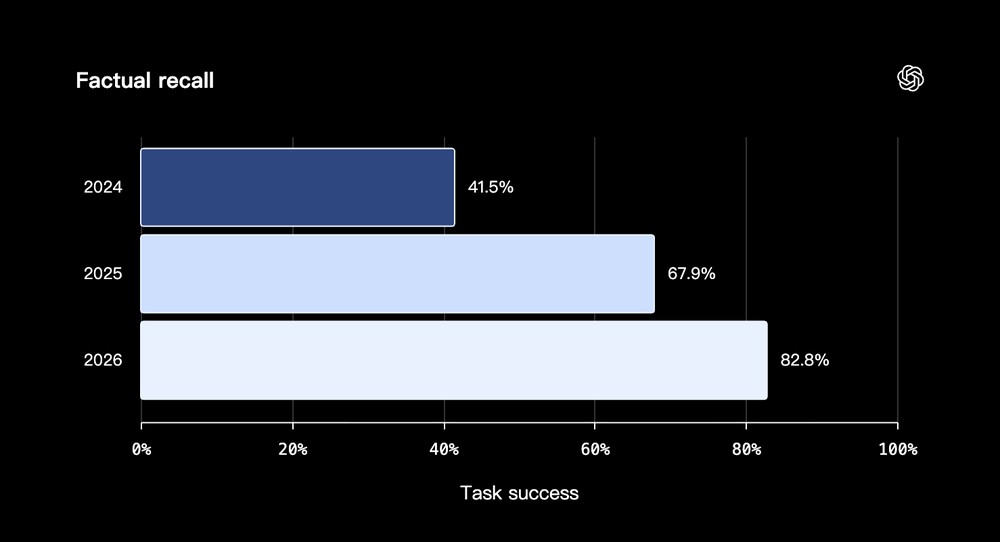
Below is “the ability to remember and correctly cite user information (Factual Recall).” You can see that it was only 41.5% in 2024, but has already risen to 82.8% in 2026, more than doubling.
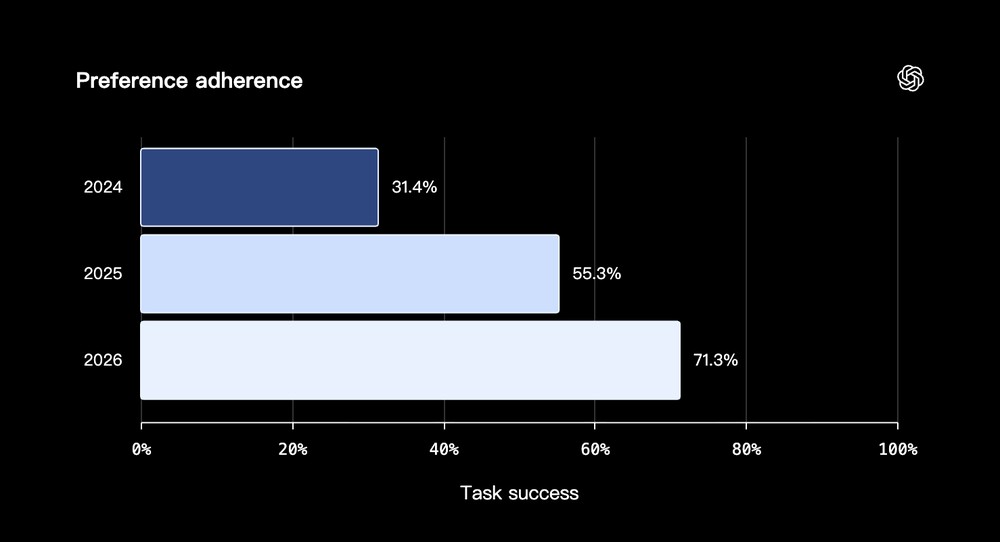
Tests of whether responses could follow user preferences and constraints (preference adherence) also improved substantially, from just 31.4% in 2024 to 71.3% in 2026:
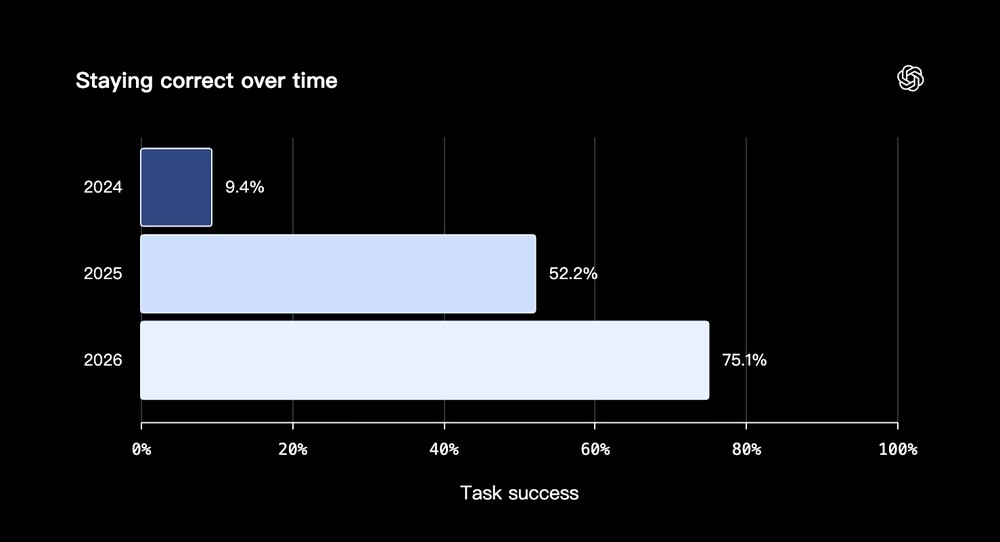
After time has passed, whether ChatGPT can still remember the correct state; in 2026, the success rate also reached 75.1%:
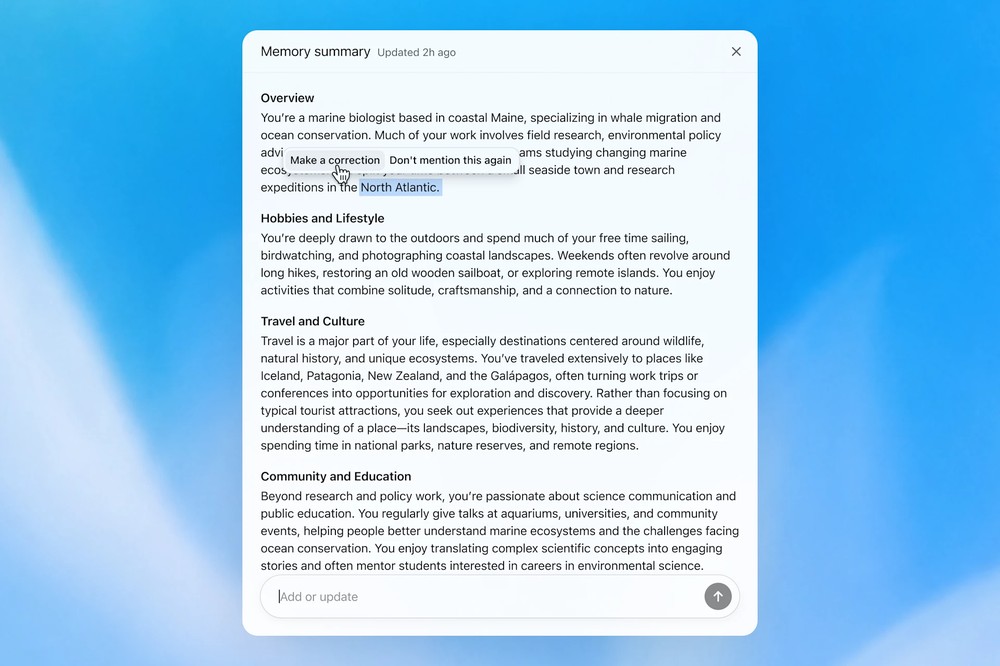
This update also adds a practical new feature called “Memory Summary.” On the memory summary page, users can see ChatGPT’s overall understanding of them, covering things like work, interests, travel preferences, project constraints, and more. You can also add, update, or correct information in the summary, or even choose “Don’t mention this again” for certain items. For frequent ChatGPT users, this is clearer than simply managing saved memories one by one:
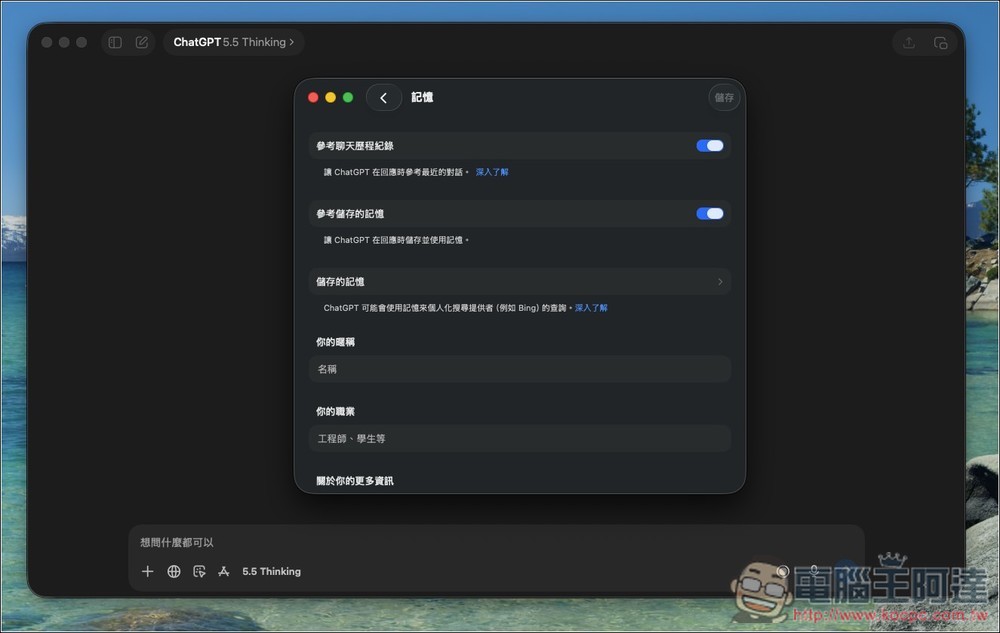
Of course, if you don’t want the memory feature, you can turn it on or off in Settings > Memory. If you don’t want certain conversations to be used to personalize future responses, you can also use temporary chats. Temporary chats won’t use existing memories, nor will they create new ones.
OpenAI also noted that recent improvements have reduced the computing power required for the Dreaming service by roughly a factor of 5; with lower system costs, more free users will also be able to experience this new memory system.
The new Dreaming memory system is now available first to U.S. Plus and Pro users, with more countries and Free and Go users rolling out in the coming weeks.
Source: KOCPC Chinese