


The useful features are definitely worth the wait! Although the thoughtful feature previously announced by Google for its own Gmail editing interface has been temporarily removed from the shelves due to performance issues (maybe it is a bit complicated?), it is said that the day when this feature will be re-launched is not far away – eh, in fact, it may not be until the end of September. Continue reading Gmail is “re-launched” with a more intuitive function of displaying contacts and editing new emails. How to use it can be read here.
▲Image source: Google
Gmail “re-listed” more intuitive contact display and new email editing functions, how to use it here
Whether you are the kind of inexperienced employee or an attentive employee who wants to ensure communication without any surprises. The latest features of the new email interface that will be brought to Gmail in this wave of confirmations should help you further avoid the embarrassment of sending letters to people you shouldn’t send them to, and can also take into account the small details of correctly addressing all recipients and bringing a super good impression.
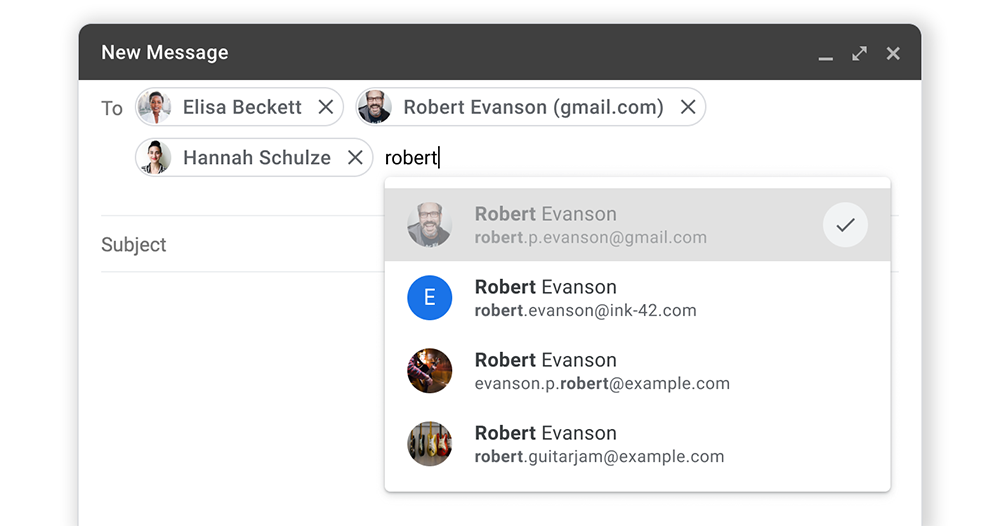
To prevent you from accidentally putting someone with the same name into the mailing list that you shouldn’t put in it when sending mail. Gmail’s latest revamp of the interface for composing new messages. It is confirmed that for contacts placed in To / Cc / Bcc mailing items, a thumbnail display function of the contact’s headshot image will be added. This allows you to more easily and intuitively confirm whether there is a contact with an incorrect profile picture in the email recipient list. The usage method is exactly the same as before, just enter the name and start composing the letter.
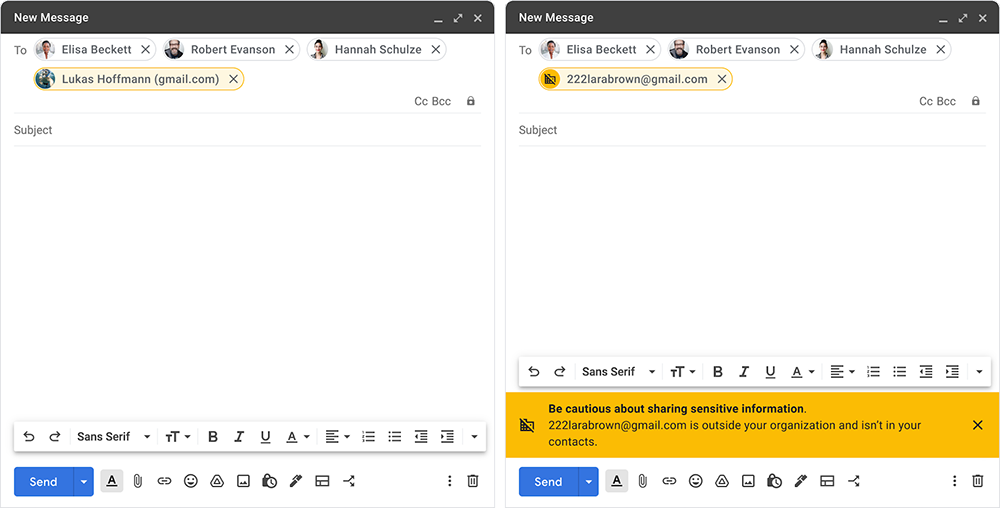
In addition, reminders for contacts “outside the organization group” such as companies are also placed at the bottom just above the send button to avoid the tragic situation of accidentally sending letters to outsiders. Moreover, when an email is listed in the mailing list, the Gmail authoring interface will also use the complete email address or for the contact, at least the Email domain and yellow will be marked to indicate that the contact may be “weird”.
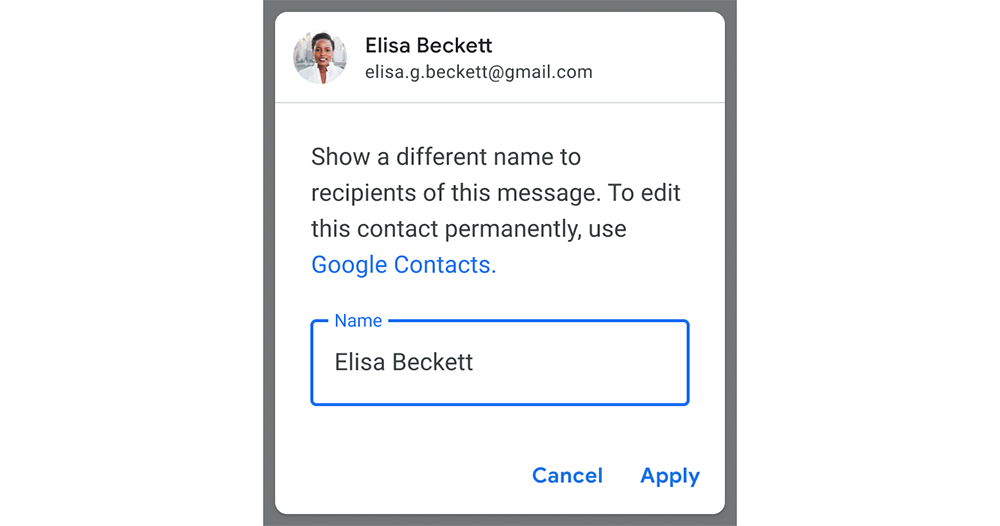
In addition to the function of helping you mark or use avatars to allow users to quickly confirm the status of the letter. This wave of Gmail updates also confirms that it will support a more intuitive “recipient” name editing function – this does not refer to “contacts”. So to put it bluntly, it is actually a pop-up window that allows you to more clearly control the function of modifying the name or job title of the contact in the message – if you need to do it once and for all and do not want to temporarily change the name, this interface will also provide a button to quickly jump to the Google Contact for modification.
This wave of functions feels like there are really many, and for the interface when adding recipients, Gmail has also introduced a preview function that allows you to quickly preview and confirm the contact items that have been added to this message by checking. This avoids the situation where too many recipients may cause confusion and keep trying to rejoin. It’s really quite rich.
Although this Gmail improvement focuses on the interface for writing new messages, it also focuses on detailed functions for receiving contacts. However, when you often need to communicate through Gmail for work, or when you need to send a large number of complicated letters. This should avoid a lot of minor errors. You can take care of all the small details more effortlessly, and I believe you can also let others feel your attentiveness and thoughtfulness.
Further reading:
Source: KOCPC Chinese