


Although you may not know what the word CAPTCHA is. However, I believe that as long as you often “bounce” on the Internet, you will definitely have encountered an authentication mechanism that looks like a puzzle, but usually asks you to point out that the picture contains certain information such as traffic lights and vehicles (there are also simple input text forms), hoping to confirm that you are a “real person”. To some extent, it (should) be considered a step towards a password-free experience. In the upcoming next-generation iOS and macOS, Apple seems to be starting to build in features that can skip these authentication mechanisms to confirm that you are not a robot. Continue reading iOS 16 is actually equipped with a function that can skip CAPTCHA authentication images.
▲Image source: THICC_LADIES_PM_ME (Reddit)
iOS 16 actually comes with the ability to skip CAPTCHA authentication images
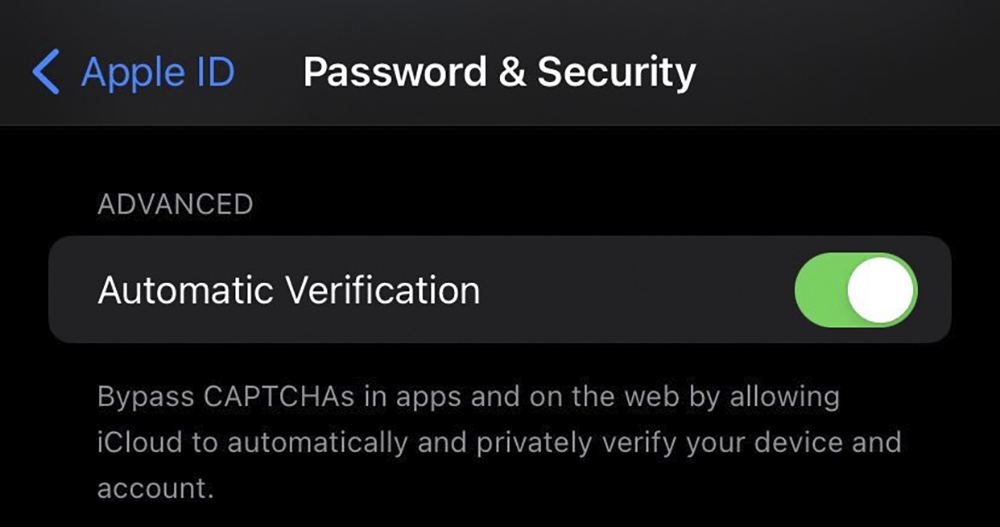
Although the CAPTCHA authentication image/text mechanism feels like it should be particularly annoying on mobile devices with relatively small screens. However, it is reported that the “Automatic Verification” function option that can skip the website authentication code mechanism can already be found in the password and security settings of the latest beta version of iOS 16 and macOS Ventura.
According to the description of this feature, after activating Automatic Verification, the system will provide the function to “skip” the authentication mechanism of CAPTCHAs on the app or website. The principle is mainly to use iCloud to refer to device and account information to confirm whether the user is an automatic authentication function.
In other words, this type of mechanism hopes to confirm whether the user is a real person, when encountering iOS (should include iPadOS) and Mac devices that turn on this automatic verification function. The original CAPTCHA verification mechanism, which even real people find annoying, will be replaced by checking with iCloud whether the relevant information of the current user meets the verification conditions. If so, the verification process will be automatically completed.
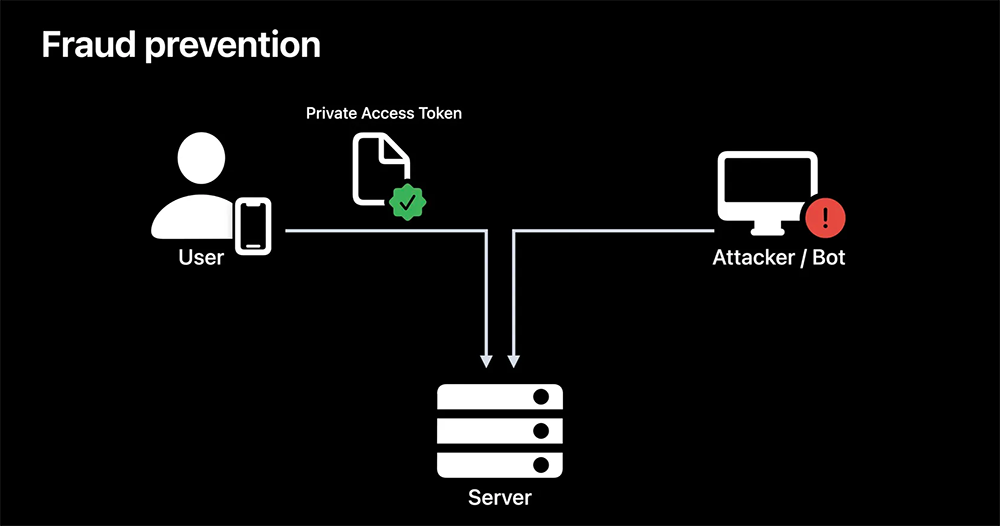
In terms of privacy assurance, Apple devices will use the privacy method of Private Access Tokens to ensure the normal operation of fast automatic verification with currently cooperating verification service providers, including Fastly and Cloudflare. Indicates that identity-related private information will not be associated by the service.
That is to say, although these service providers only receive information such as “green light release” in this mechanism. But if you have doubts about such a feature (or really like the puzzle challenge of photo authentication?). In fact, as long as this function is not turned on, it can remain as it is, that is, when CAPTCHA authentication is required, real-person authentication will continue to be completed using the original mechanism.
It sounds like this automatic verification function is a good feature worth upgrading to for users who frequently use VPN services or have cookies that prevent CAPTCHA from functioning properly?
That is to say, in fact, Cloudflare started last year to enable support for omitting the CAPTCHA mechanism through physical USB authentication device support. Apple’s communication mechanism this time through Private Access Tokens on the device should have similar logic. According to information disclosed to foreign media by Fastly, in addition to Apple, Android and Windows systems have actually made similar preparations in recent years. So, do you think this automatic authentication function will become more and more popular in the future?
Further reading:
Source: KOCPC Chinese