


Although the various inconveniences caused by the epidemic have given people a quite negative feeling. However, when working from home/studying from home has become a daily routine, many people have found their own comfort zone in this new life and work style. Even in routine online meetings, you may have the opportunity to use some “little tricks” to avoid the stress of face-to-face meetings like in the company. But now it seems that Google has no intention of letting this situation continue (eh). Continue reading Google Meet’s new feature will make it easier for you to pretend that the conference signal is poor (stunned).
▲Image source: Google
Google Meet’s new feature will make it easier for you to pretend that the conference signal is poor (login)
Although I gave excuses such as peeing, taking a shower, or even my poor signal, they all seemed more like jokes. However, if it is a serious meeting, it must be a very troublesome situation for managers if someone cannot attend the meeting normally for some reason. In other words, if it is really a hardware and software factor, you should at least know how to find a solution.

Google Meet, which once made free use of advanced features in response to the epidemic, has continued to evolve its related features as more people love to use it. For example, Google has previously made it possible for Nest Hub smart displays to participate in meetings in “Companion mode” (see more:Home conferencing tool Google Meet’s accompanying mode is available on Nest Hub smart displays), so that the experience of multi-person meetings can be better. )

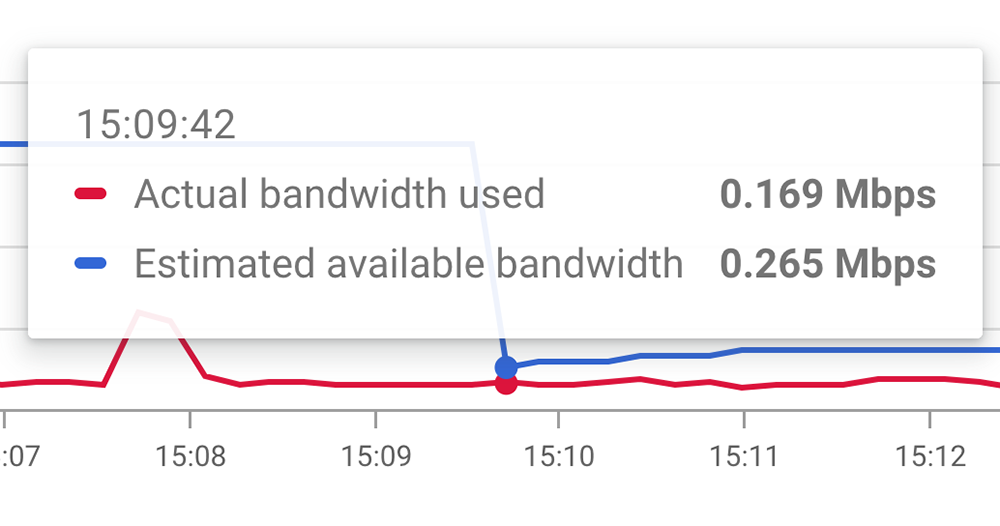
However, when it comes to bandwidth, a key factor affecting the progress of the meeting – insufficient network signal or bandwidth. Previous user experiences tended to involve everyone speaking their own words, and it seemed difficult to quickly find possible problem points or solutions. In this regard, Google has specially added a new bandwidth monitoring tool for Workspace administrators, which can instantly view the estimated maximum available bandwidth during meetings and display the currently used bandwidth accordingly.
The charts provided by this function are not only very intuitive, but also displayed separately according to incoming and outgoing. It also directly provides real-time information such as the loss chart of video packets – it seems that the chart not only has the four official icons (there are other tables above), it is a quite advanced function. You can also search to find graphs of specific participants for analysis.
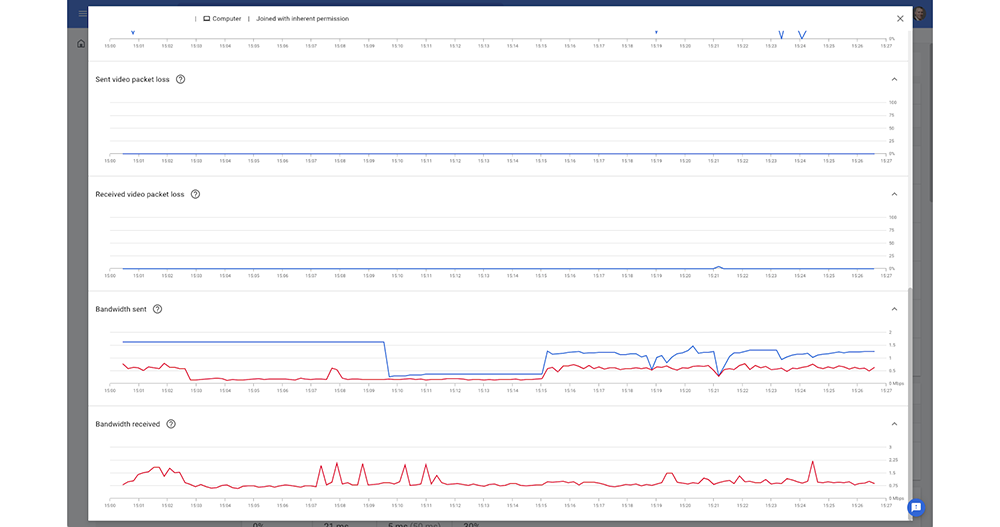
To put it simply, in the future, whenever I am in a Google Meet meeting, I will encounter someone saying that the network signal is not good. Workspace administrators should be able to identify possible issues very quickly.(Translation: Don’t pretend to have poor signal and escape)
Okay, no more fuss. I believe that everyone is willing to have a good meeting. I believe that such a tool will effectively find ways to effectively improve the quality of online meetings. It would also be nice if the meeting time would not be prolonged due to technical problems!
Further reading:
Source: KOCPC Chinese