


Many people now choose online streaming platforms as their main channel for listening to music. Spotify is one of the best, with 158 million subscribers worldwide. You can also share playlists with friends on social platforms, or use the app to create your favorite playlists and share them with users around the world. Most people open the app and listen immediately without knowing about the internal settings. Today I will tell you three settings that can make your music sound better!

Spotify makes music better with three simple settings
In addition to providing the convenience of listening to music anytime and anywhere, Spotify also has a very large music library, coupled with continuously improving functions and user-friendly music recommendations, it is loved by many people. Whether you listen to music through headphones, earbuds, or speakers, you can make your music sound better by making some simple settings in the app.
Change base volume
When listening to music, volume is the most directly adjustable item, but did you know that Spotify actually allows you to adjust the basic volume in the application according to your environment and preferences?
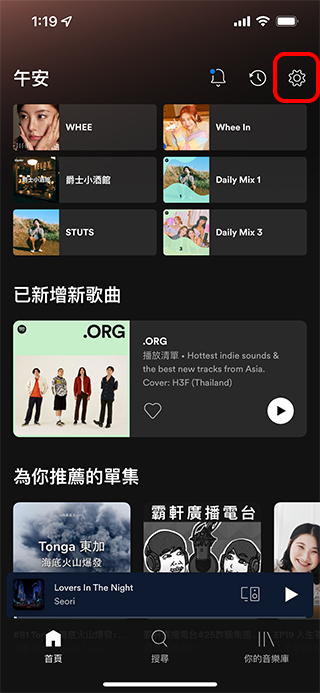
- Open Spotify and click the gear icon in the upper right corner to enter the “Settings” function.
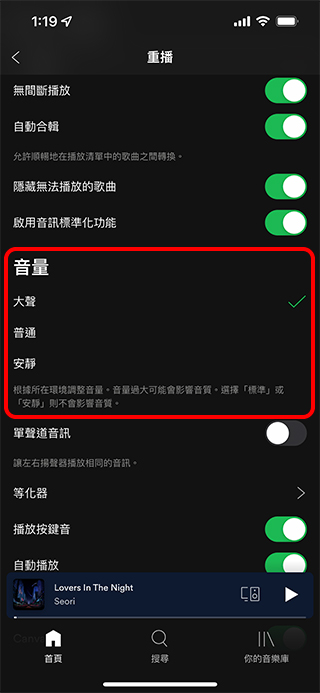
- Enter the “Replay” item inside, scroll down and you can set the “Volume” item, which provides three modes: loud, normal and quiet. If you are reading in the library, choosing quiet is best; if you are exercising in the gym, choosing loud is best. However, Spotify also reminds you that switching to loud mode may affect the sound quality. If you are very particular about sound quality, using normal or quiet is the safest way.

Adjust Spotify’s built-in equalizer
Each music type and song has its own style, and the appropriate equalizer effects vary depending on the style. If you prefer to personally feel the differences in details such as treble, bass, and accent in each song, you can try adjusting the equalizer in Spotify.
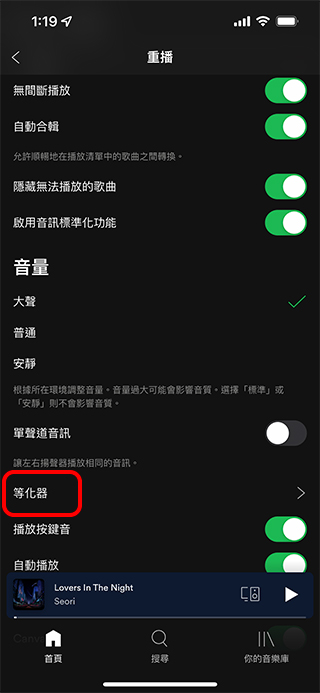
- Open Spotify, click the gear icon in the upper right corner to enter the “Settings” function, enter the “Replay” function settings, scroll down, and click “Equalizer”.
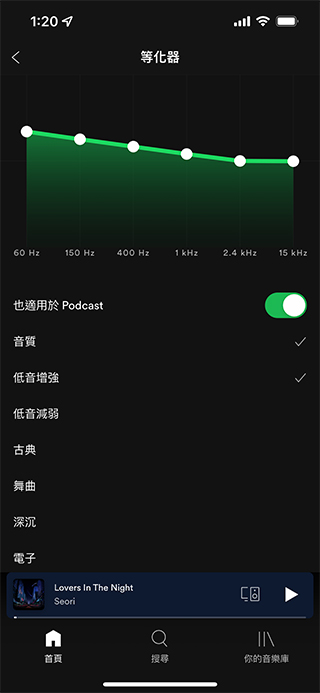
- In the equalizer setting page, you can manually adjust the top line chart yourself. Each point in the line chart affects the sound more or less. The far left represents the proportion of bass, the far right represents the treble, and of course the middle one is the final cause. You can match the proportion of high, middle and bass according to your needs. In addition, you can also scroll down and apply the equalizer named after the genre built into Spotify to automatically adjust the weight according to the selected genre.
Adjust the quality of music streaming in Spotify
You can also customize the quality of streaming music based on your connection method. For example, when connected to WiFi, you can of course have the luxury of listening to music at the highest sound quality. However, if you are not a mobile network user and want to listen to music when you are away but are afraid of using up too much data, then you can set it from here.
- Open Spotify, click the gear icon in the upper right corner to enter the “Settings” function, and scroll down to find the “Sound Quality” item.

- Both WiFi streaming and mobile network streaming have four sound quality levels to choose from: automatic, low, standard, and high. If you are a paid subscriber, there is a fifth “extremely high” option.
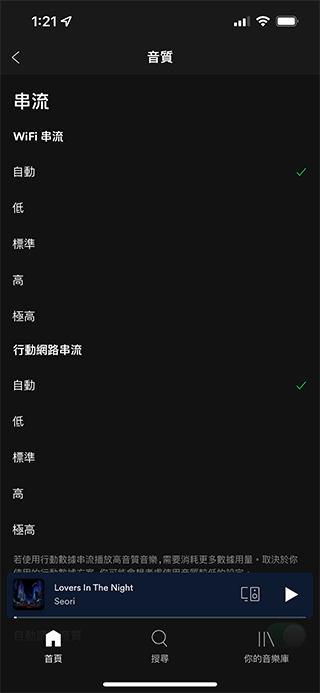
The author here follows the operation process of the iPhone version of Spotify. The other Android, Windows, and Mac versions are similar. The only difference is that the Mac version of Spotify does not have a built-in equalizer. You can only turn to other equalizer applications to adjust it.
Source: KOCPC Chinese