• About Us
King of Computer Media
  • Home
  • Tech News
  • AI News
  • Apps & Tutorials
  • Mobile & Telecom
  • Lifestyle
  • About Us
No Result
View All Result
  • Home
  • Tech News
  • AI News
  • Apps & Tutorials
  • Mobile & Telecom
  • Lifestyle
  • About Us
No Result
View All Result
King of Computer Media
No Result
View All Result

Home - Internet and software applications - Adobe Acrobat official browser free extensions for faster PDF file conversion, signing and editing

Adobe Acrobat official browser free extensions for faster PDF file conversion, signing and editing

Rocky by Rocky
November 5, 2021 - Updated on August 4, 2026
in Internet and software applications

In the past, we have introduced the free PDF online service officially launched by Adobe.Adobe Acrobat Online Services”, and every time you want to use it, you need to manually open this website, and then select the PDF function you want to use. For people who use it frequently, it may be very cumbersome. At this time, I highly recommend installing the Adobe Acrobat extension function, which is supported by Chrome and Edge. After installation, when you want to use it in the future, just select it directly from the upper right, which is convenient and fast.

screely-1636081322186

Official Adobe Acrobat extended function introduction, an easier way to convert and edit online PDFs

  • Click me to go to the Adobe Acrobat extension installation page

Here I use the Edge browser as a demonstration, and the Chrome operation is similar. After entering the extension store page, click “Add to Chrome” on the upper right:

2021-11-05_110410

This prompt will pop up above, click on Add Extension Function:
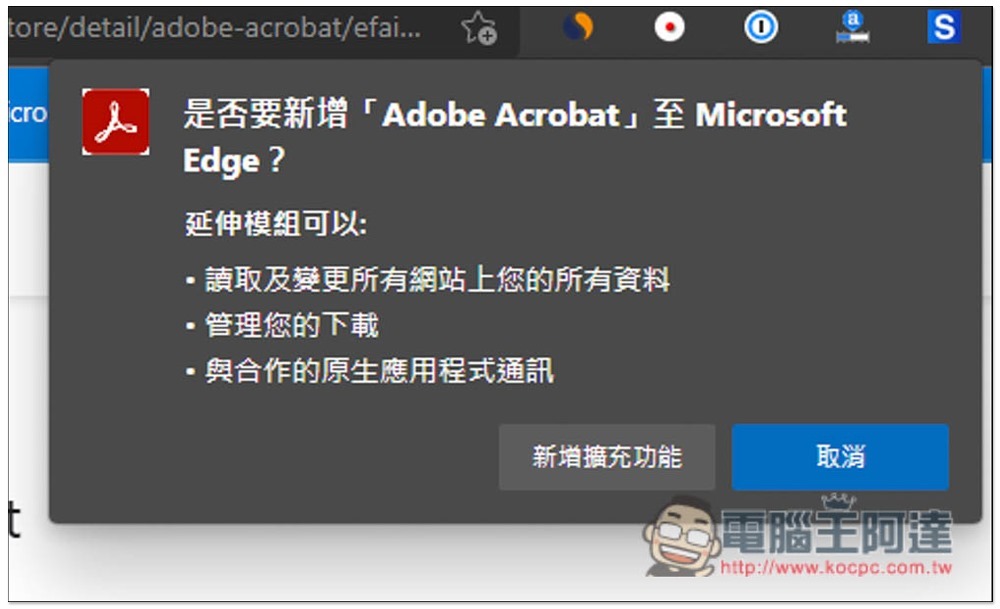
2021-11-05_110418

Then the Adobe Acrobat extension icon will appear on the upper right. If it is not there, please open it in the management extension function. You may need to wait for a while after installation. You can start using it after the icon lights up. Open it and you will find “Convert”, “Edit”, and “Sign”:

2021-11-05_110525

The editing section allows you to reorder PDF pages, rotate them, or delete them. If you want to sign, you can sign or ask the other party to sign. Detailed instructions can be given.Refer to this article:

2021-11-05_110542

After opening the function you want to use, you will automatically enter the Adobe official website. I will convert to PDF as an example. Word, Excel, PowerPoint, JPG, PNG and other image files are supported:

2021-11-05_110556

After dragging the file in, the upload and conversion will begin:

2021-11-05_110713

When completed, you will also be able to preview the file. If there is no problem, click Download on the right. You can use the converted file without logging in:

2021-11-05_110728

It’s done like this:
2021-11-05_110744

系統更新後可能沒發現的冷知識,8 個 Windows 11 新增的鍵盤快捷鍵

Source: KOCPC Chinese

Tags: AdobeExtended functions

Recent Posts

  • The Xiaomi Pad 8S Pro has passed network access certification and will debut with the self-developed XRING O3 chip.
  • The entire Google Pixel 11 lineup has been leaked! Official promotional renders of the Pixel 11 Pro XL have also surfaced
  • Are Chinese phone battery capacities falsely labeled? A brief look at the “capacity locking” phenomenon in Chinese silicon-carbon batteries.
  • NCC is leaderless, recklessly sending out national-level alert messages!?
  • What does “QR” in QR Code mean?

Recent Comments

No comments to show.
  • About Us

We welcome partnership inquiries and product review opportunities from smartphone manufacturers, iPhone accessory brands, and app developers.koc kocpc.com.tw|Privacy Policy |Hosting & Maintenance: Fast Line Taiwan, A-Chang Digital Technology

No Result
View All Result
  • Home
  • Tech News
  • AI News
  • Apps & Tutorials
  • Mobile & Telecom
  • Lifestyle
  • About Us

We welcome partnership inquiries and product review opportunities from smartphone manufacturers, iPhone accessory brands, and app developers.koc kocpc.com.tw|Privacy Policy |Hosting & Maintenance: Fast Line Taiwan, A-Chang Digital Technology