


In a few days it will be Halloween! Although many festival activities have been restricted due to the epidemic, no matter where you are, you can celebrate Halloween online with your friends through LINE! LINE Taiwan officially announced earlier today (26th) that this year’s limited-time Halloween chat room special effects job is now open! Whenever you enter specified keywords in the LINE chat room during the event period, you can activate the Halloween chat room special effects!

▲Picture source:LINE Taiwan official BLOG
LINE’s limited-time Halloween special effects are coming to the chat room! Enter the specified keyword to activate
In a few days it will be Halloween! 2021 is coming to an end before you know it. It doesn’t matter if you don’t have time for Halloween or you can’t celebrate it due to the epidemic. From the 26th to 10 a.m. on November 1, as long as you enter the specified keyword through the LINE chat room, you can deliver the limited-time “Halloween Chat Room Special Effects” through LINE to your friends and family to welcome the mysterious surprise of Halloween.
This year’s LINE Halloween chat room special effects keywords can be any combination of “Halloween”, “Trick or Treat” or “Halloween”. After entering, the following Halloween special effects composed of Bear, Bunny or Sally will be randomly displayed.
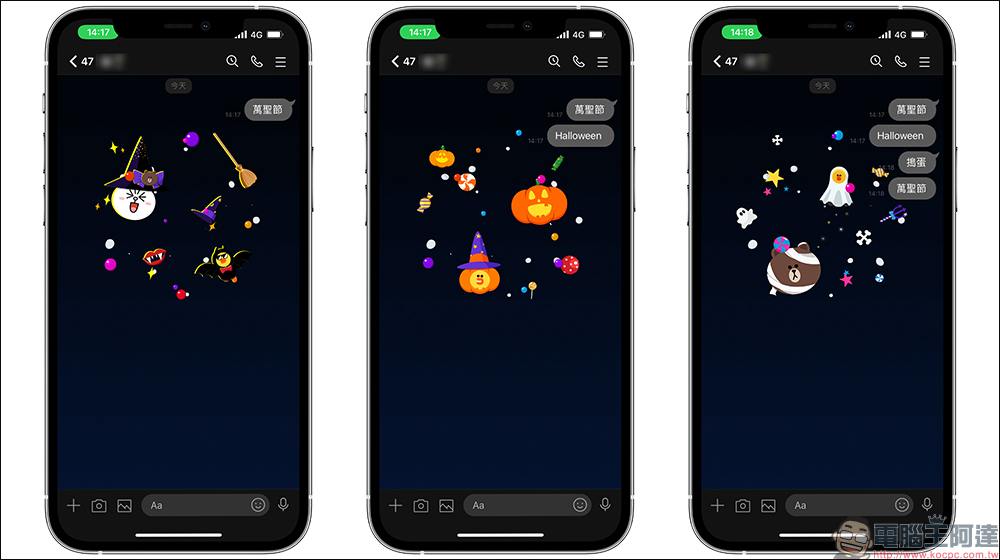
Halloween special effects version
Applicable devices: LINE iOS, Android, PC version.
LINE App version is applicable to:
- iOS: LINE iOS supports 9.15 (inclusive) and above
- Android: LINE Android 10.2 (inclusive) or above (Android users please confirm that the system version is Android 7.1 or above)
- PC version: LINE 5.19 (inclusive) and above
*Tips: If you are not sure what LINE version is, it is recommended to directly update to the latest version
How to turn on/off chat room background effects?
If the above conditions such as version, keyword, and event time are met, but the Halloween special effects do not appear, you can try to reopen the LINE App, or go to LINE’s “Settings” > “Chat” and confirm whether “Chat Background Effects” is turned on. If you don’t want to display the chat room background effects, you can also turn them off via this path!
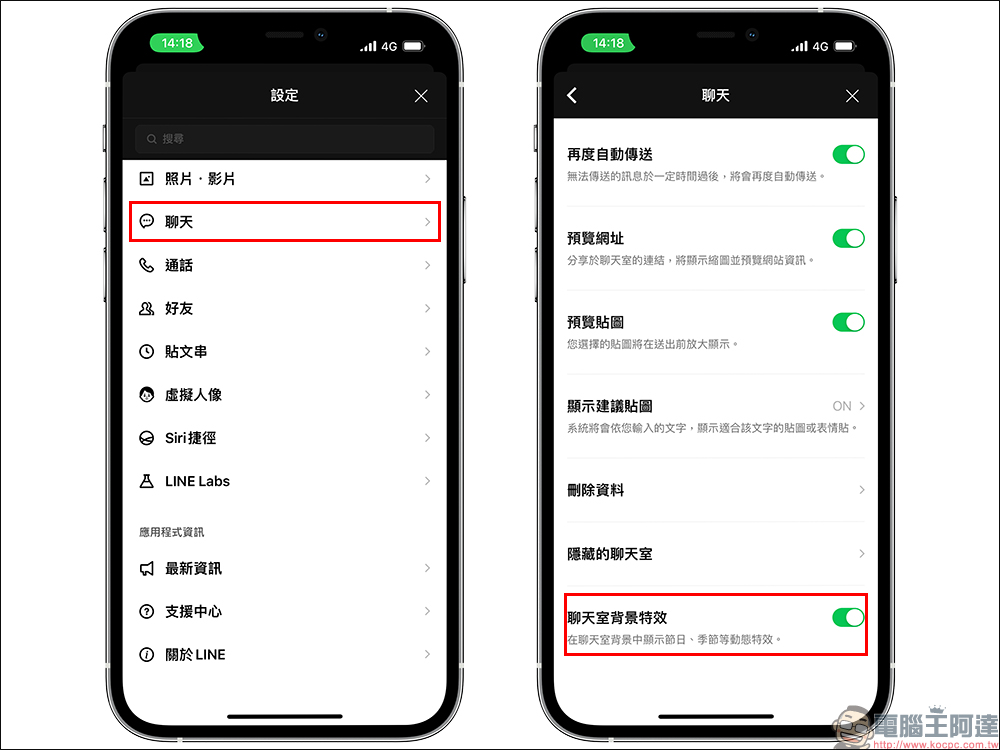
Source:LINE Taiwan official BLOG
Further reading:
LINE free sticker collection: 22 super cute LINE stickers available for download for a limited time
Source: KOCPC Chinese