

• About Us
King of Computer Media
  • Home
  • Tech News
  • AI News
  • Apps & Tutorials
  • Mobile & Telecom
  • Lifestyle
  • About Us
No Result
View All Result
  • Home
  • Tech News
  • AI News
  • Apps & Tutorials
  • Mobile & Telecom
  • Lifestyle
  • About Us
No Result
View All Result
King of Computer Media
No Result
View All Result

Home - Computer Applications and Other Tutorials - The latest computer version of Instagram is launched, allowing you to edit and post without a mobile phone!

The latest computer version of Instagram is launched, allowing you to edit and post without a mobile phone!

KOCPC Editor by KOCPC Editor
October 23, 2021 - Updated on August 4, 2026
in Computer Applications and Other Tutorials, Internet and software applications

More and more people are using Instagram now. Whether they are searching for online beauty spots, trendy brands, boutiques or food recommendations, they can all be found on Instagram. Instagram You can quickly find the latest new information on IG, but did you know that you can now edit and post on IG using the computer version? This is a long-awaited new feature for Internet beauties who are accustomed to using computers to edit beautiful pictures. You can upload photos, retouch, crop, share, etc. directly through the web version. If you don’t know how to operate it yet, just read this tutorial.

Instagram’s latest desktop version launched

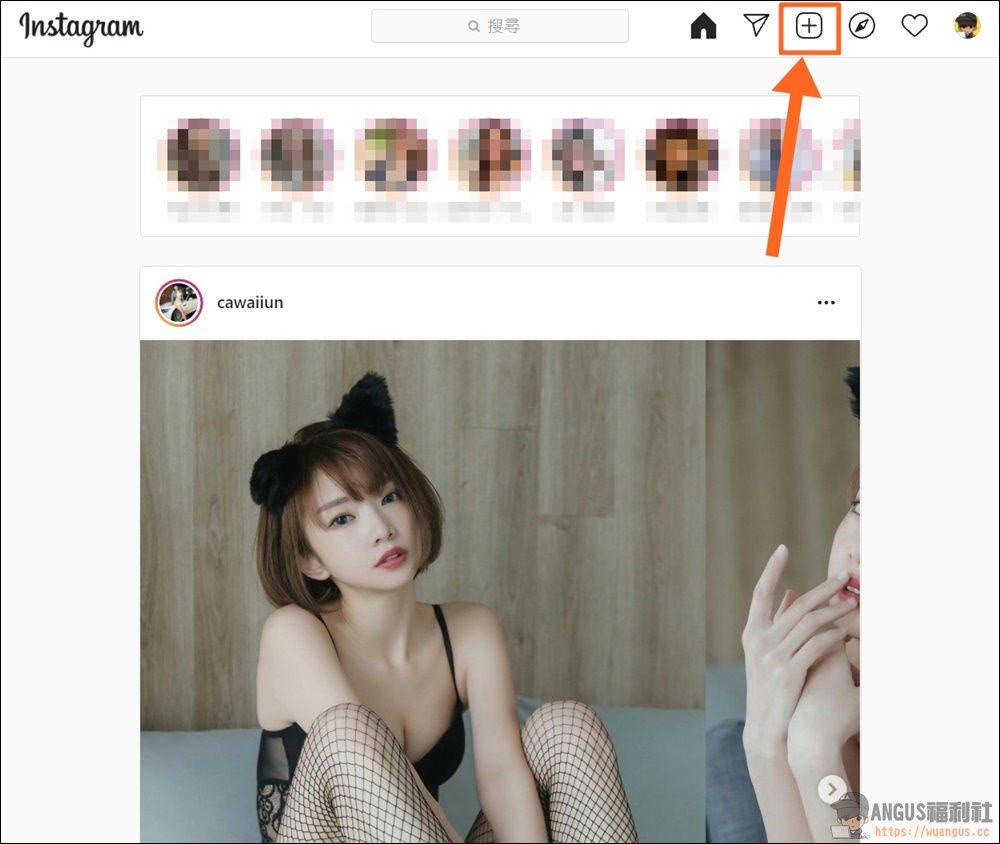
Log in first Instagram After entering the official website page, you can see that there is now a small “+” icon on the new version of IG. You can click directly to start editing and posting.
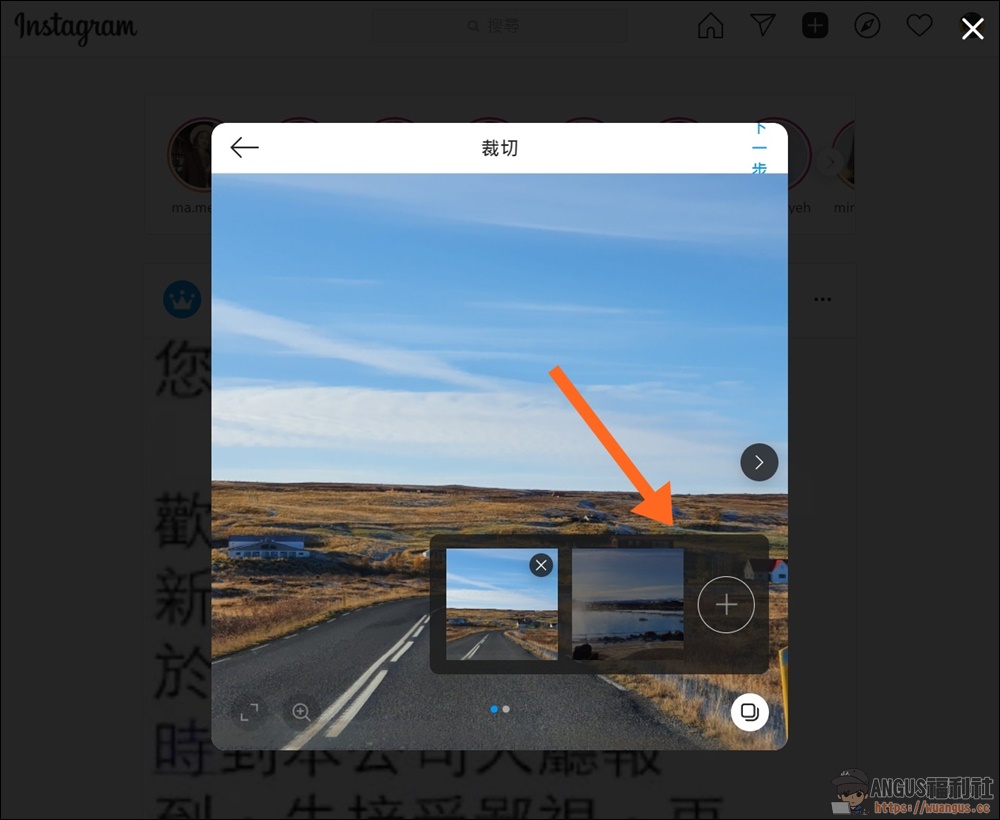
When creating a new post, you can use drag and drop to upload photos, or click “Select from Computer” to upload the photos you want to edit.

If you want to upload multiple photos, you can also add photos through the “+” icon on the lower right.
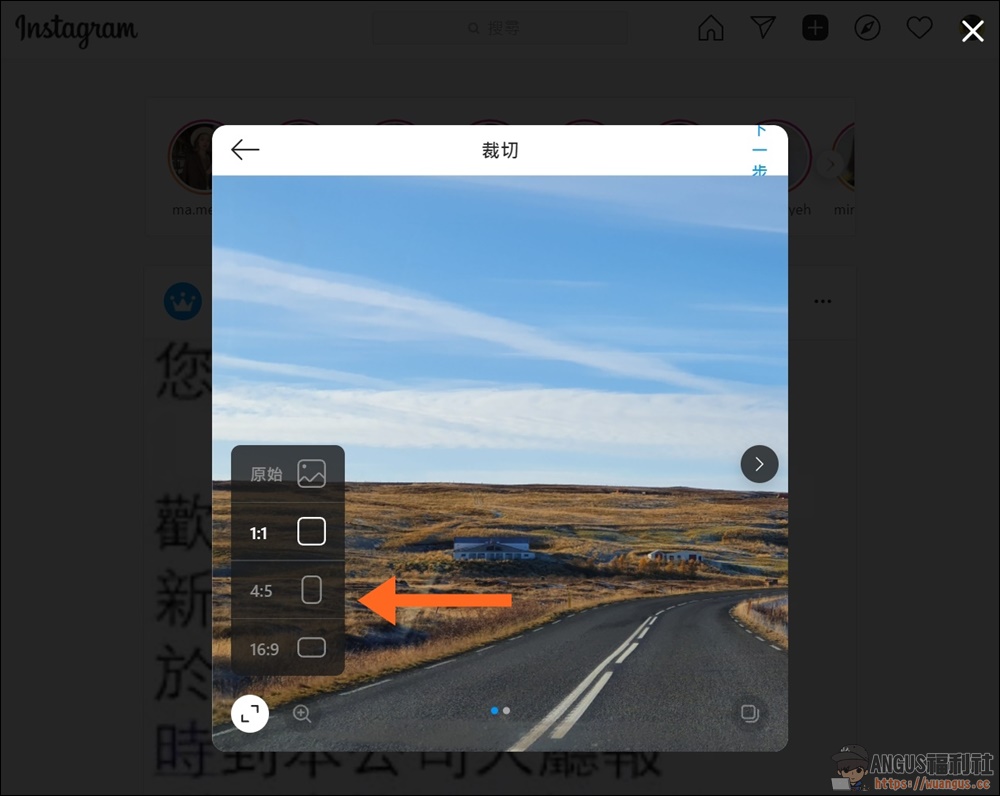
The function on the left allows you to modify the proportion and size of the photo, or use the original image without cropping.
Of course, you can also apply your favorite filters to photos. This filter function should be familiar to everyone.
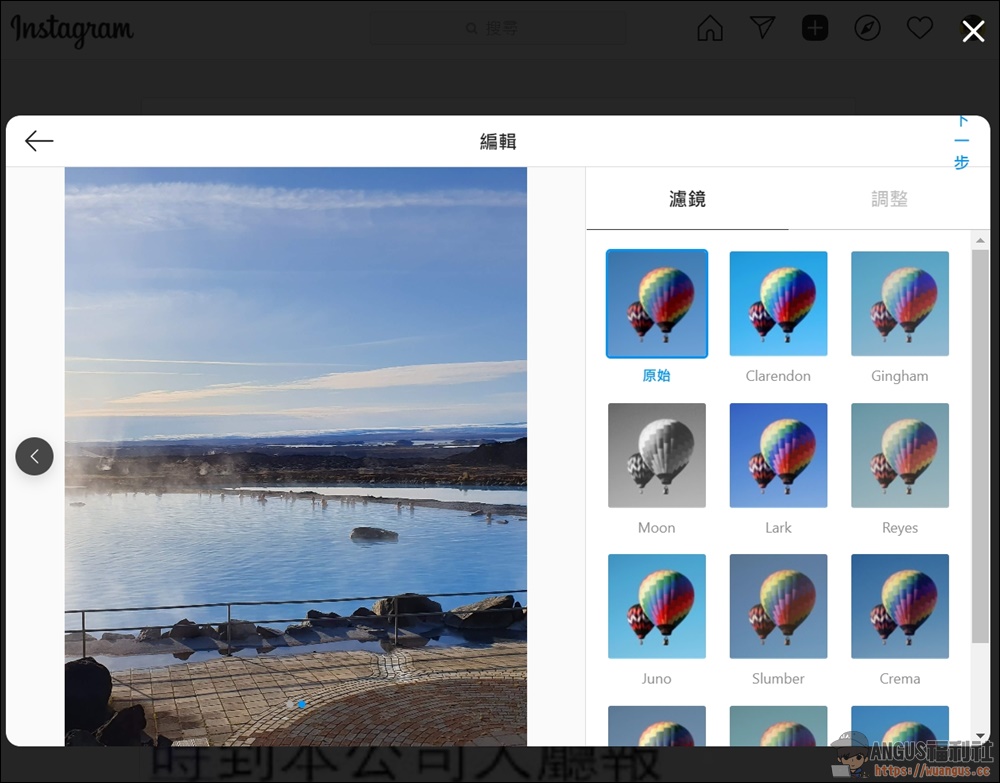
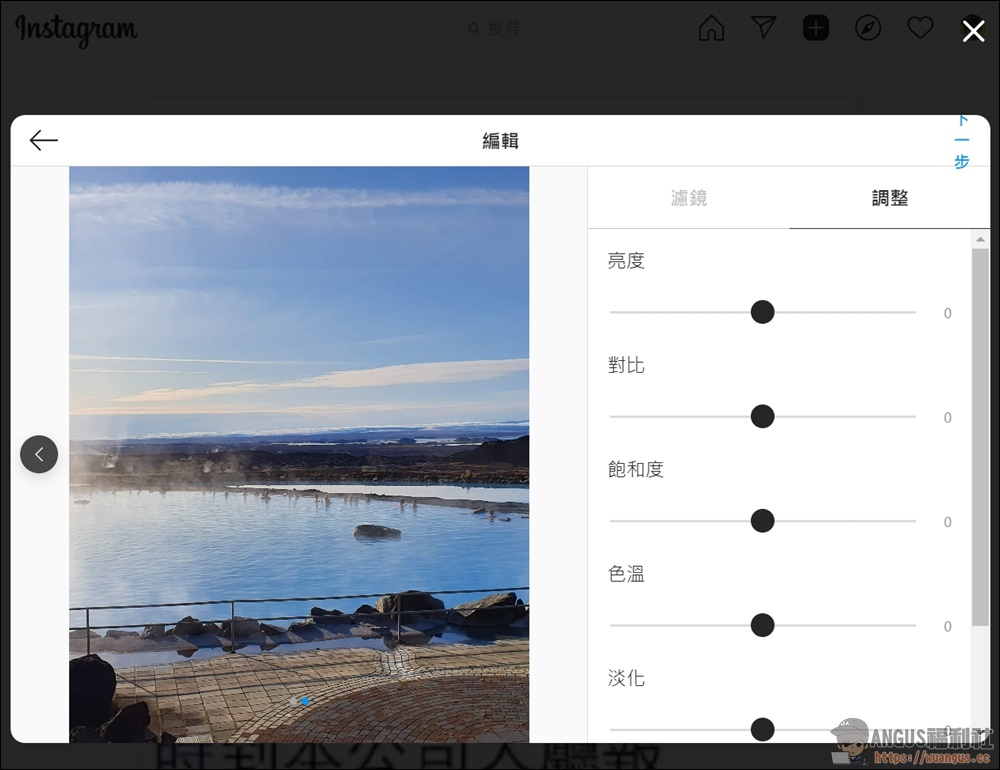
When adjusting brightness, contrast, saturation, color temperature, fade, etc., the functions are the same as those on the mobile phone, and the functions are the same.
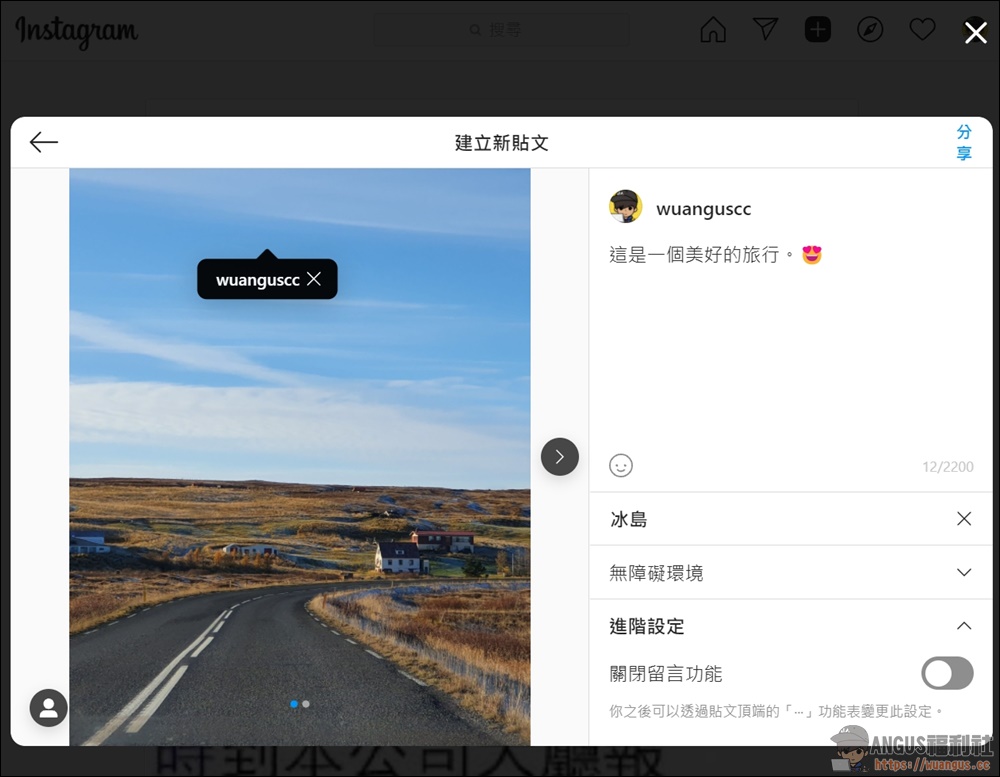
Marking the last post, editing the text, adding location, adding emoticons, etc… can all be used normally.
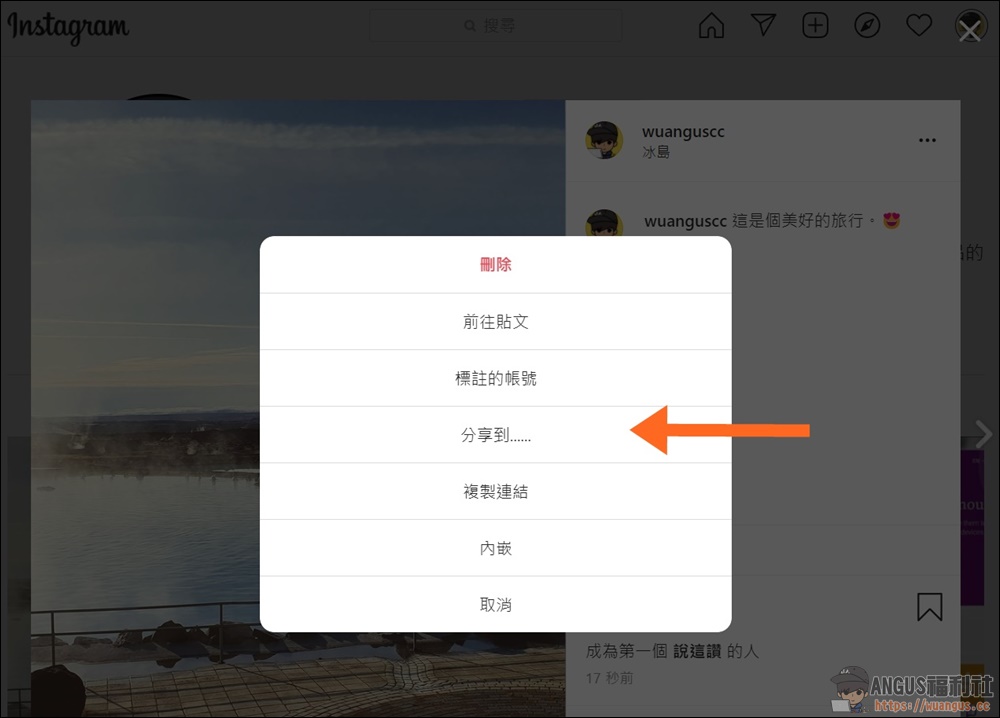
After the post is completed, you can also share it to various platforms or groups.
  • Instagram for PC:https://www.instagram.com/

Source: KOCPC Chinese

Recent Posts

  • The Xiaomi Pad 8S Pro has passed network access certification and will debut with the self-developed XRING O3 chip.
  • The entire Google Pixel 11 lineup has been leaked! Official promotional renders of the Pixel 11 Pro XL have also surfaced
  • Are Chinese phone battery capacities falsely labeled? A brief look at the “capacity locking” phenomenon in Chinese silicon-carbon batteries.
  • NCC is leaderless, recklessly sending out national-level alert messages!?
  • What does “QR” in QR Code mean?

Recent Comments

No comments to show.
  • About Us

We welcome partnership inquiries and product review opportunities from smartphone manufacturers, iPhone accessory brands, and app developers.koc kocpc.com.tw|Privacy Policy |Hosting & Maintenance: Fast Line Taiwan, A-Chang Digital Technology

No Result
View All Result
  • Home
  • Tech News
  • AI News
  • Apps & Tutorials
  • Mobile & Telecom
  • Lifestyle
  • About Us

We welcome partnership inquiries and product review opportunities from smartphone manufacturers, iPhone accessory brands, and app developers.koc kocpc.com.tw|Privacy Policy |Hosting & Maintenance: Fast Line Taiwan, A-Chang Digital Technology