


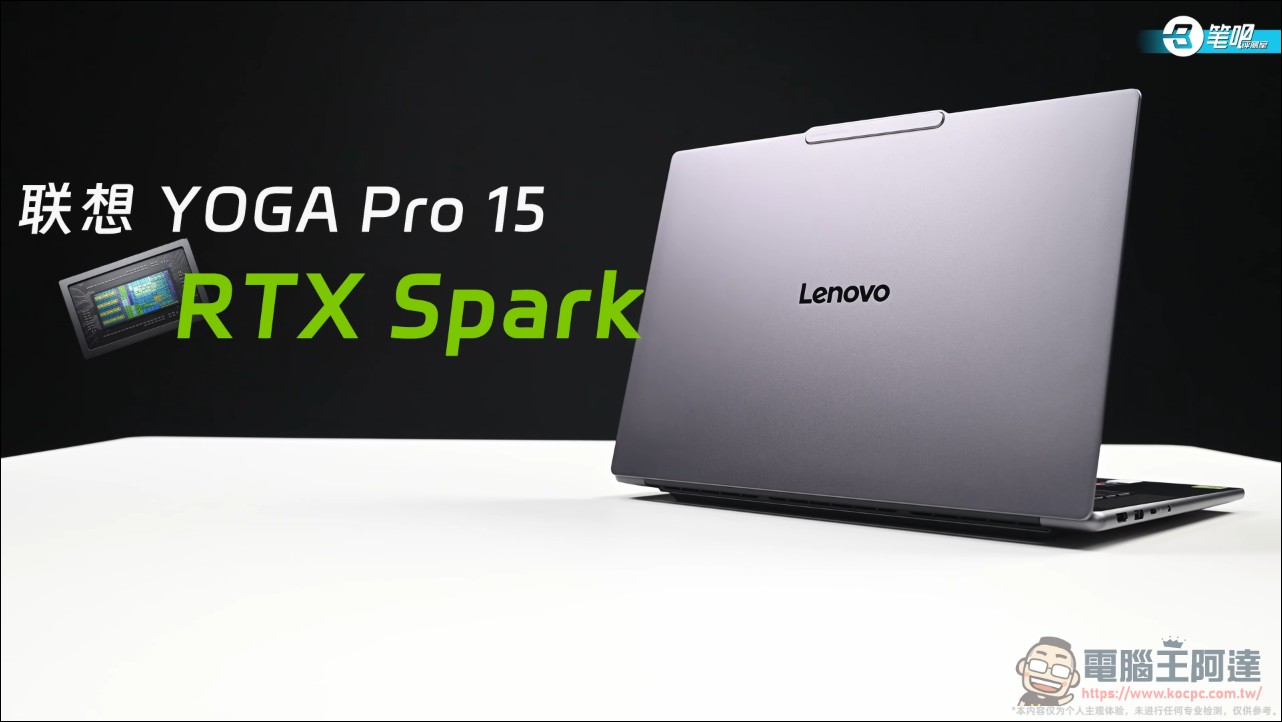
At the end of May this year, NVIDIA unveiled the RTX Spark superchip at GTC Taipei in Taipei, packing a 20-core Grace CPU, a Blackwell GPU with 6,144 CUDA cores, and up to 128GB of unified memory into a single SoC, officially positioned as a “personal AI computer.” Four months later, the first batch of RTX Spark laptops has finally gone on sale. Lenovo YOGA Pro 15 RTX Spark is one of the world’s first models equipped with the N1X superchip. The Chinese review outlet 筆吧評測室 got the fully configured version and put it through a full test of its performance in three main areas: local AI, content creation, and gaming. It should serve as a useful buying reference for those looking to get this laptop.
N1X Chip Analysis: DGX Spark’s Windows Twin
All RTX Spark models currently on the market use the first-generation N1X chip, with the CPU and GPU split across two dies, both manufactured on TSMC’s 3nm process. It comes in two configurations: the high-end version has a 20-core CPU plus 6,144 CUDA cores, while the standard version has an 18-core CPU plus 5,120 CUDA cores. The 20 CPU cores consist of 10 Cortex-X925 cores and 10 Cortex-A725 cores; the 18-core version has one fewer of each, and its P-core frequency is also slightly lower.
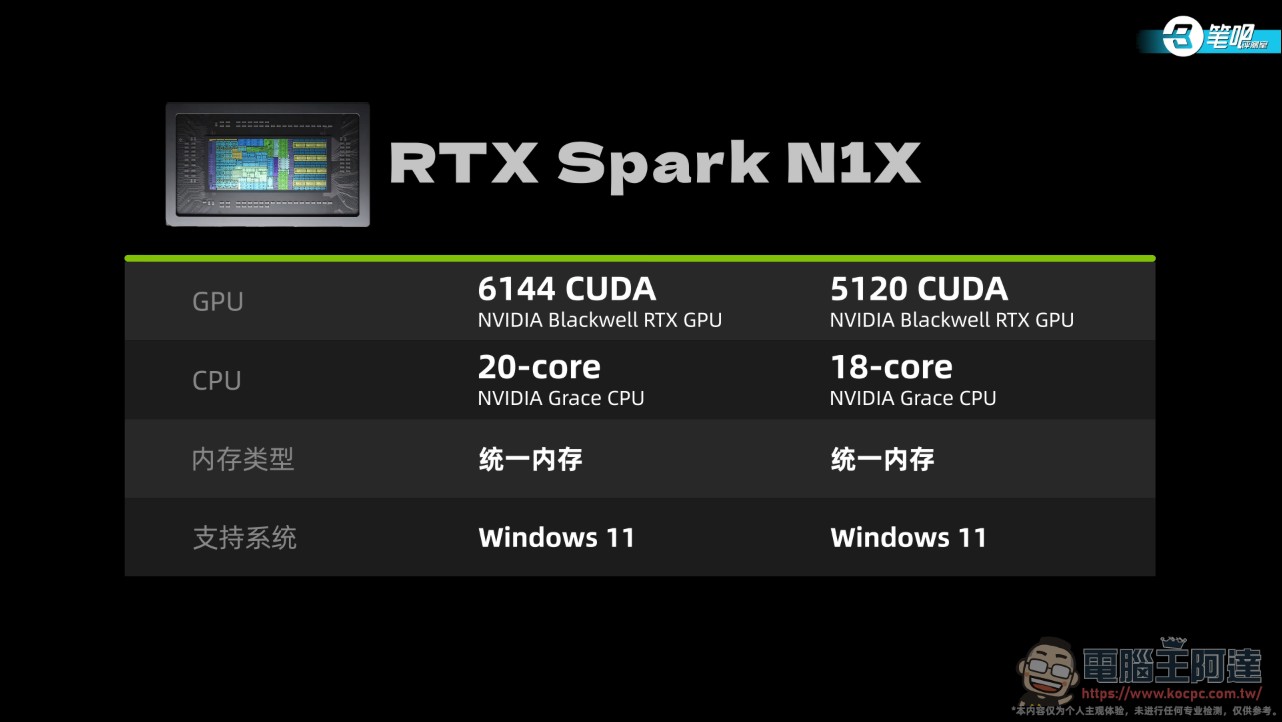
On the memory side, the high-end version offers 24 to 128GB, while the standard version offers 24 to 32GB; the standard version only appears on laptops. In terms of GPU scale, it falls between the laptop RTX 5070 Ti and 5080, while the version with 5,120 CUDA cores falls between the 5070 and 5070 Ti. Lenovo also claims this machine can run large models with over 100 billion parameters locally, and it ships with a built-in 35B model that is ready to use out of the box.
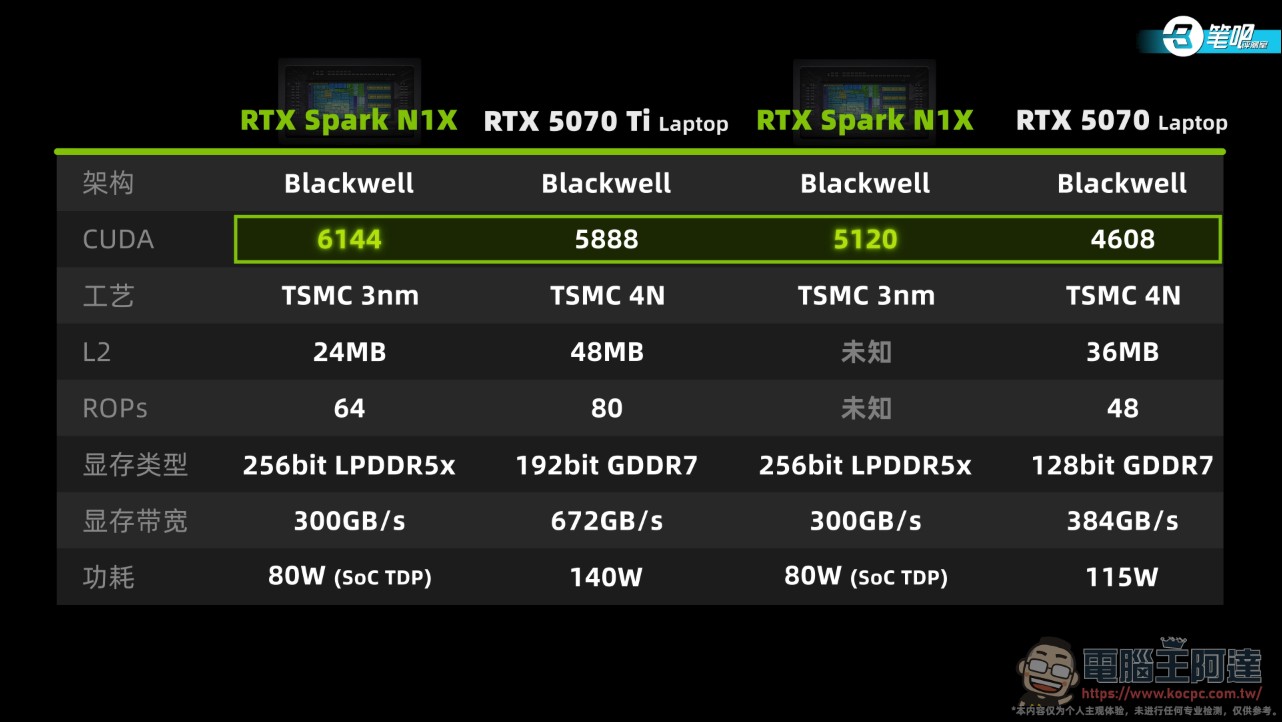
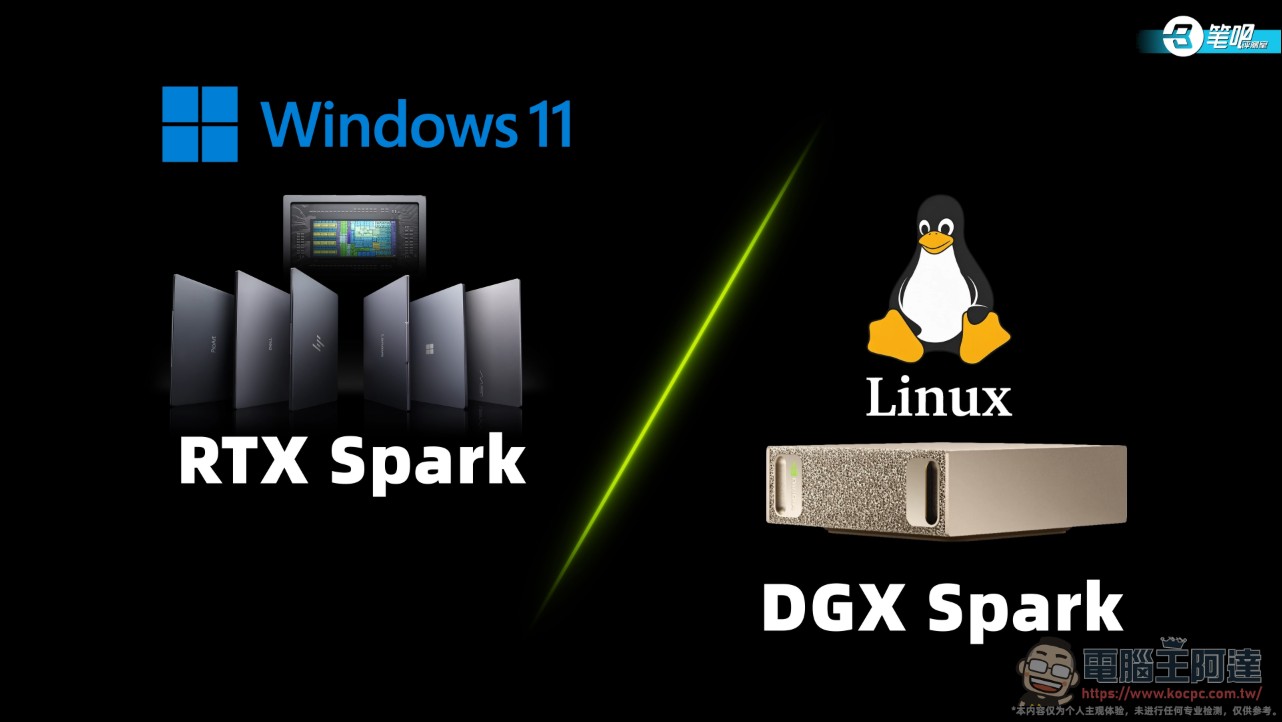
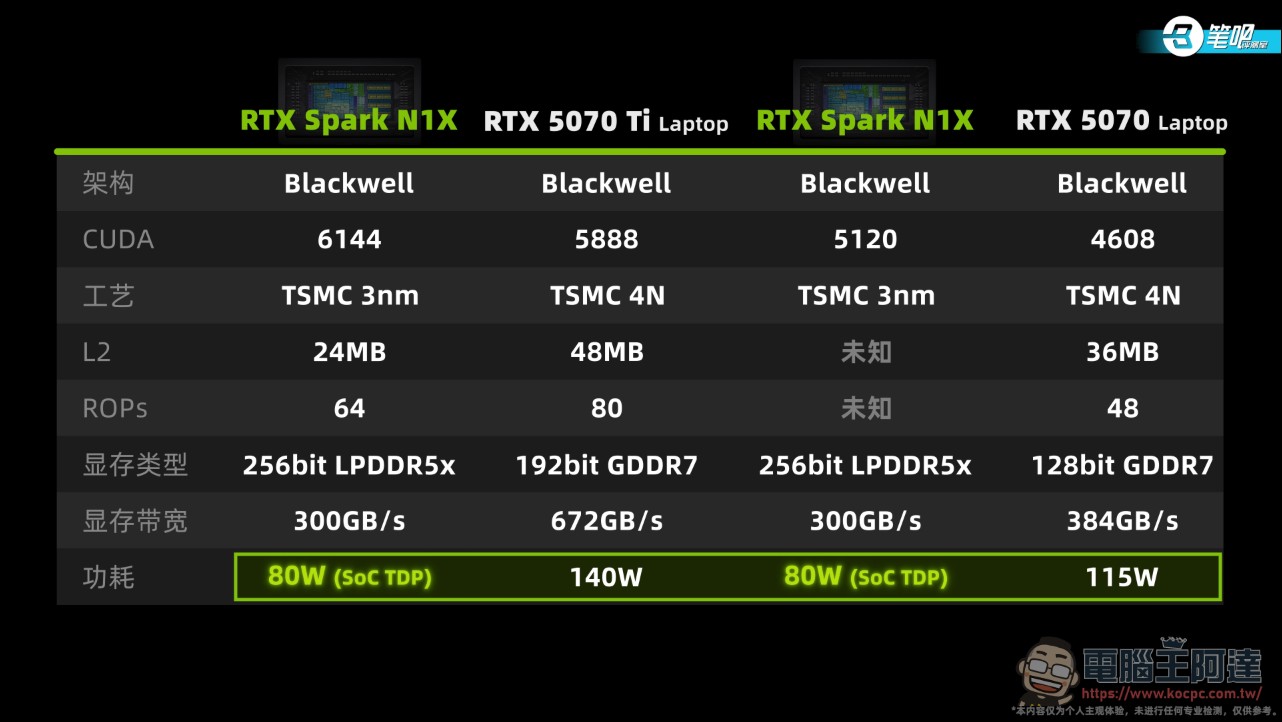
The specs are generous, but the video points out a few inherent limitations: L2 cache and memory bandwidth are both lower than RTX 50-series laptop GPUs, the ROP count is lower than the 5070 Ti, and the biggest difference is power consumption. 80W is the total SoC power draw including the CPU, so even less is actually allocated to the GPU. It’s clear that this architecture is the twin version of the GB10 chip in the DGX Spark mini PC: DGX Spark runs its own DGX OS and is positioned as a small server, while RTX Spark runs Windows 11 and targets personal computer users. MediaTek was involved in the CPU design, with a focus on power efficiency and connectivity.
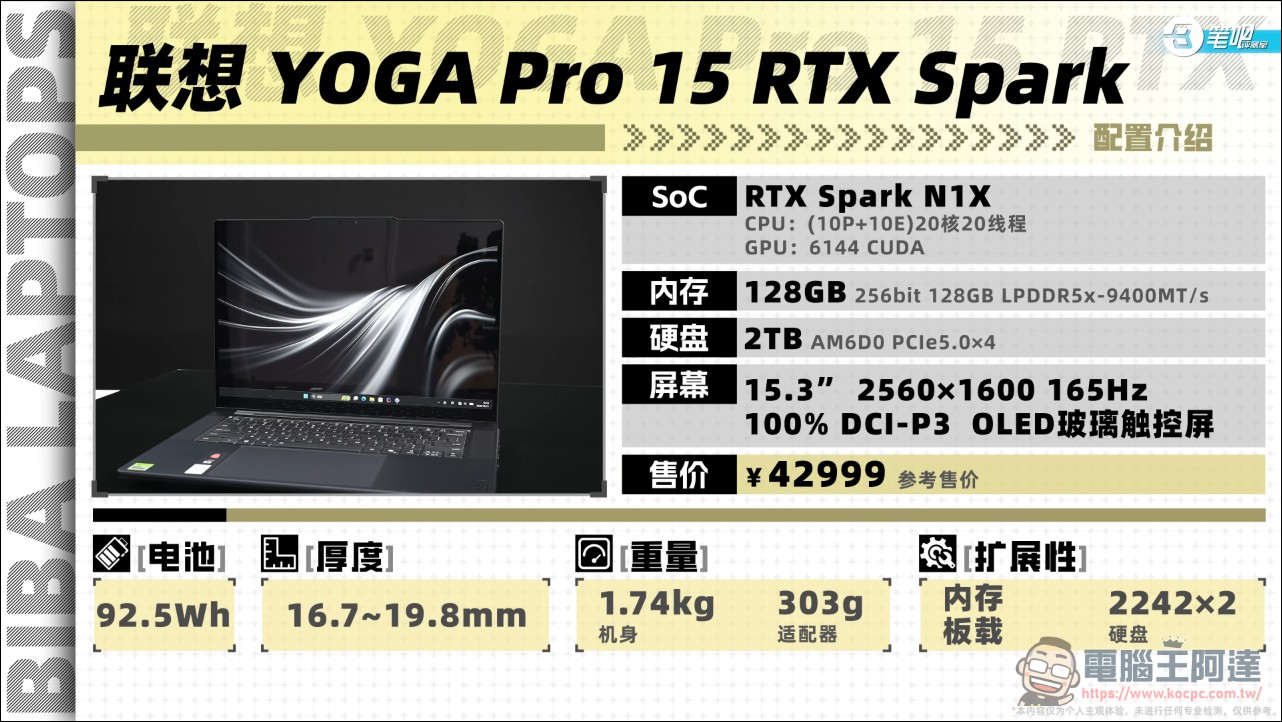
This test unit is the fully loaded Lenovo YOGA Pro 15 RTX Spark: a 20-core CPU plus N1X with 6,144 CUDA cores, 256-bit 128GB LPDDR5x-9400, a 2TB Union Memory AM6D0 PCIe 5.0 SSD, and a 15.3-inch 1600p 165Hz wide-gamut OLED glossy display, priced at 42,999 RMB, or an estimated NT$208,000.
GPU and Game Benchmarks: On-Paper Specs Don’t Match the Benchmark Scores
Looking directly at 3DMark: in the ARM-native Steel Nomad Light, the N1X scores 13,752, failing to beat the 5070, which is 25% smaller in scale than it, and only outperforming the 5060; in Time Spy and Fire Strike Extreme, which require translation, it is overall only 2% faster than the 5060, almost within the margin of error, while the 5060’s scale is only 54% of the N1X’s.
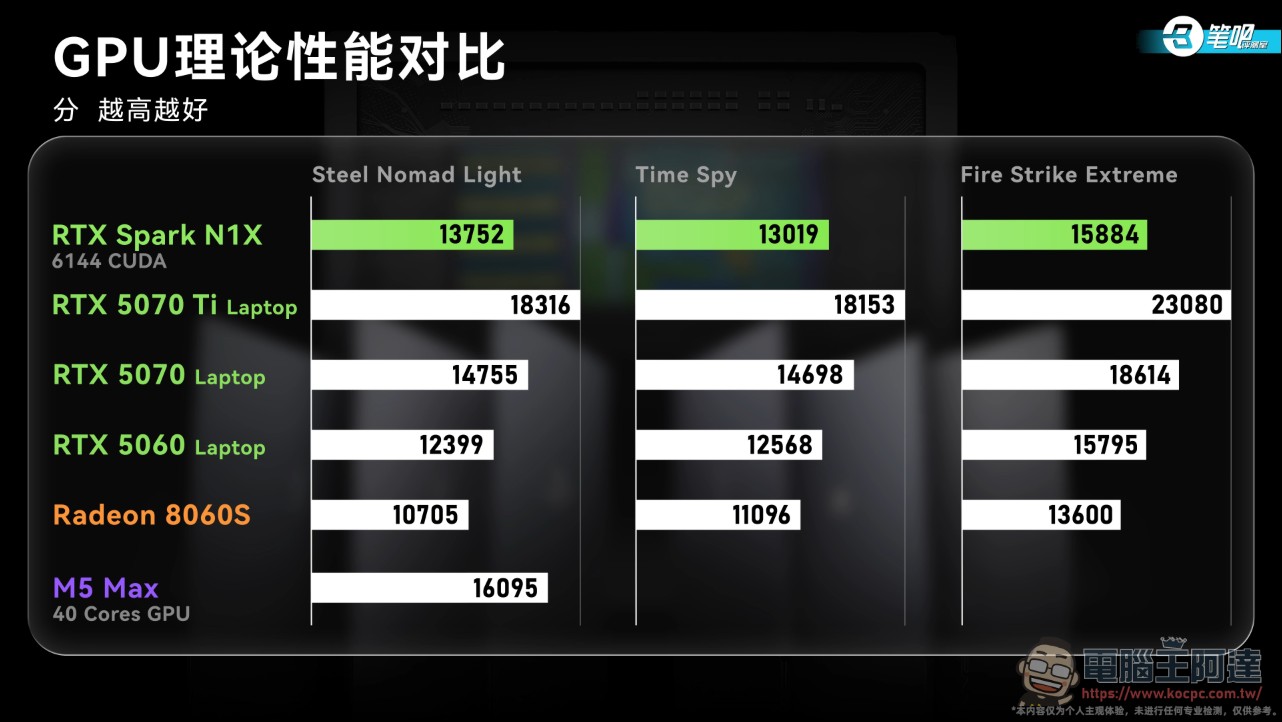
The main reason for this performance is the inherent gap in memory bandwidth and L2 cache, plus the 80W SoC power limit; according to the Steel Nomad Light efficiency curve, below 80W the N1X scores higher than the 5070, but SoC power and discrete GPU power are not calculated on exactly the same basis, so the scores are for reference only.
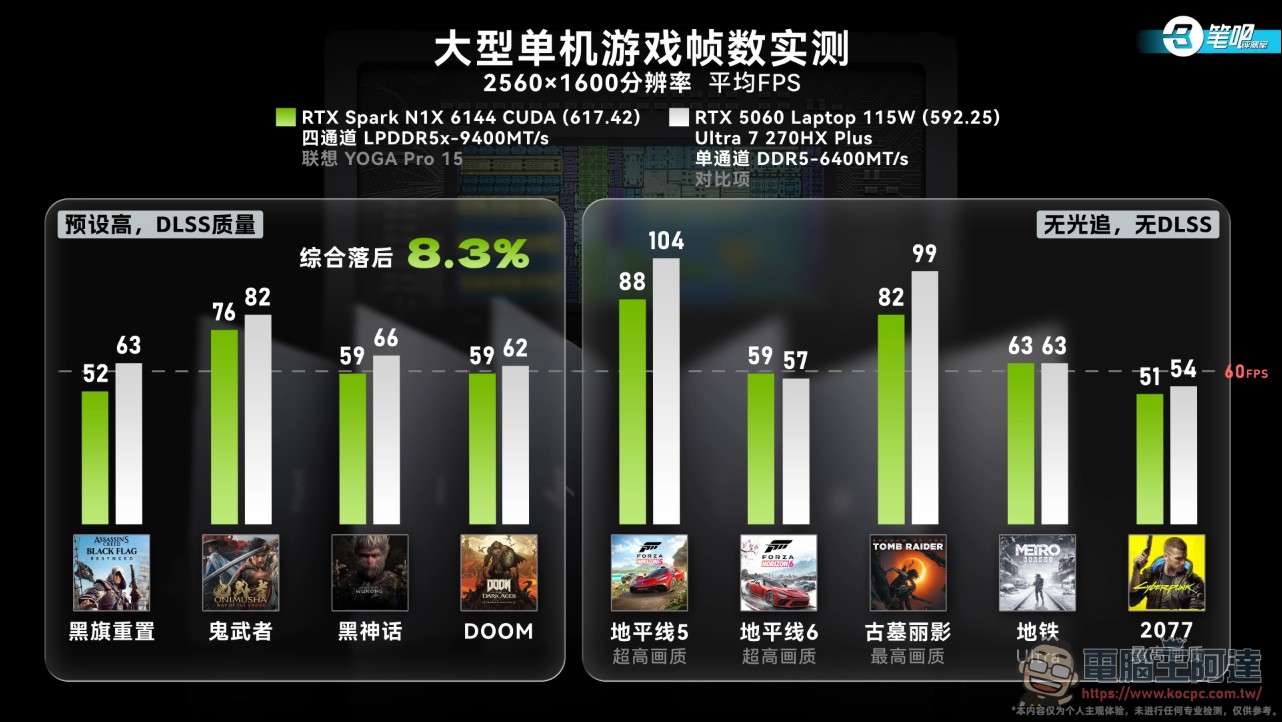
For competitive games, the concern shifts from “low frame rate” to “playable or not.” Of the 16 games tested, 5 are not yet supported: League of Legends, Delta Force, Wuthering Waves, CrossFire, and Roco Kingdom. Endfield and Zenless Zone Zero can get into the game but cannot run smoothly. The 9 that play normally are Honkai: Star Rail, Genshin Impact, Neverness to Everness, Valorant, Minecraft, Overwatch 2, Final Fantasy XIV, Total War: Warhammer III, and CS2. Among them, Minecraft is a native arm64 version and can reach over 1,000 fps; League of Legends, Delta Force, Wuthering Waves, and Endfield all have plans for native RTX Spark support. The 4 online games trail a 5060 gaming laptop by 44.7% overall, and the more CPU-intensive the test, the worse the performance. All frame rates were measured at least twice, because games running through translation stutter severely on first launch and only run normally after one cached run.
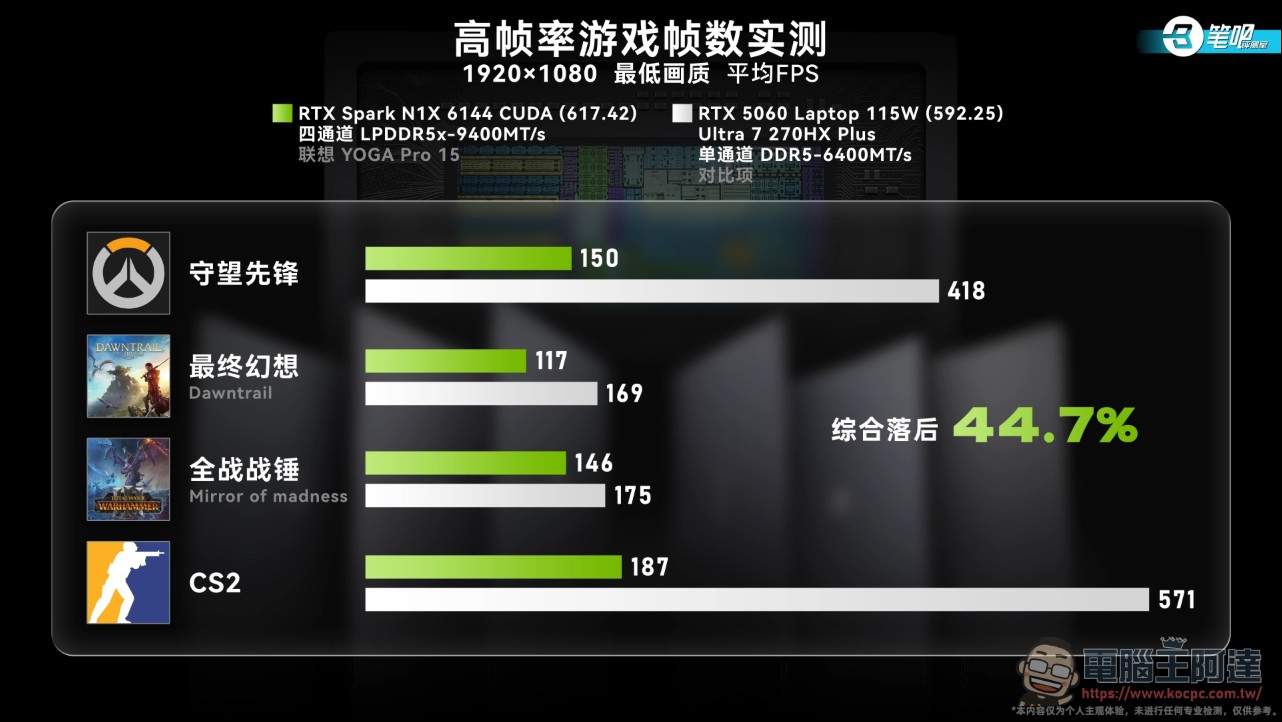
Compared with NVIDIA’s official claim that RTX Spark can run AAA games at 1440p and over 100 fps, the gap in real-world testing comes mainly from the cost of the translation layer, not from the chip itself being unable to keep up. DLSS and ray tracing features did not run into any issues throughout testing. This is a microcosm of the current state of Windows on ARM: native performance shines (Minecraft at 1,000 fps), while translation takes a hit across the board. The N1X’s GPU scale has not translated into benchmark scores: 70% of the reason lies in power and bandwidth characteristics, and 30% in the ecosystem not having caught up.
Local AI Hands-On Test
The video argues that no one buys an RTX Spark for gaming; its main arena is local AI, so the test design is also the most elaborate: it selected 49 real Agent tasks from Terminal Bench, covering software engineering, cybersecurity, system administration, data science, scientific computing, everyday data processing, and environment debugging, including long-horizon tasks that require continuous execution for over an hour, with a single test run exceeding 20 hours. Besides the RTX Spark, the contestants include the M5 Max and Ryzen AI MAX+ 395, both also equipped with 128GB of memory, each using the mainstream quantization scheme and backend for its respective platform; in addition, a cloud solution was set up on the Qwen AI platform, using full-precision Qwen 3.8 Flash as the cloud control group.
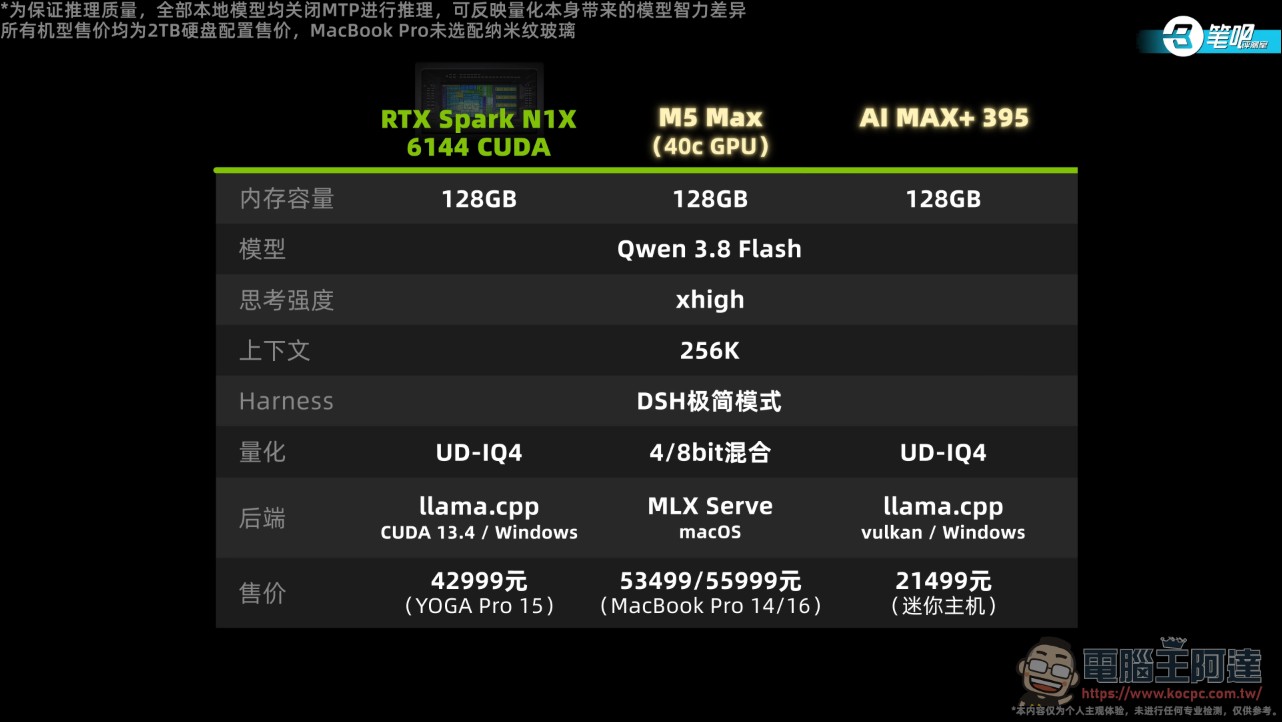
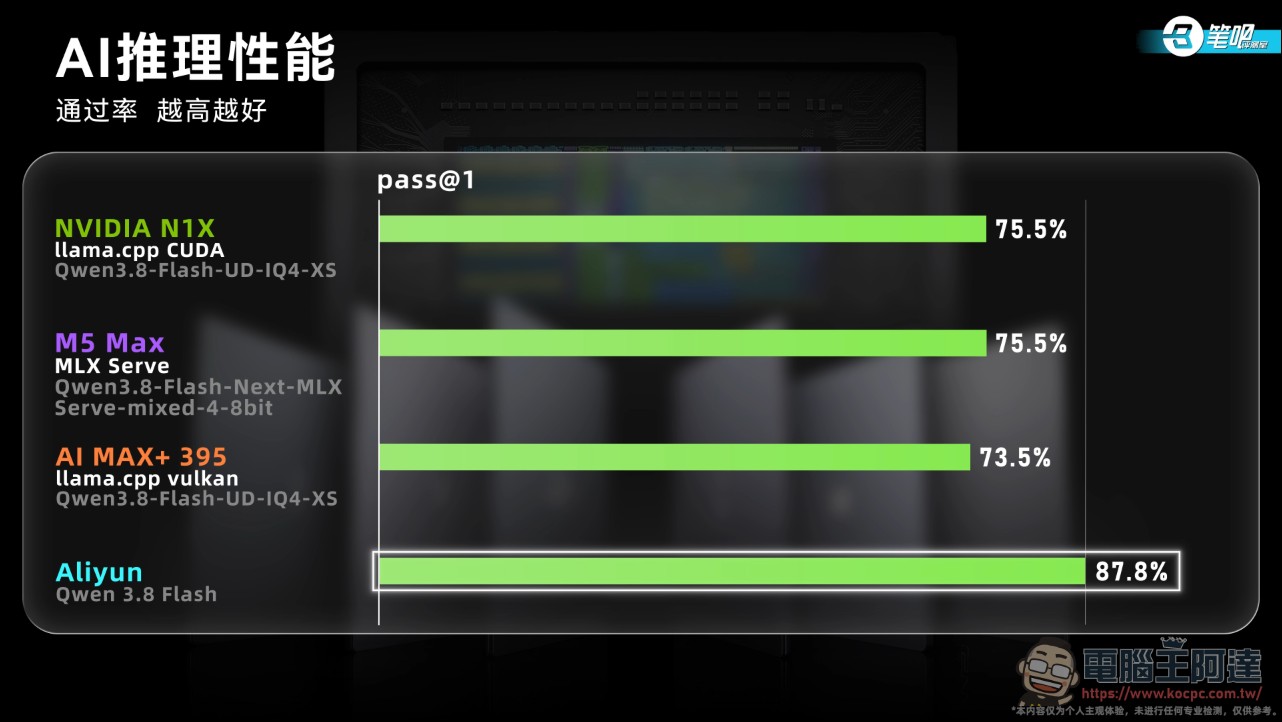
In terms of pass rate, the unquantized cloud model performed significantly better than the three local machines. The accuracy loss of quantized models is theoretically small, but over long-horizon tasks it accumulates: for example, in the task of designing DNA Q5 mutant primers, the local model did not carefully read the problem’s splitting method and validated it using its own criteria; in the task of Lorentzian fitting of Raman peaks, it got stuck spinning in thought until timeout and never entered the fitting stage at all. There were also regrettable failures: in the inverse ray tracer task, the code had already been fixed and verified in an experimental copy, but there was not enough time to copy it back; in the PyPI service setup task, all functionality was correct, but the service was started inside the agent session, so the validation program could not read it. These kinds of failures would very likely have passed if the model had simply tried once more or been given one more hint.
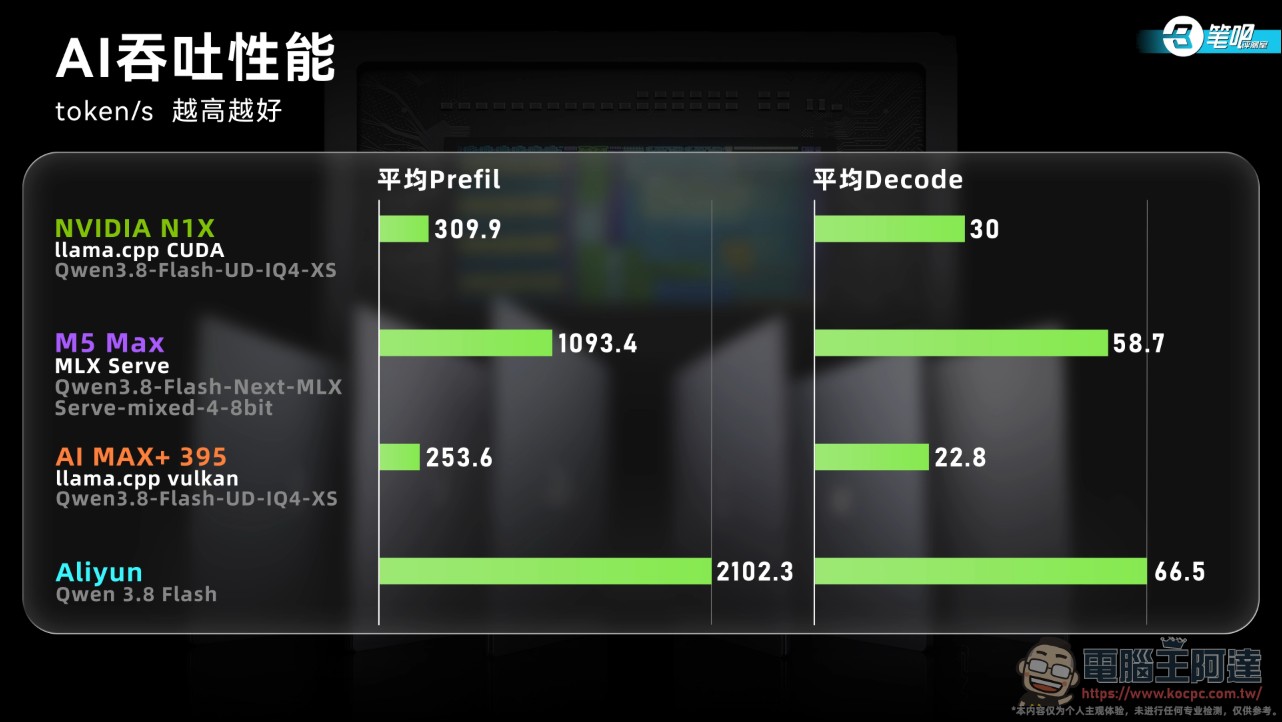
RTX Spark makes a comeback on throughput and efficiency: average prefill and decode speeds are 22.2% and 31.6% faster than AI MAX+ 395, respectively, and average task time is 20.6% less (21.2% for successful tasks only), but it still trails the best-performing M5 Max. Time to first token is very short because llama.cpp has a higher cache hit rate on these tasks; adjusting the prefill chunk size or increasing the cache quota can further improve throughput. The video also uses Artificial Analysis’s AgentPerf to test throughput in everyday office scenarios with 8 recorded real Agent conversations.
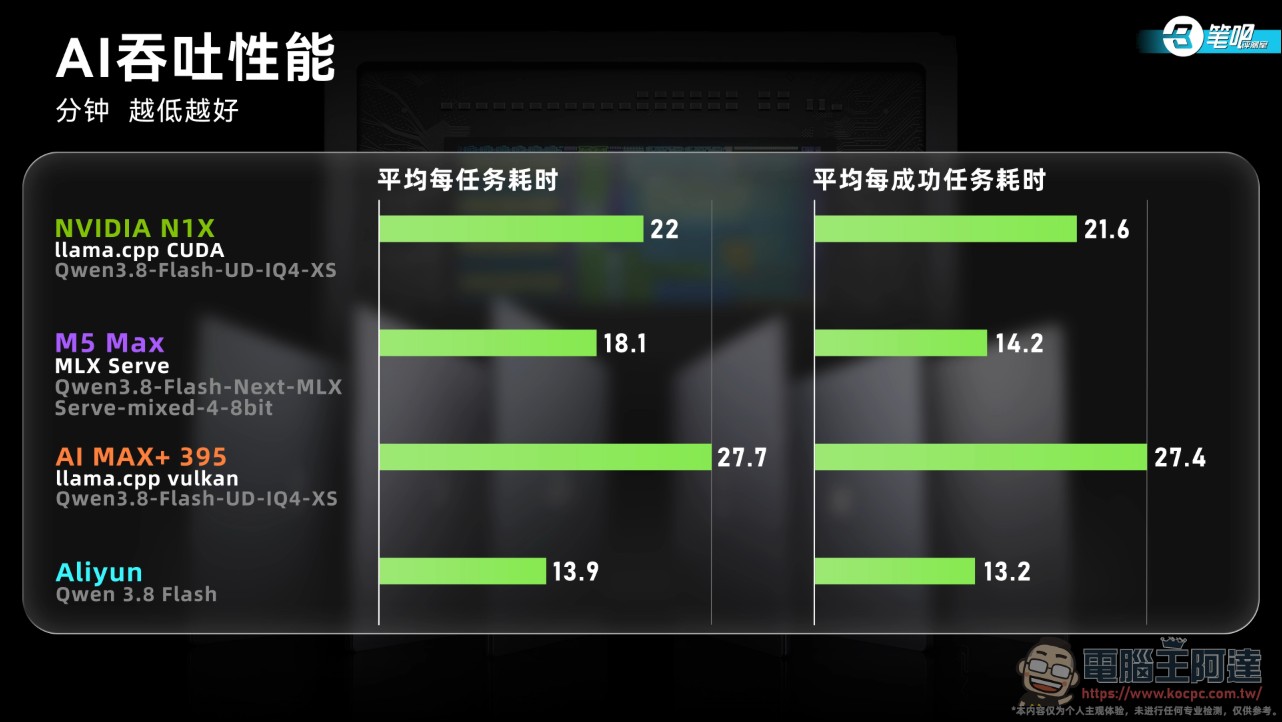
On the ecosystem side, llama.cpp already has official NVIDIA support and works out of the box; SGLang and vLLM can run via WSL but have not yet added support for RTX Spark’s shared VRAM. NVIDIA officially claims that RTX Spark can run 120B-parameter models locally, with up to a 1 million-token context. This is the most informative local AI showdown I’ve seen so far: it proves that high throughput really does translate into task completion speed (20% faster than AI MAX+ 395), but model capability falls far short of the cloud—the bottleneck is post-quantization instruction following and long-horizon stability, not hardware. The video’s line, “Fast token output doesn’t necessarily win; not stumbling is success,” is an apt commentary on local Agents.
CPU and the machine itself: a capable flagship laptop (⏱️ 11:28-15:41)
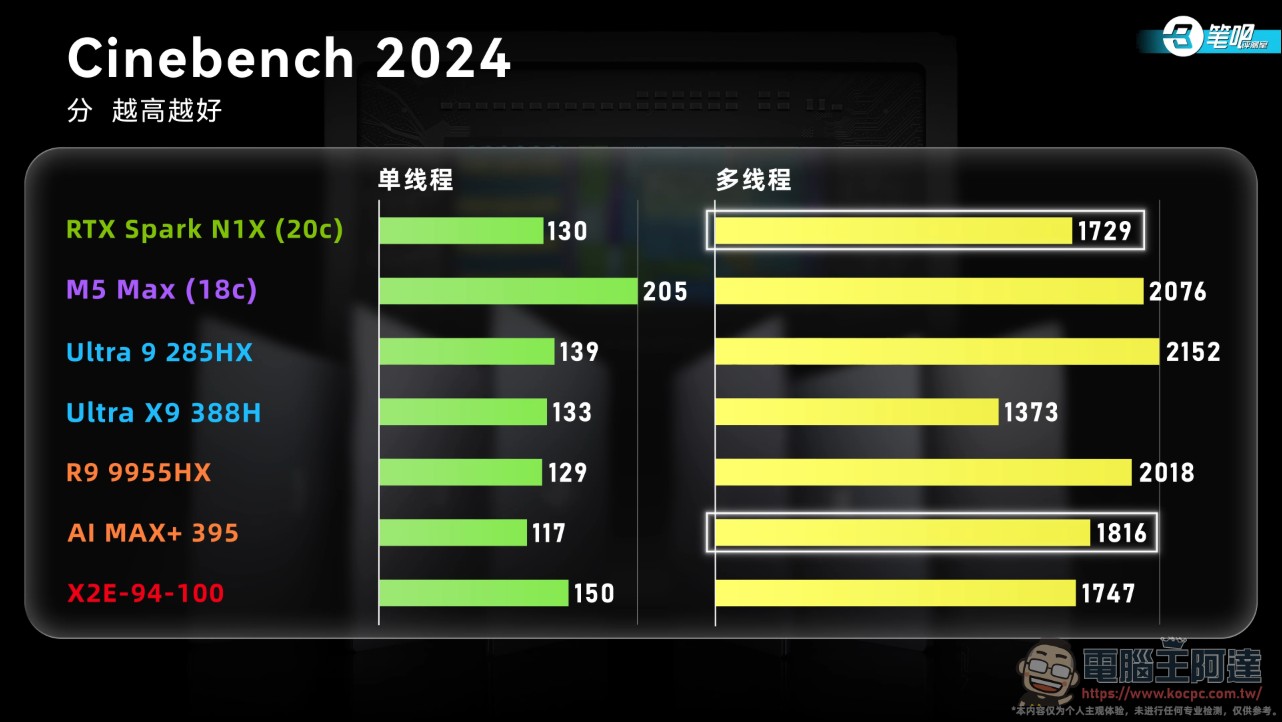
On the CPU side, ARM-native Cinebench 2024 scores 130 points single-core and 1,729 points multi-core; single-core is about on par with the Ryzen 9 9955HX, while multi-core is slightly behind the AI MAX+ 395. Cinebench R23, which requires translation, can’t keep up with the version; compared with the Qualcomm X2E-94-100, Cinebench 2024 multi-core is only 1% lower, but R23 is 7% lower, so translation efficiency seems somewhat worse than Qualcomm’s.
The machine itself does give everything a flagship should: YOGA Rhythm keyboard with 1.5mm key travel and skin-friendly coating; a 7-inch full-area pressure-sensitive touchpad with glass cover, supports 4,096 levels of pressure sensitivity, can be used as a graphics tablet, and comes with a stylus. Ports: 2A2C, all USB-C are USB 4, all USB-A are 10Gbps, HDMI and SD card slot are also high-speed, with high-speed ports on both sides; body is under 20mm and comes with a three-prong GaN charger. The 15.3-inch 2.5K OLED 165Hz touchscreen has good color accuracy and brightness, no low-frequency PWM dimming; the drawback is no AR anti-reflection, measured SCI reaches 4.74, and it easily becomes a mirror when displaying dark content.
Teardown reveals the internals: the battery has been increased from 84Wh to 92.5Wh, and measured battery life is 8 hours 15 minutes, placing it in the upper tier among NVIDIA GPU models. Cooling has been changed to a 3-heat-pipe, dual-fan inward-blowing module. At a 25°C room temperature stress test: FPU-only maintains 70W at 86°C, FurMark-only maintains 69W at 72°C, and during dual stress testing the CPU and GPU are allocated 15W and 55W with temperatures of only 63°C and 67°C, basically maxing out the 80W SoC TDP; at full load, noise at the user position is 53.9dB and the maximum keycap temperature is 43.8°C. HWiNFO does not currently support reading the N1X sensors; the data was read using NVIDIA APP.
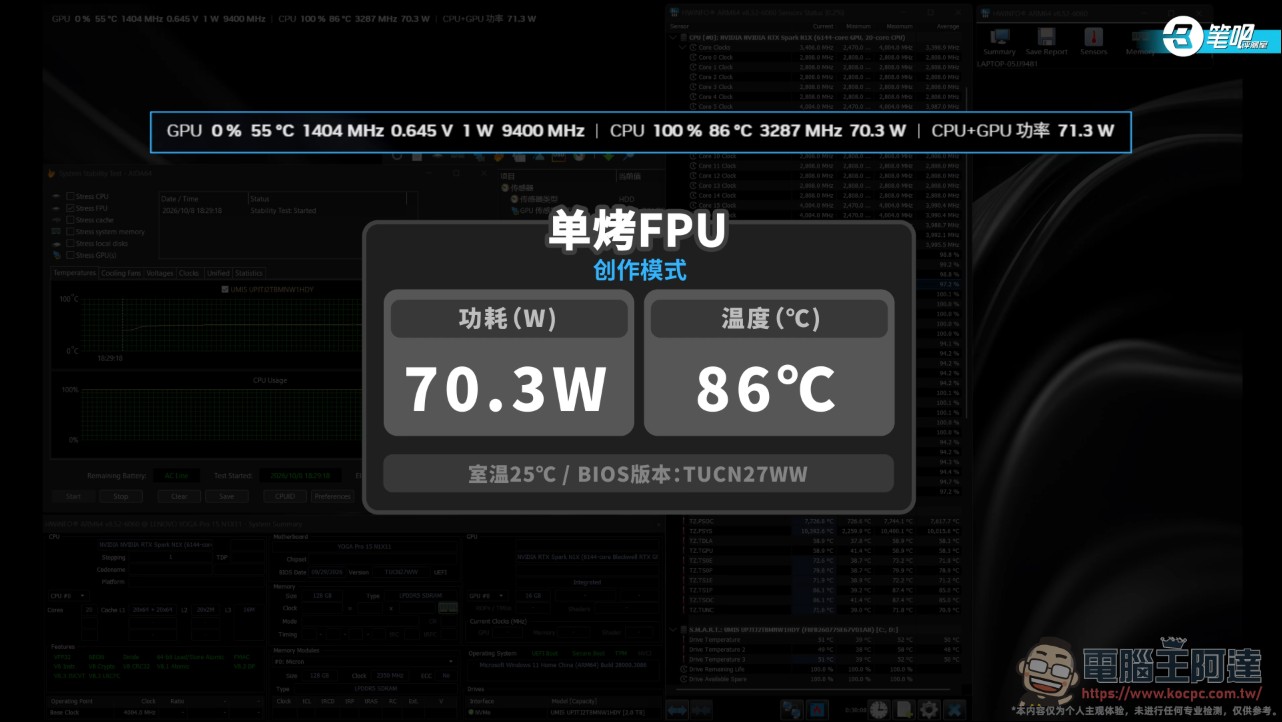
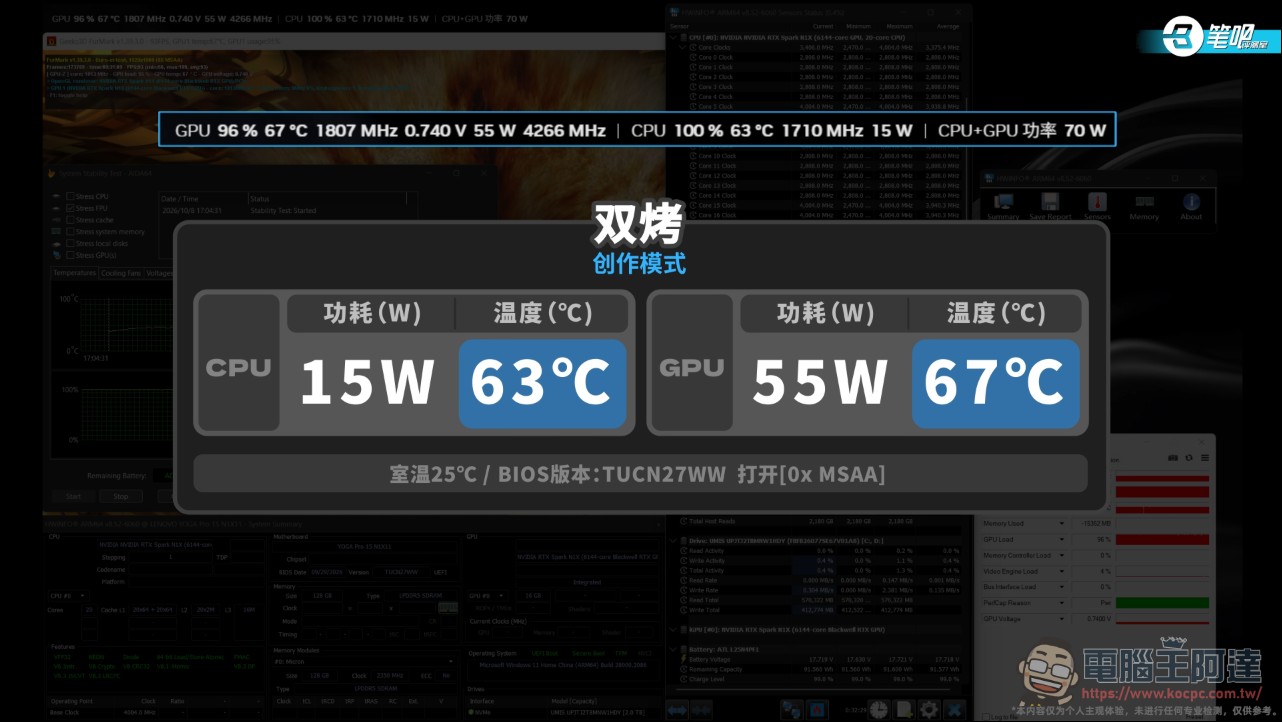
This cooling system is more than enough for an 80W SoC. Lenovo put the savings from cooling into the battery and ports, and the machine itself is a notch more polished than the chip is mature.
Conclusion: Local AI reigns supreme, but the translation tax has yet to be paid in full.
The pros summarized by 筆吧評測室: the machine’s quality is worthy of its flagship status, interface speeds are maxed out, keyboard and touchpad experience is excellent, 92.5Wh large battery, PCIe 5.0 SSD, wide color gamut OLED, and weight and thickness are also well controlled. The cooling is just right for the 80W N1X; while running at full power consumption, temperatures, noise, and surface temperatures are all not high. The cons are equally clear: as soon as it encounters translation, both CPU and GPU performance are compromised, and benchmark scores don’t match the scale. Compatibility issues with popular games are not fully resolved; some can’t get past anti-cheat, some crash, some drop frames and stutter. First-generation growing pains are unavoidable.
Local AI is this machine’s strongest trump card: RTX Spark has no rival in local AI performance among Windows laptops, and tools such as llama.cpp work out of the box, but local models’ inference quality still lags the cloud by a notch, and quantization loss is more pronounced than theory would suggest. There is also a compatibility caveat: many community NVFP4 quantization schemes built for DGX Spark cannot currently be used on Windows because of system differences. Windows on ARM has indeed improved in recent years; most everyday software now has ARM-native versions, and translating 32-bit x86 apps no longer poses serious performance problems for everyday use, but once you get to high-performance-demand scenarios, the software ecosystem’s weaknesses are all laid bare.
RTX Spark’s hardware and local AI capabilities prove that NVIDIA picked the right entry point, and unified memory plus Arm architecture truly broke Qualcomm’s monopoly in Windows on ARM; however, Adobe’s rewrite, native game ports, and developer adoption are all ecosystem efforts still in progress. What separates that from the marketing slogan “completely changing the way PCs work” is exactly the translation tax this generation of users must pay. If your work is mainly local AI, development, and creation, this machine currently has no alternative in the Windows camp; if you care about universal compatibility for games and software, this generation is not yet the time to buy.
For a more complete look at the related reviews, I highly recommend everyone check out this video:
Source: KOCPC Chinese