


With the release of the latest beta version of Android 12 this week, Google has brought a lot of new features to this new version. Computer King Ada’s team also introduced a lot of them, like more useful ones.Built-in long screenshot function,CanSystem gesture operation options to reduce accidental touches of Google Assistantfunction, and understandingDetect face position to automatically rotate screen orientationthoughtful features. After a brief trial of this Android 12 Beta 3, I found that the system actually introduced some more convenient options for web page sharing. Continue reading Android 12 new operation: share web links (teaching) report content directly on the multi-tasking page.
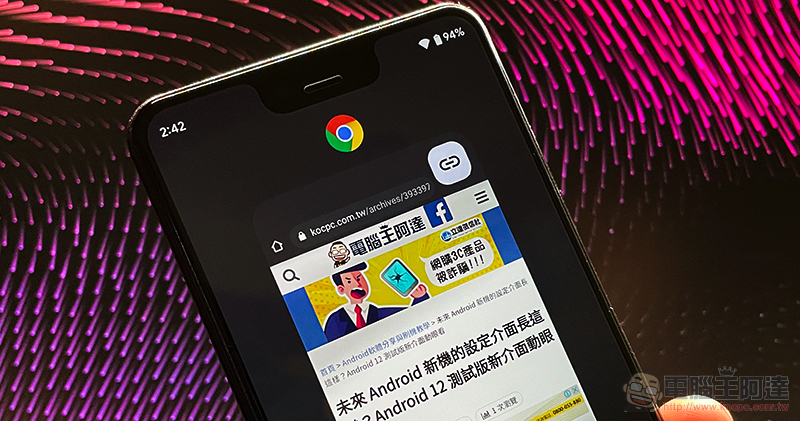
Android 12 new operation: share web links directly on the multi-tasking page (tutorial)
Although the new Android system seems to beThe third-party customized sharing menu has been tightened, but Google still has a lot of ideas for ways to activate the sharing menu, making it easier for you to share relevant content. With this update to Android 12 Beta 3, the function of quickly sharing URLs can now be launched through the “Recent Apps”, which is the multitasking page that many people are familiar with.
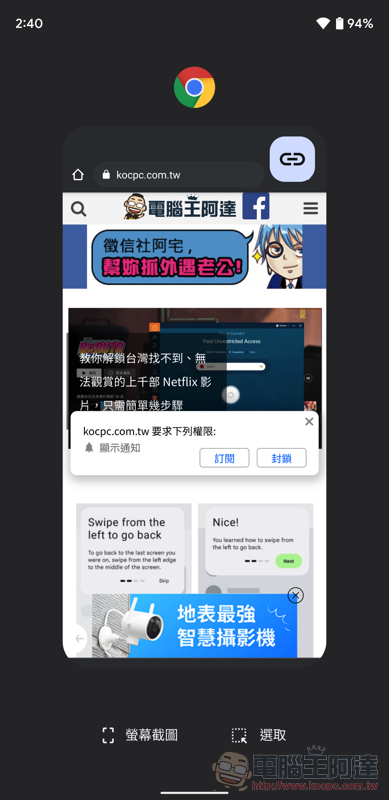
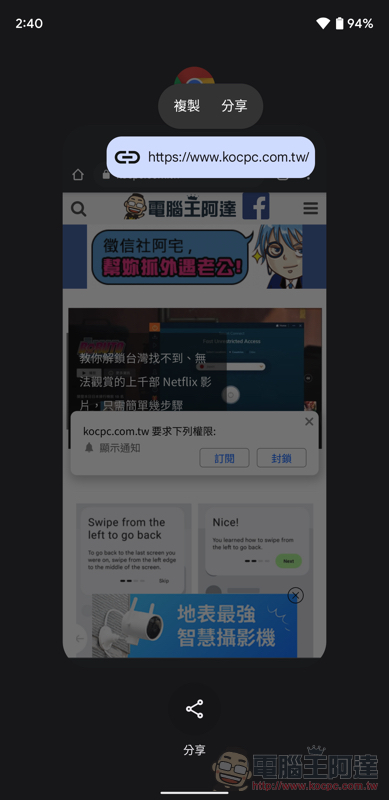
Although at this stage this feature seems to only support Google’s own Chrome browser. But basically as long as Chrome has a web page open and you launch the multitasking page, you will see a new link symbol on the multitasking page. After clicking, you can quickly share the URL of the webpage currently opened in the Chrome tab – you can directly select to copy, or use the “Share” button to share it with other applications or enable the nearby sharing function.

Speaking of which, Android actually introduced a screenshot function for multi-tasking pages somewhat unexpectedly. Now it seems that Google is planning to provide more and richer functions for the interface design of this system (after all, there is quite a lot of space up and down)? I don’t know if you think this is really more convenient?
Further reading:

Source: KOCPC Chinese