


When it comes to listening to music over Bluetooth, most people fall into two main categories: those who plug in their earphones, hit play, and think the sound quality is already great, and those who do everything possible to ensure the sound they hear remains “pristine” within Bluetooth limitations. If you’re the latter, then you’re in for a treat, because with the release of Android 17, Google Pixel phones are finally getting LHDC Bluetooth codec support. If you want to know what LHDC actually is, what changes it brings, and whether it can really improve your listening experience, you’ve come to the right place.
Android 17 will bring LHDC support to Pixel phones – what is it?
What is LHDC? What can it do?
Low Latency High Definition Audio Codec (LHDC) is not new technology. As early as 2018, the HWA Alliance began promoting it, positioning it as a solution for high-quality Bluetooth audio. Over the years, LHDC has appeared in a wide range of products: earbuds, headphones, home audio systems, and even smartphones. The truly “new” part is that it’s finally officially available on Google’s latest Pixel flagship models, with this support having actually been quietly released back in March of this year.
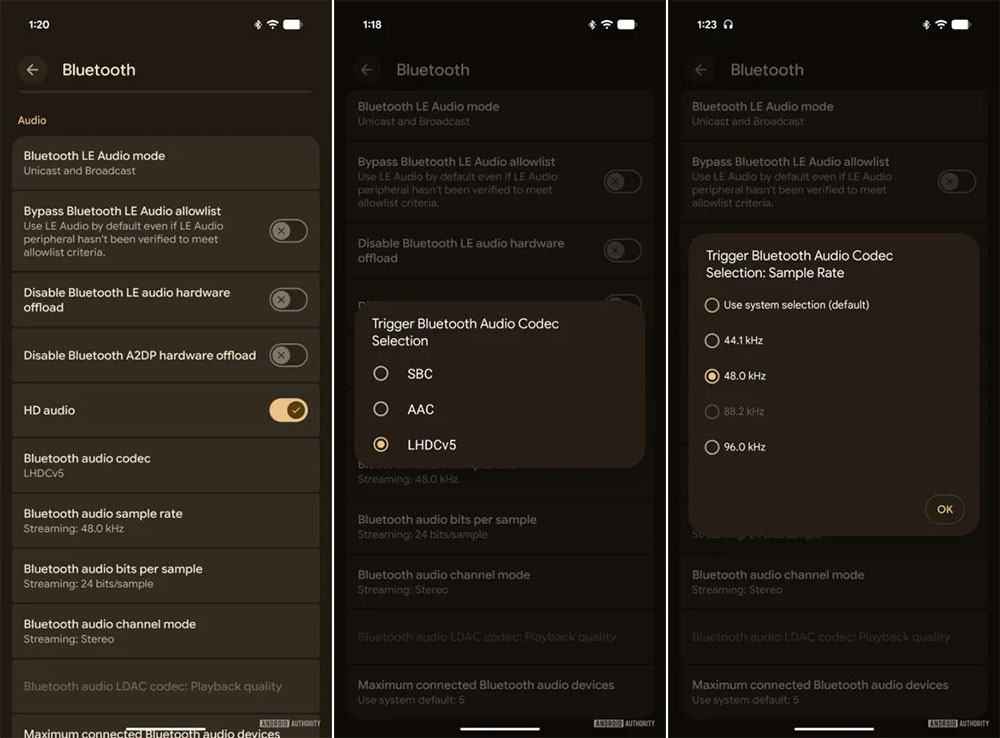
In June 2024, the Japan Audio Society (JAS) granted LHDC the Hi-Res Audio Wireless certification, making it alongside aptX Adaptive and LDAC one of the Bluetooth codecs capable of transmitting high-bitrate audio. These codecs are all considered “transparent enough” to deliver Hi-Res music wirelessly. But how does LHDC accomplish this? LHDC currently comes in several specifications:
- LHDC-48K: 16-bit / 48 kHz, up to 400 kbps
- LHDC-96K: 24-bit / 96kHz, up to 1000 kbps
- LHDC-192K: 24-bit / 192kHz, up to 1000 kbps
- LHDC-RAW: 24-bit / 96kHz, up to 4600kbps
From the specs alone, these are all high-end specifications, but anyone familiar with Bluetooth limitations knows that 1000 kbps is pushing close to the stable limit of Bluetooth connectivity. We’ll get into that later. Currently, Pixel phones support LHDC at 96kHz, while other Android brands can go up to 192kHz.
High-resolution ≠ Lossless audio: Bluetooth bandwidth remains a hard limit
Audiophiles may have already noticed that a 1000 kbps bitrate isn’t even sufficient to transmit a raw 16-bit / 44.1kHz stereo track (1411kbps). Even with FLAC Level-8 compression, it remains tight. Not to mention 24-bit / 96kHz or 192kHz tracks, which cannot be transmitted over Bluetooth without compression. In other words, no Bluetooth codec—whether LHDC, LDAC, or aptX Lossless—can truly transmit “lossless” Hi-Res audio.
What they can achieve is “high-quality compression,” not “lossless.”
Currently, publicly available information does not detail how LHDC maintains audio quality at high compression ratios. What is known is that it supports variable bit rates (160–1000 kbps). My speculation is that it may employ techniques such as noise shaping, sub-band compression, and variable bit encoding, sacrificing some imperceptible details in the high-frequency range in exchange for bandwidth. However, how it performs at low bit rates like 160 kbps remains a question worth investigating further.
High Bitrate and Bluetooth Environment: The Gap Between Theory and Reality
The biggest uncertainty factor in Bluetooth audio is connection quality. Radio frequency environment, number of nearby devices, and even the phone’s case material can all affect Bluetooth stability. To avoid dropouts or stuttering, LHDC, LDAC, and aptX Lossless all employ dynamic bitrate adjustment. Simply put:
- Better connection → Higher bitrate → Better audio quality
- Poor connection → Bitrate drops → Audio quality suffers
Listening to music with LHDC on the subway can sound much worse than at home, since the bitrate may be forced down to 160kbps or lower. So besides checking “maximum bitrate,” you also need to consider “minimum bitrate under poor conditions.” The radio quality varies drastically between different earphones and phones, making it hard to know the real performance without trying them. That’s also why LHDC supporting 192kHz doesn’t necessarily make it better than LDAC or aptX Lossless—sometimes it may even be barely distinguishable from AAC.
How to truly enjoy LHDC?
To make LHDC work, you need three conditions:
- Headphones that support LHDC
Currently, most products supporting LHDC come from Chinese brands, like the Nothing Ear 2. Unfortunately, the Pixel Buds Pro 2 doesn’t support LHDC. - Phones that support LHDC
Chinese brand Android phones generally support LHDC, while Pixel phones require Android 17 to enable it, and Galaxy and iPhone currently still don’t support it. - High-quality audio sources
You can use the FLAC library on your device with Hi-Res streaming services (24-bit / 96kHz or 192kHz), though Pixel users are currently limited to 96kHz LHDC.
Additionally, you don’t need Hi-Res tracks to benefit. High-bitrate AAC, OGG, or even CD-quality FLAC can all achieve better transmission quality with LHDC, avoiding re-compression into low-quality formats.
For Pixel users, the addition of LHDC is a long-awaited enhancement. It won’t bring a “massive leap in sound quality,” since Pixel already supports high-quality codecs like LC3, aptX, and LDAC. But the arrival of LHDC means you can use more brands and models of premium earphones, playing music at higher quality—whether you’re an audiophile or a casual listener, this is a practical upgrade.
Source: KOCPC Chinese