


Recently, the tech world was stunned by one called OpenClaw(Clawdbot; later changed its name again Moltbotwent completely viral. This, developed by an Austrian developer Peter Steinberger Self-crafted individual AI Assistantnot only within a short period of time GitHub Accumulated over 40,000 stars, it also sparked an unexpected hardware buying frenzy, with many developers frantically purchasing Apple’s… Mac miniIt even caused this mini PC to be out of stock globally for a while. What is it about Clawdbot that has tech enthusiasts so excited? How will it redefine the way we interact with AI?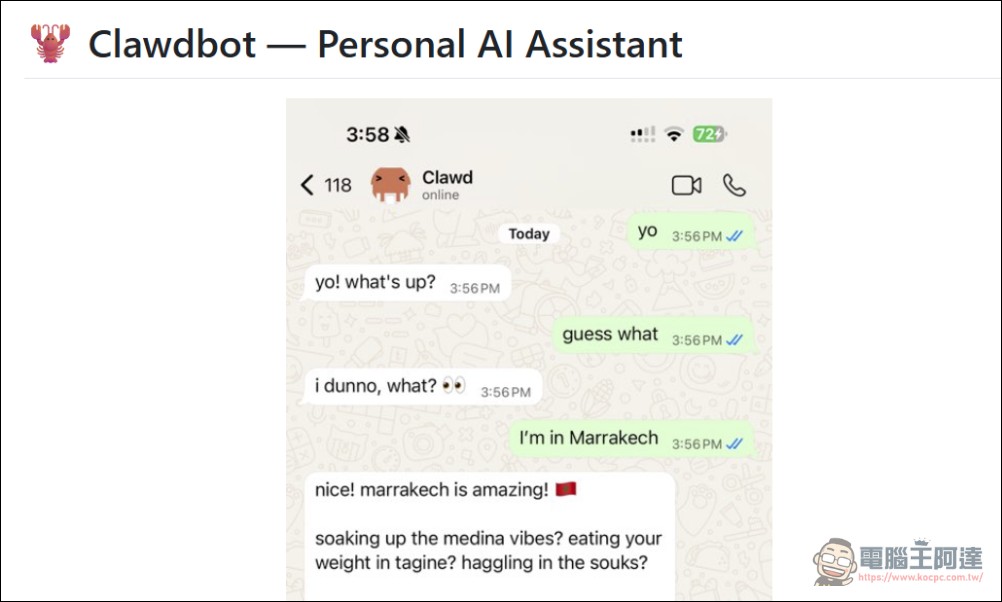
OpenClaw (Clawdbot/Moltbot) is not just a chatbot, but an AI assistant that actually gets things done.
No need to download a new app—just piggyback on your existing messaging apps
OpenClaw The most convenient design is that users don’t need to open a specific AI app. Without a fixed interface like ChatGPT or Gemini, users can simply use everyday messaging apps such as WhatsApp, Telegram, iMessage, Slack, Discord, Signal, or Microsoft Teams to directly chat with and command Clawdbot.
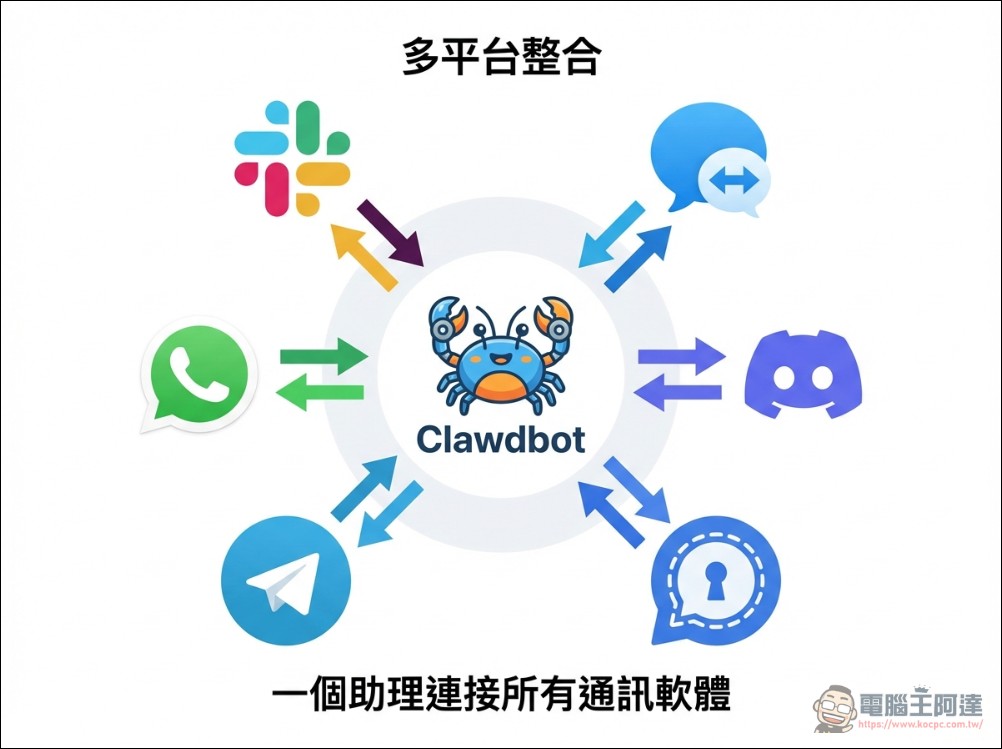
For example, when a user is out, they can send a message via Telegram to Clawdbot running on their home device: “Check the data in that Excel file on my desktop, then write me an email draft.” Clawdbot can then complete these tasks remotely. This cross-device, cross-location capability makes it a true 24/7 assistant.
This also explains why the Mac mini suddenly became a hit. This compact, quiet-running mini desktop is perfect as an AI server running 24/7. The base model Mac mini costs around NT$19,900 in some markets, making it quite cost-effective in the long run compared to monthly cloud service subscription fees of tens of dollars. On X, there were even cases of developers buying 40 Mac minis at once to deploy multiple Clawdbot instances.
i just bought 40 mac mini’s to run clawdbot all using claude max plans
you need to invest in yourself to be successful and this is my bet
it’s 2026, don’t get left behind. pic.twitter.com/hkZgs6LI6J
— Mike (@mikecantmiss) January 25, 2026
Click here to purchase Mac mini
(This is $1,700 cheaper than Apple’s official website)
The Action-Taking AI That Doesn’t Just Advise—It Delivers
Regular AI can only chat with users and provide suggestions. But OpenClaw Because it runs on the local computer with system permissions, it can directly help users operate the computer to complete real tasks. According to actual use cases, Clawdbot can write its own code and execute or debug it in the terminal; manage and organize file folders, read local documents, and archive notes; and even theoretically control lights or query system status when integrated with smart home systems. It can even help users make phone calls to book restaurants, which is incredibly powerful.
Just to see what would happen I texted Henry my Clawdbot to make a reservation for me next Saturday at a restaurant
When the OpenTable res didn’t work, it used it’s ElevenLabs skill to call the restaurant and complete the reservation
AGI is here and 99% of people have no clue pic.twitter.com/8iS5nJ7Cw2
— Alex Finn (@AlexFinn) January 25, 2026
In the community, a user shared OpenClaw In the actual operation display, he simply told Clawdbot “show some cool effects,” and Clawdbot automatically completed a series of operations including creating folders, searching for information on Google, opening the calculator application, playing sound effects, opening Wikipedia pages to search, and launching web game interfaces.
I showed my family what Clawdbot could do on the PC I gave it and…just wow
It’s actually surreal watching it happen in real time
This would give your grandma a heart attack pic.twitter.com/e9eas8fYna
— ashen (@ashen_one) January 25, 2026
Long-lasting memory with privacy protection
OpenClaw Its memory mechanism is based on local files on the user’s computer. It stores interaction content, user preferences, work progress, and other information as notes on the hard drive. This means it has long-term memory capabilities— even days later, it will still remember the presentation content the user needs to deliver, and can even proactively help draft documents based on previous discussions.

The key point is that all these memory data are stored on the user’s own computer and will never be uploaded to large tech companies’ cloud databases for training. This local-first design philosophy provides a more reassuring option for privacy-conscious users.
Open source and free, with community power driving innovation
OpenClaw Adopting an open-source model with fully public code on GitHub, anyone can download and use it for free. This decision not only lowered the barrier to entry but, more importantly, sparked innovation within the community. Currently, there are over 1,500 forked versions, with developers continuously adding new features and optimizing performance for Clawdbot.

It should be noted that, although OpenClaw The tool itself is free, but connecting to large language models like Claude, ChatGPT, and Gemini requires API calls, which incur costs. Depending on usage, monthly API expenses typically range from $5 to $20. Still, compared to the thousands of dollars per month it would cost to hire a human assistant, this is quite affordable. The community has also developed numerous extensions that continuously expand Clawdbot’s capabilities. It can control smart home devices, manage emails, schedule meetings, track to-do lists, and even write code. Some developers have described it as the real-life realization of J.A.R.V.I.S. from the movie Iron Man.
Installation Overview and Security Risks
Although Clawdbot is powerful, the installation process still presents a learning curve for average users. Users need basic terminal operation knowledge and an understanding of technical details like how to set up API keys. However, with the community continuously releasing illustrated tutorials and simplified tools, the setup process has become increasingly user-friendly, with some tutorials now claiming to complete the full setup in 30 minutes. The image below is from X (Twitter). @minchoi I translated the chart into Chinese (if it’s not clear, you can download the image below — I set the original resolution very high):
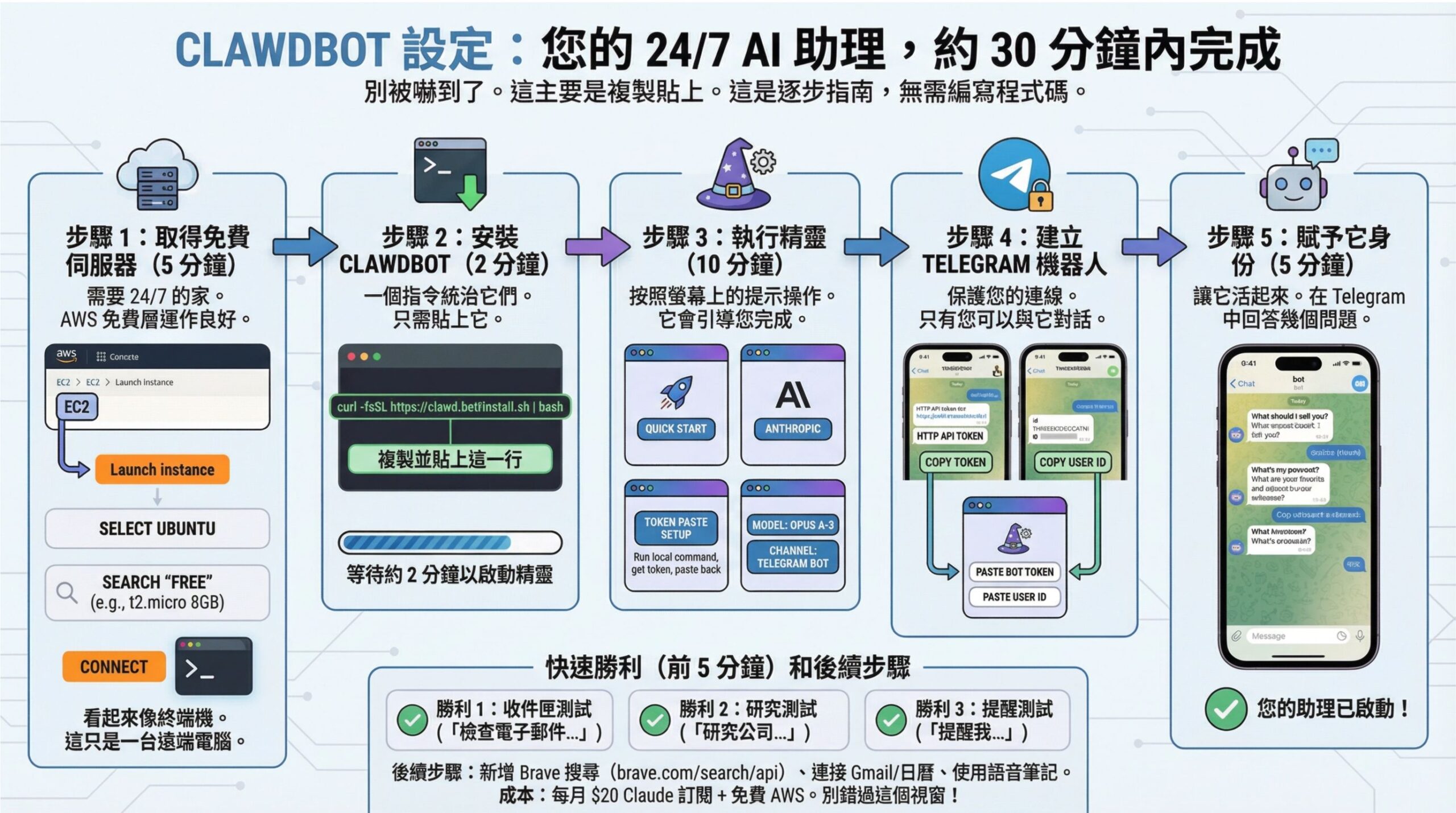
Here we also translated it on X @AlexFinn a tutorial, for those interested just to check it out. It’s very easy to install with a Mac mini (if you don’t want to watch the intro, start from 11:33). Basically, you just need to go to https://clawd.bot/ Just click to copy and paste.
If you don’t have a Mac mini, you can also use a regular computer to run a virtual machine. For the tutorial, see below.This one:
OpenClaw GitHub page (click me)
However, using OpenClaw There are also cybersecurity risks that cannot be ignored. To enable full automation, Clawdbot requires extremely high system permissions, including shell access and file system read/write permissions. This is essentially opening a backdoor in the system, and if the AI model misjudges or falls victim to a prompt injection attack, it could lead to serious consequences.
According to a report by security researcher Jamieson O’Reilly, search results from the internet scanning tool Shodan show that there are currently more than 1,000 OpenClaw Gateways are exposed on the public internet. While some have proper authentication configured, there are also instances where configuration data, environment variables, and conversation history have been exposed. In the worst cases, command execution functionality is even enabled without effective access controls.
More seriously, if an attacker obtains OpenClaw Control interface access permissions. Configuration data may contain sensitive information such as Anthropic API keys, Telegram bot tokens, Slack OAuth secrets, signing keys, and more. Chat history can span months, including private messages, attachments, and operation context. If an attacker gains write or execute permissions, they could even send messages as the user, inject content into ongoing conversations, and exfiltrate data through existing integrations in a manner that resembles legitimate traffic.

Therefore, cybersecurity experts strongly advise against installing [something] on computers that store important data or crypto wallets OpenClawThe best practice is to use dedicated equipment, or run it in a virtual machine or sandbox environment to reduce potential risks. You should also regularly update the system and OpenClaw Ensure version security
Conclusion:OpenClaw Is it the future?
OpenClaw is proof of one thing:People don’t just want an AI that can chat with them—they want an agent that can actually get things done.Although the current OpenClaw Still heavily experimental and hacker-oriented, with a steep learning curve and security risks, it nonetheless offers a glimpse of what a future “Personal AI OS” could be: an ultimate assistant that integrates communication software, operating systems, and powerful reasoning capabilities.

If you’re an advanced user who likes to try new things, and happen to have an idle Mac mini on hand,OpenClaw Absolutely one of the most worthwhile open source projects to try in early 2026. However, for general users, it’s advisable to hold off and wait for a safer, more user-friendly packaged release.
Source: KOCPC Chinese