


With earbud design AirPods Pro After the launch, Apple introduced the earplug cover fit function into the system, using sensors to detect the tightness. In the latest iOS 14 system, Apple also provides a “headphone adjustment” option for preset audio performance for all its own headphones (AirPods / AirPods Pro, EarPods and Beats headphones). Allows users to fine-tune based on their hearing, thereby providing a more customized listening experience. As for the “Headphone Sound Quality Adjustment” supported by both AirPods and wired EarPods, we have upgraded to the public beta version. This article will also teach you how to set it up in advance. Come and give it a try!
This article teaches you how to set the “Headphone Sound Quality Adjustment” that is supported by both AirPods and wired EarPods.
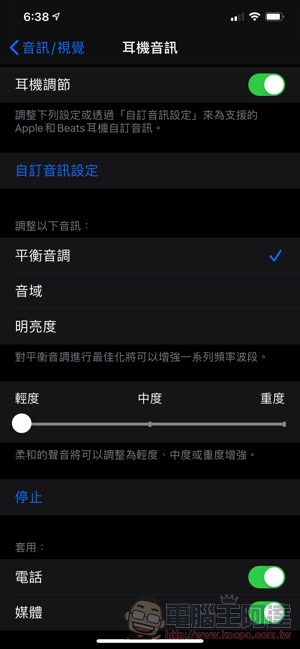
This “Headphone Audio Customization” function can be found in “Accessibility > Audio/Visual > Headphone Adjustment” in the iOS 14 settings (in fact, you can also go to the bottom of “AirPods” in Assistance).
When setting up for the first time, you will need to connect the headphones before you can turn on the “Custom Audio” setting in the headphone adjustment – you will be prompted to connect “supported” Apple or Beats headphones. After that, you can also choose which optimized frequency band you want the headphones to prefer through the options, and can choose different levels of light/medium/heavy performance and the situations it can be used in:

After wearing the supported headphones and pressing the audio customization option, the system will provide several sound effects content to let you judge whether you can listen normally (you need to find a quieter environment):


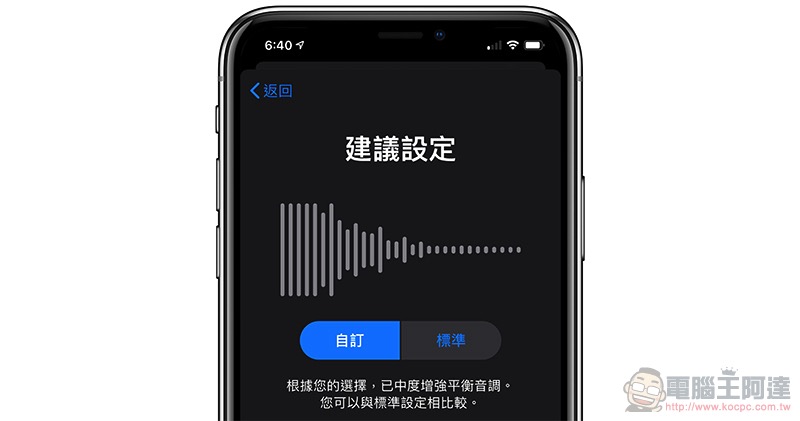
Just choose based on your own listening experience! You will eventually come to the comparison page between the “Custom” and “Standard” versions. Lets you choose your favorite settings:


What’s interesting is that when I wear AirPods, I really can’t hear the initial soft voice sound, but I can hear it normally when I switch to AirPods Pro. This may be more related to the hearing problem, but it seems that the earplug design is better at isolating noise, which helps a lot. In this regard, this sound quality adjustment function helped me select a moderately enhanced setting for a balanced tone when using AirPods. In fact, compared with the previous settings, the listening experience is indeed enhanced, making it easier to hear subtle sounds:


Overall, this headphone sound quality adjustment function should really help users obtain better listening effects within a certain range. The best thing is that it can be used not only for media playback, but also for phone calls. Unfortunately, although most Apple and Beats headphones should be supported, other brands of headphones seem to be unavailable. But it can still help many Apple users to increase the listening experience of original headphones.
Further reading:

Source: KOCPC Chinese