


Since the Wuhan pneumonia epidemic spread, the world has entered a period of alert. Of course, there are also many speculators who take advantage of people’s ignorance or panic about the epidemic to do evil. In this regard, various technology companies have taken various preventive measures to eliminate false rumors and fake information on the Internet. In the face of these pervasive malicious intentions, Google is also ready to use its various technologies to provide public assistance.
※Image source: Pixabay
Malicious programs and phishing threats related to Wuhan pneumonia are rampant, and Google strengthens user protection mechanisms
Today (4/24) Google shared recent information security issues related to the Wuhan pneumonia. In the past few weeks, it has discovered that there are as many as 18 million malicious programs and phishing threats related to the Wuhan pneumonia every day, and there are also more than 240 million spam related to the Wuhan pneumonia. Speculators have evolved from broad-based behaviors in the past to more targeted behaviors. For example, they use corresponding rhetoric, language, and other methods to guide users to click on letters and included links based on the group they want to deceive. They may also pretend to be authoritative organizations to conduct donation fraud or spread malicious programs, confusing the public and making it difficult to prevent them.
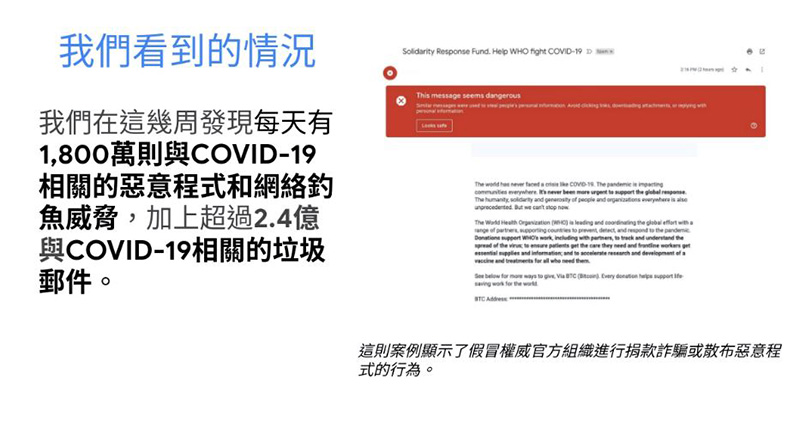
Many coronavirus-related spam messages come in the form of phishing emails, so it’s important to evaluate carefully before clicking on a link or taking any action. Please be alert when users receive emails asking for personal information, such as address and bank account. In addition, the URL embedded in the phishing link usually imitates an existing website. The difference may be one more or one less English letter. Please remember to check carefully. Users can move the mouse cursor over the hyperlink when using a desktop computer, or long-press the hyperlink when using a mobile phone to check in advance the URL connected to the hyperlink.
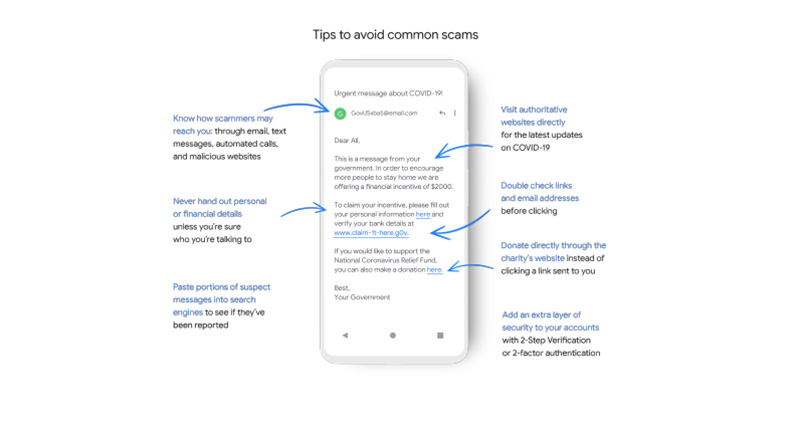
The most common fraud methods are fake authoritative health organizations, fraudulent websites pretending to be government agencies, selling products, fake financial institutions, fake non-profit organizations, etc. Their purpose is nothing more than to defraud people’s money, finances, and private information by selling without shipping, donating funds, debt collection, testing and treatment, etc. When people are in panic and uneasy, they are more likely to lose sight of things for a moment and become prey to others. Google provides the following 6 security protection mechanisms in its services to protect users’ security:
1. Built-in automatic security protection mechanism
2. TensorFlow machine learning technology to deal with phishing and malware
3. Safe browsing environment
4. Security settings check
5. Password checking tool
6. Google Play Protection
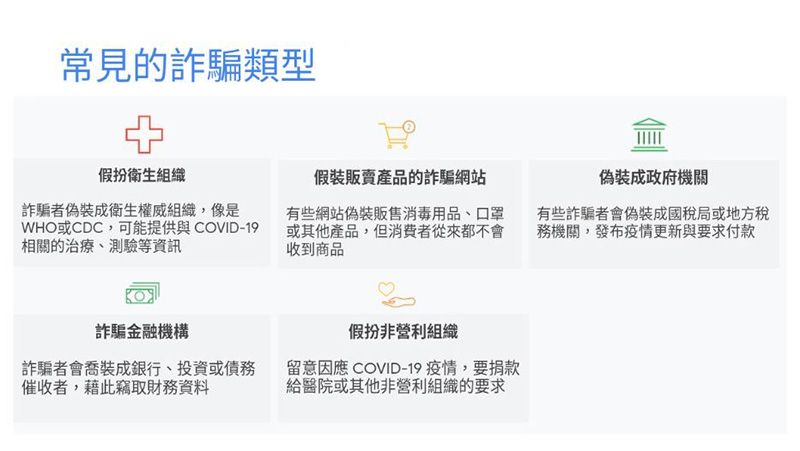
How can people proactively prevent and avoid these scams? Google also put forward 6 suggestions:
1. Use corporate email for work-related content
Many people put their company’s business information at risk when using their personal accounts or devices. Even if you work from home, it is recommended to use separate company and personal mailboxes. Company accounts usually provide more security protection mechanisms so that company business information can be kept private. If you are not sure whether the company has information security protection measures, such as two-factor authentication, you can confirm with the company IT department.

※Image source: Pixabay
2. Ensure video conferencing application information security
Choosing video conferencing software with a complete security protection mechanism can ensure that your meeting will not be interrupted due to interference from outsiders, and can encrypt and save meeting recordings to prevent the leakage of meeting secrets.
3. Please install it immediately after receiving a system or software security update notification.
When working from home, because the user is not in the office or connected to the company network, the work computer does not automatically update security devices. Therefore, it is important to keep your security system updated. These updates will address many known information security vulnerabilities.
4. Make good use of the password manager function to create and save strong passwords
When users use new online applications and services for work or school, they may be accustomed to using the same password. In fact, 66% of Americans admit that they use the same password to log in to different accounts. To ensure user profile privacy, use passwords that are unique and cannot be easily guessed. In addition, services with built-in password managers, such as Android, Chrome, and Google Accounts, can help users create effective passwords more easily.
5. Protect your Google Account
If you use a Google Account, you can easily use the Security Settings Checkup to learn about recent security issues and get personalized recommendations to protect your data and devices. You can also use the password manager to find out whether the passwords stored by users on third-party websites or accounts have been restructured or even easily tampered with. Users should also consider adding a two-step verification (also known as two-step verification) mechanism. This mechanism, like online banking or other similar services, can add an extra layer of protection. By logging in with a username and password, this two-step verification mechanism can prevent unscrupulous individuals from accessing their accounts. If your identity is a potential target of a security attack, such as a journalist, activist, politician, or high-profile healthcare professional, you can join Google’s more powerfulAdvanced Protection Plan。
6. Help ensure your children’s online safety
As schools close around the world, children are spending more time online. Users can use teaching materials to help children understand how to identify Internet spam, such as Be Internet Awesome content, or interactive learning games Interland , can also be used Family Link Create accounts suitable for your children and manage their app downloads and other usage.

※Image source: Pixabay
When receiving such doubtful letters, the most important thing is to calmly and rationally check the public information of government departments on the Internet. For ambiguous letters, donation requests, etc., be sure to check from multiple parties. Do not panic because you receive letters that appear to be from financial institutions or governments or organizations. Only by starting from yourself and being more careful when using the Internet can you ensure safety.
Source: KOCPC Chinese