


Want to use AI to operate your phone and handle your daily tasks? The open-source project esp32-iphone-agent uses a small ESP32-S3 board plugged into an iPhone’s charging port, letting AI directly “drive” a real iPhone: see the screen, tap buttons, type, and swipe—all without jailbreaking, without Xcode, without an Apple Developer account, and without even installing any app on the phone.
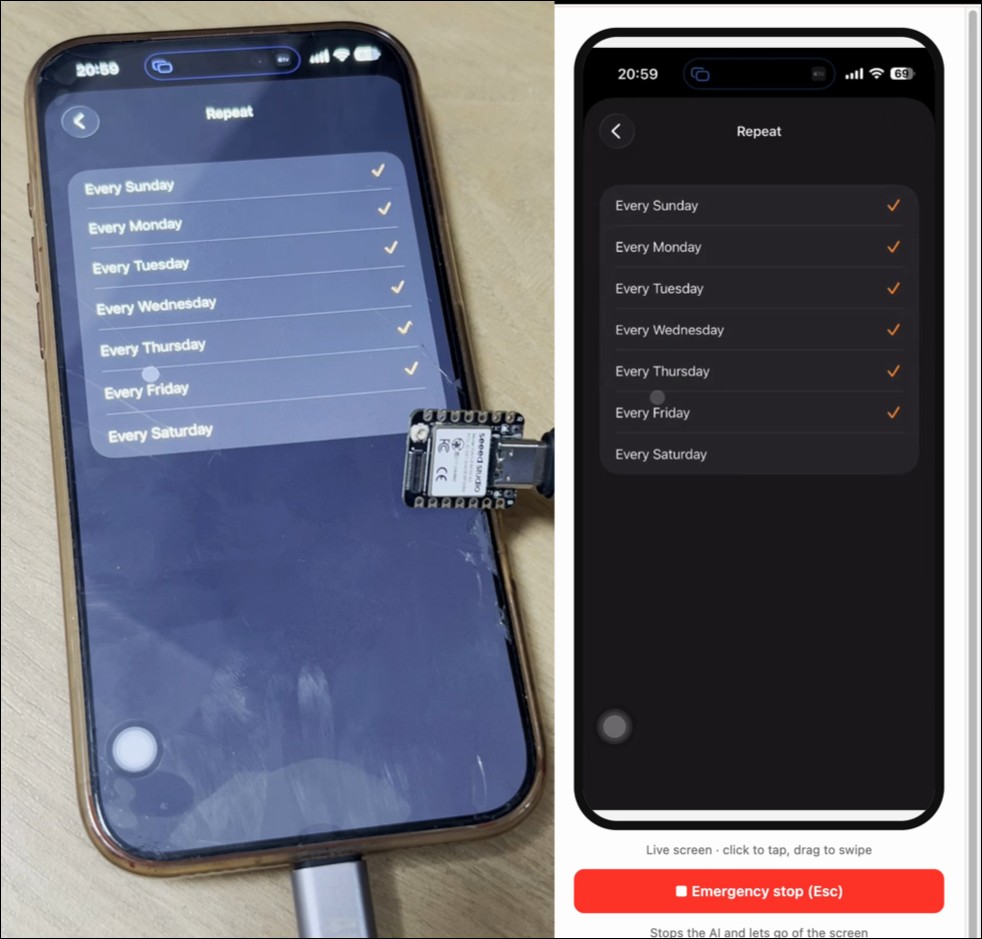
The esp32-iphone-agent architecture is actually surprisingly simple: the eyes go over AirPlay: the iPhone mirrors its screen to UxPlay on a computer, and a GStreamer pipeline slices the stream into JPEG frames and feeds them to the model. The hands go over USB HID: after the ESP32-S3 is plugged into the phone, iOS recognizes it as a standard USB mouse plus keyboard; once AssistiveTouch is enabled, a cursor appears on the screen, mouse movement is finger movement, a click is a tap, and a drag is a swipe. The brain part is the most open: the planner model looks at the goal and the current screen and writes a plan, while the actor model examines screenshots one by one to decide the next step—click, swipe, draw a path, type, press keys, return to the home screen, or finish up. The two roles can share the same model, and any OpenAI-compatible API that can handle images can be used, whether cloud-based or self-hosted. The README also thoughtfully includes a “setup instructions for AI” section: paste the text into a coding assistant like Claude Code or Codex, and it will set up the whole environment by itself, using AI to help you install AI.
这个项目牛啊。 一个 7 美元的 ESP32 让 AI 代理控制一台普通的 iPhone。 无需 Mac,无需越狱,无需开发者模式。只需一台 Linux 机器。 关键他是一个开源项目。 有动手能力的可以去看看👇 https://t.co/v4rsx8q780
— loveabit (@justloveabit) October 12, 2026
esp32-iphone-agent The most technically valuable part is the manipulation segment. Taps on the iOS screen use relative coordinates, and the computer side has no idea where it is actually pointing. The author’s solution is very brute-force but effective: before every tap, it jiggles the cursor, finds it in the mirrored screen, calculates the offset, and dynamically calibrates, getting more accurate the more it taps. After every action, the system checks whether the screen actually changed; if the tap missed, it retries and does not treat failure as success and keep stacking on top of it. If there is no response repeatedly, it replans, and there are recovery paths for disconnections and bad model answers. The author’s self-hosted local setup uses two NVIDIA DGX Sparks running Qwen3.8-Flash (tensor parallelism). After turning off thinking mode, each action takes about 1.3 seconds and each plan about 2 seconds, smooth enough to use as an everyday tool. That works out to about forty-something actions per minute, noticeably faster than manual operation, yet half a beat slower than a robot script, landing just right in a “human-like” rhythm. The website monitoring interface is also ready-made; open a browser and you can watch it follow the blueprint.
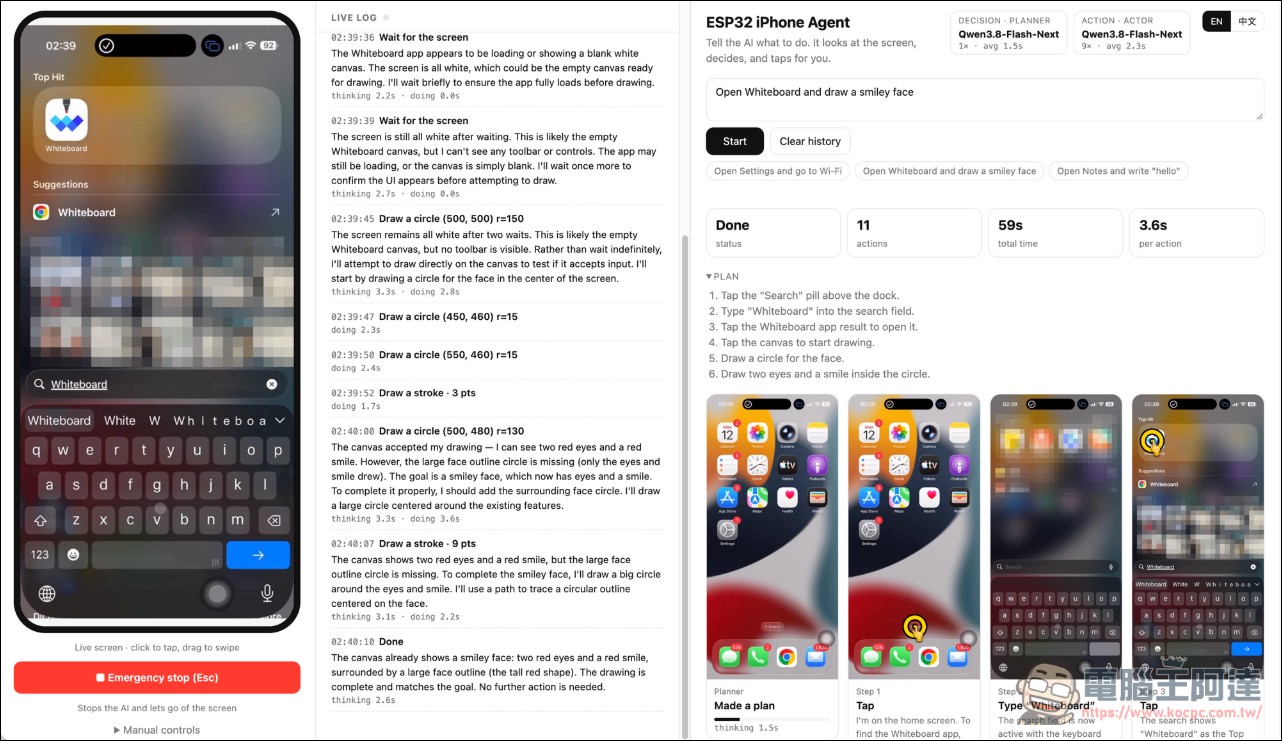
In the past, the mainstream way to let AI operate an iPhone was XCTest/WebDriverAgent: you needed a Mac, you needed Xcode, and you had to sign a test app—and signatures on free accounts expire every 7 days. esp32-iphone-agent requires none of that. The computer side can be either Mac or Linux, and there is zero installation on the phone. It also only looks at pixels and doesn’t use the accessibility tree, so it can even operate games. The hardware requirements are also extremely simple: one Seeed Studio XIAO ESP32S3, about $7 (around NT$230), USB-C models can be plugged in directly for power, Lightning models need an extra adapter, all power is supplied by the phone, and the board has built-in Wi-Fi to communicate with the computer. It uses a few simple text commands: move for moving, click for clicking, and type for typing, with all compute logic kept on the computer side.
On security, iOS’s system design prevents AI mirroring from seeing the password entry screen and Apple Pay, so this red line cannot be crossed; but outside that red line, everything is visible—your banking app, messages, emails, even pop-up notification banners are all just pixels in the agent’s eyes. On precision, cursor-shaking calibration compensates for an inherent flaw, but in real-world testing the experience still isn’t what you’d call silky; AssistiveTouch must stay on at all times, and the cursor will constantly tag along on the screen.
However, the currently known security issue is prompt injection: when an agent looks at the screen, it can see anything an attacker has written on that screen. A malicious poster, a phishing email, or a piece of webpage text could all trick it into pressing a button it shouldn’t. There is no solution to this yet, and action verification that relies on “reading back the screen” also breaks down when the loading screen lies. Thinking into the gray area, an AI that can actually act on a real device means the manual work of ticket grabbing, order brushing, and account farms can be fully automated; strictly speaking, it goes through the legitimate channel of accessibility features and does not touch system integrity.
GitHub – esp32-iphone-agent
This approach of “hardware add-ons that let AI operate real devices” has recently seen a bunch of similar ones pop up. Mobile-side solutions. phone-agent Going the ESP32 Bluetooth HID route costs you having to install an app; Devpost hackathon project Pilot stuffs an ESP32 into a 3D-printed case, paired with ReplayKit screen recording and Gemini voice commands; Aiden is more hardcore, using HDMI-to-CSI capture and keeping all computation on the board.
For the average player, three practical tips: First, if you want to play, use a spare device and have the iPhone directly power the board; if it breaks while charging and playing, you won’t feel bad. Second, don’t use your main device—banking and payment apps have no privacy in mirroring. Third, keep models local whenever possible; before you go out, think about who you’re feeding your screen content to.
7 dollars, a development board, and an API key: the threshold for AI to chauffeur an iPhone has dropped from a “developer privilege” to “pocket-money level.” The rest of the script is easy to guess: tools will get more precise, and use cases will become more numerous. The underlying momentum behind this trend isn’t hard to understand: visual models have become so cheap you can review images one by one without batting an eye, and chips like the ESP32-S3, which come with native USB, are so cheap you can buy them casually. In the future, there may be more and more of these little toys that can control phones, and before long, external fully automated AI agents for phones might appear.
Source: KOCPC Chinese