


Zoom is currently the most used video conferencing software. It has been exposed to security controversies recently. Instead of debating whether Zoom is safe at this stage, it is better to try other video conferencing software. I have used Skype communication software and Zoom before, and when I was looking for other video tools, Microsoft developed another “Meet Now” service. It is actually a Skype connection method that does not require installing software or registering. I personally think it is quite practical, and the most important thing is that it is free!

In fact, most of the netizens and students around us still use Zoom video conferencing software, and many people also use Microsoft Teams. In fact, for small and medium-sized enterprises, the key is to be simple, easy to use and free, and Skype-basedMeet Now video conferencingThe service allows you to easily get it as long as you have a browser, and you don’t need to install any software or register. It’s really convenient!
[Meet Now Service]:https://www.skype.com/zh-Hant/free-conference-call/
Open your browser and enterMeet Now’s Chinese version page, you don’t need to download Skype or any software, and you don’t need to log in to your account. When the following picture appears, click [Create Free Meeting].

When you see a generated link, just copy the link and share it with the people who want to join the video using social software.

The author prefers to use the [Share Invitation] button directly, because it is also very convenient to use email.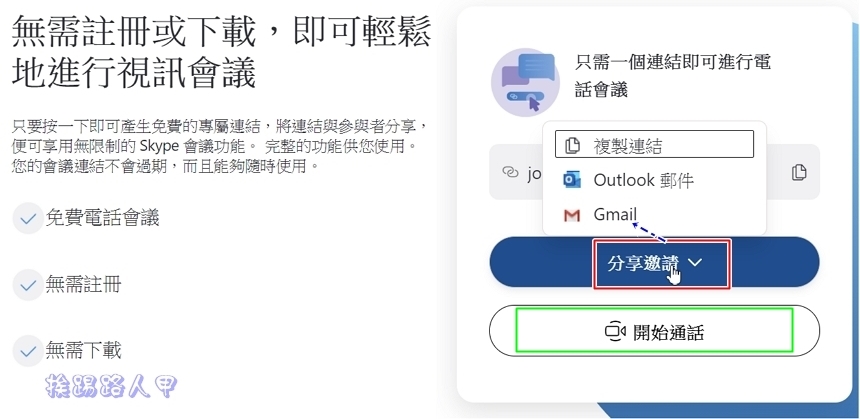
Enter the email screen and see the meeting link invitation. Click Send to send the meeting link.

Return to the original meeting and press [Start Call] to enter the video conference. Before joining, a message to open Skype will appear (if you have installed Skype). Ignore pressing [Cancel] and click [Join as Guest].

After entering the name, click [Add].

In this screen, the room is waiting for participants to join. In fact, there is no need to wait for everyone to arrive. You can directly press [Start Call].

After the meeting is opened, you can wait for others to log in.

As people join one after another, they can still have video and text chats. With the new coronavirus epidemic in sight, Microsoft’s Meet Now is a good choice. Once again, there is no need to register or install software, and it is easy to choose remote video conferences. Plus, it is free.

If you find that the microphone cannot be turned on, remember to go to “Advanced” in “Settings” to turn it on!

Sure enough, after turning it on, the microphone switch is no longer gray.

Further reading
- TuneFab Apple Music Converter removes the shackles of DRM and easily converts MP3 music
- TuneFab Spotify Music Converter easily downloads MP3 files and listens offline without ads
- Lightweight and fast free compression and decompression software Bandizip
Source: KOCPC Chinese