


Compared with the iPhone password that may be unlocked dozens of times a day, for users who rarely spend money in the App Store, the opportunities for Apple ID to be used are relatively few. Because of this, many people find that they can’t remember the password when they actually have to enter their Apple ID password. In fact, don’t worry if you forget your password. Today I’m going to share how to easily and quickly reset your Apple ID password on iPhone.

What should I do if I forget my Apple ID account password? You can reset it right from your iPhone! (teaching)
according to Apple official policy, Apple ID must use a strong password. Moreover, the password rules are a bit cumbersome.Password must be “8 or more characters” and “contain both uppercase and lowercase letters”, and “at least one number”.Users can also add additional characters and punctuation marks to further increase the strength of the password. Apple also has other password rules in place to make sure your passwords aren’t easily guessed.
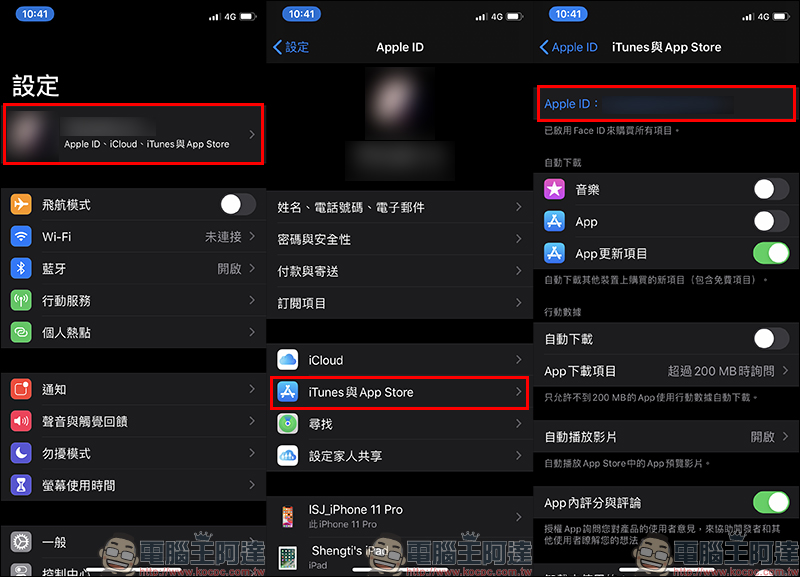
When it comes to Apple ID accounts and passwords, although the probability of forgetting the account is relatively low, for people whose usual mailboxes and Apple IDs are different, there may still be many people who are not sure what their Apple ID account is. First, open “Settings” and click on Apple ID at the top of the screen to enter, then click on “iTunes and App Store”. You will see the complete Apple ID account on the next page!
Since this article will teach you how to directly reset the password of Apple ID using iPhone, click on Apple ID in this step (as shown in the red frame on the right in the picture below):
At this time, click “iForget” in the function menu of the floating window to reset the Apple ID password. But before that, the user must first enter the “unlock” password of the iPhone. After completing the verification, the user can reset the new Apple ID password:
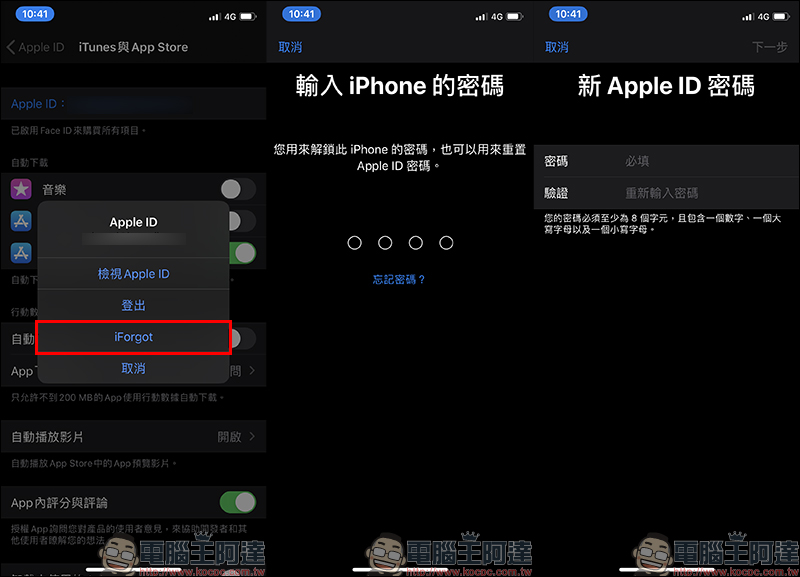
Isn’t it much simpler than imagined? As for users who use iPad or iPod touch, don’t worry, because in fact, the operation steps of the other two devices mentioned above are exactly the same as those of iPhone. As long as you follow the same steps, you can easily retrieve your Apple ID password!
Further reading:
Can you directly change the iCloud password by logging in to the iPhone unlock password and close Find My iPhone directly?

iOS Safari Tips You May Not Know: How to find keywords in web content and web page titles in tabs?

Source: KOCPC Chinese