


Compared with Android mobile devices, which have a higher degree of system freedom, in the iOS / iPadOS used by Apple iPhone / iPad devices, in the past, the convenience of exchanging files other than photos was actually relatively poor. However, after the new generation of Apple systems has introduced applications such as the “Files app” that are specialized in managing and integrating multiple cloud services (and also support file access from external storage devices), more and more third-party applications are now supporting this application to gain a more free way of productivity – the latest one to join this support is the Gmail app that many people love. Continue reading Gmail app will provide iOS Files support Text of the report.
▲Image source: Google
Gmail app will provide iOS Files support, of course for attaching files
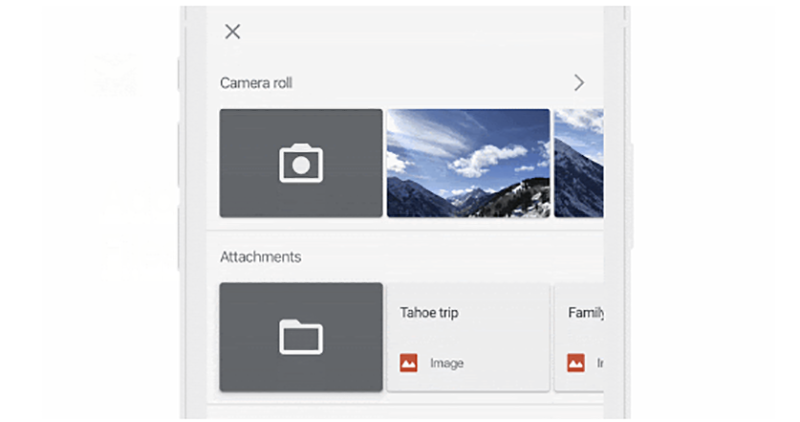
In the past, in the iOS Gmail app (or basically all three-party mail apps), you could only add some photos to attached files, or at most, if you were using the Google Drive cloud service, you would have the opportunity to import other files through this method. Now, since the original iOS apps can also be integrated with the Files app to provide more diverse file support, Google recently officially announced that the Gmail app’s attached file function has integrated this feature.
▲Image source: Google
I have to say that Google is really following up on iOS features very quickly (although the editor has not received this update yet). In the latest version of the Gmail app for iOS, you can import the files supported by the Files app into the attached file of the message – it is not yet sure whether USB external devices can be supported, but if it can directly support Files / files, it should not be difficult in theory (after all, even if it really doesn’t work, you can just throw the file to the local machine).
In addition, now that the Files app can already integrate Google cloud services, after importing this function, it is not sure whether the “Cloud Drive” file attachment function originally provided directly by Gmail will still exist independently.

▲Image source: Google
Google’s original blog also uses simple animations to demonstrate how to use the Gmail app integrated with the Files app. Basically, when replying to a letter or composing a new email, you can open this interface by clicking on the file paper clip in the upper right corner. At this time, the first item in the second row of the attached file function column is the button of the iOS Files app. Once clicked, it will be the same as the original iOS mail app, allowing you to select the file you want to use in the interface.
Pictures/sources cited in this article
Further reading:
Facebook finally has a dark mode, but the Lite version of the app is available first (tutorial)

Source: KOCPC Chinese