


Previously, using Gemini in Chrome required the Chrome browser interface to be set to English, which wasn’t very convenient for Chinese users. The good news is that Google recently announced support for over 50 languages, including Traditional and Simplified Chinese. This means you no longer need to switch your browser to English just to use Gemini in Chrome!
While it has expanded to more countries this time, unfortunately Taiwan is still not on the list, meaning it remains unavailable at this stage.
Google announces Gemini in Chrome now supports 50+ languages, expanded to 3 countries
If you’re not quite sure what Gemini in Chrome is, let me also briefly explain it here.
In simple terms, Google has directly integrated its Gemini AI assistant into the Chrome browser. No additional extensions are needed—just click the Gemini icon in the browser’s top-right corner, and a side panel appears where you can chat with the AI directly, similar to competitors like Perplexity Comet and ChatGPT Atlas.
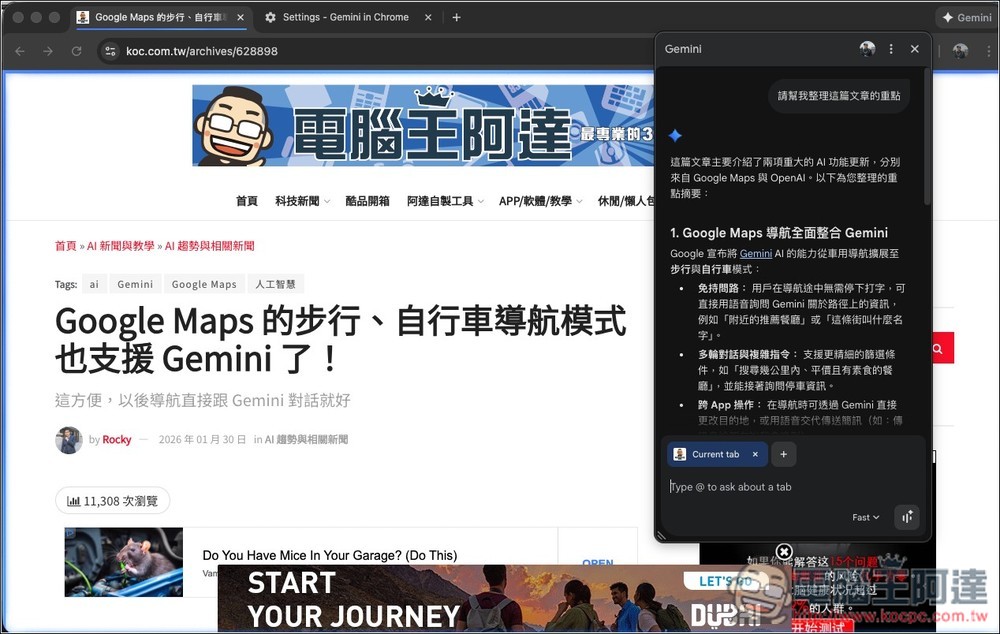
Compared to separately opening the Gemini webpage, Gemini in Chrome lets you get things done without leaving your current page. For example, when you’re reading a long English article, you can ask Gemini to summarize the key points directly. When comparing prices while shopping online, it can also analyze multiple tabs you have open (up to 10) at the same time and present the comparison results for you.
Besides web-related operations, it also supports various Google services, including Gmail, Google Calendar, Google Maps, and YouTube. This means you can send emails, create events, look up location information, and even ask questions about YouTube videos directly in the sidebar, without switching pages at all.
Originally, Gemini in Chrome only supported English, but earlier Google’s official blog announced over 50 new languages, covering major languages like Traditional Chinese, Simplified Chinese, Japanese, Korean, French, German, Spanish, Hindi, Thai, Vietnamese, and more. For Chinese-speaking users, you can now chat with Gemini in Chrome even with your interface set to Chinese. In addition, support is no longer limited to just the United States—Canada, India, and New Zealand can now also use it, marking Gemini in Chrome’s first expansion to more countries.
In addition, Google also mentioned that Chrome now has more built-in AI capabilities, such as directly integrating the newly launched Nano Banana 2 into Chrome, allowing users to generate/edit images through text descriptions in the sidebar without opening new tabs or re-uploading files. For example, if you want to see how a piece of furniture would look in your living room, you can use prompts to have AI visualize it for you.
On the security front, the model has also been trained to recognize known threats (such as prompt injection attacks). Additionally, before executing sensitive operations (like sending emails or creating calendar events), the system will first display a confirmation window and only proceed after user confirmation, preventing AI from taking unauthorized actions.
Google also announced that Gemini in Chrome will continue expanding to more countries and regions throughout 2026. Since it already supports Chinese, I suspect Taiwan won’t have to wait long to get it, so we can look forward to that.
Source: KOCPC Chinese