


After a long half year of waiting,Perplexity Announced on July 28, its AI Agent tool “Personal Computer“Officially launched on Windows platform. Since its launch at the beginning of this year, this tool first operated in the cloud, and then expanded to Mac. Now it has finally entered the desktop operating system with the largest market share in the world, allowing Windows users to directly schedule AI Agents to handle daily work in the local environment.
According to Perplexity’s official description, Personal Computer is a “local Agent work platform” that can directly dispatch multiple AI Agents on the user’s computer to complete research, write programs, browse web pages, create documents, etc. across local files, connected applications and networks. The biggest difference from traditional AI assistants is that it not only answers questions, but can actually “do things”, including opening files, editing spreadsheets, creating presentations, and even connecting workflows across applications.
Personal Computer is now available in the Perplexity app for Windows.
Personal Computer is the local agent harness for your work. It orchestrates agents across your local files, connected apps, and the web.
Research, code, browse, and build all inside one unified system. pic.twitter.com/9W7lweCG8k
— Perplexity (@perplexity_ai) July 28, 2026
From cloud to on-premises: The evolution of Personal Computer
Perplexity’s Agent product line has gone through several important phases. In February 2026, Perplexity first released the “Computer” function. At that time, it was a multi-model scheduling system in the cloud. The backend could use more than 19 AI models to handle complex tasks (it was also the first service to allow AI to directly control computers, earlier than Claude and Codex). This breaks the framework of other AI companies’ products that can only use their own models, allowing the system to automatically select the most suitable model based on the characteristics of the task.
Perplexity 推出 AI 電腦「Perplexity Computer」功能!自動完成整個工作流程,整合 Claude、ChatGPT、Gemini 等模型
In March of this year, Perplexity launched Physical version of Mac Mini hardware, with a monthly fee of US$200 (approximately NT$6,500), the AI Agent is bound to a dedicated device for execution. This approach has caused a lot of discussion in the industry. Turning a Mac Mini into a 24-hour AI workstation is a novel concept but it also means that users need additional hardware investment.

In April, Perplexity liberated Personal Computer for Mac from proprietary hardware and turned it into software that can run directly on the user’s Mac. In May, Microsoft 365 and Teams were further integrated, allowing Agents to directly operate Office files and conferencing systems. It was announced in June that a Windows version would be coming soon, and it won’t officially go live until July 28.
The core function of the Windows version: not just chatting, but helping you do things
Personal Computer for Windows is designed to “operate directly in the user’s desktop environment.” Unlike traditional AI assistants that can only talk in a browser window, it can be launched from anywhere on the Windows desktop and schedule tasks between local files, applications and the network.
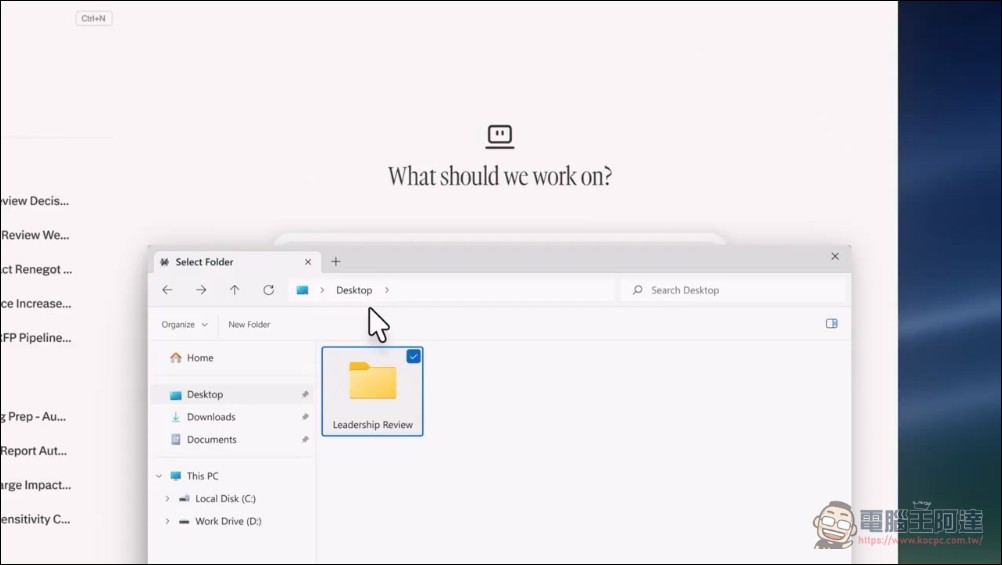
Local file accessIt is the core capability of this product. Users can specify the folders that are allowed to be accessed, and the AI Agent can search, open, read, edit, and write files within the authorization scope. Perplexity emphasizes that the software will only access folders and files explicitly authorized by the user to ensure privacy control. This means that the Agent can directly read the draft report on your desktop, modify the Excel spreadsheet, and even help you create a new Word file without the need for you to manually upload the file.
400+ App Connectors It is the key to connecting external services in series. Through App Connectors, Personal Computer can pull data from services such as Snowflake, Salesforce, HubSpot, Microsoft Outlook, OneDrive, etc. and use it in local files. For example, business personnel can ask Agent to pull customer data from Salesforce, combine it with a quotation table in Excel, and automatically generate a Word report or PowerPoint presentation.
Deep Microsoft 365 integrationOn the other hand, Agent can directly operate Excel, PowerPoint, Word, Outlook and other files. According to Perplexity’s demonstration, users can ask the Agent to read the latest prices from the local Excel quotation table, automatically update the corresponding content in Word or PowerPoint, and then synchronize and save the modified version. Perplexity specifically mentioned in the official blog: “Enterprise work is often performed on local Windows devices, and these tasks have been beyond the reach of AI in the past.”
Multi-model schedulingIt is the underlying technology of Personal Computer. The backend can schedule more than 20 top AI models. Users do not need to choose the model themselves. The system will automatically assign the most suitable model for processing according to the type of task. This “model-agnostic” architecture allows Perplexity to not be limited by the strengths or weaknesses of a single model, and can call the most suitable model for different tasks (such as text writing, data analysis, and code generation).
security mechanismOn the other hand, before performing sensitive operations (such as sending emails, deleting files), the system will proactively notify users and wait for confirmation. Enterprise-side Connectors will inherit existing permission management, data retention and compliance policies, and Perplexity states that it will not use enterprise data for model training.
Subscription plans and pricing: Available from Pro to Enterprise
Personal Computer for Windows is currently available to Pro, Max and Enterprise subscribers and supports Windows 10 and Windows 11. The Perplexity Pro plan costs US$20 per month (approximately NT$650), and the Max plan costs US$200 per month (approximately NT$6,500).
Previously, Personal Computer was only available to Max and Enterprise Max users, and the monthly fee threshold was as high as $200. The price was too high and kept many people away. This expansion to the Pro level with a monthly fee of US$20 significantly lowers the threshold for use, allowing more general users to have the opportunity to experience the working mode of the local AI Agent.
Positioning differences from other AI desktop tools
The launch of Personal Computer allows Perplexity to compete head-on with rivals such as Microsoft Copilot and Google Gemini on the “AI Agent Desktop” track. Microsoft’s Copilot is deeply integrated with the Microsoft 365 ecosystem, while Google’s Gemini is centered on Chrome and Google Workspace. The strategic difference of Perplexity is that it spans multiple ecosystems at the same time, connects services from different vendors through more than 400 App Connectors, and uses multi-model scheduling to handle various tasks.
For Windows users, this means that the usage pattern of AI assistants is changing from “opening a browser and asking questions” to “distributing tasks directly to the Agent on the desktop.” When the Agent can read local files, operate Office files, and connect to enterprise tools, the application scenarios of AI will expand from pure information query to actual work execution. Windows support significantly lowers the barrier to adoption for enterprises, as the majority of enterprise work environments are still dominated by Windows. However, similar functions are now supported by Claude and Codex, such as Computer Use, which allows AI to control the computer to perform work. Perplexity can be said to have “got up early and rushed to the evening market” in this area. It is hard to say how much space there is in the market for lowering the price and launching the Wundows version so late.
Source: KOCPC Chinese