


Google Photos is a versatile app that offers a variety of options for backing up photos and videos. However, if you’re someone who takes a lot of photos and videos on your phone, the backup intervals can be harder to predict. Google Photos backups often drain your phone’s battery, especially when the app doesn’t offer scheduling options.
Google Photos’ backup feature will soon be more battery-friendly
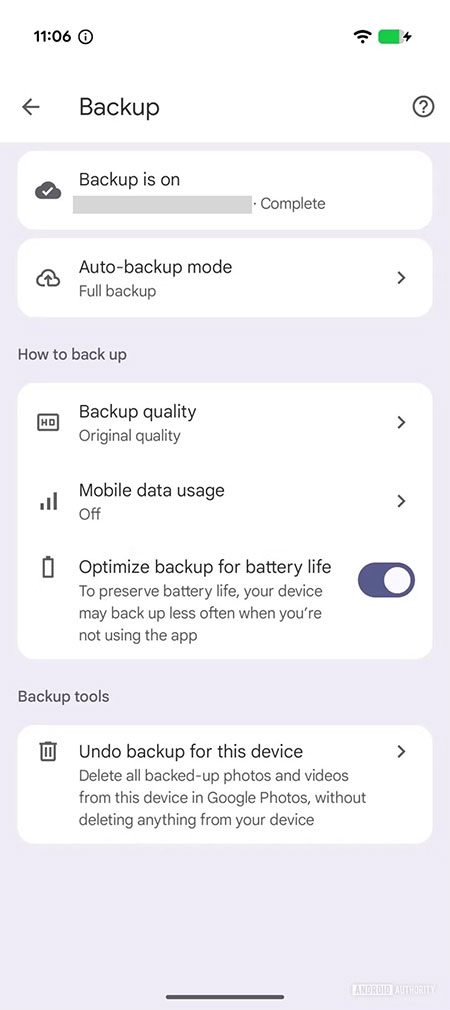
Google is aware of this issue with Photos and is developing a new toggle to optimize backups and extend battery life. Foreign media Android Authority This toggle feature was discovered in version 7.59 of the Photos app, giving us a sneak peek at its location and how to use it in the backup settings.
When this toggle is enabled, as described in the accompanying instructions, your device may reduce the frequency of backups when you are not using the app. This means that backup activity may only be enabled when you open the app, and all background uploads may be paused or minimized. This system does have some drawbacks—for example, you might not be able to find your most recently taken photos or videos on all your devices. But when it comes to balancing battery life and functionality, you always have to make some trade-offs.
Ideally, users should have an option to back up media only when connected to a charger; this option used to be available in the Photos app but was removed in 2017. However, the new option set to be added this time should be a good alternative—and perhaps even the best solution. The Photos app already allows you to back up exclusively via Wi-Fi and to control—or even completely restrict—mobile data usage during uploads. However, regardless of the type of network you use, backing up high-quality videos and photos to the cloud consumes a significant amount of battery power. With this in mind, it makes perfect sense to limit the times when backups occur.
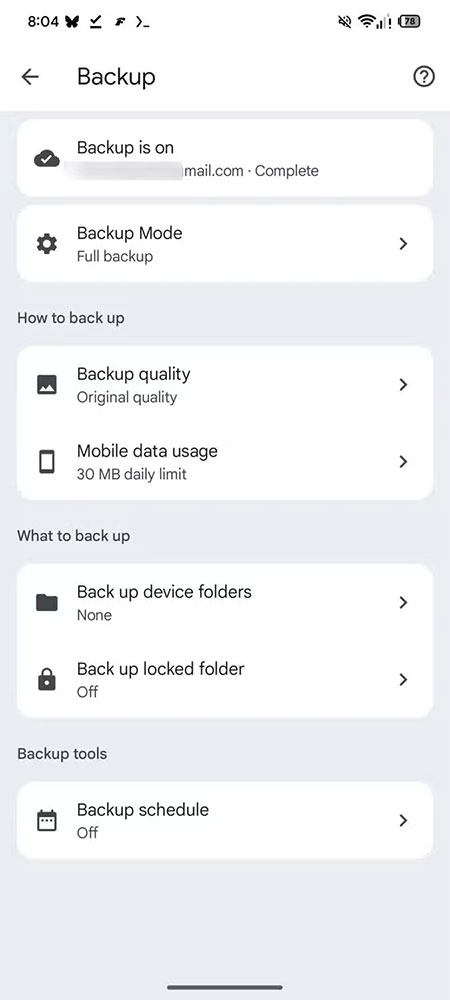
In addition, Android Authority also discovered a new “Backup Schedule” option on the backup page; unfortunately, there are no further details explaining how this feature works. However, this work in progress shows that Google Photos is beginning to take the media backup experience more seriously. At the same time, a Material 3 Expressive redesign of the Google Photos interface has been revealed, which will bring a fresh visual look to the existing layout.
Since these features have been officially confirmed by Google Photos, there is no further information yet on when they will be made available to the public. We just hope the wait won’t be too long, as additional backup options would be very helpful for frequent users of the service.
Source: KOCPC Chinese