


Phrasing phone calls are really annoying. I usually keep my phone ringer on in case I need to be contacted in case of emergencies, but this also means that my iPhone will ring with several inexplicable harassing calls almost every week. These calls are especially annoying when I need to keep quiet at home to avoid waking up my family members who are taking a nap. Fortunately, the “call screening” function launched in iOS 26 solves this problem and effectively reduces phone harassment.
This iPhone trick can reduce spam calls
Call screening is not an exclusive feature of Apple Intelligence and can be used as long as your iPhone can be upgraded to iOS 26. I enabled this feature when it launched in beta, and it’s blocked a lot of spam calls since then, but only if you turn it on first.
Here are the steps to enable call screening:
- Open the Settings app.
- Scroll to the bottom and click “APP”.
- Find “Phone”.
- In the “Filter Unknown Calls” section, the three options are for:
-
Never
Default mode. Unsaved numbers will ring normally, and missed calls will appear in “Recent Calls” as usual. -
Ask for the reason for the call
Instead of ringing, the iPhone first asks the caller for the purpose of the call. After the other party answers, you will receive a text summary and then decide whether to answer. -
mute
The most aggressive blocking method. All unsaved numbers will be muted and forwarded to voicemail without any questions asked.
-
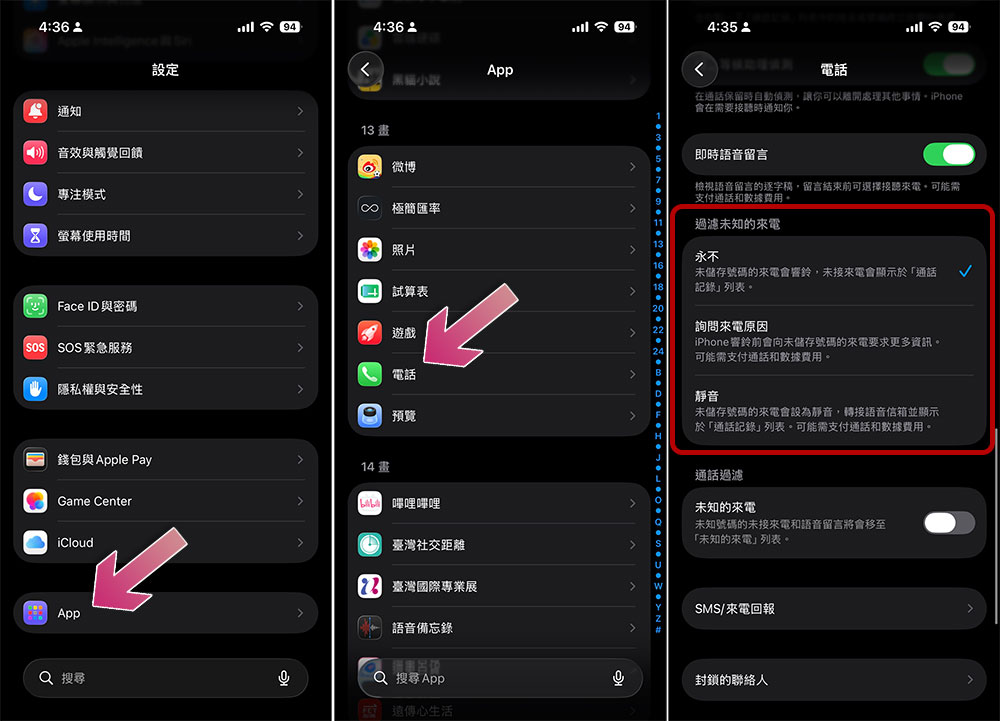
For most people who want to reduce nuisance calls, “asking the reason for the call” is the most compromise option. Scam calls will occasionally answer questions, but really important calls, such as medical institutions notifying test results, can also be seen by you smoothly. If you select “Silent”, these important calls may be ignored; if you select “Never”, you must endure all unknown calls.
If you try “Ask for the reason for the call” and feel it’s not suitable, you can always go back to the settings and switch to other modes. Of course, you can also directly put your iPhone into silent mode to avoid being disturbed by incoming calls.
Source: KOCPC Chinese