


ChatGPT Pro is OpenAI’s highest-tier personal subscription plan, with a monthly fee starting at $100, so when people see a chance to get it for free, almost anyone would be tempted—especially since all you have to do is register for an online event to get 3 months. But you need to be extremely careful with deals like this: even if the event looks formal and the webpage looks almost identical to the official event page, foreign cybersecurity researchers recently found that it is actually a phishing trap designed by hackers. If you follow the instructions and log in to your Microsoft or Google account, access to your account may fall into hackers’ hands, and even having two-factor authentication enabled may not necessarily stop them.
Image source: Bleeping Computer
The free 3-month ChatGPT Pro giveaway is a trap! A fake OpenAI campaign steals Google and Microsoft accounts and can even bypass two-factor authentication.
According to foreign media Bleeping Computer Report, Push Security researcher Luke Jennings In the report, they noted that in late October they detected and blocked multiple instances of customers’ browsers connecting to fake event registration pages, the most prominent of which impersonated an OpenAI Academy event website. The page promoted an online livestream on November 4 titled “ChatGPT for Social & Digital Marketing Teams,” highlighting how social and digital marketing teams can use ChatGPT and offering 3 months of ChatGPT Pro for signing up.
The process is roughly like this: the victim first receives an event invitation email. The link in the email does not go directly to the phishing site; instead, it first goes through a Google short URL (c.gle, share.google) or a Zapier zpr.io redirect. One redirect chain even first detours through x.com’s logout page. These are all domains people normally trust, so they are less likely to be blocked.
After you click through, you’ll first see a Cloudflare “Confirm you’re not a robot” human verification screen. For most people, this screen is very common, and it actually makes the whole process seem even more legitimate. But its real purpose is simply to block security companies’ automated scanning tools. Push Security notes that most public scans of these domains stop at this page and never see the phishing content behind it.
After passing verification, you are taken directly to an event page impersonating OpenAI Academy. The page states that you need to register with a work account and provides two buttons: “Continue with Microsoft” and “Continue with Google.” More importantly, these event pages are automatically translated into the visitor’s language, meaning that when users in Taiwan open them, they may see a Chinese version and are more likely to mistake it for an official international event.
The phishing trap currently being reported mainly targets “corporate accounts,” because a company’s Microsoft 365 or Google Workspace account can connect to internal documents, customer data, and cloud drives, making it much more valuable to hackers. Push Security also noted in its report that many employees now want to use the latest AI tools, which makes AI a very good lure.
If you choose a Microsoft account, a “Confirm access” window will pop up on the webpage, showing a verification code and asking you to copy it down. Then, after you click “Open Microsoft,” the actual Microsoft device sign-in page will appear, and the URL is completely legitimate.
The whole process may seem fine to you, but this trick is actually called “device code phishing.” It exploits Microsoft’s normal device sign-in mechanism, which was originally used for devices that are hard to type on, such as smart TVs and game consoles. For example, after the TV screen displays a code, you enter it on the official page on your phone and sign in, and the TV can then gain access to your account:
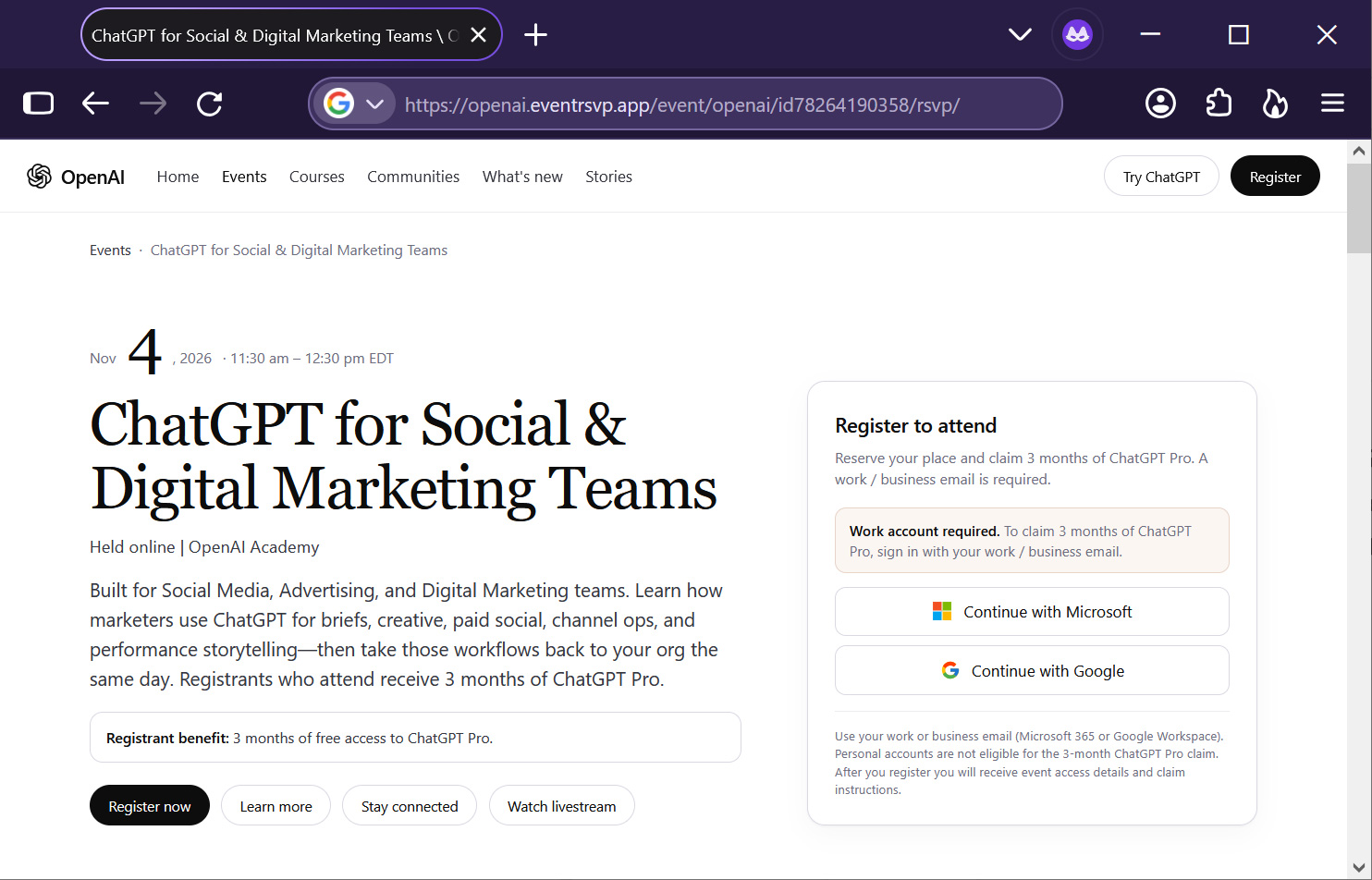
Image source: Push Security via Bleeping Computer
Except this time, that code was generated on the hacker’s side. After you enter it, log in, and click Agree, the login token issued by Microsoft is delivered to the hacker’s Kali365 session—essentially, you opened the door for the hacker yourself. Because the entire process takes place on genuine Microsoft pages and the password and two-factor authentication are entered as usual, it is very difficult for victims to notice anything is wrong:
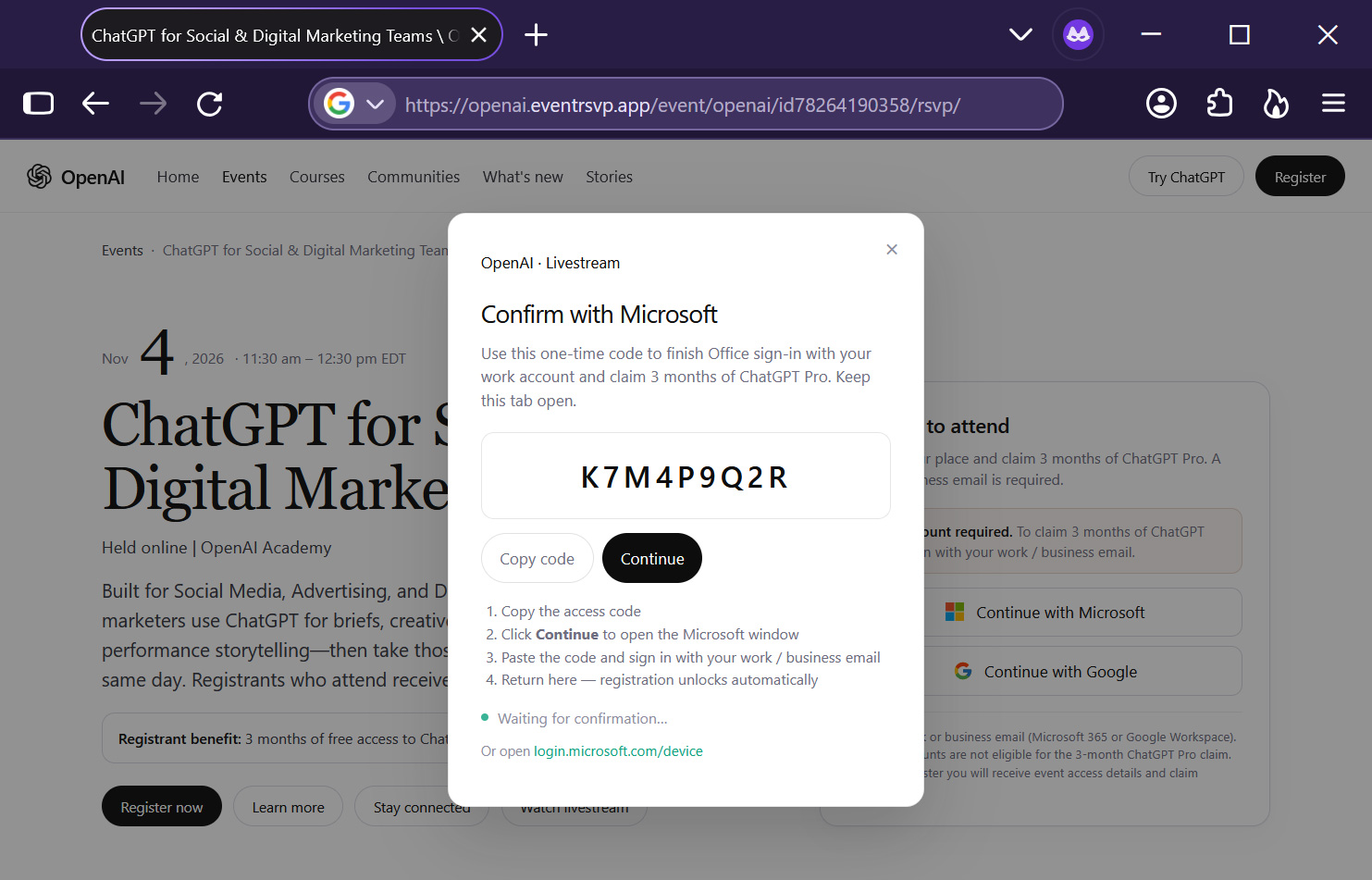
Image source: Push Security via Bleeping Computer
And it’s not over yet: the fake event page will then display “Signed in as…, opening Microsoft 365” and take you to a fake Microsoft login page set up by VoidProxy, stealing your password and session cookie a second time and giving the hackers another backup means of access.
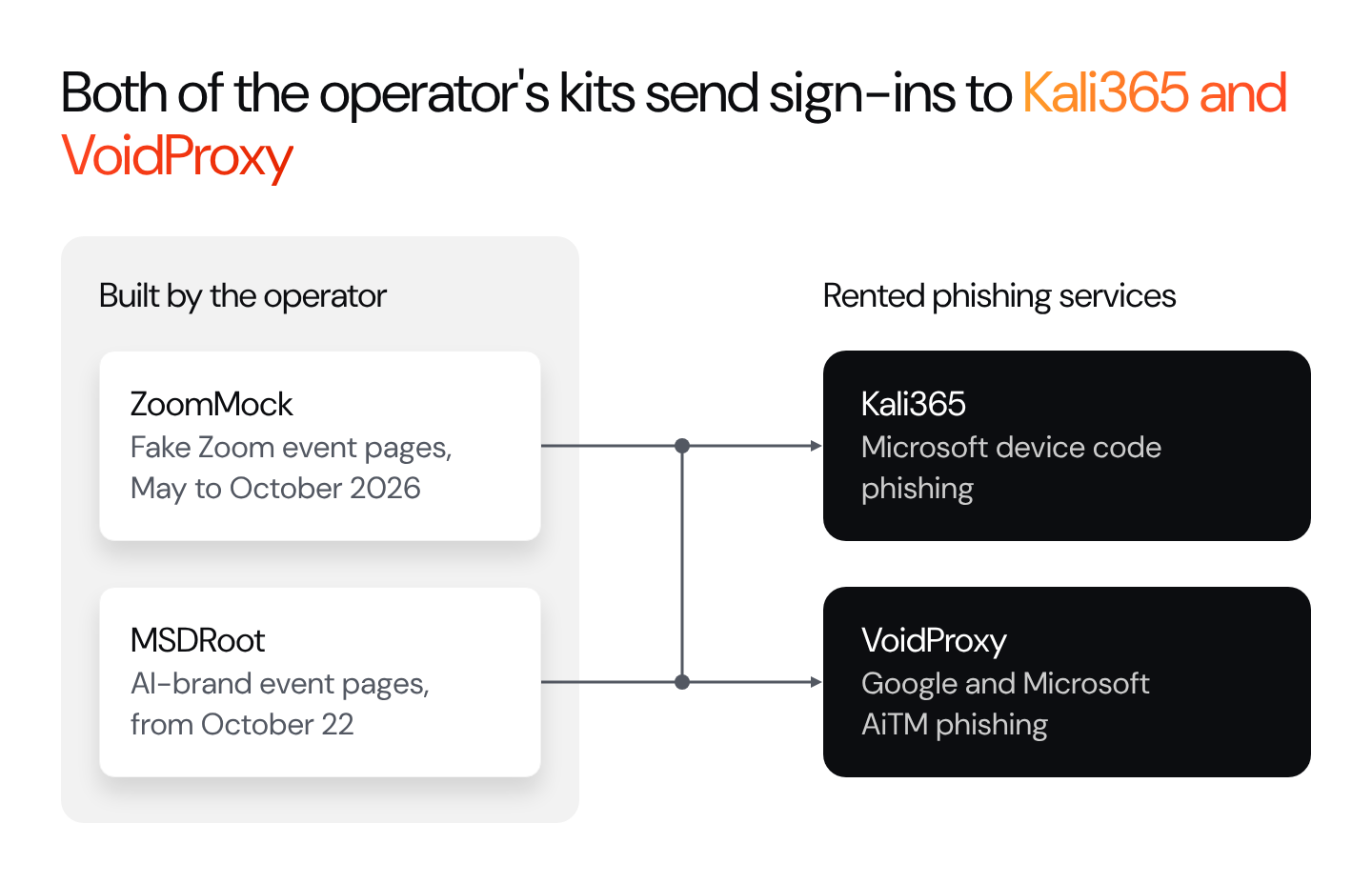
Image source: Push Security
If you choose to sign in with a Google account, the webpage will pop up a window titled “Portal” that looks like a normal Google sign-in screen. But this window is actually opened on VoidProxy’s reverse-proxy domain. The hacker’s server sits between you and Google: whatever you enter, it forwards to Google, while also copying your password, two-factor authentication response, and post-login session cookie in full.
It’s not just ChatGPT Pro—researchers also found other versions in the same phishing campaign, such as:
- SpaceX: Faked an invitation-only “Starship Product Briefing” on November 12, themed around SpaceX’s AI marketing and Grok; registrants could choose between “3 months of Grok Heavy” and “one share of SpaceX stock.”
- Anthropic: Fake “Anthropic at AWS re:Invent” event. By the time researchers investigated, the page had already been taken offline; it was among the first batch of new fake event pages to appear on October 22.
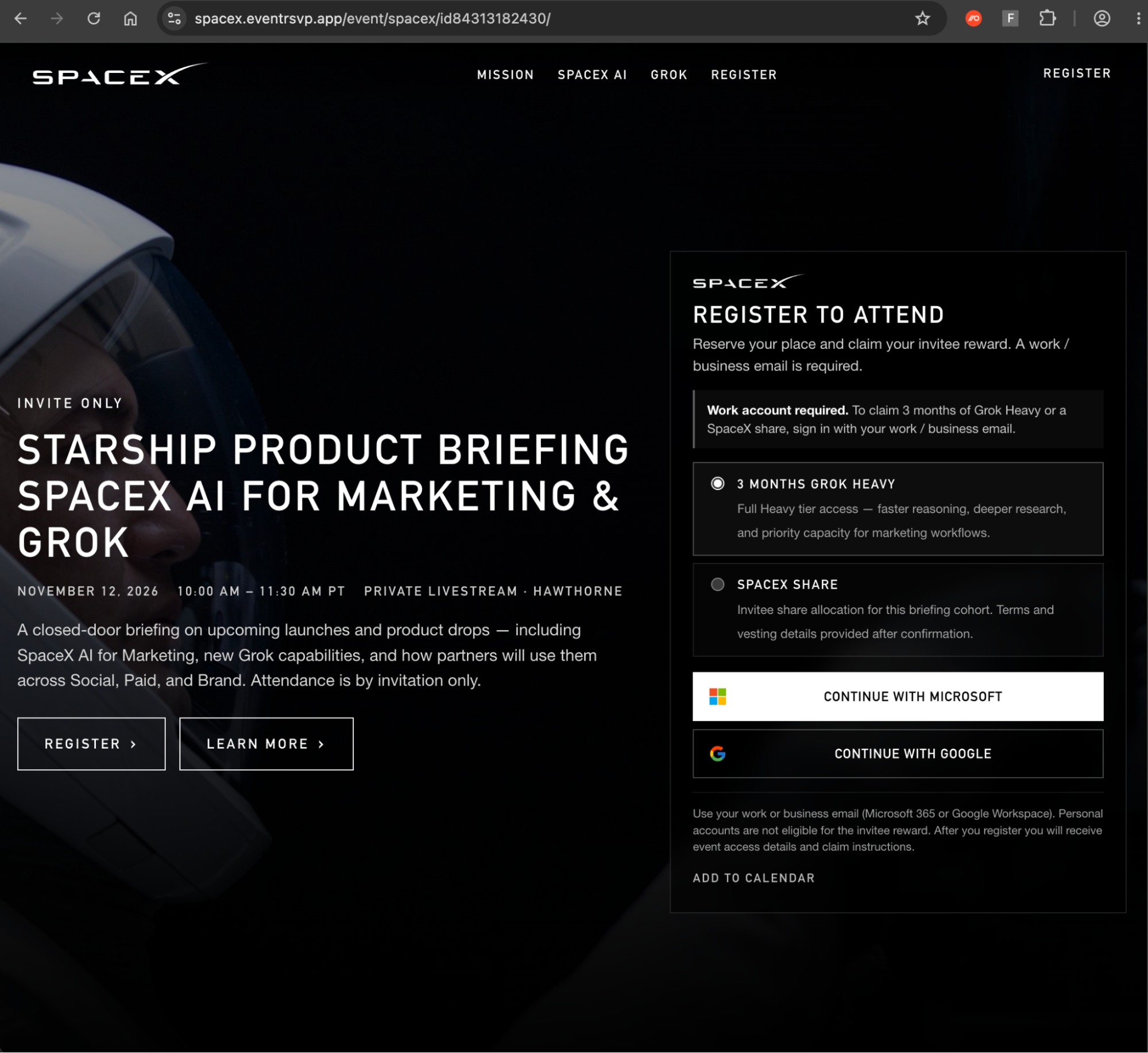
Image source: Push Security
So from now on, whenever you receive any invitation event for AI benefits, you really need to be extra careful—for example, first check online whether the official source really has this event, and don’t casually enter device verification codes, and so on.
Don’t assume that because you’ve enabled two-factor authentication, your account is at low risk of being stolen. That’s not actually true—it can still be bypassed through man-in-the-middle attacks or device-code phishing.
Source: KOCPC Chinese