


In this AI era, fraud is no longer just a matter of shooting birds. Scam groups will use various AI tools, such as AI voice imitation, deepfake face-changing, and even use cross-platform data analysis to set more difficult traps.
At the same time, computer viruses are also evolving. Hackers have begun to use AI to develop self-learning AI viruses. They can easily bypass signature scanning of traditional anti-virus software and quietly sneak into computers to steal data or carry out blackmail.
Facing the dual threats of “mobile phone AI fraud” and “computer AI virus” in 2026, self-identification or basic anti-virus alone is obviously insufficient. More powerful cross-device AI protection is needed, and Trend Micro’s “AI anti-fraud expert + PC-cillin cloud anti-virus” is a very good combination.
This article will give you an in-depth analysis of how the “AI Fraud Prevention Expert” on the mobile phone and the “PC-cillin Cloud Edition” on the computer use AI to quickly identify various fraud techniques and ensure that online activities are not invaded by viruses.
Free trial of PC-cillin cloud version + AI fraud prevention expert
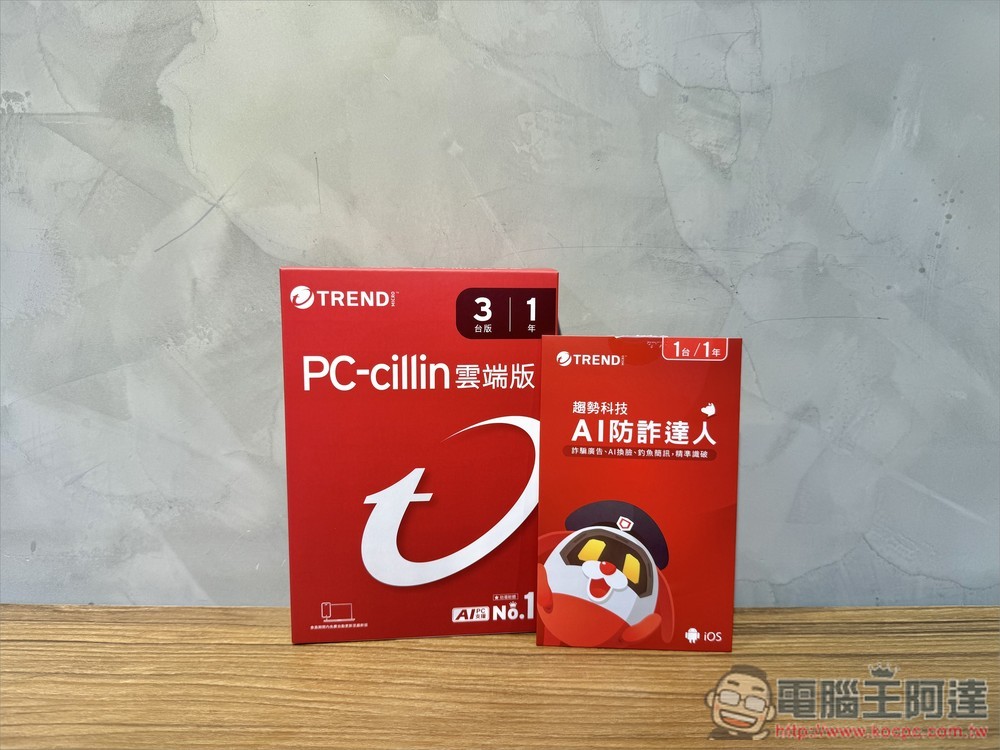
Scams are everywhere! Why are “mobile phone fraud prevention” and “computer anti-virus” indispensable in 2026?
Fraud has entered the cross-platform and AI era
“The methods used by fraud groups today will never be beyond your imagination.”
In the past, to avoid scams, we usually just ignored cold calls, but after entering 2026, scams have become “cross-platform” and even “AI-based.”
The so-called “cross-platform” means that they will slowly induce you through multiple platforms. For example, the most common method is to first display “guaranteed profit investment ads” on Facebook to induce you to join the LINE investment group, and then send profit screenshots every day to attract you to download the investment app recommended by them and deposit money. In the end, you will be defrauded.
Some high-end techniques will also create professional investment websites that allow you to switch to computers “across devices”. When you see this beautiful interface, you will think it is real, and then you will believe it is real.
With the popularity of AI tools, hackers will also use AI to generate phishing copywriting, let AI write virus codes that can automatically mutate, and even use AI to forge sound and images. For most people, it is really difficult to distinguish the authenticity from the fake.
Common threats on mobile phones: fake investments, phishing text messages and AI imitations
- Fake investment scam: This is the type with the highest amount of fraud now. Scammers place a large number of advertisements on Facebook and Instagram pretending to be celebrities and financial experts to induce you to join LINE investment groups, and then trick you into downloading investment apps from unknown sources.
- Phishing SMS bombing: Taking advantage of your fear of trouble, send fake text messages that pretend to be “eTag toll not paid”, “electricity bill overdue” or “package delivery failed”. Since the mobile phone screen is small, it is difficult to identify the authenticity of the URL. If you accidentally click on the link, your personal information will be leaked immediately.
- AI imitation: The fraud group only needs to obtain a few seconds of voice samples of your relatives and friends, and can easily copy the voices through AI and call you to falsely claim that you are in urgent need of borrowing money or have been kidnapped. In an emergency, hearing a “familiar” voice again can be very easy to let go of one’s guard.
Common threats on computers: fake websites, phishing emails and ransomware viruses
- Fake shopping or investment websites: Fraudulent groups will create exquisite computer versions of “fake investment platforms” or “fake e-commerce websites”, or even perfectly copy other real websites. When you see this professional interface on the big screen of your computer, you won’t think too much and put down your guard before entering your account password or credit card number.
- Phishing email: This is a very common and relatively old fraud method, but many people will still be deceived. You will receive emails pretending to be shopping invoices, express delivery notifications, etc. Once you click on the attachments, your computer may be infected.
- AI variant viruses and ransomware: Hackers have begun to use AI to develop viruses with “learning capabilities”. This virus will automatically modify the characteristics of the program code to evade scanning by traditional anti-virus software, sneak into your system quietly, encrypt all files, and extort a high ransom.
This is why you need “AI zone defense”
In this era of ever-changing AI scams and AI viruses on both mobile phones and computers, it is definitely not enough to rely on your own identification or caution.
“AI problems must be protected with AI.” Trend Micro’s AI joint defense solution can fully protect you:
- On the mobile phone, use the “AI Fraud Prevention Expert” as the first line of defense, using AI to identify possible fraud and filter links at any time.
- On the computer, install “PC-cillin Cloud Edition” to protect your data security, and use AI cloud virus interception technology to accurately intercept mutant viruses and malicious websites.
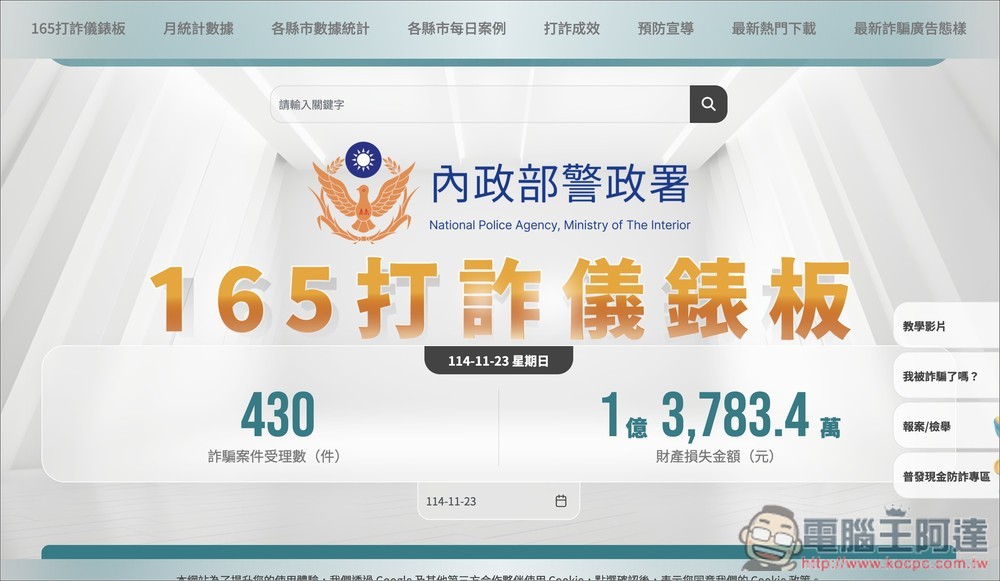
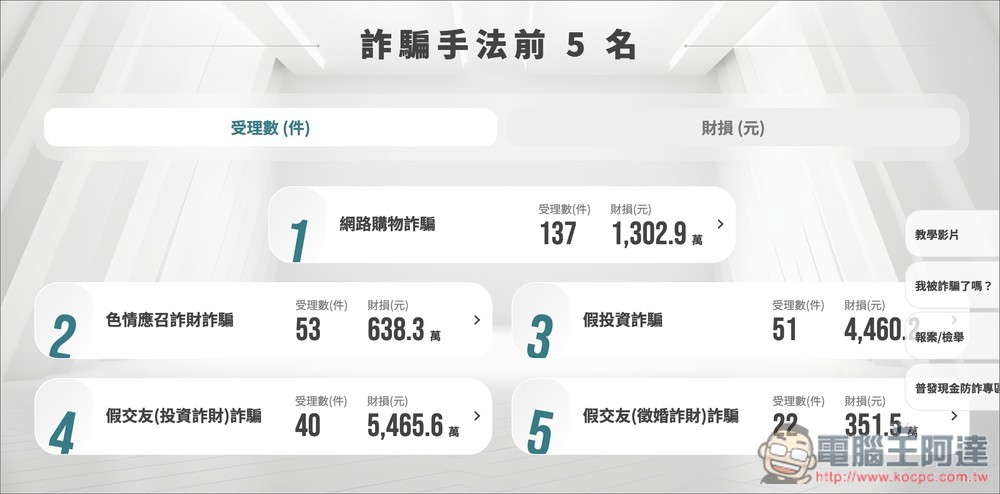
Even though the Police Department has been promoting fraud, the number of fraud cases received every day still exceeds 100, and the amount of property losses has reached more than 100 million yuan:
[Mobile version] AI fraud prevention expert: free call filtering and AI detection helper
Mobile phones are the main entry point for fraud. The “AI Anti-Fraud Master” app launched by Trend Micro is an AI gatekeeper designed to deal with modern complex frauds. It not only integrates the latest anti-fraud database, but also provides an AI chatbot to help you instantly identify authenticity and fraud. It also opens up the core call detection function for everyone to use for free.
Try AI Fraud Prevention Expert for free for 30 days
Free features: Strange call detection and automatic blocking
This feature is available to everyone for free. When there is an incoming call on your phone, the screen will immediately display the identity of the caller (such as bank customer service, logistics staff, or a scam call), allowing you to directly decide whether to answer or not:
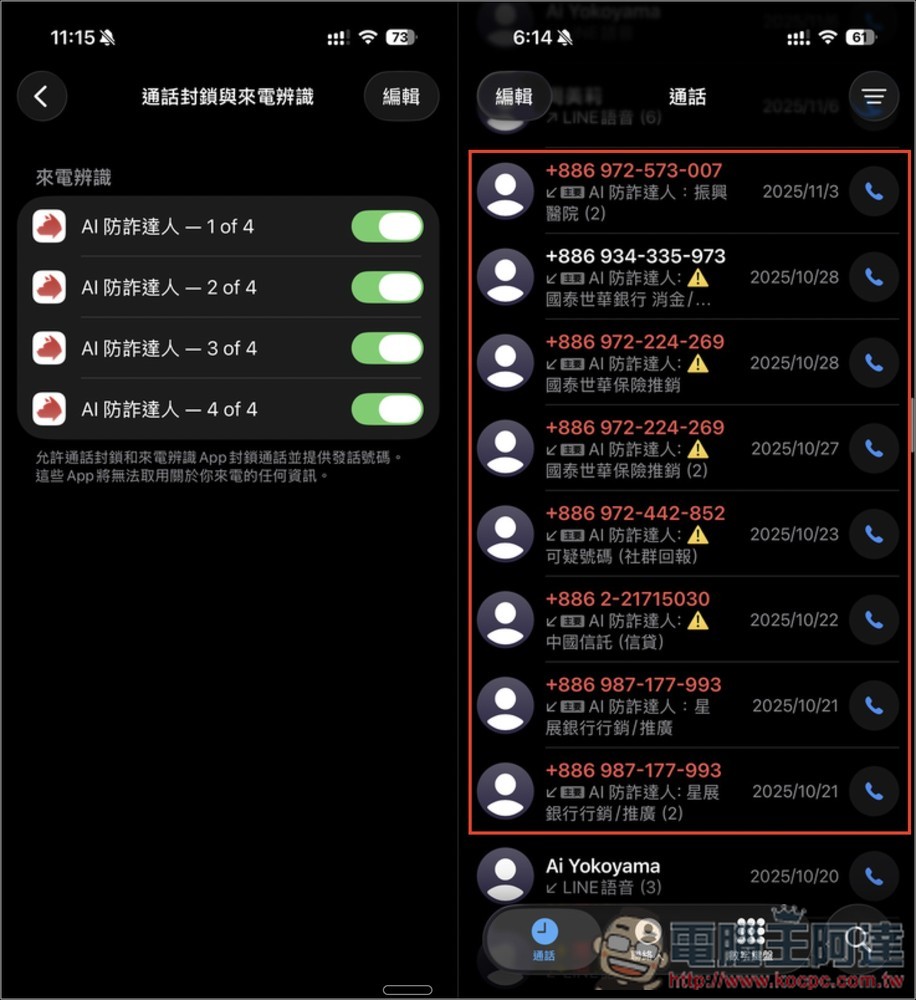
If you are sure you don’t want to receive this number in the future, you can also add it to the “block list” so that when calls come in the future, the AI anti-fraud expert will help you block them and you will not be harassed again:
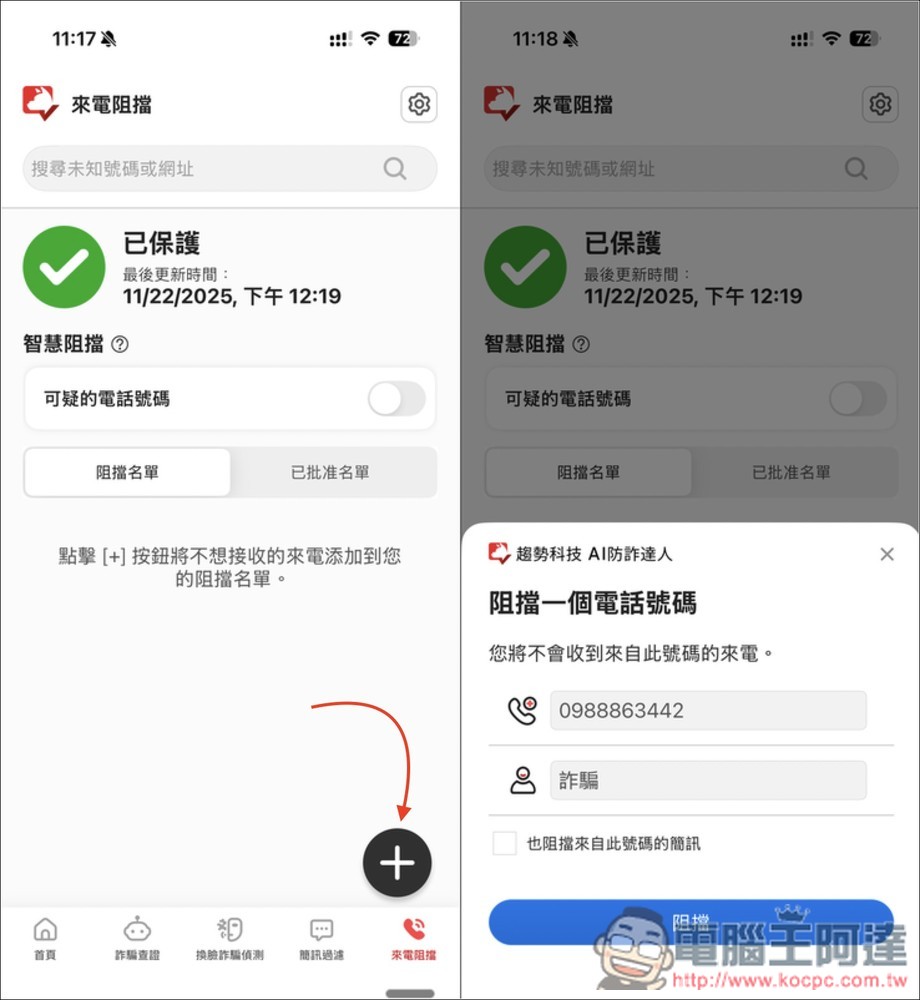
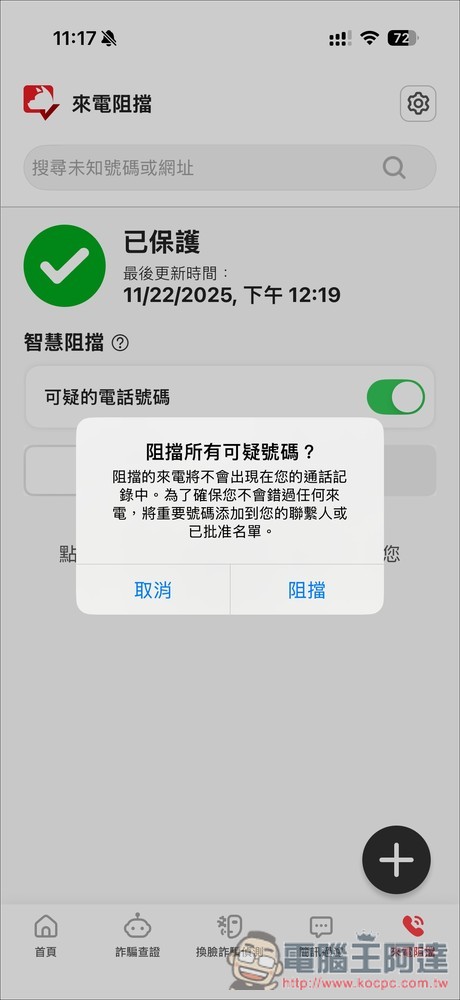
In addition, there is a “smart blocking” function. After enabling the suspicious phone number below, the AI fraud expert will automatically determine whether to block it. You do not need to manually add the number to the blocked list. Also remember to add important phone numbers to the “Approved List” to avoid the embarrassment of not receiving calls:
Don’t know if it’s a scam? Use AI to help you detect fraud
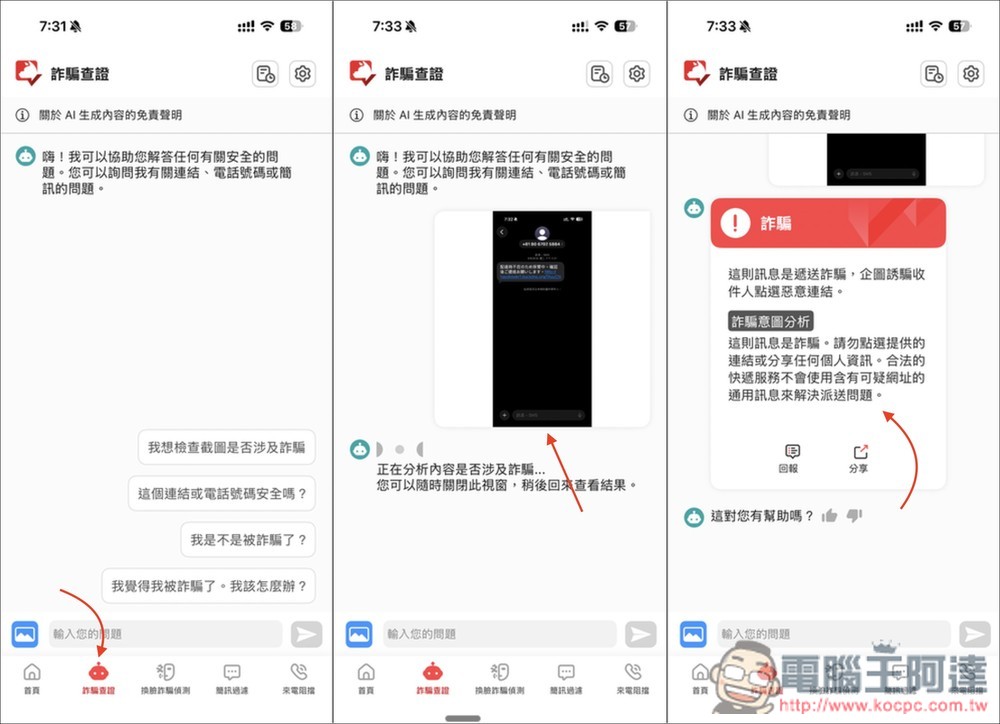
This is one of the biggest features of the AI anti-fraud expert. It has a built-in AI chatbot specially designed for “fraud verification training”. Send it a screenshot or ask a question in text, and the AI will immediately analyze whether the situation you encounter is a scam.
I uploaded a screenshot of the “Not at home, home delivery is being kept” text message I received a while ago. The AI responded that it was a shipping scam, trying to trick people into clicking on malicious links:
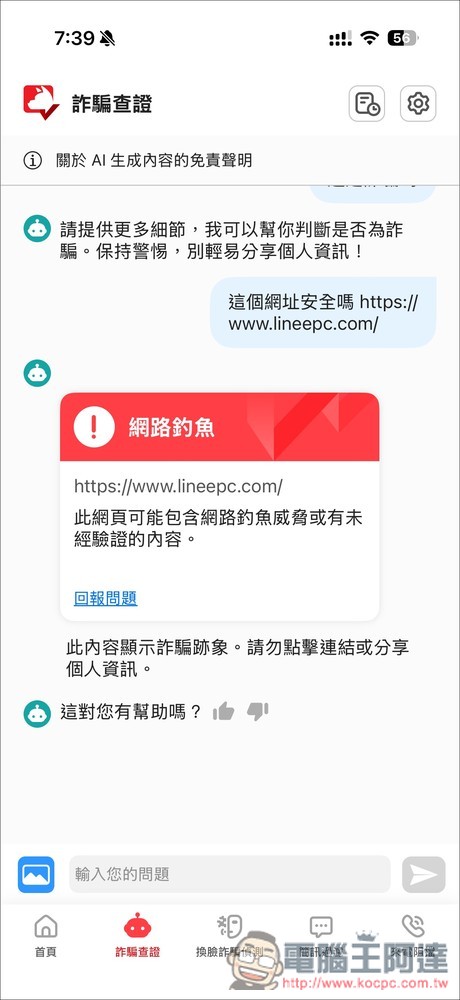
In addition, AI can also identify whether the link is safe or not. When I asked it about the link to the fake LINE official website, it showed that it was phishing:
If you are an iPhone user, it now also supports “Hey Siri, is this a scam?”, which will automatically take a screenshot and send it to the AI anti-fraud expert for verification (it is recommended to always allow it, so you don’t need to click allow again in the future). Just use what you say, it’s super convenient:
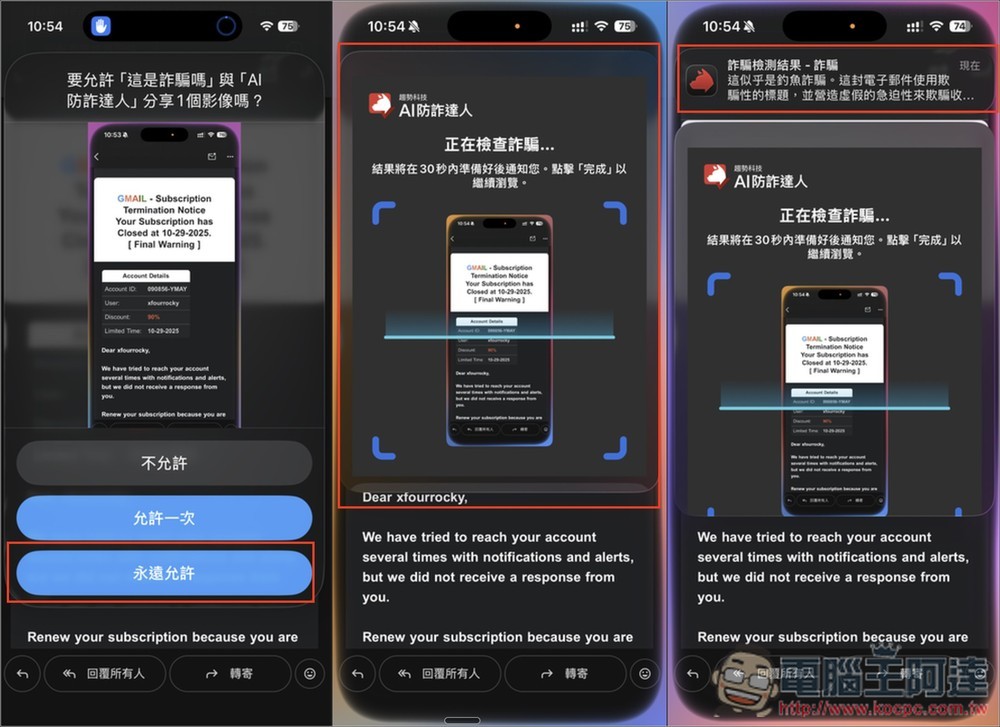
Wait a few seconds and you will get the verification result. Click on the notification to open the AI fraud prevention expert to read the full reply:
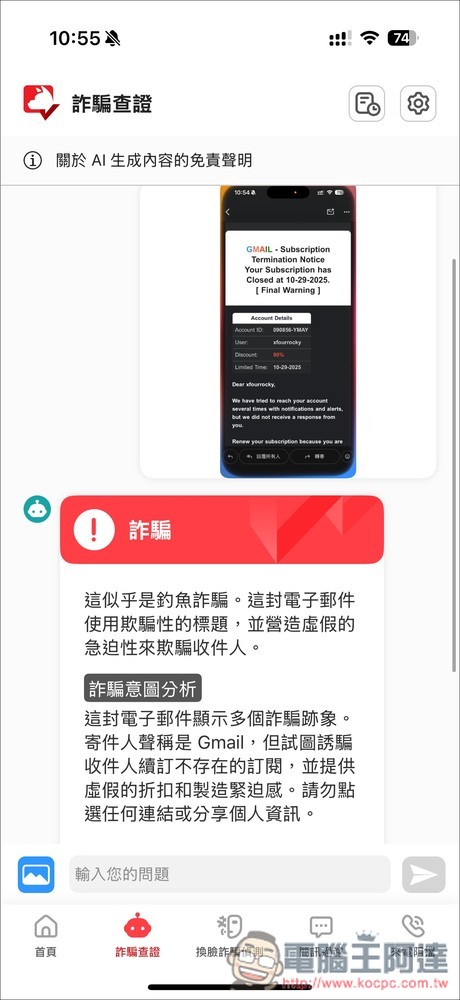
AI fraud verification is really useful, especially for elders or children who are relatively unaware of fraud. It allows them to quickly inquire before they may be defrauded, thus reducing the risk.
Essential anti-fraud means in the AI era: AI face-changing (Deepfake) fraud detection
This is the most critical protection function in 2026, and it is also a technology that ordinary caller identification apps cannot provide.
Fraudulent groups have begun to use deepfake technology to disguise themselves as your relatives, friends or prosecutors during video calls, making it almost impossible to tell the authenticity with the naked eye.
The method of use is very simple. When making a video call, turn on the “Start Detection” of face-swapping fraud detection, and you will be asked to allow screen live broadcast. Click “Start Live Broadcast”, and then return to the original video call, and the AI fraud prevention expert will detect:
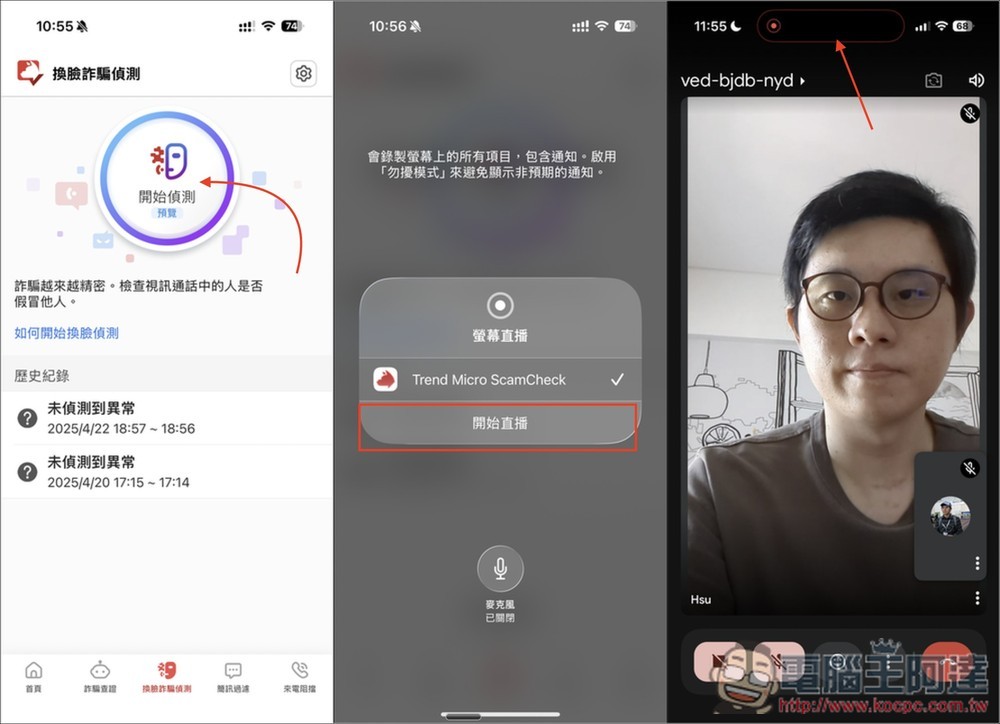
This function uses Trend Micro’s dynamic image detection and machine learning technology to perform AI counterfeiting analysis based on image features. It first identifies abnormalities such as character shapes, facial edges, broken images, and afterimages in the video, and then uses image frequency analysis to identify whether it is a fake face synthesized by Deepfake technology.
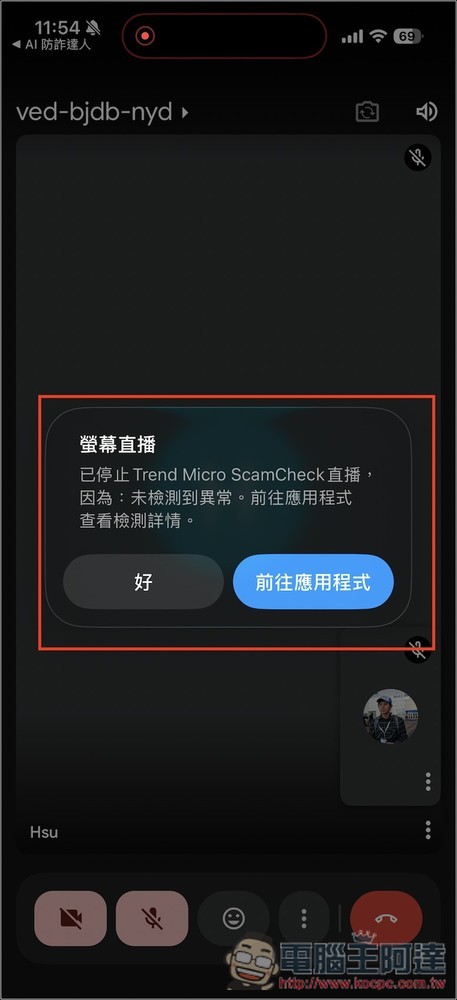
If it is, it will warn you immediately so that you can know it is fake at the first time. If not, “No exception detected” will be displayed:
“Fraud Alert Radar” detects whether you are at risk of being defrauded at any time
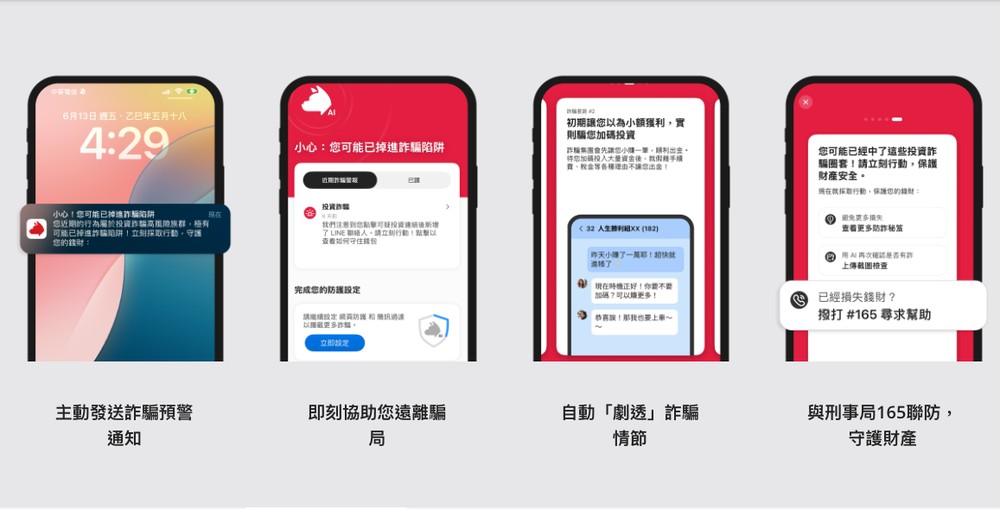
In addition to the AI fraud verification proactively asked above, the AI fraud expert also has a “fraud warning radar”. This function is like a digital detector. It uses AI fraud prediction models, fraud behavior pattern analysis, and the Criminal Bureau 165 joint defense to actively scan for hidden dangers.
- Detect scam scripts early: The AI fraud prevention expert will instantly compare the cloud fraud database based on the content of the text messages you receive or the website you are browsing.
- Brake before falling into a trap: If it detects that you are exposed to signs of fraud, such as clicking on a malicious link or receiving a phishing text message, the App will proactively issue a “danger alert” before you enter your account password or send money and tell you that you may have fallen into a fraud trap. Before you are actually cheated, I will help you stop it.
[Computer version] PC-cillin cloud version: not only anti-virus, but also an AI anti-fraud partner
Many people may think that Windows itself has built-in Microsoft Defender, so why do we need to install additional anti-virus software?
This is because the PC-cillin cloud version not only uses AI smart anti-virus functions to protect your computer in real time, it is also a small AI anti-fraud helper that monitors your online activities for potential risks at any time to avoid falling into situations where you may be scammed.
It even provides a more secure online payment process that is not afraid of credit card information being stolen by hackers. It is much more powerful than Windows built-in.
PC-cillin cloud version also provides a 30-day free trial, giving you enough time to fully experience it.
Free trial of PC-cillin cloud version
AI smart anti-virus, AI App protection and ransomware killer
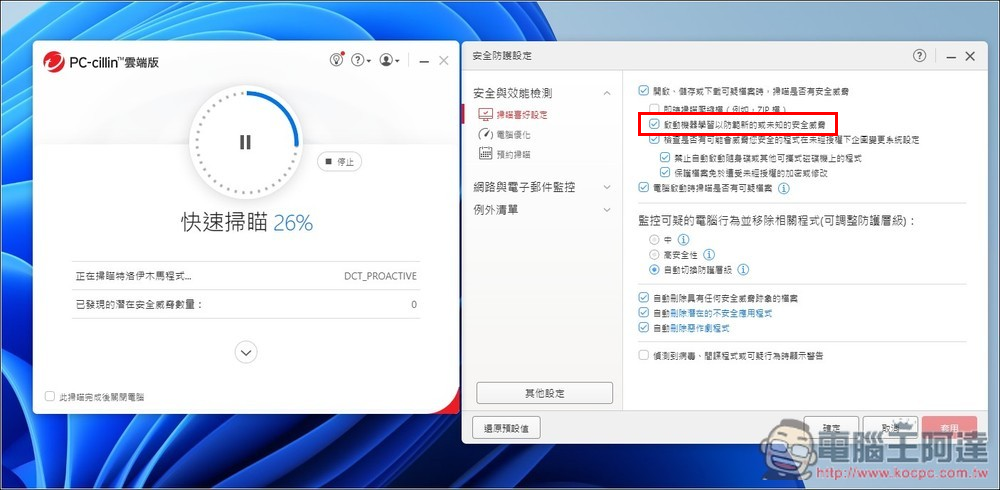
PC-cillin cloud version has introduced the most advanced AI artificial intelligence and machine learning technology, which means that it no longer just memorizes virus characteristics, but can analyze the “behavior pattern” of the program like an experienced security expert.
Even if it is an unknown virus or a variant of a malicious program that has not been seen before, as long as it shows abnormal behavior (such as trying to modify system files), PC-cillin’s AI can instantly determine and block it.
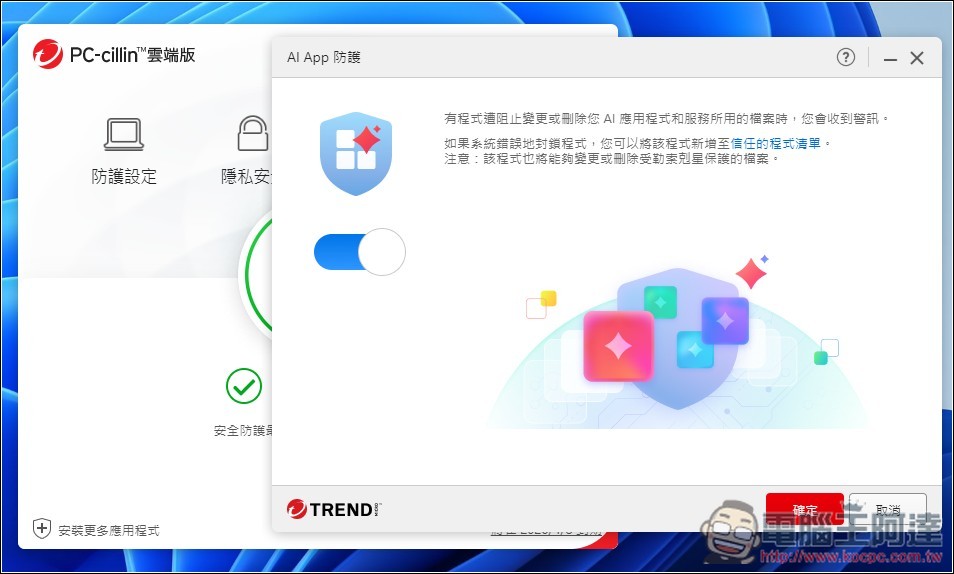
What’s even better is that many people now set up AI applications locally, which contain a lot of sensitive data, and they will definitely worry about being stolen by hackers. The PC-cillin cloud version now provides the “AI App Protection” function. When turned on, it will protect AI applications and services and prevent unauthorized programs from tampering with files. If a program is blocked, you will receive a notification immediately:
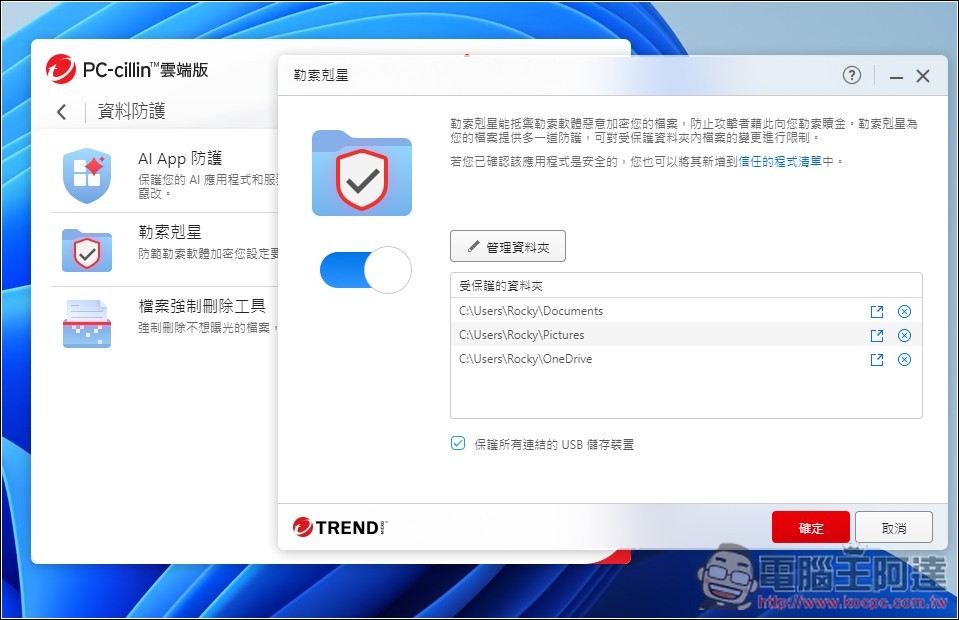
In response to the “file kidnapping” problem that computer users are afraid of, PC-cillin also provides an exclusive protection shield. After adding important folders to the “ransom killer” (such as photos, work documents), the system will closely monitor these folders and only allow trusted applications to access them. Any unauthorized program that attempts to encrypt or alter files will be immediately blocked:
“AI Fraud Prevention”: Block threats instantly
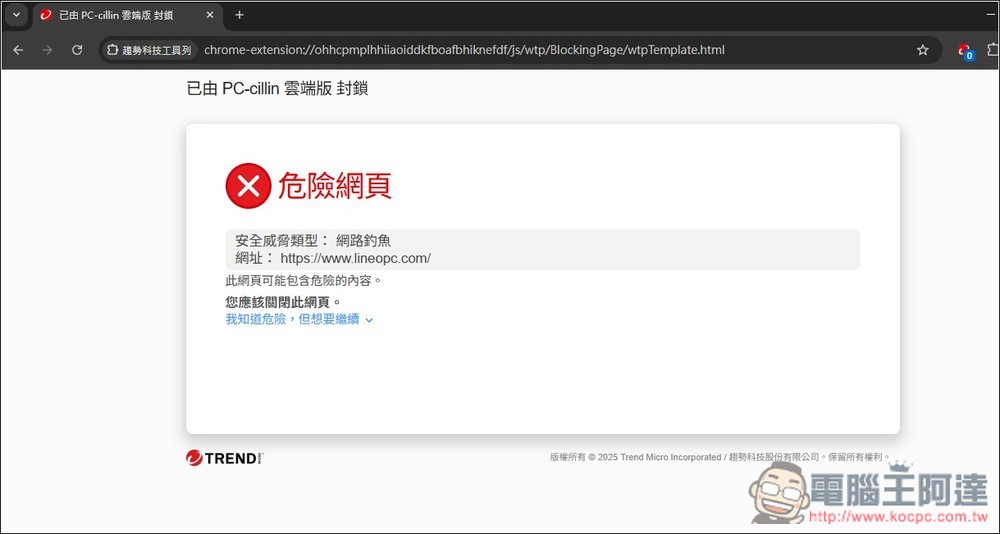
There are often “fake” official websites on the Internet. If you are not careful, your account and password will be stolen by fraud groups. For example, LINE is very common. You may not lose anything if your account password is stolen, but your relatives and friends may be defrauded by someone pretending to be you.
PC-cillin cloud version has powerful “Web Threat Protection”, which will instantly compare billions of threat data around the world through Trend Micro’s huge Smart Protection Network global cloud information network. When you click on an email link, browse the web or social networking site, once AI detects that the URL belongs to the “Fraud Blacklist”, “Phishing Website” or contains malicious programs, a red warning window will immediately pop up and the connection will be blocked.
For example, the fake official website of LINE in the picture below not only reminds you that it is unsafe when you click on it, but even if you open it, it will also show that it is unsafe and cannot be browsed:
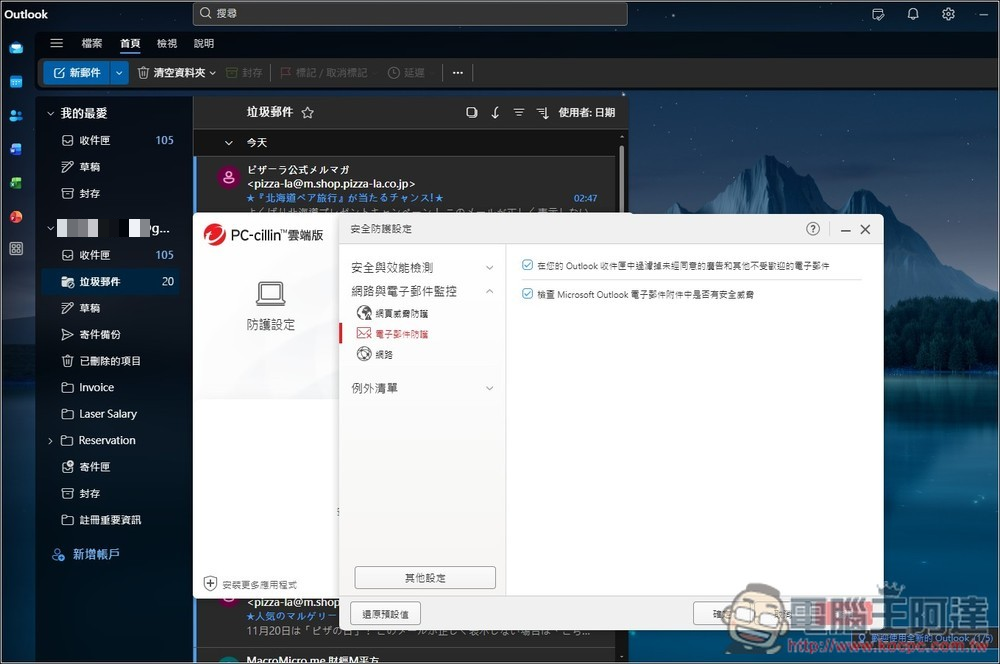
In addition, PC-cillin also has a built-in active email scanning function for email software commonly used by Windows users such as Outlook, which will help you filter out phishing emails containing malicious links or ransomware attachments, isolate threats before opening them, and cut off the risk of computer intrusion from the source:
Pay with peace of mind: Get the most secure online shopping transaction process
Nowadays, everyone is accustomed to making online transfers, stock orders or online shopping on computers (such as momo, PChome), and when filling in credit card or bank information, they are more or less worried about being stolen. With PC-cillin cloud version of “Safe Pay”, you can rest assured.
Anxin Pay is a protective function specially designed for financial transactions. When activated, the system will open a strictly protected browser window (identified by a blue frame). In this mode, PC-cillin will block any unauthorized program execution, prevent “keyboard logging” Trojans from stealing the passwords you enter, and block malicious script injection or man-in-the-middle attacks:
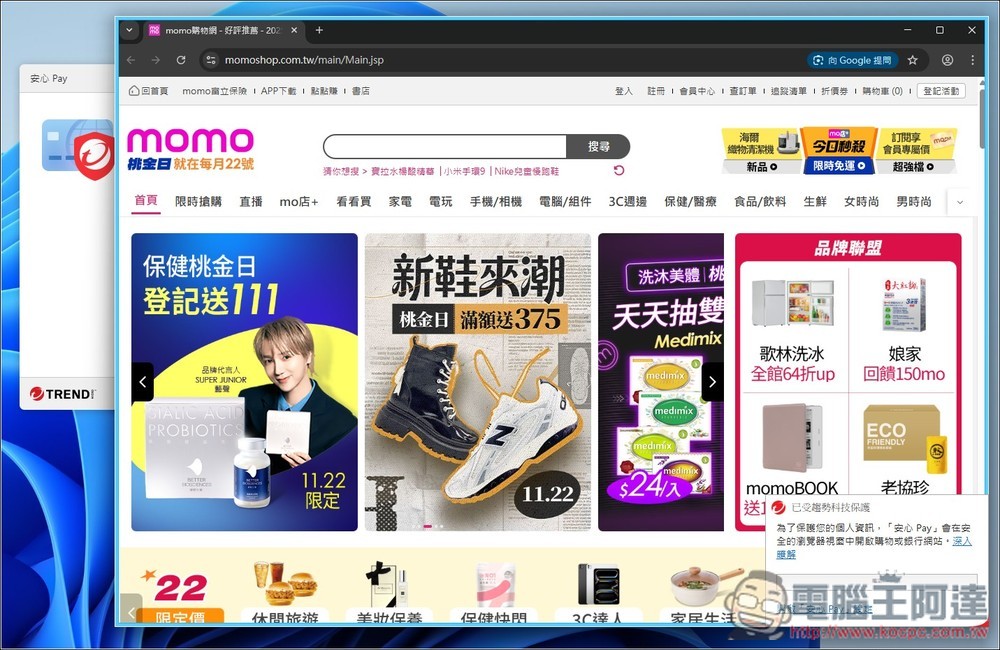
This allows you to enter your credit card number on your computer with the same peace of mind as transacting at the bank.
Police Department 165 partners and the world’s top security capabilities
There are many anti-virus software on the market, why is Trend Micro’s “cross-device AI joint defense” the first choice in 2026?
Because it has the strongest local intelligence from the Taiwan Police Department and the world’s top anti-virus technology, this is an advantage that other anti-virus software cannot provide.
AI fraud prevention expert: Police Department 165 official partner
The most critical factor in fighting fraud is undoubtedly “intelligence speed.” Scam calls, tactics, and fake URLs change every day. If the blacklist of the protection software is updated too slowly, it will be of little help.
- Official certification, the fastest information: “AI Fraud Prevention Expert” is the official partner of the 165 National Anti-Fraud Network of the Taiwan Ministry of Interior Police Department, which means it can directly connect to 165’s anti-fraud database.
- Localized protection with zero time difference: Whenever someone reports a new fraudulent call or phishing link to 165, this information will be synchronized to the database of AI fraud experts as quickly as possible.
- Block Taiwan-specific scams: Many international anti-virus software cannot identify Taiwan’s unique “fake official documents,” “fake police officers,” or “local investment scams.” However, AI fraud prevention experts have a local database in Taiwan, so they can accurately identify fraud scripts designed for Taiwanese people.
PC-cillin cloud version: a leading global information security brand
Not to mention Trend Micro PC-cillin Cloud Edition, it is already a very advanced, professional and comprehensive anti-virus software.
- Global market share and technology leader: Trend Micro is one of the world’s largest information security software companies and has been deeply involved in the information security field for more than 30 years.
- Award-winning by international reviews: PC-cillin has long been rated highly as “Best Protection” and “100% Detection Rate” in international authoritative anti-virus software reviews such as AV-TEST and AV-Comparatives.
- AI anti-virus technology pioneer: Long before AI fraud became popular, Trend Micro had already applied AI technology to virus detection. This means that when you install PC-cillin, you are using a top-level protection system that has been verified by millions of users around the world and unanimously recommended by international security agencies.
Introduction to Trend Micro’s solution: Not only for yourself, but also recommended as “protection for the whole family”
After understanding the importance of “mobile phone + computer” cross-device AI joint defense, you may ask: “Do I need to buy two sets of software?”
The answer is no. Trend Micro has launched the “PC-cillin AI Anti-Fraud Special Investigation Team” solution. A set of serial numbers can enable the advanced functions of PC-cillin cloud version (computer anti-virus) and AI anti-fraud expert (mobile phone anti-fraud) at the same time.
Free trial of PC-cillin cloud version + AI fraud prevention expert
The first choice for high CP value: 3 protection solutions (average cost is less than 1.5 yuan a day)
Modern people usually have more than one device. At the same time, fraud groups also like to target the “old” and “young” in the family. Therefore, we strongly recommend choosing the “3-device protection” version. Not only your own device, but also the elders and children in the family can be protected together:
- Recommended plan: 3 sets, 2-year version (online discount price NT$ 3,190)
- Why is it the most cost-effective?? If you choose this option, you can protect “your computer + your mobile phone + your partner’s or elder’s mobile phone”. Calculated, the monthly protection cost for each device is only about 44 yuan. For less than the price of a cup of supermarket coffee, you can get two years of peace of mind from fraud and virus threats. It is the option with the highest CP value.
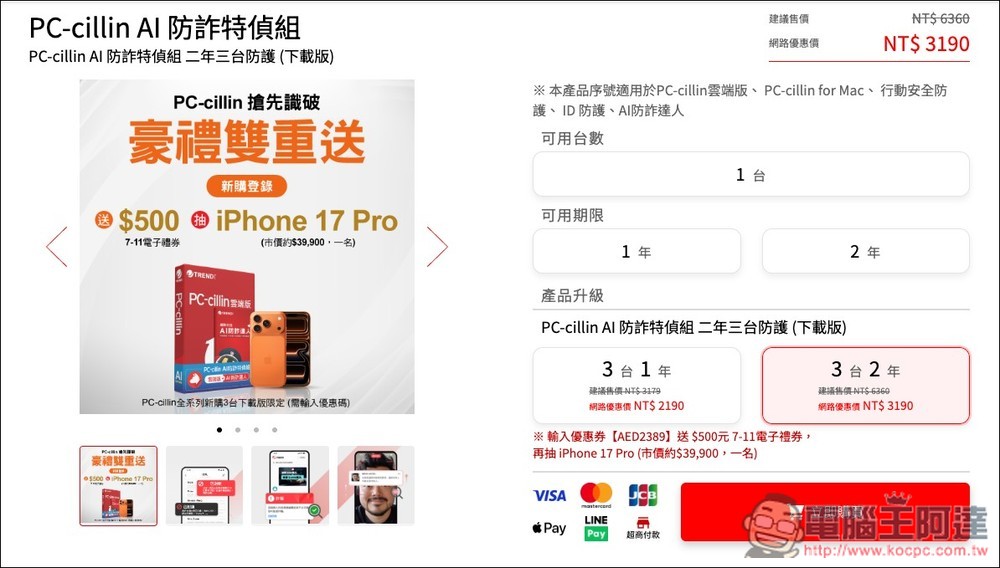
Of course, if you really only need anti-fraud protection for your phone or anti-virus for your computer, Trend Micro also offers the option of buying it separately.
- AI fraud prevention expert starting from NT$890/year
- PC-cillin cloud version starting from NT$990/year
[Limited time double gift] New purchase login to win iPhone 17 Pro
Now is the best time to buy. Trend Micro is launching a double gift event for 3 downloadable versions of the entire PC-cillin series. Enter the exclusive coupon code [AED2389] when purchasing to enjoy the following:
- The first level (guaranteed gift): Log in to get a $500 7-11 e-gift certificate for new purchases.
- The second draw (increased draw): There is a chance to win the latest iPhone 17 Pro (market price is about $39,900).
in conclusion
In the age of 2026, when AI fraud and viruses are becoming increasingly difficult to prevent, it is important to protect yourself and your family’s assets and data. Trend Micro’s “PC-cillin AI Fraud Prevention Special Investigation Team” is really worth considering. Spending a little money every month will give you more peace of mind. This investment is definitely worth it.
Free trial of PC-cillin cloud version + AI fraud prevention expert
Source: KOCPC Chinese