


Trend Micro recently discovered that a hacker group used a Trojan horse program to impersonate the LINE desktop application to launch attacks. When people search for keywords such as “Line for PC” through Google, fake download URLs may appear. If they accidentally install it by mistake, their computers may be implanted with malicious Trojans, causing personal information to be leaked or the device to be controlled. Trend Micro recommends: Pay close attention to the accuracy of the URL, make good use of security tools to prevent verification, and ensure that virus codes are updated to prevent your device from being compromised by malicious links or malicious programs.

Notice! Hackers used fake official websites to let users download the LINE computer app containing Trojans
According to Trend Micro’s observation, when people search for keywords such as “LINE on PC” through Google recently, they are very likely to see fake URLs on the homepage of the search results that are very similar to the official website, such as “www[.]linec-tw[.]OOO”, “line-chinese[.]OOO”, “line-tw[.]OOO”, “windows-line[.]OOO”, etc. The content of these counterfeit websites is almost all in Traditional Chinese, indicating that this attack is specifically targeting users in Taiwan.
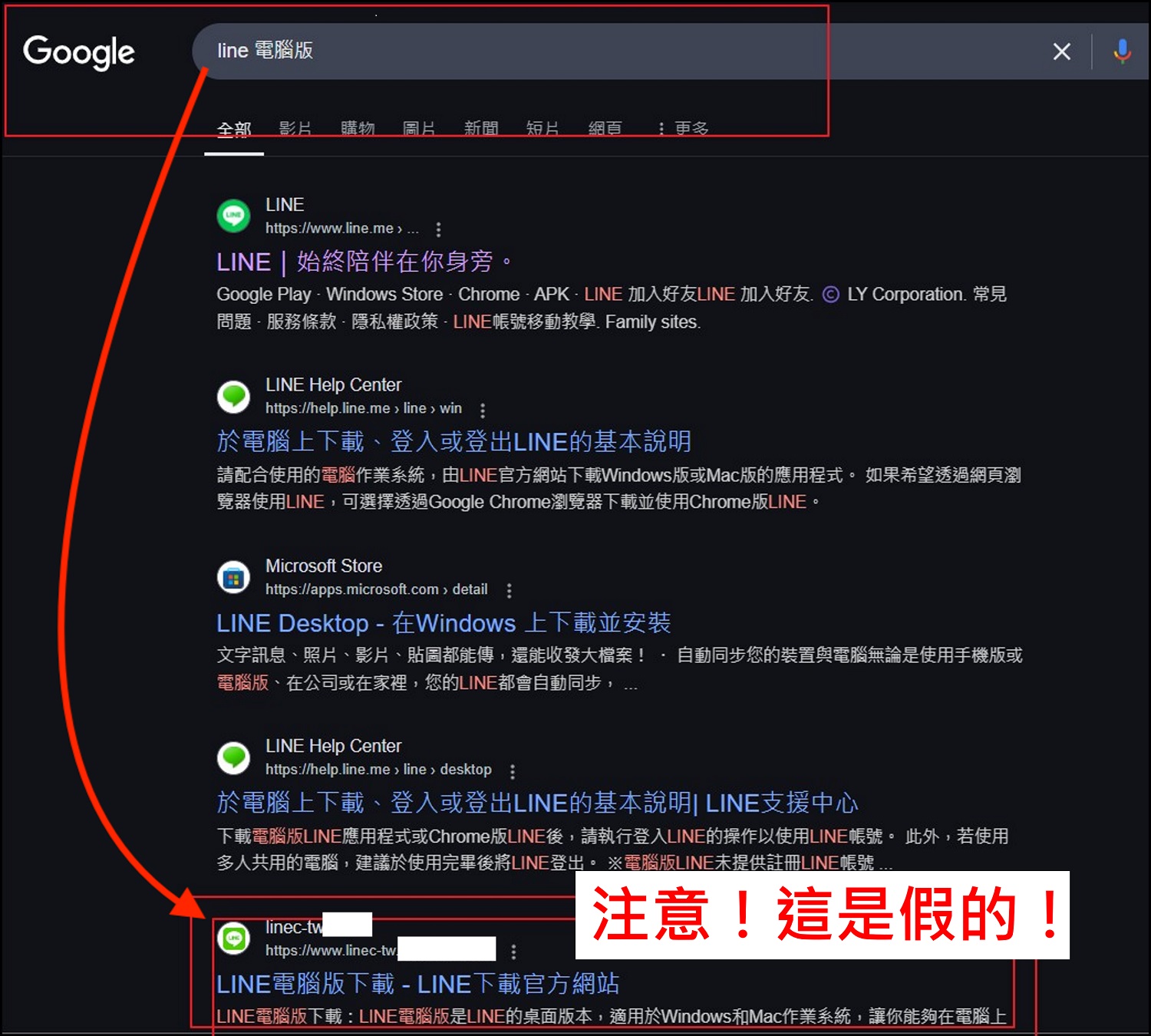
Once people mistakenly click on these fake URLs and download fake LINE installation programs, malicious Trojans may be implanted in their computers, which may lead to the leakage of personal data, remote control of devices, and may even further infect other connected devices, causing widespread harm.

Information security risks cannot be ignored. Pay attention to signs of Trojan infection
Trend Micro pointed out that Trojans have always been a common and enduring attack method used by hackers. As early as in the past, many hackers used popular apps or well-known search engines as packaging to lure users into traps. This attack on the counterfeit computer version of LINE further demonstrates that the hacker group accurately understands the online behavior and needs of Taiwanese users, and then designs highly realistic phishing websites and camouflage programs.
When a Trojan horse is implanted into a device, the following abnormal symptoms may occur, including:
-
Device performance slows down significantly
-
Frequent pop-up of abnormal or advertising windows
-
The browser is directed to a suspicious website
-
High memory and CPU usage
-
Unfamiliar applications appear in the system
Once the above situation is discovered, it is very likely that the device has been invaded by malicious programs, and security detection and removal measures should be taken immediately.
In order to effectively reduce the risk of encountering Trojans or other online threats, Trend Micro proposes the following three major security protection recommendations for Taiwanese people to refer to when downloading the PC version of LINE or other applications.
1. Only download apps from official websites
The public should develop good downloading habits and be sure to confirm that the download source is the official brand website. Especially when looking for download links through search engines, they should carefully check the correctness of the URL to avoid accidentally clicking on malicious links to download fake programs.
2. Make good use of professional security tools to prevent threats
In the face of an environment where AI technology is developing and fraud techniques are changing with each passing day, it is recommended that users install and enable professional information security protection tools. For example, PC-cillin 2025 can provide comprehensive protection for computers, mobile phones, tablets and other devices, actively blocking malicious links and Trojan programs; mobile phone users can also install AI anti-fraud experts to help identify multiple fraud techniques such as text messages, phone calls, emails, and social platforms.
3. Regularly update virus patterns and security protection programs
Internet attacks are changing rapidly and security threats are becoming increasingly diverse. Users should regularly check and update their anti-virus software virus codes to ensure that they are using the latest version of security protection programs to effectively reduce the risk of victimization.
Although disguised Trojans are a traditional hacker attack method, with the rapid evolution of the digital environment and AI technology, hackers’ action strategies are also constantly evolving. The attacks targeting the Taiwan market not only highlight the trend of localization and precision of hacker groups, but also force Internet users to face the ubiquity of information security threats. Hackers no longer rely solely on a single intrusion technique, but instead combine social engineering, phishing attacks, malicious programs, AI fake messages and other means to try to deceive users’ trust and further achieve the purpose of controlling devices or stealing personal information.
In this regard, users’ own awareness and vigilance of information security are also particularly important. Developing good Internet security habits in daily life, such as downloading programs carefully, regularly checking device status, and making good use of information security tools, will be the first line of defense against Internet threats.
Source: KOCPC Chinese