


Have you ever had the experience of going abroad temporarily, but still worried about not having your passport photo taken and the visa photo format unclear? Or, in order to renew your ID card or driver’s license, go to a photocopy shop, queue up, pay for a photo, only to be dissatisfied with it? Now there is a savior for these troubles!
“Passport Photo Aid” is an ID photo creation app specially designed for users around the world, and it is a “lifetime authorized version” with one purchase! Whether you want to apply for an overseas passport, visa, ID card, student ID card, or driver’s license, you can quickly create an ID photo that meets the official standards of each country in just a few steps by turning on your phone. Not only does it save time and avoid queuing, it also allows you to take better photos and save money.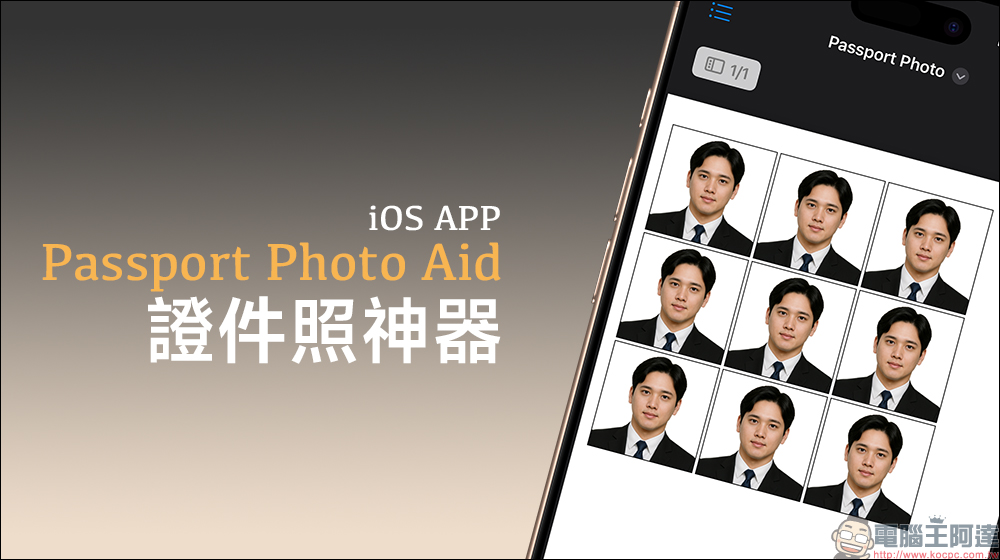
Lazy savior! Passport Photo Aid ID photo tool iOS App (free download for a limited time)
“Passport Photo Aid” not only allows you to take ID photos, its biggest selling point is that it has built-in ID photo format templates for more than 120 countries and regions, from the United States, the United Kingdom, Canada, Australia to Germany, India, Japan, and even Taiwan, all common passport and ID card photo needs are clearly supported.
Users only need to select the country and corresponding ID type in the app, and the system will automatically apply the correct size and composition range for you. In this way, you no longer have to worry about the technical terms “3.5×4.5 cm” or “white background photo”, and you don’t have to worry about going to the photocopy shop and being told that the size does not match and you need to retake it.
On the main screen of the app, first click “Gallery” to import photos from the album, or click “Camera” to take a picture immediately with the iPhone camera: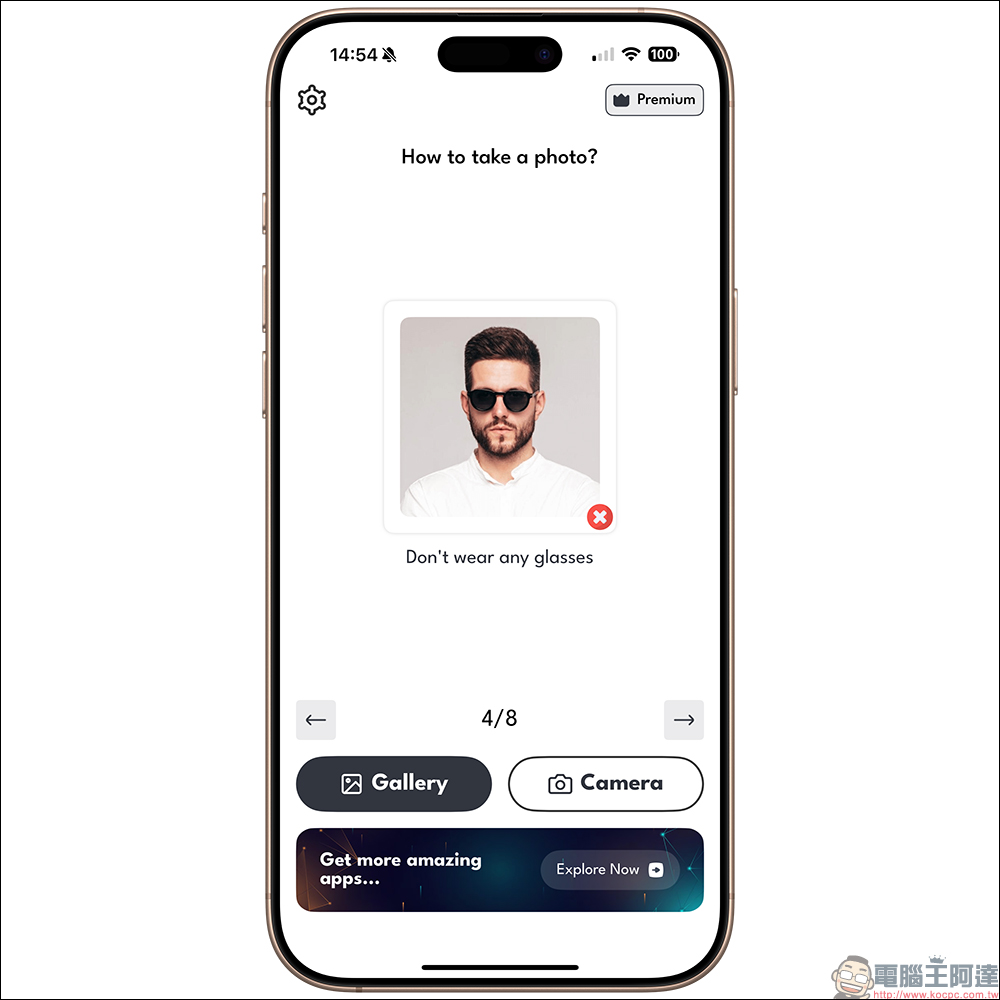
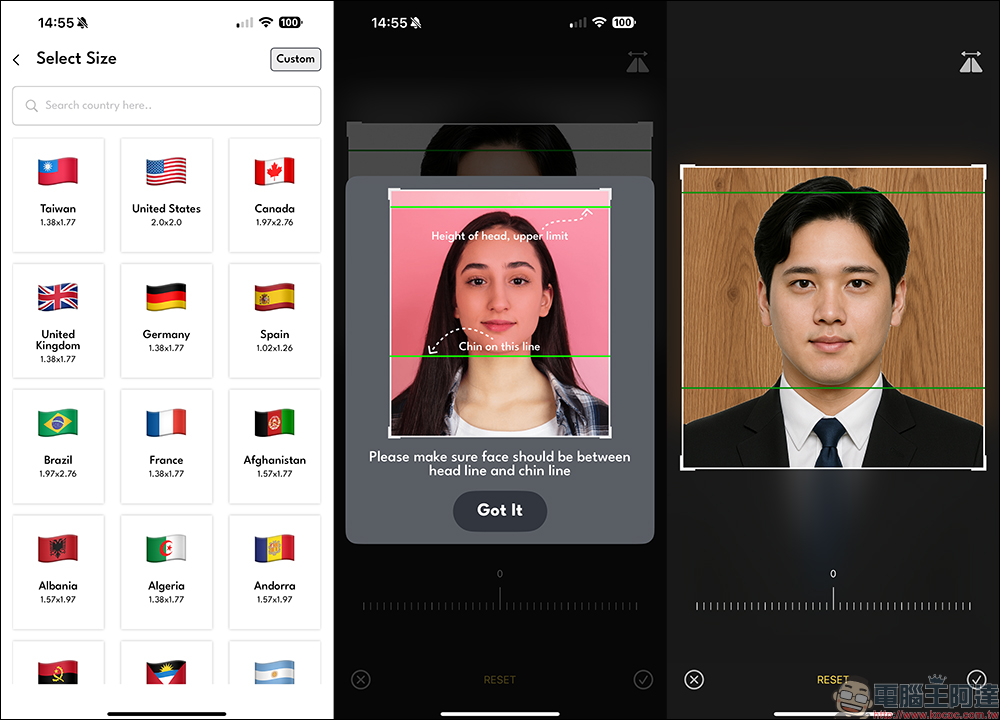
Then select the country where you want to create ID photos. The photo sizes for each country are listed below. Users can also click “Custom” to customize. Next, adjust the proportion of the photo screen. The built-in app also provides suggested positions for users to refer to:
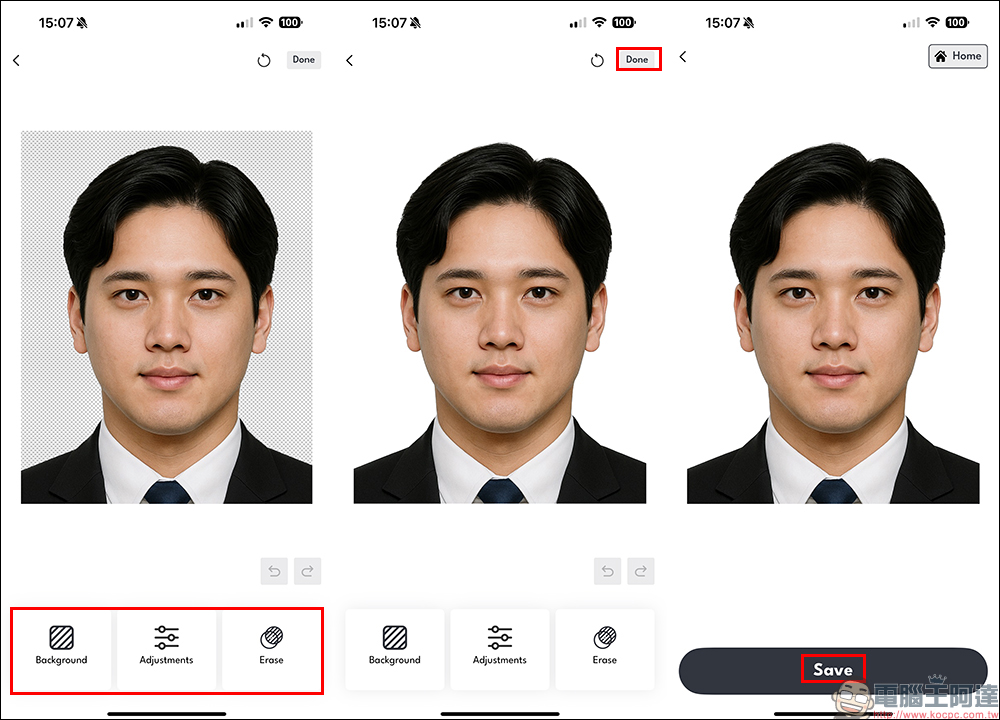
One of the most troublesome aspects of taking ID photos is the background problem. Some visas require a white background, some require a blue background, and some even require a red background. Don’t worry, “Passport Photo Aid” has built-in AI automatic back removal technology, which can automatically separate the characters from the original background with just one click, and can switch to standard background colors such as white, blue, and red as needed. What’s even more powerful is that its back-removing effect is surprisingly detailed, with no hair being cut off or edges blurred, and it’s also very friendly to users with long hair or bangs.
The interface design of this app is very intuitive, and even elders or novice users who are not often exposed to image processing can quickly get started. The whole process is very smooth. You can complete a set of qualified ID photos in about 3 minutes, and you can take and adjust them repeatedly until you are satisfied. Whether you want to submit electronically or print out paper submissions, you can do it easily. You don’t need to open Photoshop and cut it yourself. It really makes you a customer once you use it. When all settings are completed, click “Save” to save.
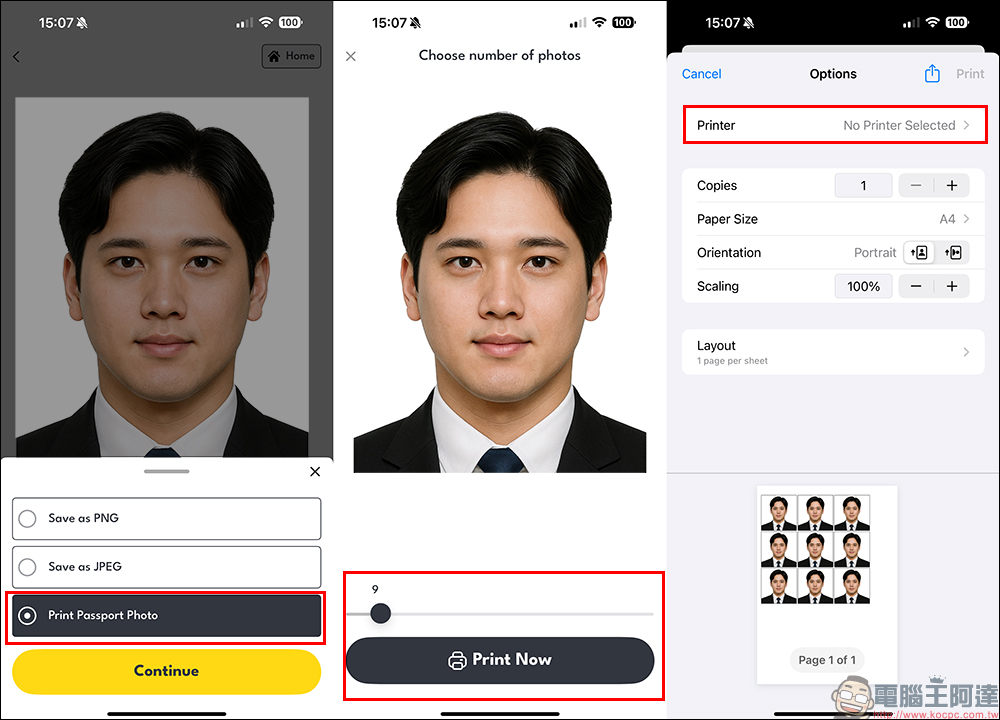
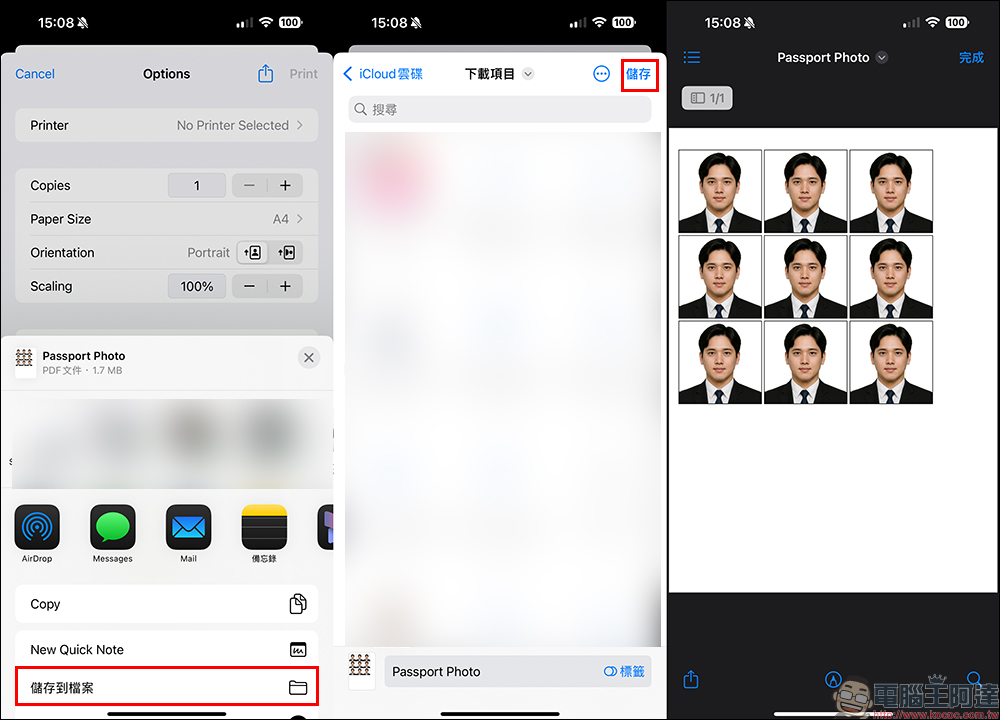
After taking photos, what many people care about most is “how to export them.” Some apps only provide previews and require additional payment for actual storage. “Passport Photo Aid” directly allows you to save high-resolution photos to your phone, and even print them directly into physical photo formats and send them to supermarkets or photocopy shops for printing.
For iPhone users, the more convenient way is to save the file to “Files” first! Of course, this app also provides PNG or JPEG formats, but I believe that if you need to print ID photos, it is recommended to click the “Print Passport Photo” button, because you can set the number of ID photos to be generated, and directly help users organize them into PDF format files. It is very convenient to go to a supermarket or store to print the photos afterwards.
Free download for a limited time
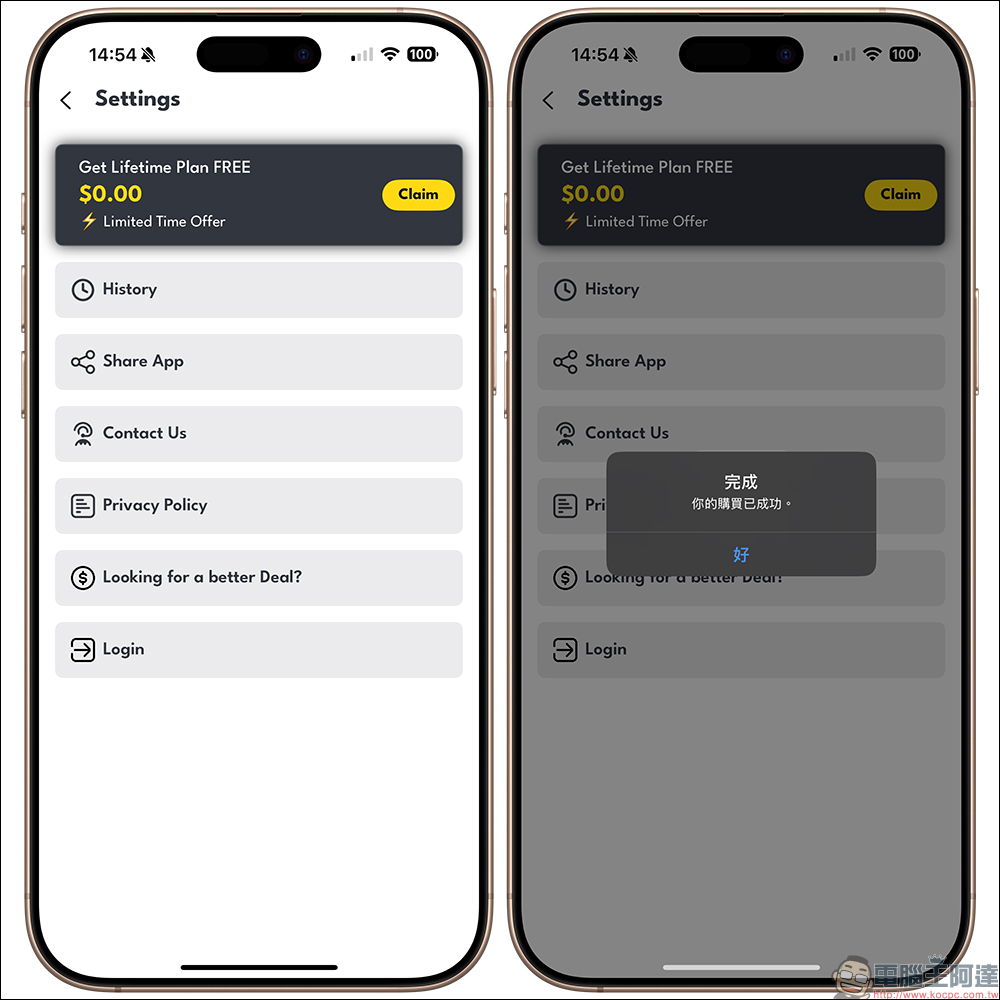
This app is currently available for free download in the App Store for a limited time. The lifetime authorized version with the original price of US$29.99 is also available for free during the event period. Remember to follow the steps below so as not to miss it!
First, download “Passport Photo Aid” from the App Store and open the app.
Then click on the “Settings” setting menu in the upper left corner to find the “Get Lifetime Plan FREE” option and click on it. If it is still within the limited-free period, the price will be displayed on the screen as $0.00. After clicking it, you can successfully receive the lifetime license!
Please also note that this free license will not automatically pop up a reminder, so remember to manually go in and set it up. If you miss this event, you may need to pay to unlock full features in the future.
Passport Photo Aid APP download (App Store)
Conclusion
If you happen to be going abroad, applying for a passport, or changing ID photos recently, you might as well buy “Passport Photo Aid” during the current event. This professional ID photo production tool can not only automatically handle the background, size, and format, but also supports the needs of more than 120 countries and regions around the world. It turns your mobile phone into an ID photo maker. You can take beautiful photos and fully comply with the regulations. It is really convenient!
Further reading:
No ChatGPT account or VPN required! Easily generate a complete guide to Ghibli-style pictures with one click, and you can play it using the Edge browser!

Source: KOCPC Chinese