


There are reports from users that both Windows 11 24H2 and even 23H2 and 22H2 are updated after the Windows 11 KB5048685 bugfix update launched this Thursday. All kinds of questions are constantly emerging. Continue reading Windows 11 KB5048685 update causes the “Start” function to freeze when pressed, and reports of Wi-Fi failure and failure to complete the update are reported.

Windows 11 KB5048685 update causes the “Start” function to freeze as soon as it is pressed, and there are also reports of Wi-Fi failures and the update being unable to be completed.
When everyone is still asking why Windows 11 24H2 has problems “again”, perhaps the emergence of more creative bugs is also a way to divert attention (big mistake).
In short, there are now reports from users, whether it is Windows 11 24H2 or even 23H2 and 22H2 updates, after the Windows 11 KB5048685 fix update launched this Thursday. All kinds of questions are constantly emerging.
According to foreign media, there are about three major types of problems caused by Windows 11 KB5048685 “currently”.
One of them is the extremely annoying situation that after installing the update, the start menu will not respond after clicking (the official specifically cites the situation as the most serious when using VDI virtual desktop infrastructure).
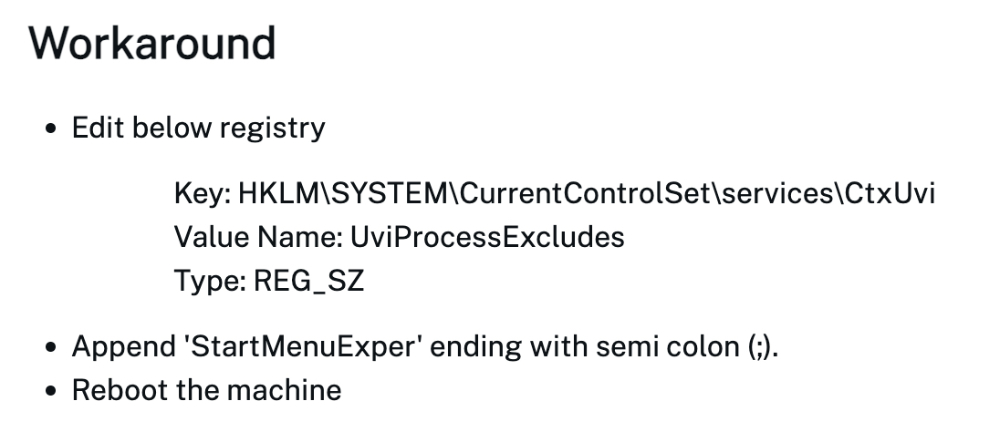
In this regard, it is currently pointed out that you can change the “UviProcessExcludes” value to “StartMenuExper;” by modifying “Key: HKLM\SYSTEM\CurrentControlSet\services\CtxUvi”, and then remember to restart the computer to take effect.
That is to say, editing the login file is really risky, so it is recommended to read the currentSolution steps posted on citrix websiteTo avoid causing more problems, remember to back up.
Of course, I believe everyone hopes that Microsoft will not be so creative, and it would be better if even the Start menu, which is most commonly used every day, can be released.
Unfortunately, in addition to this problem, there are also peoplerepaidIt seems that the installation of Windows 11 KB5048685 update cannot be completed normally – it is said that it is stuck at 6x% and will not move; and a 0x80070002 error is encounteredUnable to installof; alsoreturn Even after Windows is installed, it will still keep saying that it needs to be updated and restarted – there is still no solution even through repeated restarts, nor through the system’s troubleshooting application.
Finally, some people have reported that Wi-Fi cannot work properly after installing the Windows 11 KB5048685 update – they will receive error messages such as “DNS server not reachable” and “Restart modem”.
The above problems are suspected to be caused by the Windows 11 KB5048685 update. Basically, more than 10 or even more than 50 people have said that they have encountered the same situation.
It has to be said that if we look at the amount of damage caused by a single issue, it may not be considered a disaster. But judging from the types of problems encountered after updating, it seems that this Windows 11 KB5048685 update is really a big problem! It is recommended that you stop watching and listening before updating.
via:Neowin|
Further reading:
AirPods 4 active noise reduction model unboxing experience: fully “adapted” to your needs
Source: KOCPC Chinese