


Although for Android users, the experience of switching pages immediately after performing the previous gesture feels quite smooth and fast. However, if you use Android’s original Google Chrome browser, you can also pay tribute to the visual switching experience of iOS’s original browser Safari. I believe that everyone will not reject the possibility that the Android browsing experience has different “flexible” or “Q-bomb” experiences. Interestingly, foreign media also discovered that in the latest experimental features of the Chrome browser, Google has really brought similar visual features to enhance the user experience. Continue reading Chrome for Android can also have the super-smooth experience of the original iOS browser! Turn on this hidden option and report the content.

Chrome for Android can also have the super-smooth experience of the original iOS browser! Try turning on this hidden option
Although for Android users, the experience of switching pages immediately after performing the previous gesture feels quite smooth and fast. However, if you use Android’s original Google Chrome browser, you can also pay tribute to the visual switching experience of iOS’s original browser Safari.
I believe that everyone will not reject the possibility that the Android browsing experience has different “flexible” or “Q-bomb” experiences.
Interestingly, foreign media also discovered that in the latest experimental features of the Chrome browser, Google has really brought similar visual features to enhance the user experience. And you can also turn it on as an experimental function early!

▲Image source: Google
How to enable smoother Chrome’s visual transitions between previous and next pages
This feature is available in chrome://flags Search for “Back-” to find it. The full name is “Back-forward visual transitions”. Select Enable from the drop-down menu below to turn this feature on – remember to restart Chrome (you will be prompted).
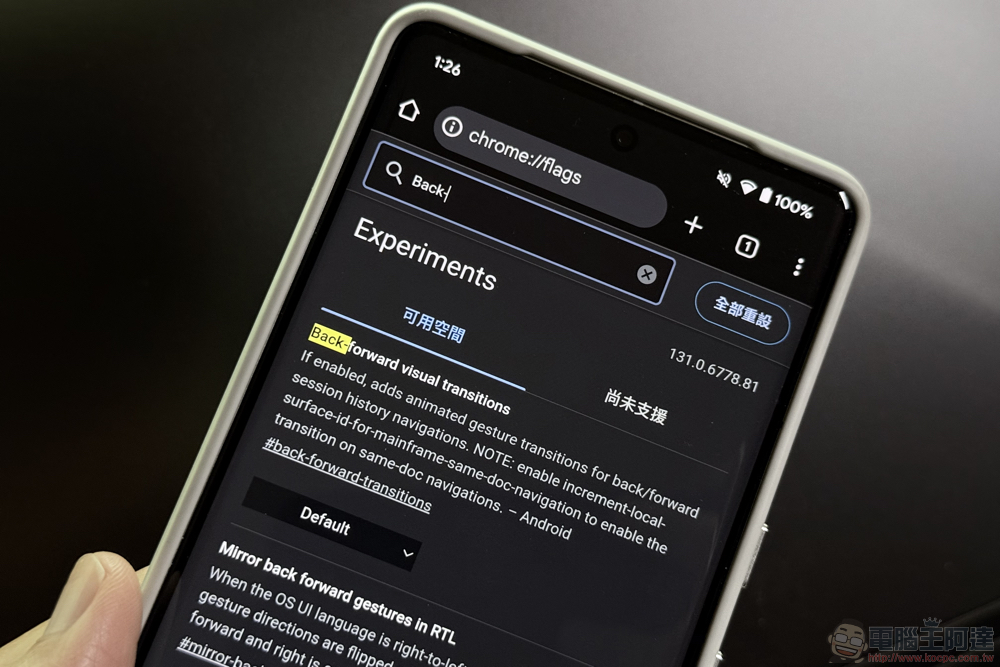
Although to put it bluntly, this function uses the screenshot cache (bfcache) of the displayed page to provide you with a silky experience as if you are turning pages. But seriously speaking, compared to Chrome’s original experience of simply switching pages directly with an arrow (and even seeing a black (gray) screen), I do feel that the phone’s response and texture have been improved in terms of somatosensory.
Friends who are interested in trying this function can turn it on through the tutorial we mentioned earlier. If you are not used to it and want to turn it off, you can take the same steps and select Default or “Disable” to turn it off. And remember to restart the Chrome browser for it to take effect.
via:PhoneArena|
Further reading:
Source: KOCPC Chinese