


Google of Veo3 Video Creation Platform:Flow Since its official launch in May this year, it quickly became generative AI videoOne of the most popular platforms in the creative field. According to official data, the number of videos generated through Flow has exceeded within just a few months. 500 millionThis not only reflects the speed at which generative AI video tools have been adopted, but also shows creators’ strong demand for low-barrier, high-efficiency creative workflows. However, as usage has scaled up, the Flow team has gradually begun to hear another kind of voice:Creators are no longer satisfied with just “generation,” but crave more precise, more refined control.Particularly in areas such as character consistency, visual composition, lighting and atmosphere, and camera language, professional and semi-professional creators are rapidly raising their demands for controllability. Against this backdrop, Flow has recently been rolling out a series of new “refinement and editing” features, aiming to make generative creation no longer a one-off random output, but a work that can be repeatedly adjusted and gradually refined to approximate what the creator envisions.
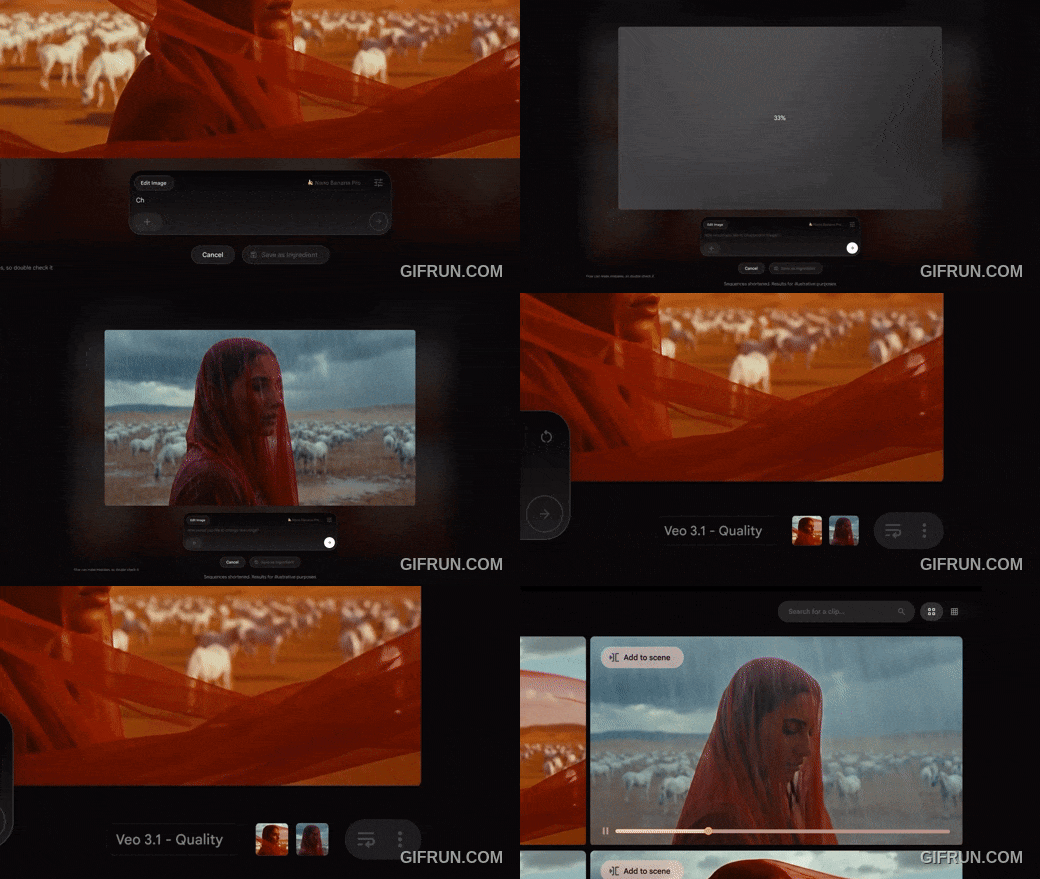
Nano Banana Pro ushers image generation into the era of “professional tuning.”
In Flow’s creative workflow, “imagery” plays a key role. Whether serving as a character, a subject in the video, or the starting point of an entire edit, image quality and controllability directly affect the final outcome. To strengthen this aspect, Flow has introduced a brand-new 「Images」Dedicated Workspace for Imagesenabling users to complete image generation, adjustment, and refinement in the same environment without having to switch back and forth between multiple tools.
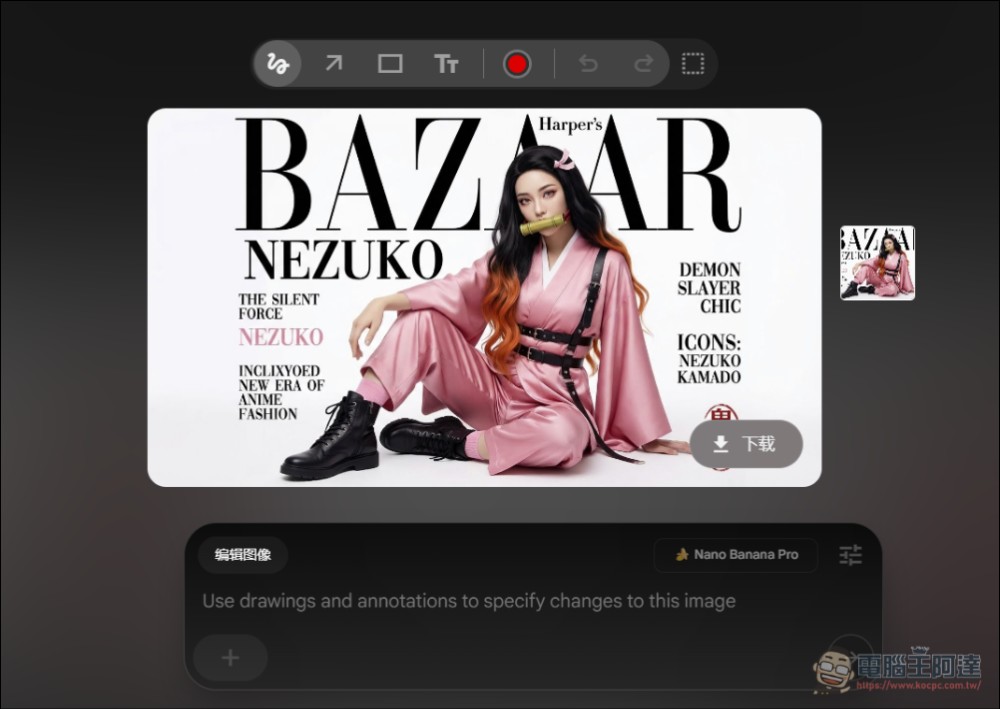
In this image workspace, free users can use the Imagen and Nano Banana image generation capabilities; meanwhile, subscribers (AI Pro and above) can further access the newly launched Nano Banana Pro。
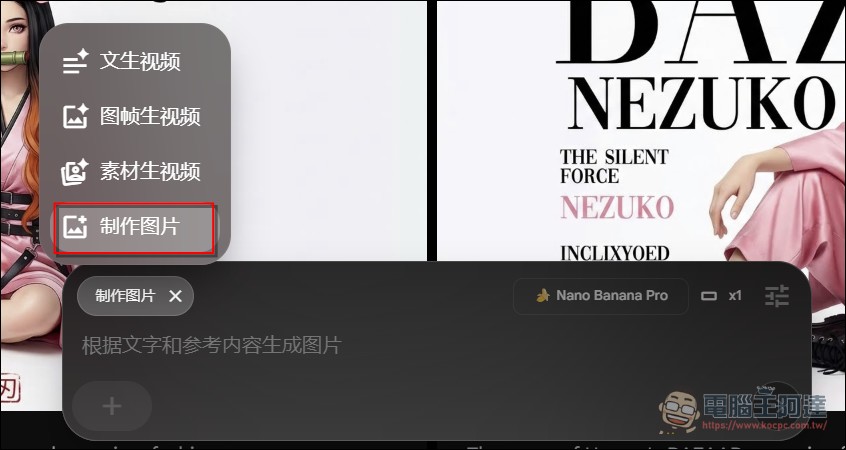
Nano Banana Pro is positioned as a “professional-grade imaging model,” with its core value lying in providing more advanced, predictable control options, including:
-
Depth of Field (Depth of Focus)
-
Lighting configuration
-
Color Grading
These adjustment options, which in the past were mostly found only in professional photography and post-processing software, are now directly integrated into the generation stage, allowing creators to make more precise visual style settings “before generation.”
No Need to Start Over: Local Fixes Instead of a Full Rebuild
One major pain point of generative imaging tools in the past was the high cost of modification. Whenever you wanted to adjust a character’s clothing, pose, or lighting, you often had to regenerate the entire image, making it difficult to maintain consistency in character details and style.
Flow transforms this workflow with Nano Banana Pro. Creators can now:
-
Only replace the character’s costume.
-
Fine-tune the pose or camera angle.
-
Change the lighting atmosphere
andNo need to redo the entire scene.This not only improves efficiency but also helps preserve consistency in character and visual style. Another key capability is “reference image blending.” Users can reference multiple images at once as the basis for generation, and while preserving key details, integrate different elements into a single frame. For character design, concept art, or brand visual consistency, this is an extremely valuable feature. Take the video below as an example: the goal is to have the character wear the specified sneakers and end with a specific pose.
Use doodles to directly “tell AI what you want.”
Text prompts have always been the core interface for generative AI, but for many visual creators, “translating images into words” is itself a barrier.
Flow proposes another solution to this:Doodle-style Prompt (Prompt by Doodling)。
Visual intuition replaces verbal refinement.
In Flow, users can directly draw or annotate on images, for example:
-
Draw the position of the object you want to add.
-
Mark the areas you wish to change.
-
Use simple lines to indicate shape and direction.
Flow will understand the intent behind these doodles and incorporate it into the final generated result.
Workflow integration to reduce tool switching costs.
It is worth noting that this feature isnatively built into FlowCreators no longer need to export images to other drawing or photo-editing software for annotation. For creators who value efficiency, this represents a significant simplification of the overall workflow.
Precisely Add or Remove On-Screen Elements: Video Object Insertion and Removal Feature Now Available
In actual creative work, creators often face a situation:The entire film is almost perfect, yet it just happens to have one unnecessary element, or is missing a key component.In the past, such issues often meant regenerating the entire video. But Flow now provides a more refined solution.
Users simply click the pencil icon on the video clip to:
-
Insert new objects or characters into the video.
-
Remove unwanted elements from the image.
The other visual content remains unchanged. This ability for “localized adjustments” brings generated video, for the first time, truly close to the editing flexibility of traditional editing software.
Reshoot it? Use “Reshoot” to adjust camera movement and viewing angle.
Camera language is an important part of film narrative, but in generative videos, it is not uncommon for camera angles or movements to fall short of expectations. To address this, Flow has launched a brand new Camera Adjustment(Reshoot) Features. With Reshoot, users can adjust existing videos:
-
Camera position
-
Orbit Angle
-
Dolly’s forward-and-backward pushing movement method
This lets creators experiment with different perspectives to see the visual effects without having to redo the content.
From image model upgrades, doodle prompting, and object-level editing to camera motion adjustments, the features Flow recently released all point toward a common direction:Gradually return creative control to the creators.Generative AI is moving from a stage of “generate once and leave it to fate” to a new model of “iterative refinement, gradually approaching the ideal result.” For professional content creators, this is not just a feature update but a shift in creative philosophy. The Flow team also stated that they hope these new capabilities will help creators produce content that is more dynamic and more aligned with their original vision. Judging from the current product pace, Flow is clearly trying to find a more mature balance between generation efficiency and creative precision.
Source: KOCPC Chinese