


Although the previous YouTube for Android TV application experience has provided the freedom to switch accounts. Recently, after the official correction of this problem, we have seen that YouTube seems to be pursuing a more perfect user experience. It was discovered that a new experience has been brought to the account switching interface. Let’s also take a quick look at where this change is useful and how to use it. Continue reading What’s new with Netflix’s new version of YouTube for Android TV? What’s changed in account switching? Is it useful? How to use it? Report text.
▲Image source: Google
What changes are there in account switching in the new version of YouTube for Android TV that follows Netflix? Is it useful? How to use it?
Although the previous YouTube for Android TV application experience has provided the freedom to switch accounts. However, it has been previously discovered that this account switching solution is not only relatively complicated to use, but also has the risk of double-hacking vulnerabilities caused by linked login accounts – it is alleged that Android TV does not have any security measures when logging in to a Google account, and can log in to other Google services.
After the official corrected the problem in this regard, we see that YouTube seems to be pursuing a more perfect user experience. It was discovered by foreign media that it has brought a new experience to the account switching interface. Let’s also take a quick look at where this change is useful and how to use it.
Previously, on devices supporting Android TV, switching accounts to enjoy the best YouTube video recommendations and viewing experience would require at least 6 clicks and several page switches.
This process may be fine when using touch control, but it will be a bit troublesome if you need to use a remote control to control it – especially when there may be many people in your family who want to switch to their own accounts to watch.
Come to a new version of the switching interface that is closer to mainstream film and television services such as Netflix and Amazon Prime.
Although YouTube for Android TV will give you a “shuddering” complete logout at the beginning – don’t worry, the account is not stolen (well, if it is updated to the new interface). After logging in, you will get the new YouTube for Android TV account switching interface (picture below).
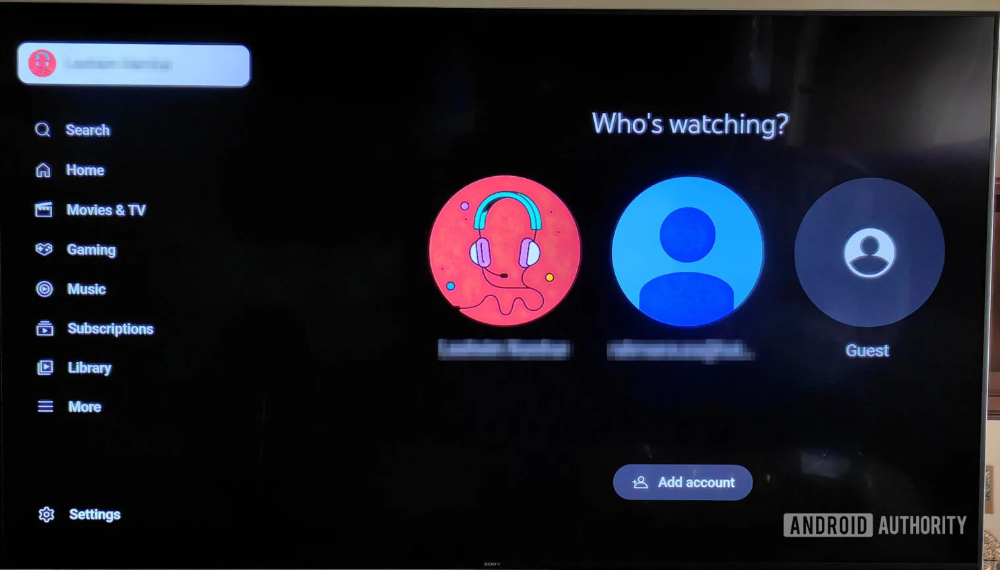
▲Image source: Android Authority
Afterwards, YouTube for Android TV will display the name and icon of the account you want to switch directly after entering the page. Each interface has two benefits. First, the switching efficiency is much higher, it is simpler and easier to use and is close to the practice of mainstream film and television services. Second, after logging out of Android TV, the use of YouTube will not be affected. It can be said that the safety has improved and the user experience has also improved. So if you encounter a situation where you have to log in again, don’t be unhappy.
Quote sources:Android Authority|
Further reading:

Source: KOCPC Chinese