


Free Wi-Fi is everywhere from coffee shops to airports, but convenience often comes with its own set of concerns. Public Wi-Fi networks are a gold rush for hackers, and private actors from all over the world have come up with countless ways to steal your data. Isn’t that a bit alarmist to say so?

Why is public Wi-Fi a hacker’s playground? How do you protect yourself?
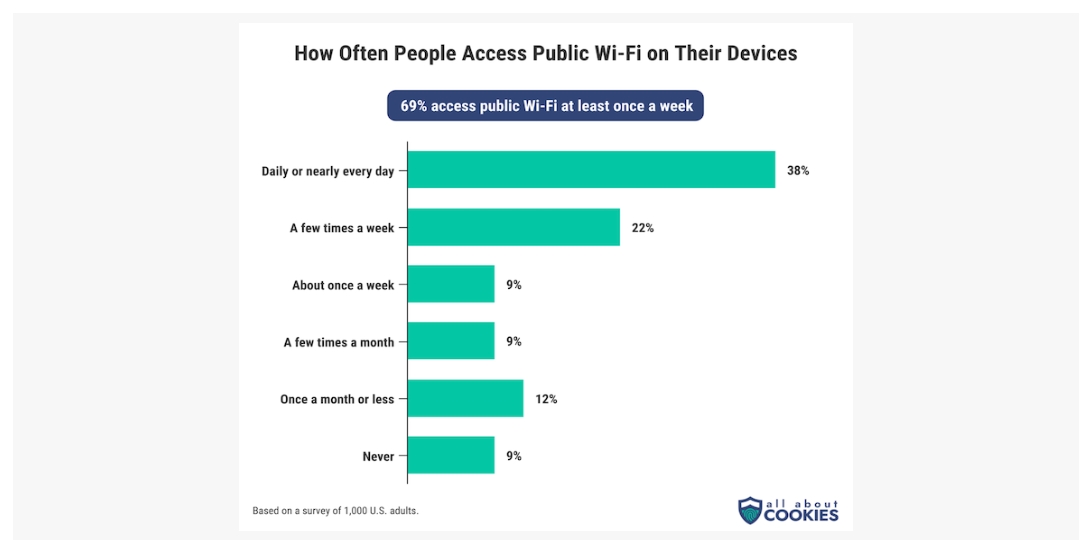
Public Wi-Fi is convenient, but it comes with risks. When you sit in a coffee shop, airport, or restaurant, you often connect to the public Internet without a second thought, but behind the scenes of convenience and free access, there is often filth. according to All About Cookies ’s survey found that 69% of people connect to public Wi-Fi at least once a week, even though nearly half admit to being unsure about the network’s security. Let’s take a closer look at the most common attacks on public Wi-Fi and how to keep yourself safe.
Common public Wi-Fi attacks
Hackers love public Wi-Fi like kids love candy, and here are the most common ways they attack users:
- MITM attack
Imagine you upload the first note in class and someone intercepts it, reads it, and then passes it on like nothing happened, that’s a MITM attack. Hackers sneak in between you and the website you’re visiting to steal or manipulate data, and this attack remains a favorite among hackers on unsecured public Wi-Fi. - fake hotspot
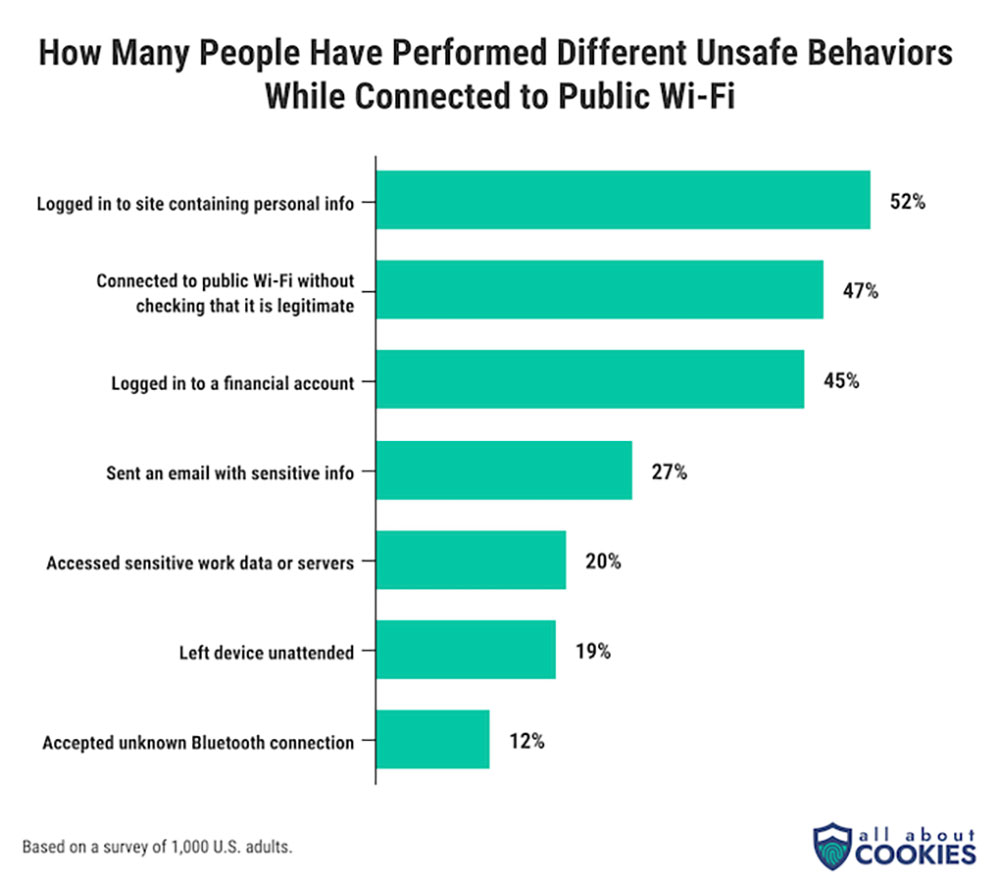
It’s like thinking you’re connecting to a legitimate Wi-Fi network, but in fact you’re just walking into a trap. Hackers set up fake hotspots that look like real hotspots. Once connected, all data is exposed. A shocking 47% of people admitted to connecting to a public network without verifying its security. - Packet probing
Packet probing sounds harmless, but it’s how hackers eavesdrop on data. They capture and analyze packets sent across the network. HTTPS reduces the effectiveness of this attack, but not every website or service uses it, leaving packets exposed. - session hijacking
If a hacker can steal session cookies, they don’t need your password. Session hijacking is like someone snatching your boarding pass mid-flight, they don’t need to know your details, they just need the ticket stub. With it, hackers can impersonate you and access accounts. - virus injection
Sometimes, malware can sneak onto your device simply by connecting to public Wi-Fi. Hackers exploit vulnerabilities and spread malware that can steal information or track your activities without your knowledge.

Protect yourself on public Wi-Fi
Now that you know public Wi-Fi is full of traps, let’s talk about how to stay safe.
- Use a VPN
A VPN works like a secret tunnel to protect your data from prying eyes, and it encrypts your traffic making it nearly impossible for hackers to intercept anything useful. Nonetheless, according to Forbes Advisor According to data, only 40% of users use a VPN when using public Wi-Fi.
- 僅連接到 HTTPS 安全網站
將 HTTPS 視為安全徽章的數位版本,這不僅僅是隨機字母,而是安全、加密的連接。在輸入個人詳細資料之前,請務必檢查瀏覽器網址列中是否有 HTTPS 和掛鎖圖示。 - 停用自動連接
雖然自動連接在家庭或工作等熟悉的地方提供了便利,但由於邪惡的假熱點網路等威脅,他們在公共場合可能存在風險。無論你使用哪種裝置(iOS、Android、Mac 或 Windows),請確保將其設定為僅自動連接到已知網路,連線前務必手動驗證公共 Wi-Fi。 - 避免敏感交易
如果你不會在公共場合大聲說出你的金融詳細資訊,那麼你就不應該在公共 Wi-Fi 上輸入這些訊息。保存敏感交易,僅用安全、可信賴的網路,不幸的是,超過一半的網路用戶都會毫無戒心地在公共 Wi-Fi 上輸入個人或財務訊息,這就是一個重大風險。
- 保護自己免受惡意軟體威脅
為了阻止這些不速之客,請定期更新你的作業系統和應用程式,可以關閉他們可能溜進去的後門。確保你的防毒軟體始終掃瞄並更新置最新的病毒定義,以保護你的裝置免受潛在威脅。
你可以在哪裡找到安全的 Wi-Fi 連結?
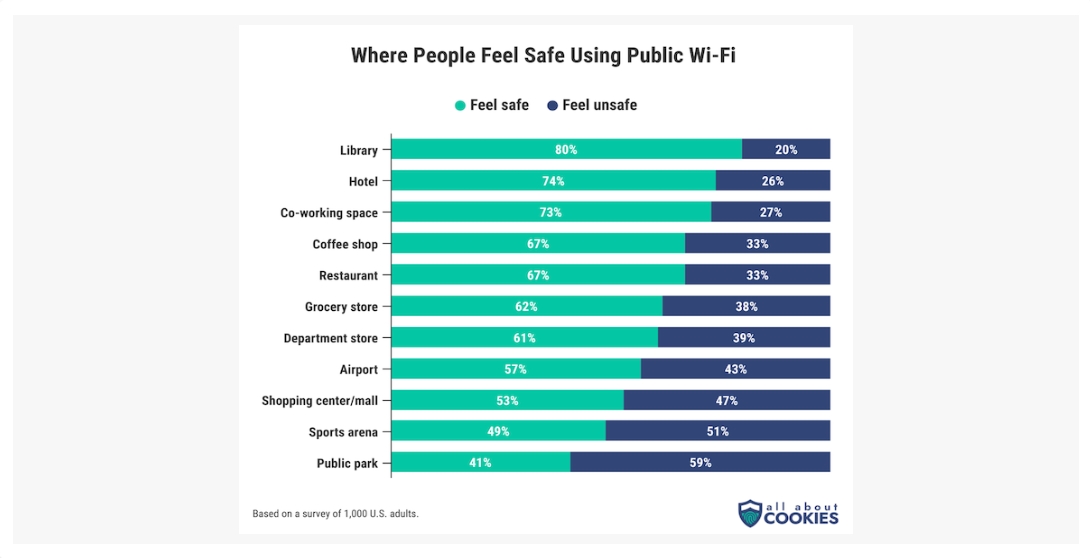
並非所有公共 Wi-Fi 都是一樣的。根據 All About Cookies 的調查,圖書館是最值得信賴的公共 Wi-Fi 地點,80% 的用戶在那裡都會感到安全,緊隨其後的是酒店和共享辦公空間。另一方面,公園被認為是最不安全的,59% 的人感到不安全。
公共 Wi-Fi 無所不在,但風險同樣存在。經常使用公共 Wi-Fi 的人中有四分之一在連線時遇到安全問題。透過了解駭客所依賴的攻擊並遵循一些基本的安全提是,你仍然可以在保全資訊的情況下享受便利。無論你身在何處,都能隨時了解情況、保持謹慎並自信地瀏覽。
延伸閱讀:使用公共 Wi-Fi 時,這 4 件事情要注意

Source: KOCPC Chinese