


By 2024, there are already many compelling reasons for people to choose SSDs over HDDs. Since they don’t have any moving parts, SSDs generally have a longer lifespan than HDDs, making them ideal for average users who don’t need a lot of storage but just want a reliable hard drive that lasts longer. However, SSDs are not permanent products, and they actually have limits, which means you can only write a limited amount of data on the SSD before it enters a read-only state. But how long can an SSD last before it becomes unusable?

How long does an SSD last?
What is the lifespan of an SSD?
It’s true that SSDs have a limited lifespan, but that’s not something that most users need to worry about, and I say that because even avid computer users can use an SSD for a few years before running into considerable risk of failure. That being said, the exact lifespan of an SSD depends heavily on a few key factors, such as how much data is written to the drive, its health, and more. So it’s safe to say that the lifespan of an SSD depends on your drive itself and usage, making it a very subjective topic.

Based on some modern SSD endurance ratings on the market, it’s safe to assume that the SSD will last until about 700TB of data has been written during its lifetime. Of course, your SSD may live longer and die sooner, but this is just an average number to keep in mind, and knowing the average lifespan of an SSD can allow you to extrapolate the remaining life.
Estimating SSD lifespan using warranty and MTBF times
Thankfully, you don’t have to rely on average figures to estimate how long your SSD will last before it dies. Most SSD manufacturers have warranty information that you can use to predict how long your SSD will last. Total writes (TBW) information is specific to each SSD model, so it’s best to check with the SSD manufacturer to determine its life cycle and plan your replacement purchase accordingly. For example, a computer with a 1TB XPG GAMMIX S60 SSD installed has a TBW rating of 450TB (pictured below). For your SSD, this value may be higher or lower depending on the model and its storage capacity. You can find the exact value by consulting the spec sheet for your SSD make and model.
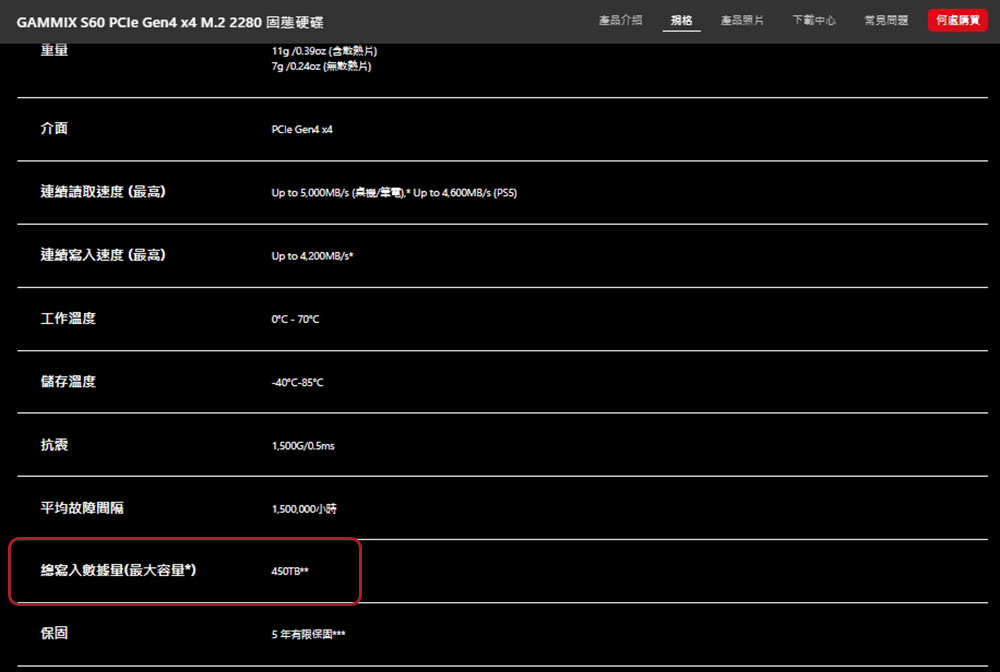
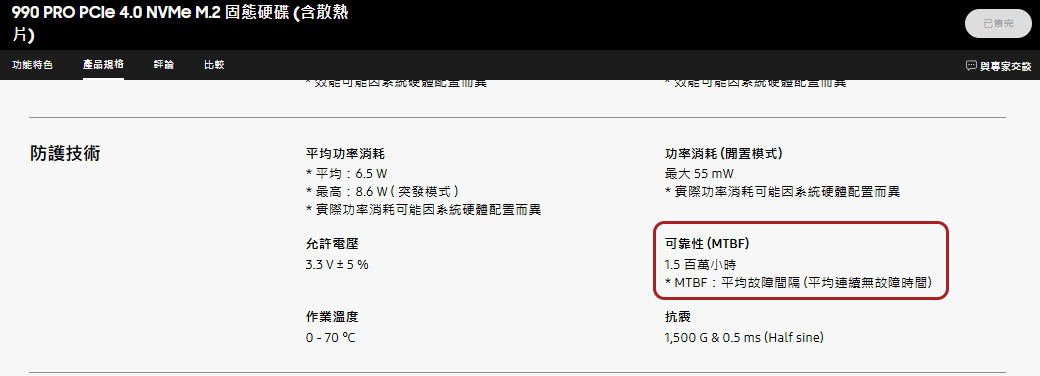
Different SSDs do not all list TBW, and the standards used for rating are different. You can also estimate the SSD’s lifespan using the MTBF times provided by the manufacturer, as shown in the Samsung Evo 990 Pro SSD specs screenshot below. MTBF data can be found on the SSD spec sheet and tells you how likely the SSD is to fail within the warranty period. You can use the SSD’s MTBF value and its warranty period to extrapolate the probability of failure, but the general rule of thumb is that the higher the number of MTBF hours, the less likely the SSD is to fail.
Estimating SSD lifespan using the CrystalDiskInfo utility
If you don’t want to wade through an SSD’s spec sheet and use its MTBF data to calculate its remaining life, or you already have an SSD installed, you can use a utility like CrystalDiskInfo to easily identify the SSD’s current state.
- Download the CrystalDiskInfo application and install it on your computer.
- Upon startup, a window will open detailing important information related to the SSD, including health and overall rating:
- Good: It means your SSD is fine and does not need to do anything special.
- Caution Note: This means your SSD is beginning to fail and you should start backing up files and prepare to purchase a replacement.
- Bad: This means your SSD has reached the end of its life, so do so now if you haven’t already.
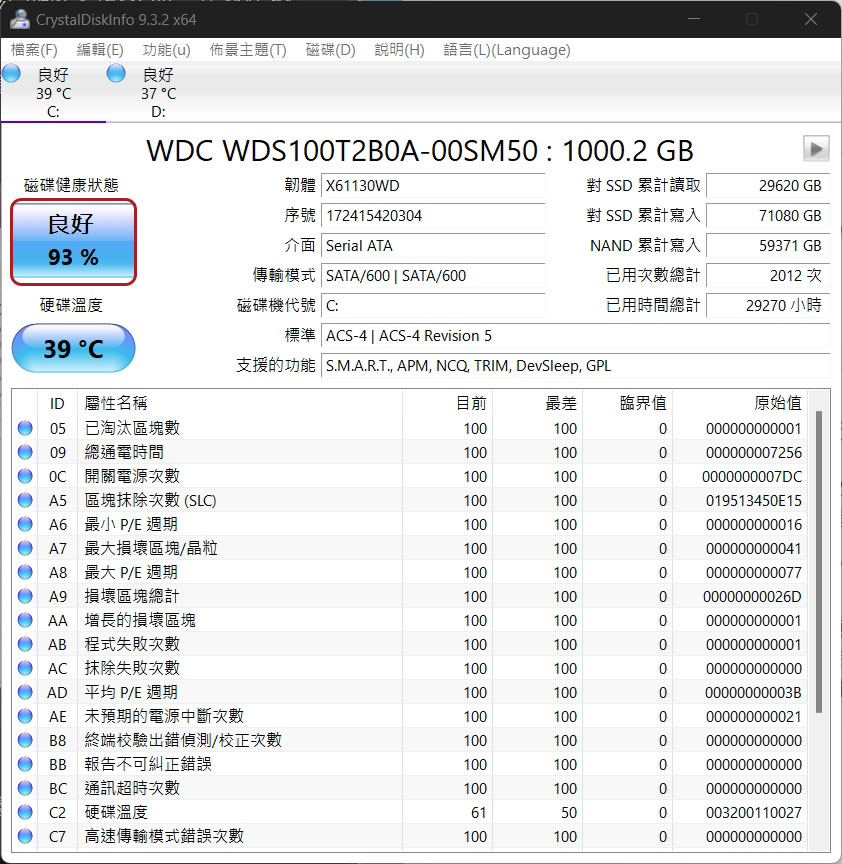
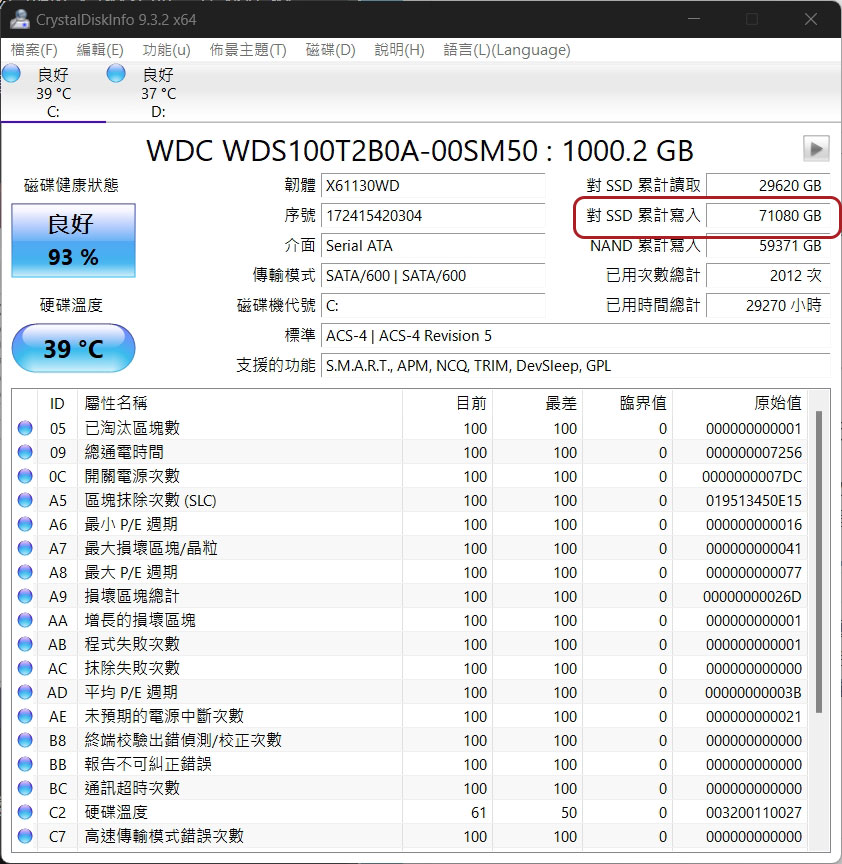
- You can also view the “Cumulative writes to SSD” data, which tells you how much data has been written to the SSD.
-
Compare the cumulative write value highlighted by the CrystalDiskInfo utility to the SSD’s TBW rating to get a rough idea of the SSD’s lifespan.
How much data do you need to write every day?
Although everyone uses a computer to store data, what the data is and how often it changes varies from person to person. As mentioned before, SSDs can withstand heavy use, but the more data is written and deleted, the faster they wear out. How do you ensure your SSD doesn’t exceed its limits? Once you know the TBW rating and SSD capacity provided by the manufacturer, you can do the calculation relatively easily.
The SSD Writes Per Day (DWPD) calculation allows us to determine how much can be written to an SSD per day without wearing out before the warranty expires, using the following formula:
DWPD =(TBW(以 TB 為單位)x 1000)/(365 天 x 保固期(以年為單位)x SSD 容量(以 TB 為單位))
Take the 1TB XPG GAMMIX S60 SSD mentioned above as an example. The TBW of this SSD is 450TB, the warranty period is 5 years, and the capacity is 1TB. The calculation formula after applying the formula is as follows:
DWPD = 450 / 365 x 5 x 1
The DWPD that can be obtained for this SSD is about 0.25, which is 25% of the SSD capacity. Since the 1TB XPG GAMMIX S60 SSD has a capacity of 1TB, you can fully overwrite up to 250GB of data per day over a period of 5 years without any issues.
SSDs usually last a long time
While there’s no easy way to tell how long an SSD will last before it fails, there are some simple ways you can estimate its remaining life. I recommend using a utility such as CyrstalDiskInfo to find out how much data has been written to the disk. You can then compare that value to the SSD’s rated TBW value to get a general idea. No matter where your SSD is in its life cycle, we always recommend backing up your PC to ensure you never lose valuable data.
Source: KOCPC Chinese