


Many people use LINE Pay as one of their daily mobile payment tools. However, sometimes we cut some credit cards due to our own credit card management, and sometimes we want to rearrange the cards bound to LINE Pay because the credit cards have expired. Compared with binding a new credit card, everyone may know how to do it, but unbinding is a function that fewer people use frequently. In fact, it is very simple to unbind an expired or cut credit card bound to LINE Pay. This article will walk you through it.
LINE Pay credit card unbinding tutorial: How to delete the credit card/debit card bound to LINE Pay? Read the steps at once
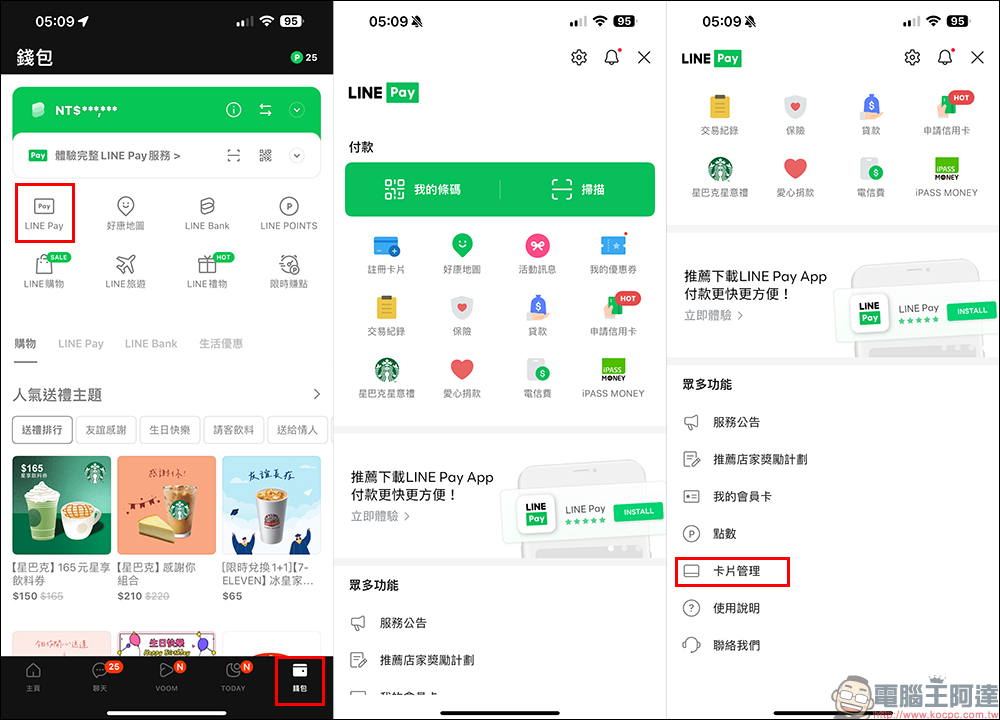
Have some credit cards been cut? Or has the credit card expired? Or you simply don’t want to use that credit card as a card bound to LINE Pay. In this case, you need to delete the bound credit card or debit card. The steps are actually very simple! Here we will briefly share the instructions for deleting cards in LINE App and LINE Pay App. First of all, if you are used to using LINE Pay service from LINE App, you can first click on the “Wallet” page, then select “LINE Pay”, then slide down and click on “Card Management”:
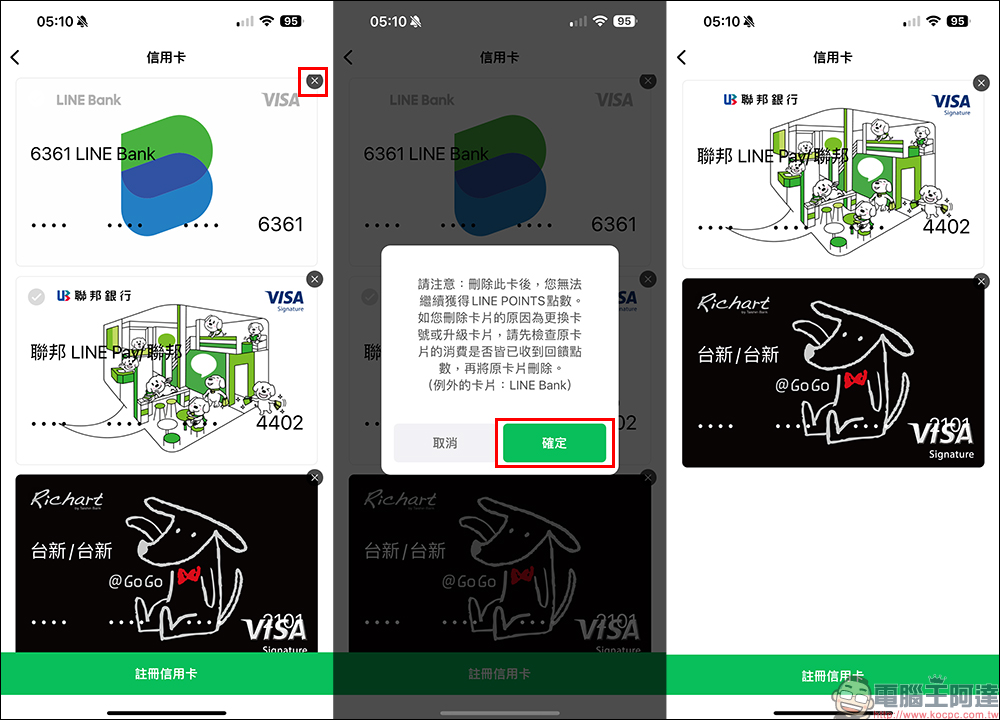
Click the “X” in the upper right corner of the card you want to delete to delete the card. Before deleting, a reminder will pop up on the screen, because after deleting the card, you will no longer be able to obtain LINE POINTS points. Therefore, before deleting a card, please make sure to check whether there are any LINE POINTS that have not yet been received for this card and have not been credited to your account! After confirming that there is no problem, you can press “Confirm” to delete the card.
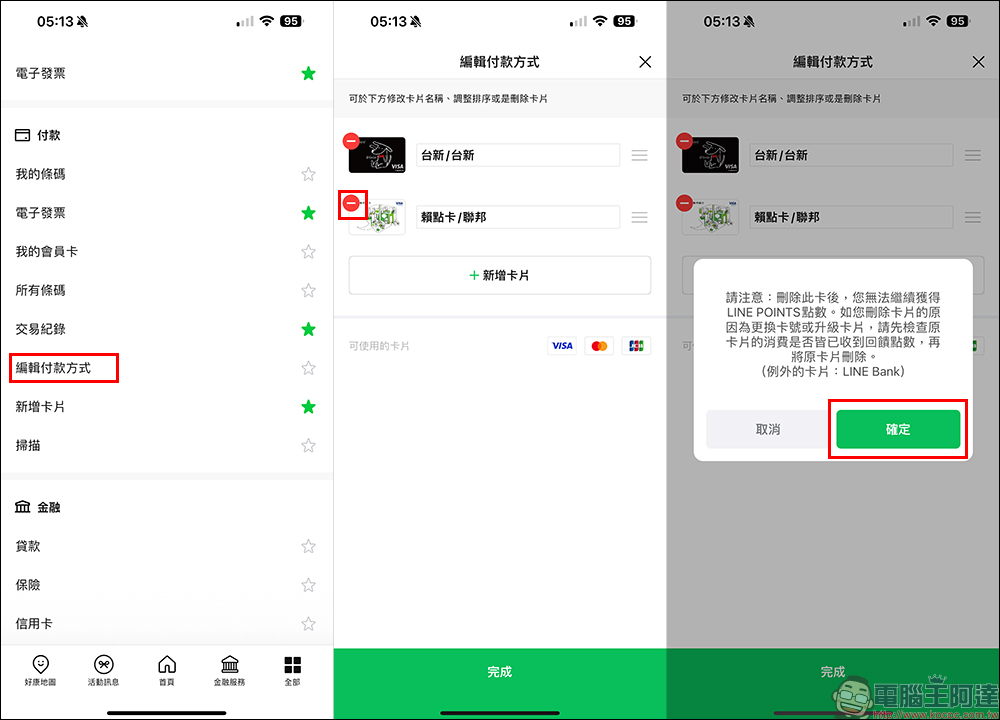
In addition, if you are accustomed to using the LINE Pay App, you can open the App and go to “All”, then find “Edit Payment Method” and you will see the bound credit card/debit card. Click the “-” symbol to delete the card. Before deleting, you will still be reminded that after deleting this card, you will no longer be able to obtain LINE POINTS points.
Small reminder:
- If you deleteChina Trust LINE Pay Card, Fubon J POINTS/JU Card or Federal Laidian Card, you will lose the points reward qualification; if the reason for deletion is to replace the card or change the LINE Pay account, please remember to rebind the card.
- If you have set the deleted card as an automatic deduction method through LINE Pay, for example: subscribing to magazines, videos, music, LINE official accounts or taxi services, please be sure to return to the service’s website or APP to update the deduction method, so as not to affect your rights due to deduction failure.
LINE Pay Frequently Asked Questions and Answers
- What cards can be bound to LINE Pay?
- You can bind Visa, MasterCard and JCB credit cards or debit cards from any card-issuing bank on LINE Pay
- How many credit cards/debit cards can be bound at most?
- Up to 10 credit cards or debit cards can be bound
- Common reasons why credit card/debit card cannot be bound:
- Common reason 1: Unable to complete identity verification
- The cards bound are China Trust, Yushan, United Federation, Cathay Pacific, Taipei Fubon or LINE Bank:
① Whether the mobile phone number you set in LINE does not match the mobile phone number retained by the card-issuing bank; if you have just changed your mobile phone number to the card-issuing bank, it is recommended that you try to bind the card again the next day.
② The card information you entered is incorrect (including card number, expiration date and the last three digits on the back)
③ You have not opened a card yet
④ The card is invalid or deactivated or has restricted use.
※Even if the mobile phone numbers match, if any of the information in points ② is incorrect or the card is not opened or the card cannot be used normally in points ③④, an error message indicating that the mobile phone numbers do not match will appear, so please pay attention. - You are bound to a card from another issuing bank:
① This card does not support the 3DS 2.0 verification mechanism
② Failed to pass 3DS 2.0 verification, for example: unable to receive one-time verification code (OTP), OTP verification error, fingerprint recognition or Face ID recognition error, etc.
※Remind you that if you have tried verification multiple times but still cannot pass verification, you must contact the card-issuing bank or bind another card.
- The cards bound are China Trust, Yushan, United Federation, Cathay Pacific, Taipei Fubon or LINE Bank:
- Common reason 2: The card-issuing bank did not approve the 0 yuan test transaction
- When binding a card to LINE Pay, the system will test a 0 yuan transaction to confirm whether the card is valid. Please confirm the reason for disapproval with the card-issuing bank.
- Common reason 3: Trying to bind the same card to multiple LINE Pay accounts
- If the message “The maximum number of registrations has been reached” appears, please contact LINE Pay Customer Service CenterContact us and the customer service staff will confirm whether they can assist you further.
- Common reason 1: Unable to complete identity verification
Further reading:
LINE free sticker collection: 21 LINE stickers such as super cute little soldiers can be downloaded for a limited time
Source: KOCPC Chinese