


Did you know that your Windows computer is protecting the boot process with a 15-year-old security certificate that is expiring in less than a month? The first-generation Secure Boot certificate released by Microsoft in 2011 will officially expire in June 2026. If users do not update to the new “2023 Secure Boot certificate” through Windows Update, although Windows can still be booted and used normally, Microsoft will gradually stop pushing critical security updates and malware blacklists, and the overall security of the device will be permanently reduced.
What are Secure Boot credentials? Why does it expire?
Secure Boot is a security feature of UEFI firmware that only allows trusted software that has been verified by a digital signature to be executed when the computer is turned on, preventing rootkits or boot-type malware from being loaded before the system starts. This mechanism has been used since the Windows 8 era, and the Microsoft Secure Boot root certificate (CA) responsible for verification was first released in 2011 and has been used for 15 years.
It is a basic security principle of cryptography that credentials have expiration dates. Even the top-level root credentials have expiration dates. 2011 Secure Boot credentials will expire in June 2026. Microsoft has issued a new “2023 Secure Boot Certificate” (2023 Secure Boot Certificate) as early as 2023, and has successively pushed it to all Windows 10 and Windows 11 users through Windows Update.
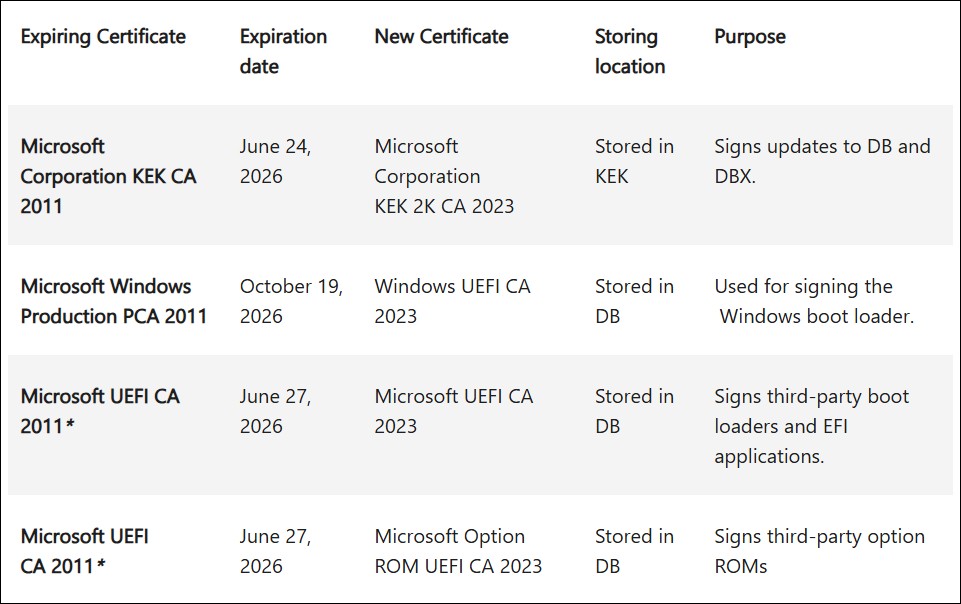
For ordinary users, as long as Windows Update is executed normally, the system will automatically receive and install new Secure Boot credentials without manual operation.
What happens if I don’t update? Microsoft gives a clear answer
In response to the question that many users are concerned about “what will happen if it is not dealt with”, Microsoft gave a warning in May 2026.clear statement:
- Windows can still be booted and used normally : Expiration of old credentials will not cause the computer to become unbootable or system crash
- Security is permanently reduced : Microsoft will stop pushing critical boot updates and malware blacklists that rely on Secure Boot signature verification, and devices will be unable to defend against new attacks targeting the boot process.
- Future Windows upgrades may be blocked : “Future OS upgrades will check for the presence of 2023 Secure Boot credentials.” If the device lacks the new credentials, it will not be able to upgrade to the next major version.
- Third-party software trust issues : Third-party boot software and drivers signed with new certificates will not be properly verified and trusted on old systems
Simply put, ignoring this update will not cause immediate disaster in the short term, but your computer’s protection against boot-level security threats will gradually return to zero, and you may encounter obstacles when you want to upgrade Windows in the future.
How to check if your computer has been updated?
Open the Windows Security app → Click “Device security” → In the “Secure Boot” area, you should see the certificate status displayed. If your Windows has installed cumulative updates from April 2026 onwards, the system should have automatically obtained new 2023 credentials.
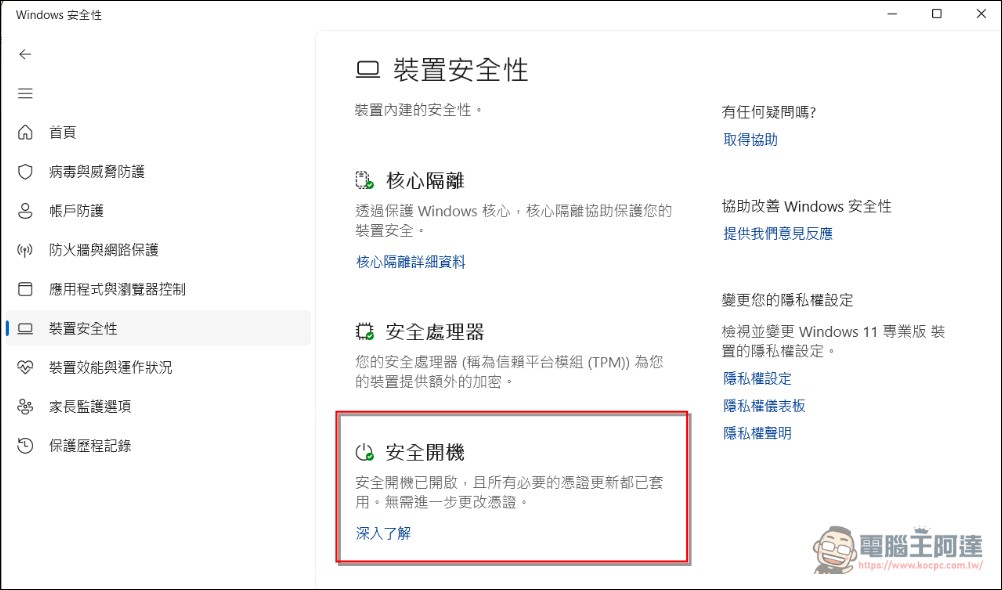
If not, please make sure your Secure Boot is enabled in UEFI/BIOS settings, and then run Windows Update to check for updates. Microsoft will begin pushing this update through Windows Update in April 2026, and will begin showing certificate expiration reminders in the Windows Security Center in May.
For enterprise IT administrators, Microsoft has also released detailed Secure Boot Playbook, explains how to deploy and manage this credential update at scale through Intune, Group Policy, or SCCM.
Special situation: What should I do if Secure Boot is turned off?
If you have Secure Boot turned off (for example, to install a Linux dual-boot or use specific hardware), the situation is slightly more complicated. Microsoft said that the system will check whether Secure Boot is enabled when updating to prevent unnecessary updates from causing the device to fail to boot.
Some motherboard firmware can update the certificate even if Secure Boot is turned off, but the safest way is to temporarily turn on Secure Boot in the BIOS/UEFI settings, run Windows Update to complete the certificate update, and then turn it off as needed. This ensures that the new credentials are correctly installed into the UEFI firmware.
It is important to note that some older hardware (especially models from 2011 to 2013) may not be able to install new credentials due to firmware limitations. Such devices will no longer receive Secure Boot-related security updates, and users are advised to evaluate upgrading their hardware.
This update is also about the future of post-quantum cryptography
2023 Secure Boot certificates are set to be valid until 2038, which appears to have a 12-year lifespan. But Microsoft specifically pointed out that this deadline “is not the final answer” because the cryptography industry is undergoing a larger change: the migration of post-quantum cryptography (PQC).
Existing RSA and elliptic curve cryptography (ECC) will be vulnerable to powerful quantum computers. Microsoft predicts that “hardware manufactured in the 2030s will ship with completely new post-quantum cryptographic credentials.” This means that Secure Boot will also undergo a more fundamental architectural upgrade in the 2030s, when it will move from the encryption algorithm level to quantum security.
In fact, Windows 11 has begun to introduce anti-quantum cryptography technology, and components such as BitLocker and core signatures have gradually adopted post-quantum algorithms. This 2023 voucher update can be seen as a mid-range transition before full quantization. Microsoft has also clearly outlined its cryptography migration roadmap for the next few years in its quantum security timeline, including comprehensive reforms at the core operating system components, cloud services, and hardware levels.
Conclusion
The expiration of Secure Boot certificates in June 2026 is not a crisis that will cause the computer to be reimbursed instantly, but a “security hygiene check” that requires users and IT administrators to complete updates before the deadline. As long as your Windows has regular updates, it’s probably solved. But if your computer missed the update due to special settings, now is the time to open Windows Update to check.
All in all, this credential update is not only related to current boot security, but also connected to Microsoft’s long-term layout in the post-quantum cryptography era. From this perspective, updating Secure Boot credentials is not just “fixing vulnerabilities”, but also preparing for the next cryptographic generation change. Taiwan has a large number of Windows users and enterprises, especially IT environments that deploy a large number of Windows devices. They should complete a network-wide certificate update inventory and check before the expiration in June.
Source: KOCPC Chinese